TL;DR: Most etiquette guides recycle the same generic advice regardless of who you're emailing or what's at stake. This one maps 15 specific rules to the situations IT company owners and team leads actually face: client proposals, vendor threads, internal handoffs, and escalations. Each rule connects to a concrete outcome, whether that's a faster reply, a cleaner handoff, or fewer back-and-forth clarifications.
Why email etiquette still matters in 2026
Professional 3D rendered workspace with laptop showing email interface, organized desk setup symbolizing email etiquette and business communication
Professional 3D rendered workspace with laptop showing email interface, organized desk setup symbolizing email etiquette and business communication
Poor email habits carry a real cost for IT company owners. A vague subject line means your client proposal gets skipped. A rushed follow-up on an unpaid invoice signals carelessness, not urgency. A cold outreach email with no clear ask gets deleted before the second sentence.
The Radicati Group estimates business users send and receive over 330 billion emails daily, and competition for attention inside any inbox is brutal. Your emails carry commercial weight: proposals, scopes of work, invoice reminders, and sales outreach. One poorly written message can stall a deal that took weeks to build.
Professional email etiquette is not about sounding polished. It is about getting the outcome you sent the email to achieve: a reply, an approval, a payment. Work email best practices reduce back-and-forth, protect client trust, and keep threads short enough that nothing falls through.
The rules below are organized by where they have the most impact, starting with whether your email gets opened at all.
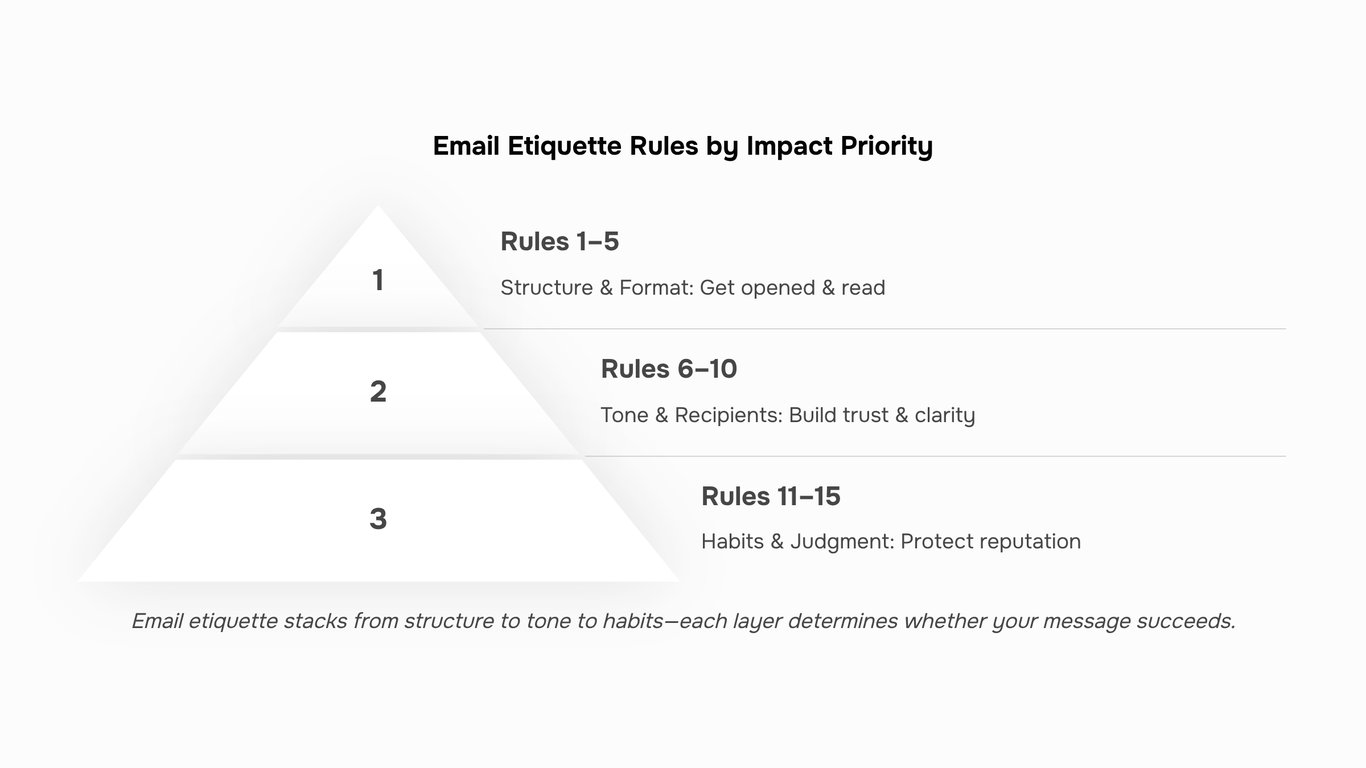
Rules 1 to 5: Get your structure right before you hit send
These five rules determine whether your email gets opened, read, and acted on. Skip them and you're not just being informal — you're giving clients a reason to deprioritize you.
1. Write a subject line that earns the open. Email subject line best practices come down to one thing: specificity. "Quick question" gets ignored. "Invoice #1042 — payment due Friday" gets opened. For IT company owners sending proposals or follow-ups, the subject line is your first commercial signal. Keep it under 50 characters and name the action or deadline.
2. Match your greeting to the relationship. "Hey" works with a colleague you've spoken to three times today. It doesn't work with a new client receiving their first proposal. Default to "Hi [First name]" for established contacts and "Dear [First name]" when the relationship is new or the stakes are high, such as a contract renewal or an escalation.
3. One email, one topic. Threads that mix a project update, an invoice question, and a scheduling request create confusion about what needs a reply and when. If you need to address three things, send three short emails or use a numbered list inside one — but make the primary ask unmistakable.
4. Write to the length the content requires, not longer. Most professional email etiquette guides say "keep it short" without defining short. A useful benchmark: if your email takes more than 90 seconds to read, it probably needs a call instead. For IT context specifically, long technical explanations buried in email threads are a common reason decisions stall.
5. Format for scanning, not reading. Use short paragraphs, one idea per paragraph, and a clear closing line that states what you need and by when. A well-formatted email signals that you respect the recipient's time — and it reduces the back-and-forth that kills deal momentum.
These are the business email rules that filter your emails from the noise before tone or content even enters the picture. The next five cover where things go wrong once the email is open.
Rules 6 to 10: Control your tone and your recipient list
Tone is where most professional relationships quietly break down. A message that reads as neutral to you can land as curt to a client waiting on a proposal decision. These five rules cover the mistakes that damage trust before the recipient even reaches your signature.
Rule 6: Match your tone to the relationship, not your mood. Reread your draft as if you're the recipient, not the sender. If you're following up on an unpaid invoice, "As per my previous email" signals frustration. "Circling back on the invoice from the 14th" says the same thing without the edge. One word swap can mean the difference between a reply and a stall.
Rule 7: Treat reply-all as a last resort. Most reply-all threads exist because someone didn't pause before hitting send. Before you reply to a group, ask whether every person on that thread needs your response. For IT companies coordinating across clients, vendors, and internal teams, unnecessary reply-alls create noise that buries the messages that actually need action.
Rule 8: Use CC and BCC deliberately. CC someone when they need visibility but no action is required. BCC is appropriate for the initial outreach in a cold email sequence or when you're protecting a contact's details in a group message. Copying your manager on every client email signals distrust. Copying no one on a client escalation leaves you exposed. Be intentional about who sees what and why.
Rule 9: Drop the jargon when writing to non-technical clients. If your email to a client includes terms like "API endpoint," "SLA breach," or "containerized deployment" without explanation, you've shifted the burden of understanding onto them. Plain language closes deals faster. If the technical detail matters, put it in an appendix or a follow-up call, not the main body of a client-facing email.
Rule 10: Proofread before you send, every time. Spellcheck catches typos, not wrong words. "The project is now pubic" passes spellcheck. A quick read-aloud catches it. For emails carrying commercial weight, such as proposals or sales follow-up messages, one embarrassing error can undercut weeks of relationship-building. Budget 60 seconds per email. It is one of the highest-return habits in business email rules.
Rules 11 to 15: Build habits that protect your reputation
Rule 11: Respond within one business day, even if just to acknowledge.
Email response time etiquette matters more than most people realize. In a B2B context, a 48-hour silence on a proposal or invoice query reads as disinterest, not busyness. If you need time to give a proper answer, send a short acknowledgment: "Got this, I'll come back to you by Thursday." That single line protects the relationship while you work.
Rule 12: Follow up without being pushy.
One follow-up after three to five business days is professional. Two follow-ups with no reply signals persistence. Three or more signals desperation. If you're sending invoice follow-ups or chasing a signed contract, space your messages and change the angle slightly each time rather than forwarding the same thread. For a structured approach to timing and phrasing, this breakdown of sales follow-up email timing is worth reading before you hit send.
Rule 13: Move sensitive conversations off email.
Billing disputes, performance feedback, and scope disagreements do not belong in a thread. Email creates a permanent record but removes tone, and that combination turns a manageable conversation into a documented conflict. If a thread is getting tense, pick up the phone or schedule a call. Follow up in writing only to confirm what was agreed, not to continue the argument.
Rule 14: Keep your signature clean and functional.
A signature with four lines of promotional text, a headshot, and three social icons is noise. A clean signature includes your name, title, company, phone number, and one link. If that link points somewhere useful, even better. A well-structured professional email signature does quiet credibility work on every message you send.
Rule 15: Know when not to email at all.
Professional email etiquette includes recognizing when email is the wrong tool. Anything that requires back-and-forth more than twice should become a call. Anything emotionally charged should start as a conversation. Anything time-sensitive enough to matter in the next two hours needs a phone call or a direct message, not an email that sits unread.
These five habits are where reactive emailers and professionals visibly diverge. The difference is rarely dramatic. It shows up in small choices made consistently.
Where most professionals break these rules without realizing it
Most professionals don't break email rules deliberately. They break them because they're moving fast and no one flagged the pattern.
Here are the failures that show up most often in IT and client-facing work:
Vague subject lines on follow-ups. "Following up" tells the recipient nothing. "Invoice #4821 — payment due Friday" gets opened and acted on. The subject line is the first business decision in your email.
Over-CCing on sensitive threads. Looping in five people on a billing dispute or a client complaint signals poor judgment. Copy only the people who need to act or decide.
Replying to all by default. Most replies belong to one person. Hitting "reply all" on a 12-person thread wastes everyone's time and buries the actual conversation.
Attaching files without context. Sending a 40-page technical proposal with no summary forces the recipient to do your work. One sentence explaining what's attached and what you need from them changes the outcome.
Skipping the signature on short replies. A one-line response still represents your company. A complete professional email signature takes seconds to set up and removes ambiguity on every send.
Sending follow-ups at the wrong time. Timing affects whether your message lands or gets buried. The best time to send a sales follow-up is a decision, not a guess.
Run through this list against your last ten sent emails. Most teams find at least two patterns worth fixing.
How to keep these rules consistent when your email volume grows
Knowing the rules is the easy part. Applying them consistently when you're sending 50 to 100 emails a week across client proposals, invoice follow-ups, and sales sequences is where most IT teams slip.
The failure pattern is predictable: etiquette holds when volume is low, then degrades as pressure builds. Subject lines get lazy. Follow-ups go out without context. CC lists expand by default.
The fix is building the rules into your workflow rather than relying on memory. Template your most common email types, including cold email follow-ups, with subject lines, tone, and structure already set. Review sequences before they go out, not after. Pair that with a consistent professional email signature so every message signals credibility by default.
Evox handles exactly this: it organizes outbound email sequences so your professional email etiquette standards apply to every message, not just the ones you write manually. Good email communication tips only stick when the system enforces them.
Closing
Good email etiquette isn't a soft skill — it's what separates a reply from silence.
Apply these 15 rules consistently and you'll write clearer subject lines, set the right tone for every thread, and stop losing deals to messages that felt off without anyone knowing why. The mechanics are simple enough when your volume is low. The challenge is maintaining that standard when your team is managing outreach sequences, chasing invoice approvals, and handling client threads at the same time.
That's where discipline alone stops being enough. Lio's Evox keeps your email workflow organized across all of it, so the structure, timing, and tone that make these rules work don't slip when the volume picks up.
If you're already applying most of these rules, you're ahead of most teams. The next step is making sure the rest of your team is too. Start with Evox and give every message the same standard, regardless of who sent it.
FAQ
Q. What are the basic rules of email etiquette at work?
A. Keep subject lines specific so the recipient knows what action is needed before they open the message. Reply within one business day, match your tone to your audience, and proofread before hitting send. Use CC and Reply All sparingly. For IT teams specifically, those basics translate directly into faster client responses, fewer clarification threads, and cleaner internal handoffs.
Q. How quickly should you reply to a professional email?
A. Twenty-four hours is the accepted standard for most professional emails. Same business day is the expectation for anything urgent or client-facing. If a full reply will take longer, send a short acknowledgment first, something like "Got this, I will have a full response to you by Thursday." That one sentence stops the sender from following up and signals that you are on top of it.
Q. When should you use CC versus BCC in a business email?
A. CC when all recipients should see who else received the message, such as looping in a project manager on a client thread. BCC when you need to protect recipient privacy, avoid an unwanted reply-all chain, or add a silent stakeholder without cluttering the conversation. A good rule of thumb: if the people on CC would be surprised to see each other's names, BCC is probably the right call.
Q. Is it rude to send a follow-up email if someone has not replied?
A. No. One follow-up after 2 to 3 business days is standard professional practice, not pushy. People miss emails, inboxes get buried, and a single polite nudge is expected. What crosses the line is following up daily or escalating tone after one missed reply. Keep the follow-up short, reference your original message, and make the ask clear so the recipient can respond in under a minute.
Q. What should you never include in a professional email?
A. Avoid personal complaints, emotional venting, confidential client data shared without proper authorization, and sarcasm (which almost never lands in text the way it does in conversation). Sensitive pricing discussions, contract disputes, and anything you would not want forwarded also belong off email entirely. A practical rule: if you are writing while frustrated, draft the message, close it, and come back to it the next morning before you decide whether to send it.
Q. How long should a professional email be?
A. Most professional emails should fit one screen without scrolling, roughly 150 to 200 words. That length is enough to state context, make a clear ask, and give any necessary detail. If you are consistently going beyond 300 words, the topic likely belongs in a shared document, a brief, or a meeting. Long emails tend to bury the action item, which means slower replies and more back-and-forth for your team.


 Elena Petrova15 September 2026


