TL;DR: Most guides on vendor invoice processing define the term and move on. This one walks IT company owners through a concrete six-step implementation: how to structure approval workflows, handle partial payments, and connect vendor billing to the rest of your operations. No dedicated finance team required.
What vendor invoice processing actually means
Modern 3D illustration of vendor invoice processing workflow with tablet, data visualization, and organized digital elements
Vendor invoice processing is the end-to-end system your business uses to receive, verify, approve, and pay bills from external suppliers. It is not the same as general invoicing, where you bill your own clients. This is the inbound side: money leaving your business, tracked against what you actually ordered and received.
For IT service companies, that distinction matters more than most finance guides acknowledge. Your vendor bills are often tied directly to project costs, hardware procurement, or subcontractor work billed back to a client. A loose vendor bill management process does not just create accounting headaches. It creates billing gaps between what you paid a vendor and what you recover from the client.
According to Ardent Partners (2024), the average cost of processing a single vendor invoice manually is $10.18, compared to $3.40 with automation. That gap compounds fast across a growing vendor list.
A proper vendor invoice processing system gives every bill a defined path: receipt, three-way match, approval routing, and payment release. Without that path, the failure points covered in the next section are not edge cases. They are the default.
Why most vendor invoice workflows break down
Manual vendor invoice workflows fail in predictable ways. Recognizing the pattern is the first step toward fixing it.
The most common break point is missed approvals. A bill arrives by email, sits in someone's inbox, and never reaches the person who needs to sign off. Without a defined invoice approval workflow, invoices move on memory and goodwill, not process. According to the Institute of Finance and Management (2024), companies without automated approval routing take an average of 14.6 days longer to process a single invoice than those with a system in place.
Duplicate payments follow closely. When invoices arrive across email, a shared drive, and a project folder, the same bill can enter the system twice. No one catches it until the vendor reconciliation happens, sometimes months later.
The third failure point is no payment visibility. Finance knows an invoice exists. The project lead does not. If your team bills clients against vendor costs, that disconnect creates real cash flow risk. You cannot track vendor payments against project budgets when the data lives in separate places.
The fourth is manual data entry errors. Research from Ardent Partners (2024) estimates that up to 62% of invoices processed manually contain at least one error requiring correction. Each correction adds cost, delays payment, and strains vendor relationships.
These are not edge cases. They are the default state of any team running a vendor invoice processing system built on email threads and spreadsheets.
Six steps to implement a vendor invoice processing system
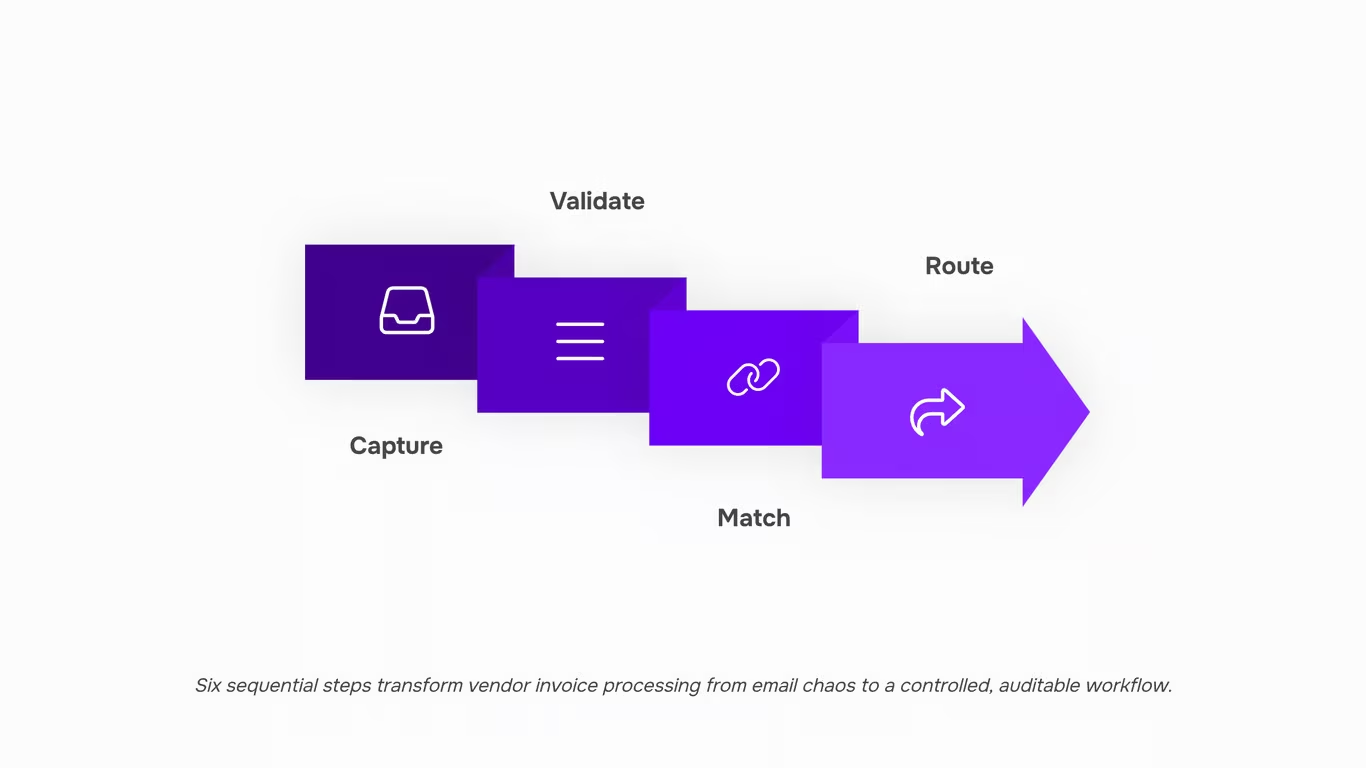
Six steps to implement a vendor invoice processing system that actually holds together across your whole operation.
Step 1: Capture every invoice in one place
Route all vendor bills to a single intake point before anything else happens. That means one email address, one upload portal, or one connected inbox, not three inboxes and a shared drive folder. When invoices arrive through multiple channels, some get missed and the rest get processed inconsistently.
A practical example: designate vendors@yourcompany.com as the only accepted submission address and update your vendor onboarding docs to reflect it. Every bill that arrives anywhere else gets forwarded there before it touches a workflow.
Step 2: Validate invoice fields before the bill moves forward
Before an invoice enters your invoice approval workflow, confirm it carries the minimum required fields: vendor name, invoice number, issue date, due date, line-item descriptions, amounts, and a matching purchase order or project reference. According to the Institute of Finance and Management, roughly 25% of vendor invoices contain at least one error that requires manual correction. Catching those errors at intake costs far less than catching them after payment.
If a bill is missing a PO number or a project code, send it back to the vendor immediately with a standard correction request. Do not let incomplete invoices move downstream.
Step 3: Match the invoice to a purchase order or project
Three-way matching, comparing the invoice against the purchase order and the delivery confirmation, is the standard control for preventing overpayments and duplicate payments. For IT service companies, this step often means matching a vendor bill to a specific client project so the cost can be tracked against what you will bill the client.
This is where most manual systems break down. If your team is doing this in a spreadsheet, the match is only as reliable as whoever ran the lookup last. A vendor invoice processing system that links bills to project records removes that dependency entirely.
Step 4: Route the invoice through a defined approval chain
Every invoice needs a named approver before payment is authorized. Define approval thresholds in advance: for example, bills under $500 go to the operations lead, bills above $500 go to the finance owner or principal. Document the chain and make it visible to everyone who touches invoices.
Approval delays are one of the most common causes of late payment fees and strained vendor relationships. According to Ardent Partners' 2024 Payables Insight Report, companies with a formalized approval workflow process invoices roughly three times faster than those without one.
Step 5: Schedule and execute payment with vendor payment tracking
Once approved, the invoice moves to payment scheduling. Assign a payment date based on the due date and your cash flow position, not whoever remembered to check the queue that week. Record the payment method, amount, and date against the invoice record immediately.
Vendor payment tracking matters here because partial payments are common in IT services, particularly when a vendor bill covers materials and labor across multiple project phases. If you pay 60% now and 40% on delivery, that split needs to be logged against the original bill so your reconciliation does not show a gap. Inzo handles this by allocating payments against individual line items, so the outstanding balance is always visible without manual calculation.
Step 6: Reconcile and close the invoice
Reconciliation means confirming that what you paid matches what was invoiced, what was delivered, and what your bank statement shows. Run this check at least monthly, ideally at the close of each billing cycle. Flag any discrepancy, whether an underpayment, a missed credit note, or a duplicate charge, before it rolls into the next period.
For IT companies billing clients against vendor costs, this step also feeds your project cost reporting. If you want a deeper look at how automation changes the economics of this entire sequence, the guide to automated invoice processing covers the ROI case in detail.
What to include on every vendor invoice you receive
Before a vendor bill enters your vendor invoice processing workflow, it needs to carry specific fields. Missing even one can stall approval, trigger a duplicate payment, or break the link between a vendor cost and the client project it supports.
Treat this as your pre-approval checklist. Every invoice you receive should include:
- Vendor name and contact details, including the billing address on file
- Unique invoice number, so your team can track it without duplicates
- Invoice date and payment due date, which anchor your cash flow forecast
- Itemized line items, with quantities, unit costs, and a clear description of each service or product
- Subtotal, applicable taxes, and total amount due
- Payment terms (net 30, net 15, or otherwise)
- Purchase order number, if your procurement management system requires PO matching
- Bank or remittance details for the vendor
If any field is missing, return the bill before logging it. Chasing corrections after approval adds friction and delays payment. A tool like Inzo flags incomplete vendor bills automatically during intake, so gaps surface before they reach your approver's queue.
How to send and receive invoices electronically
Set up a shared inbox or dedicated email address (for example, ap@yourcompany.com) before you send your first electronic invoice. This gives every vendor a single, consistent delivery point and makes vendor payment tracking much easier to audit later.
For format, PDF is the safest default. It preserves layout across email clients and is easy to attach to a bill record. If a vendor sends a non-PDF file, convert it before it enters your vendor invoice processing workflow.
On receipt, confirm three things immediately: the invoice number is present, the amount matches your purchase order, and the vendor's payment details are correct. Flag anything that fails this check before it moves to approval.
Tools like Inzo generate PDF invoices and send them directly from the platform, which removes the manual attachment step. When paired with your procurement records, each incoming bill links automatically to the originating purchase order.
Common mistakes that slow vendor invoice processing down
Most IT owners running a vendor invoice processing system hit the same four walls.
No three-way match before approval. Approving an invoice without checking it against the purchase order and delivery confirmation is how duplicate payments and overbilling slip through. Fix: make PO matching a required step in your invoice approval workflow before any bill moves forward.
Routing invoices to the wrong person. When every invoice lands in one inbox, urgent bills stall behind low-priority ones. Fix: assign approval routing by vendor type or spend threshold from day one.
No link between vendor costs and project budgets. This is a real gap for IT service companies billing clients against vendor spend. Fix: tag each bill to a project code at entry, not after the fact.
Manual data entry on digital invoices. According to the Institute of Finance and Management, manual processing costs three to five times more per invoice than automated handling. Fix: review automated invoice processing options before your volume grows past what a spreadsheet can hold.
No audit trail. If you cannot show when an invoice was received, reviewed, and paid, disputes become expensive. Fix: use AI invoice management software that timestamps every action automatically.
Closing
Build a Vendor Invoice Processing System That Actually Scales
Vendor invoice processing only breaks down when the steps aren't defined — once you have a clear intake method, a consistent matching process, and an approval workflow that doesn't rely on chasing people, the whole cycle tightens up. The six steps covered here give you that structure, whether you're running them manually today or ready to automate tomorrow.
The difference between acting on this and ignoring it is straightforward: one path leads to faster payments, cleaner vendor relationships, and audit-ready records; the other keeps finance teams buried in follow-up emails and mismatched POs.
These steps work in a spreadsheet. They work even better in a dedicated tool. IT companies using Inzo skip the manual matching and approval follow-up entirely — the workflow handles it, so your team handles the exceptions, not the routine.
If you want to see how that looks in practice, explore Inzo and walk through the workflow yourself.
FAQ
Q. What information should I include on a vendor invoice?
A. Include your business name, buyer details, a unique invoice number, issue and due dates, an itemized list with quantities and prices, total amount, taxes, and accepted payment methods. Missing even one required field, like a PO number, can trigger a rejection and delay payment by weeks.
Q. How do I create a professional vendor invoice?
A. Start with your business details, the vendor's information, an itemized list, payment terms, and a unique invoice number. Send it as a PDF to keep formatting consistent across devices.
Q. Can I send and receive vendor invoices electronically?
A. Yes. Most modern systems let you generate invoices as PDFs, send them via email, and receive vendor bills digitally without touching paper. Tools like Worksbuddy's Inzo handle both sides in one place.
Q. What is the difference between a vendor invoice and a purchase order?
A. A purchase order is your commitment to buy; a vendor invoice is the vendor's request for payment after fulfilling that order. The two should match before you approve payment.
Q. How do I handle a vendor invoice that covers multiple projects?
A. Split the invoice amount across each project and log each allocation separately so your records stay clean and auditable. If your tool supports it, assign portions of the invoice directly to each project without duplicating the vendor record.
Q. What happens if a vendor invoice has an error before I approve it?
A. Flag it and send it back to the vendor for correction before it moves further in the approval chain. Approving a wrong invoice creates downstream problems, including duplicate payments or tax mismatches.


 Elena Petrova15 September 2026


