Standard Operating Procedure Format: Elements, Structure, and How to Write One
What Are the Benefits of Implementing End-to-End Automation Solutions?
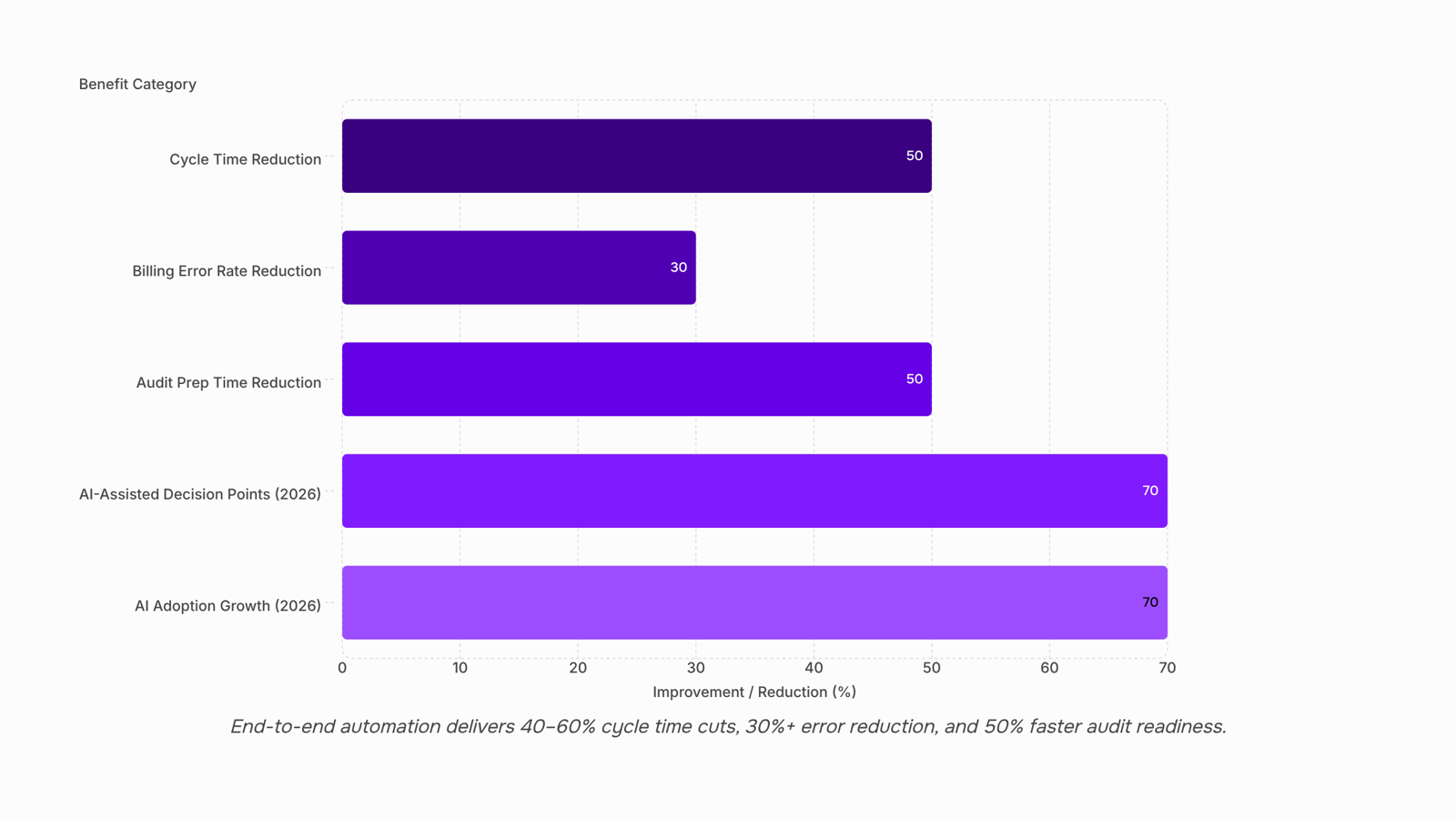
Automating individual tasks still leaves manual handoffs between them, and that is where delays, errors, and compliance gaps live. End-to-end automation connects every step into one governed workflow, cutting cycle times by 40 to 60%, eliminating data entry errors at system boundaries, and generating audit trails automatically. It also scales without adding headcount. In 2026, AI is extending these gains further by handling unstructured inputs and flagging workflow failures before they happen. The organizations seeing the biggest returns are the ones treating automation as a platform, not a collection of one-off projects.
What is end-to-end automation?
End-to-end automation is the practice of designing, deploying, and managing automated workflows that cover the complete lifecycle of a business process, from initiation to completion, across all systems and roles involved.
This is different from task automation, which handles a single repetitive action, and different from robotic process automation (RPA), which mimics user interactions with existing interfaces. End-to-end automation operates at the process level. It defines the sequence, enforces the logic, routes work to the right people or systems, and tracks every step from start to finish.
The practical implication is that end-to-end automation requires a platform that handles triggers, conditional logic, integrations, approvals, and reporting in one place, rather than stitching together five separate tools that each own one slice of the process.
Consider an IT incident response workflow. A ticket arrives, gets triaged based on severity, routes to the correct team, triggers a notification to the client, escalates if unresolved within a defined window, and closes with a resolution log. Each of those steps involves a different system and a different actor. End-to-end automation runs all of it as a single, auditable flow. Triggers and actions are the building blocks that make that possible.
How does end-to-end automation work?
An end-to-end automation solution operates through a layered architecture. Understanding the layers helps clarify where benefits are generated.
Trigger layer. Every automated process starts with a trigger: a form submission, a status change, a scheduled time, an API event, or a threshold being crossed.
Logic layer. Once triggered, the workflow applies conditional logic to determine what happens next. If a request exceeds a dollar threshold, route to finance. If a ticket is unresolved after 4 hours, escalate.
Integration layer. Most processes touch multiple systems. The automation platform reads from and writes to each system involved, so work moves without manual re-entry.
Action layer. The workflow executes actions: creating records, sending notifications, assigning tasks, updating fields, generating documents.
Monitoring and reporting layer. Every step, every decision, and every actor is logged. This is what makes compliance reporting possible and what distinguishes a governed workflow from a script running in the background.
Each layer contributes to a distinct category of benefit. The trigger and logic layers reduce cycle time. The integration layer eliminates data errors. The monitoring layer produces the visibility and compliance documentation that manual processes can never generate reliably.
Key benefits of implementing end-to-end automation solutions
Reduced cycle time. End-to-end automation eliminates idle time between process steps. Manual handoffs introduce delays at every stage. A request submitted at 4:00 PM may not reach the next actor until the following morning. Automated handoffs execute in seconds, regardless of time zone. According to Forrester's 2024 Automation Impact Report, companies that automate end-to-end workflows reduce average process cycle times by 40 to 60%.
Fewer errors at system boundaries. Automated transitions between systems enforce data consistency, removing the transcription errors and missed fields that occur when humans move data manually. An automated integration reads a value once and writes it consistently to every downstream system. Teams using Salesforce report that automating data entry between CRM and billing systems reduces billing error rates by more than 30% in the first year.
Centralized process visibility. A unified automation platform shows every process instance, its current status, and whether it is on track or delayed, in real time. This replaces the status-update meetings that exist only because visibility is fragmented across email threads and spreadsheets. Bottlenecks become visible before they cause failures, and managers can see workload distribution without asking.
Faster audit readiness. Automated workflows generate a complete audit trail as a byproduct of execution. Every approval is timestamped and attributed. Every routing decision is recorded with the logic that drove it. According to Deloitte's 2024 Regulatory Compliance Survey, organizations using automated workflow platforms reduce audit preparation time by an average of 50%, primarily by eliminating manual reconstruction of process records.
Scalability without proportional headcount growth. A workflow that runs 100 times a week and 10,000 times a week uses the same configuration. Manual processes scale linearly with headcount. Automated processes do not. Teams can absorb volume increases during growth phases or seasonal spikes without the lag of recruiting and onboarding staff for repetitive work.
Faster onboarding for new processes. Teams with a working automation platform add new workflows faster because the infrastructure, integrations, and governance framework already exist. The first automation requires setup from scratch. By the fifth or tenth workflow, the marginal cost of adding a new automated process is a fraction of the original investment. Organizations that treat automation as a platform rather than a series of one-off projects realize this compounding return over time. Building an efficient business process workflow on an established platform is measurably faster than starting from zero each time.
End-to-end automation vs. point solutions: a comparison
Dimension | Point solutions | End-to-end platform |
|---|
Scope | One process or one tool | Full process lifecycle across systems |
Visibility | Per-tool reporting | Unified process monitoring |
Error risk | Manual handoffs between tools | Automated transitions, consistent data |
Compliance | Audit data scattered across tools | Centralized, auto-generated audit trail |
Scalability | Grows with each tool's limits | Scales at the platform level |
Maintenance | Each tool updated separately | Single platform to maintain |
Common challenges that reduce automation benefits
Underestimating integration complexity. A platform with 200 integrations may still lack depth in the three systems a process actually touches. Shallow integrations create manual steps that negate cycle time gains.
Automating poorly defined processes. Automating an undocumented process produces a faster version of the same problem. Document decision points and exception paths before building the workflow.
Skipping the monitoring layer. Automation without visibility is a black box. Teams that skip monitoring discover failures through customer complaints, not dashboards.
Choosing point solutions over platforms. Automating each process with a different tool creates a maintenance burden and eliminates cross-process visibility, eroding the scalability benefit over time.
Treating automation as an IT project. End-to-end automation requires process owners, not just developers. Platforms that require code for every change exclude the people who understand the process best.
How end-to-end automation benefits show up in real workflows
Real workflows show where end-to-end automation moves from concept to measurable outcome. These three scenarios illustrate how a documented SOP format, once connected to automation logic, eliminates the manual handoffs that slow teams down.
IT service management. A new employee request enters the system and triggers provisioning across Active Directory, email, Slack, and the ticketing system simultaneously.
The IT team sees one consolidated status view instead of four separate queues.
Approvals, credential creation, and access grants run in sequence without a technician manually moving the task forward.
Cycle time drops from days to hours because the SOP's defined steps become the automation's trigger conditions.
Client onboarding. A signed contract is the single trigger that sets the entire onboarding sequence in motion.
The client record is created in the CRM automatically.
The onboarding checklist generates and assigns to the account manager.
A welcome email goes out without anyone manually initiating it.
Every step between contract signature and first client contact runs without a single manual handoff, because the SOP format defined the sequence in advance.
Invoice processing and approvals. A vendor submits an invoice through the portal, and the workflow handles everything from that point forward.
Field extraction pulls the relevant data automatically.
Routing logic sends the invoice to the correct approver based on amount and department, conditions already written into the SOP.
Reminders fire automatically if the invoice sits unapproved past a defined window.
Upon approval, the invoice posts directly to the ERP.
The finance team tracks every invoice's status in one view, without chasing email threads or following up manually.
In each scenario, the SOP format is doing the structural work. The automation is simply executing what the format already defined.
How AI is expanding automation benefits in 2026
AI is extending the benefits of end-to-end automation beyond rule-based execution into adaptive orchestration.
At the trigger layer, AI classifies incoming requests, emails, and documents and routes them to the correct workflow without requiring a human to read and categorize each one. This extends cycle time benefits to unstructured inputs that previously required manual triage.
At the logic layer, AI suggests branching conditions based on historical process data, flagging paths that frequently cause delays or errors. This improves accuracy benefits by surfacing exception patterns that human designers would miss.
At the exception layer, AI identifies when a running workflow is likely to fail based on pattern recognition and surfaces it for human review before the failure occurs. This extends the compliance and visibility benefits by making the audit trail predictive, not just retrospective.
According to Gartner's 2025 Hyperautomation Market Guide, 70% of new automation deployments will include at least one AI-assisted decision point by 2026, up from 30% in 2023. For teams evaluating platforms today, the practical question is whether the platform has an AI integration roadmap, because a platform without one will require replacement sooner than one building AI into the workflow engine itself.
Where automation benefits compound over time
Automation benefits do not arrive all at once. They build as more processes move onto a shared platform and the team accumulates workflow templates, integration configurations, and process data.
Organizations that realize the largest gains treat automation as infrastructure, not a series of one-off projects. Each new workflow built on an established platform costs less to deploy, runs faster, and adds to a shared visibility layer rather than creating another isolated data source.
Compounding also shows up in error reduction. The first automated workflow eliminates a category of manual mistakes. The fifth eliminates cross-process handoff errors. By the tenth, the team has enough process data to identify bottlenecks that were invisible before.
The gains that take longest to appear are also the most durable:
Cycle time reductions that shrink as each connected system removes a waiting step
Scalability gains that allow headcount to stay flat while output grows
Audit and compliance readiness that improves automatically as every triggered action is logged
SOP enforcement that shifts from manager-dependent to system-dependent, removing reliance on individual memory
The first decision that determines how much compounds is platform choice. Orchestration platforms, those designed to coordinate multi-step, multi-system workflows, accumulate value differently than single-task automation tools. Most teams hit a ceiling when they start with a lightweight tool and later discover it was never designed for complex, cross-system workflows. Switching platforms at that point means rebuilding what already works, which erases a significant portion of the compounding already earned.
If your team is dealing with multi-step, multi-system processes that current tools cannot handle cleanly, book a 30-minute walkthrough of how WorksBuddy handles end-to-end orchestration across your existing stack. Free plan available. No credit card required.
FAQ
What are the main benefits of end-to-end automation solutions?
The primary benefits are reduced process cycle time, fewer data errors at system handoffs, centralized visibility across all process instances, and the ability to scale process volume without adding headcount. These benefits compound as more processes move onto a single platform.
How much time can end-to-end automation save?
According to Forrester's 2024 Automation Impact Report, companies automating end-to-end workflows reduce average process cycle times by 40 to 60%. The largest gains occur in approval-heavy processes like procurement, onboarding, and compliance reviews.
What is the difference between end-to-end automation and task automation?
Task automation handles a single action, such as sending an email or moving a file. End-to-end automation covers the complete lifecycle of a process, connecting triggers, logic, integrations, approvals, and monitoring into one governed workflow. Task automation reduces effort at one point. End-to-end automation eliminates coordination overhead across the entire process.
Does end-to-end automation reduce compliance risk?
Yes. Automated workflows generate a complete audit trail as a byproduct of execution, recording every step and decision without manual documentation. Deloitte's 2024 Regulatory Compliance Survey found that organizations using automated workflow platforms reduce audit preparation time by an average of 50%.
When does end-to-end automation not deliver the expected benefits?
Benefits are reduced when processes are automated before they are properly documented, or when monitoring is skipped entirely. Automating a poorly defined process produces a faster version of the same problem. A clear standard operating procedure format is the prerequisite, not an afterthought.
How is AI changing automation in 2026?
AI extends automation by handling unstructured inputs at the trigger layer and predicting workflow failures before they occur. Gartner's 2025 Hyperautomation Market Guide projects that 70% of new automation deployments will include at least one AI-assisted decision point by 2026.


 Elena Petrova15 September 2026


