TL;DR: Most double opt-in guides explain the concept, then show you a screenshot with no annotation. This one breaks down 7 real examples — subject line logic, CTA placement, copy length, urgency mechanics — and ties each pattern to a specific list-building scenario. You'll leave with structures you can copy, not principles you have to translate.
What double opt-in emails do and why they matter
A double opt-in confirmation email is the second step in a two-stage signup process. The subscriber enters their email, then receives a confirmation message they must click before joining your list. That click is the mechanism that matters.
Without it, you're accepting any address someone types, including typos, disposable inboxes, and addresses entered without the owner's knowledge. Those contacts drag down your sender reputation over time, which affects whether your campaigns reach the inbox at all. Permission-based email marketing exists precisely to prevent this.
The stakes are concrete. Confirmation rates vary significantly by industry and email design, but a poorly structured confirmation email can see 40-60% of subscribers never complete the step. That's not a list quality problem, it's a design problem. Subject line clarity, a single visible CTA, and sending within the first two minutes of signup all affect whether someone confirms or forgets.
For B2B senders, the case is even stronger. Following B2B email marketing best practices means treating list quality as a deliverability input, not just a hygiene task. A smaller confirmed list consistently outperforms a larger unverified one on open rates, click rates, and inbox placement.
The double opt-in best practices covered in the next section focus on the five design elements that move confirmation rates in a measurable direction.
What makes a double opt-in email effective
Five elements separate a compelling double opt-in email from one that gets ignored before the confirm button is ever clicked.
Subject line clarity: Transactional emails perform best when the subject line states exactly what's inside. "Please confirm your email address" consistently outperforms clever alternatives because subscribers recognize the pattern and act on it. Keep it under 50 characters.
Single CTA: One button, one job. Every additional link you add splits attention and drops confirmation rate. The button copy should name the action: "Confirm my subscription" beats "Click here" every time.
Minimal copy: Three to five sentences is the ceiling. Explain what they signed up for, what happens after they confirm, and nothing else. This matters more for permission-based email marketing than almost any other touchpoint.
Urgency cue: A short expiration window ("This link expires in 48 hours") reduces the number of subscribers who intend to confirm but never return. It also filters genuinely uninterested signups before they dilute your list.
Brand trust signals: Your logo, sender name, and a one-line reminder of where the subscriber signed up all reduce spam complaints. Unfamiliar senders get reported. Familiar ones get confirmed.
Good double opt-in email design is not decoration. Each element directly affects whether the email gets opened, acted on, or ignored. The B2B email marketing best practices that apply to campaigns apply here too, just compressed into a single transactional moment.
7 best double opt-in email examples worth copying
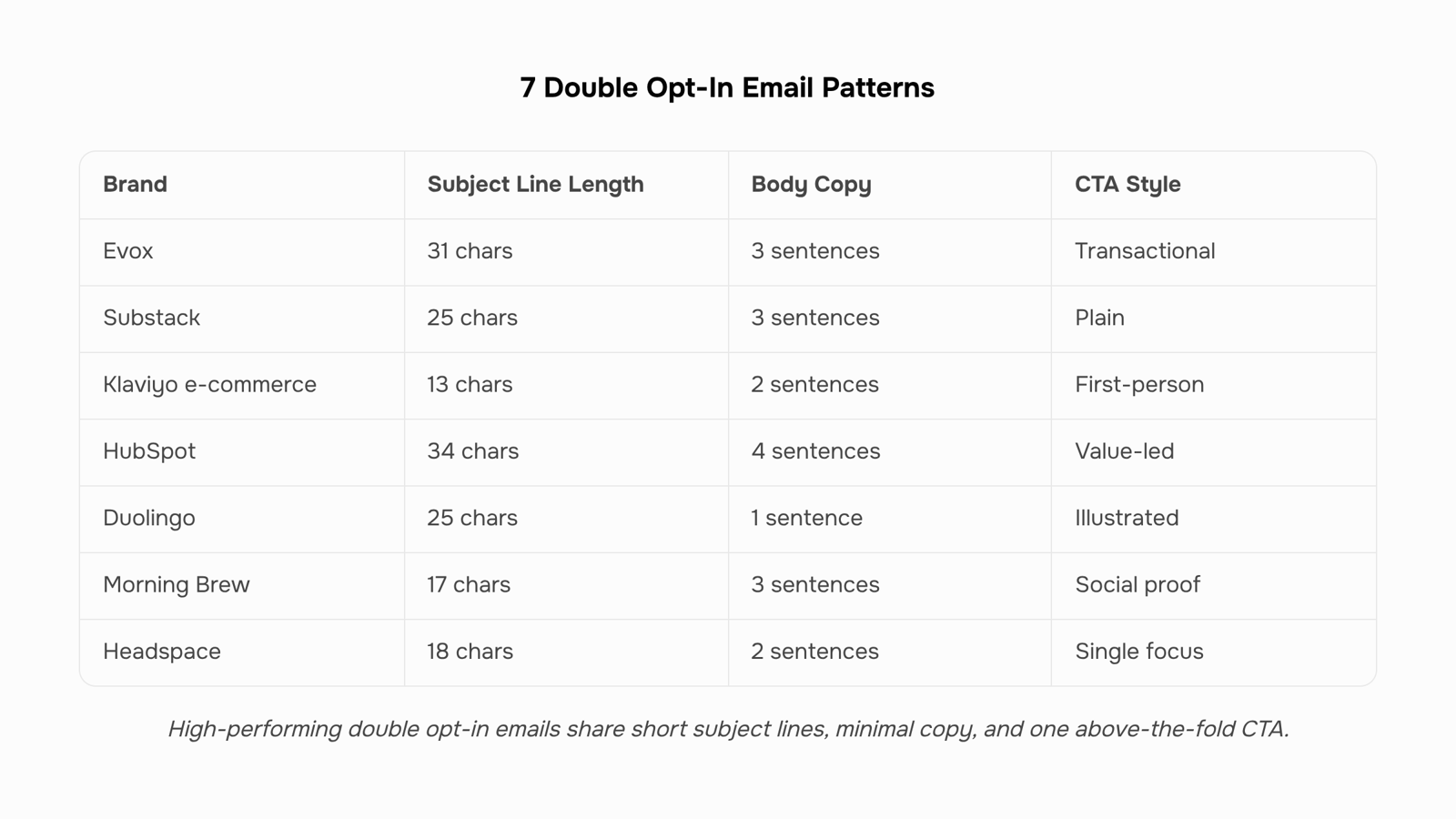
These seven examples cover the range of industries and list types you're most likely to encounter. For each one, the callouts focus on the four variables that actually move confirmation rates: subject line, CTA text, copy length, and the trust or urgency signal doing the work underneath.
1. Substack (newsletter) Subject line: "Please confirm your email" (28 characters) CTA: "Confirm your subscription" Copy length: 3 sentences. No navigation, no social links, no upsell. What works: The subject line is transactional and direct. Substack's sender name carries enough brand recognition to skip the logo-heavy header. The single CTA sits above the fold on every device. Confirmation rates for plain-text-adjacent layouts like this tend to outperform image-heavy alternatives because they clear spam filters more reliably.
2. Klaviyo-powered e-commerce store (product list) Subject line: "One step left" (13 characters) CTA: "Yes, confirm my email" Copy length: 2 sentences plus a product thumbnail. What works: First-person CTA copy ("my email") reduces friction by framing the action as the subscriber's choice, not a requirement. The product thumbnail reinforces what they signed up for without adding a second link.
3. HubSpot (B2B content list) Subject line: "Confirm your HubSpot subscription" (34 characters) CTA: "Click to confirm" Copy length: 4 sentences with a brief value reminder. What works: The value reminder ("you'll get weekly marketing tips") answers the implicit question "why should I bother?" without turning the email into a pitch. The subject line stays under 40 characters, which matters for preview text truncation on mobile.
4. Duolingo (app onboarding) Subject line: "Verify your email address" (25 characters) CTA: "Verify email" Copy length: 1 sentence. Illustration, no body copy. What works: Duolingo leans on brand illustration to carry warmth. The email is essentially a button with a mascot. For high-volume consumer apps, stripping copy to near-zero reduces decision fatigue at the confirmation step.
5. Morning Brew (daily newsletter) Subject line: "You're almost in" (17 characters) CTA: "Confirm my subscription" Copy length: 3 sentences with a social proof line. What works: "You're almost in" creates mild exclusivity without manufactured urgency. The social proof line ("join X million readers") gives a hesitant subscriber a reason to complete the step. If you're building reusable confirmation templates, Gmail template workflows can help you version and test these without rebuilding from scratch each time.
6. Typeform (SaaS trial) Subject line: "Confirm your Typeform account" (29 characters) CTA: "Confirm account" Copy length: 2 sentences. No imagery. What works: Minimal copy works here because the subscriber just filled out a form. They know what they signed up for. Repeating the value proposition would add length without adding clarity.
7. Headspace (wellness app) Subject line: "Just one more step" (18 characters) CTA: "Confirm your email" Copy length: 2 sentences with a calm visual. What works: The subject line signals low effort, which matches the brand's tone. The visual is on-brand without adding links. Headspace avoids the common mistake of including a secondary "download the app" CTA that splits click intent and suppresses confirmation rates.
The pattern across all seven: short subject lines, single CTAs, and copy that answers "why confirm?" in one sentence or less.
Best practices for double opt-in email design
The examples above reveal a consistent pattern. The emails that get confirmed share the same structural decisions. The ones that don't share the same avoidable mistakes.
These double opt-in best practices apply across industries and list types:
Subject line under 40 characters: Shorter lines display fully on mobile and read as transactional, not promotional. "Confirm your subscription" outperforms "Please take a moment to verify your email address with us."
Send within 60 seconds of signup: Intent decays fast. A confirmation that arrives 20 minutes later competes with a cold inbox and a subscriber who has already moved on.
Single CTA, above the fold: One button. No secondary links, no social icons, no footer nav. Every additional click path reduces the probability of the one click you need.
CTA button copy that states the action: "Confirm my email" converts better than "Click here" because it removes ambiguity about what happens next.
Plain-text fallback: Some inboxes block HTML. A plain-text version keeps the confirmation link accessible regardless of rendering environment.
Good double opt-in email design is also part of a broader commitment to permission-based email marketing. If you want these principles applied to your full acquisition funnel, the B2B email marketing best practices guide covers sequencing, timing, and list hygiene in more depth.
How to fix low confirmation rates on double opt-in emails
Low confirmation rates almost always trace back to one of four fixable problems.
Spam folder delivery: Authentication gaps (missing SPF, DKIM, or DMARC records) push confirmation emails into junk before the subscriber ever sees them. Fix: verify all three records and send from a subdomain dedicated to transactional mail.
Vague subject lines: "Please confirm" tells the reader nothing urgent. A compelling double opt-in email uses a subject like "One click to confirm your [Brand] subscription" — specific, under 40 characters, and action-oriented.
Delayed send: A confirmation email arriving 10 minutes after signup loses most readers. Trigger it within 60 seconds of form submission.
Too much friction: If confirmation requires logging in, filling a field, or clicking through two pages, most people abandon. One click to one confirmation page is the ceiling.
For a broader look at what moves subscribers toward action, email conversion rate best practices covers the mechanics in detail.
Most campaign tools split this into three separate configurations: a trigger, an automation sequence, and a confirmation redirect. Here is the order that works.
Set the trigger: Connect your signup form to fire when a new contact is added with "unconfirmed" status. Do not add them to any broadcast list yet.
Build the confirmation email: One CTA, sent within 60 seconds of signup. Subject line under 50 characters. This is your double opt-in confirmation email doing its only job.
Configure the confirmation redirect: When the link is clicked, flip the contact status to "confirmed" and enroll them in your welcome sequence.
Track drop-off: Most tools show you how many triggered vs. confirmed. If that gap exceeds 40%, revisit the previous section.
Evox handles all three steps inside one multi-step campaign builder, so the trigger, send, and status update stay connected without manual handoffs. For teams following B2B email marketing best practices, keeping confirmation logic in one place reduces the risk of contacts slipping through with the wrong status.
Closing
The difference between a confirmed list and an abandoned signup flow comes down to five design decisions: a clear subject line, one visible button, minimal copy, a time boundary, and a trust signal. You've now seen how Substack, Klaviyo, HubSpot, and five other high-performing senders structure these elements—and which patterns consistently move confirmation rates above 60%.
The next step isn't to memorize these examples. It's to build your own confirmation sequence using the same framework, then track whether your confirmation rate climbs. Evox lets you design, send, and monitor these sequences with built-in deliverability tracking so you can see exactly which design changes move the needle. Ready to see how it works?
FAQ
Q. What makes a double opt-in email effective?
A. Five elements: a clear subject line under 50 characters, a single CTA button, three to five sentences of copy, an urgency cue (like a 48-hour expiration), and brand trust signals like your logo. Each directly affects confirmation rates.Q. How do I write a compelling double opt-in email?
A. State exactly what the subscriber signed up for, explain what happens after they confirm, and keep it to one sentence per idea. Use first-person CTA copy ("Confirm my email") and send within 60 seconds of signup to capture intent before it fades.Q. What are the benefits of using double opt-in emails for marketing?
A. Double opt-in eliminates typos, disposable inboxes, and unverified addresses that damage sender reputation. A smaller confirmed list consistently outperforms a larger unverified one on opens, clicks, and inbox placement—especially critical for B2B senders.Q. What are some best practices for double opt-in email design?
A. Keep subject lines under 40 characters, send within 60 seconds of signup, use one CTA button, include an expiration window, and add a trust signal like your logo or sender name. Avoid secondary links, navigation, or upsells that split attention.Q. Can you provide examples of successful double opt-in email campaigns?
A. Substack uses transactional subject lines and plain-text layouts; Morning Brew adds social proof ("join X million readers"); Duolingo strips copy to near-zero for high-volume apps. Each prioritizes a single CTA and confirmation intent over decoration.


 Elena Petrova15 September 2026


