TL;DR: Most online invoice maker roundups hand you a feature checklist and call it a day. This one evaluates tools across the full payment cycle: creation, sending, tracking, and follow-up, so you know what actually happens when a client goes quiet. If you run an IT company and need invoices that collect, not just document, read on.
What an online invoice maker actually does
Professional workspace with laptop showing invoice dashboard, calculator, and organized documents on clean desk
At its core, an online invoice maker lets you create invoice online free or at low cost, send it to a client, and collect payment without printing a single page. That part is table stakes.
The real distinction is what the tool does after you hit send. A basic invoice builder stops at the PDF. A full billing-cycle tool tracks whether the client opened the invoice, flags overdue payments, fires automated reminders, and updates your records when payment lands. For an invoice maker for small business, that difference is the gap between chasing clients manually and having the process run itself.
It also matters where the invoice starts. The strongest tools connect to the work that triggered the billing, such as a completed project, a signed contract, or a closed deal. Inzo does exactly this, generating invoices automatically when a project closes or a CRM deal converts, so nothing slips through.
That full loop, creation plus sending plus tracking, is the evaluation frame you should apply to every tool in this article. If a tool breaks that loop, it creates work instead of removing it.
Why small businesses switch from manual invoicing
Manual invoicing costs more than most small business owners realize. According to SCORE, small businesses spend an average of five hours per week on invoicing and payment follow-up. That time compounds fast across a quarter.
The real damage shows up in cash flow. FreshBooks research found that roughly one in three small business invoices is paid late. Spreadsheets and Word templates share a common flaw: once the invoice leaves your outbox, you lose visibility. There is no way to see whether the client opened it, no automatic reminder when the due date passes, and no dashboard showing which payments are outstanding.
The result is a familiar loop: send invoice, wait, follow up manually, wait again, chase the payment, repeat. If you need to send and track invoices online as one connected workflow rather than two separate tasks, a spreadsheet simply cannot do that.
Automated invoicing software removes the follow-up loop by triggering payment reminders without manual input. That shift alone recovers hours each week and reduces the late-payment rate that quietly erodes margins.
The best invoicing software for small businesses does not just create a document. It manages what happens after you hit send.
Four criteria separate tools worth your time from ones that create new problems.
Customization matters more than most buyers expect. An invoice with company logo, your service line descriptions, and consistent brand colors signals professionalism before a client even reads the total. If a tool limits what you can brand, it limits how you present your business.
Sending should be built in, not bolted on. The best invoice maker for small business options let you deliver directly to a client's inbox, track opens, and confirm delivery without switching apps. If you need a separate email tool to send, that is a gap.
Tracking is where most free tools fall short. Knowing whether an invoice was opened, viewed, or ignored changes how you follow up. Without that visibility, you are guessing.
Automation is the criterion that separates good tools from great ones. Automated reminders, status updates, and payment confirmations remove the manual chase entirely. When you evaluate the best invoicing tools 2026 has to offer, ask one question: what does this tool do after the invoice is sent? That answer tells you almost everything.
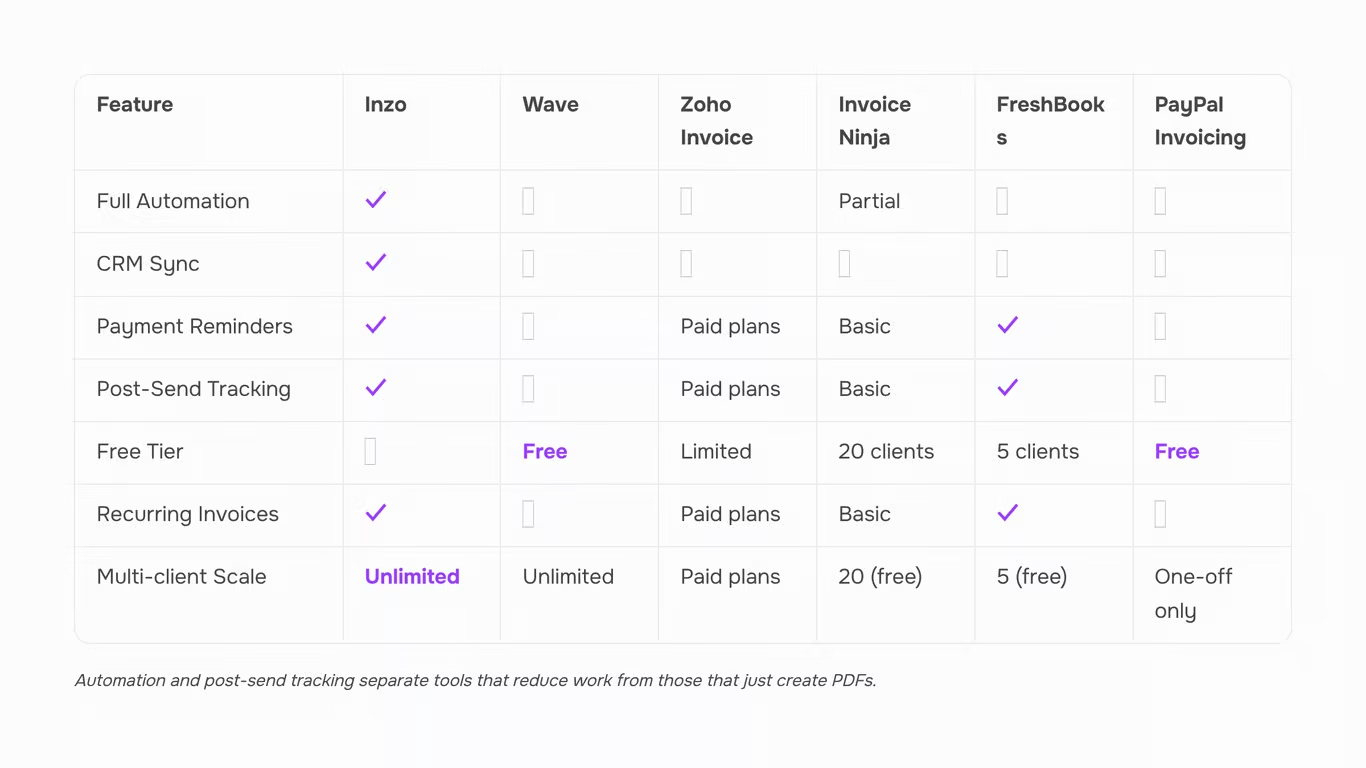
Each tool below is scored against the same four criteria from the framework above: customization, sending, tracking, and automation depth. That last one is where most roundups go quiet, so it gets the most attention here.
1. Inzo
Inzo is the strongest option for IT service businesses that bill from project or deal completion. It handles the full payment cycle: creation, sending, tracking, and automated follow-up, without requiring a separate tool for each stage.
What separates it from the rest of the list is upstream connectivity. When a project closes in Taro, Inzo generates the invoice automatically. When a deal moves to won in Lio, the invoice follows. When a contract is signed through Revo, billing starts without anyone opening a dashboard. That closed loop is what most automated invoicing software does not offer.
Customization is solid: branded templates, logo placement, line-item control, and estimate-to-invoice conversion. Payment tracking is real-time, with automated reminders that fire based on due date, not someone's memory. Inzo is a paid tool with no permanent free plan, but a free trial is available at worksbuddy.ai/inzo.
2. Wave

Wave is the most-cited free option, and its free plan is genuinely useful for solo operators. You can create invoice online free, send it, and accept payments. The gap shows up in automation: Wave does not offer automated payment reminders on its free plan, and there is no CRM or project trigger to generate invoices upstream. If your billing follows a completed service, you are still creating invoices manually.
3. Zoho Invoice

Zoho Invoice is free and covers customization well, including invoice with company logo and multi-currency support. Automated reminders are available, which puts it ahead of Wave on follow-up. The limitation is integration depth. Zoho Invoice connects naturally to other Zoho products, but if your project management or CRM lives outside that ecosystem, the automation stops at the invoice level. It does not close the loop from work completion to billing.
4. Invoice Ninja

Invoice Ninja offers a free plan capped at 20 clients, which is workable for small teams. Customization is strong, and the open-source version gives technical teams more control. Automated reminders are available on paid plans, not free. Like Zoho, it handles the invoice itself well but does not connect to upstream project or deal triggers.
5. FreshBooks

FreshBooks is one of the better tools for tracking invoices after they are sent. You can see when a client opens an invoice, which removes the "I never received it" excuse from late-payment conversations. Automation is available on paid tiers. The trade-off is cost: FreshBooks is priced for growing businesses, and its entry plan limits the number of billable clients. For teams that need to send and track invoices online as a single workflow, FreshBooks is a credible option, just not a connected one.
6. PayPal Invoicing
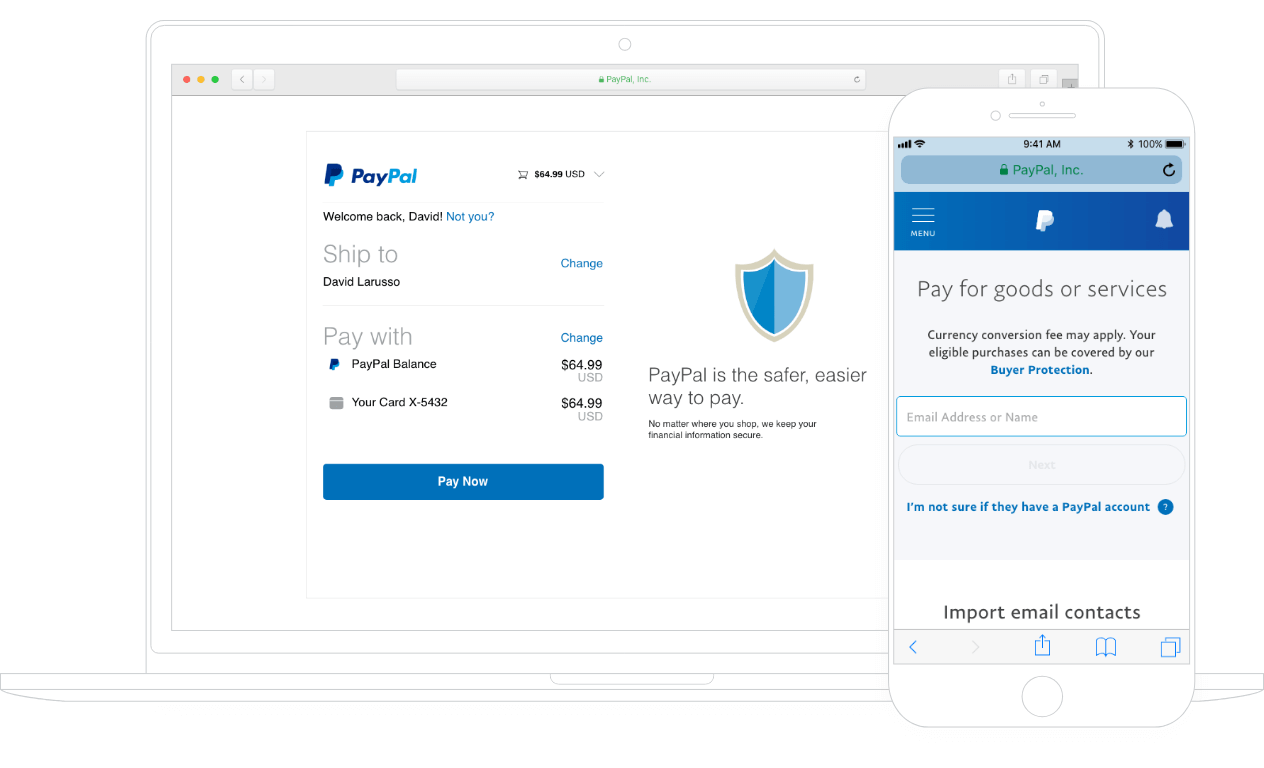
PayPal Invoicing is the fastest way to create and send a basic invoice if your client already pays via PayPal. Customization is limited, tracking is surface-level, and automation is minimal. It works for one-off transactions. It does not work as a billing system for a service business with recurring or project-based revenue.
The comparison table in the next section puts these six tools side by side on all four criteria so the trade-offs are visible in one view.
A feature list tells you what a tool can do. A comparison table tells you where it breaks.
| Tool |
Creation & customization |
Send and track invoices online |
Automation depth |
Free plan limit |
| Inzo |
Templates + logo, project-linked |
Real-time status, auto-reminders |
Full: reminders, follow-ups, CRM sync |
Trial available |
| Wave |
Clean templates |
Basic send, no tracking dashboard |
No automation on free plan |
Unlimited invoices, no automation |
| Zoho Invoice |
Strong customization |
Sends well, limited tracking |
Reminders on paid plans only |
1,000 invoices/year |
| Invoice Ninja |
Good templates |
Sends well, portal view |
Basic automation, no CRM link |
20 clients |
| FreshBooks |
Polished |
Solid tracking |
Reminders included |
5 clients |
| PayPal Invoicing |
Minimal |
Send only |
None |
Unlimited, no automation |
The pattern is consistent. Free plans for an invoice maker for small business break down exactly where growing teams need them most: automation and post-send tracking.
How to create and send your first invoice online
Getting your first invoice out takes five steps, not fifteen.
-
Set up your account and branding. Upload your company logo, add your business address, and set your default payment terms. An invoice with company logo signals professionalism before the client reads a single line item.
-
Pull in client and project details. Enter the client's billing contact, the services delivered, and the agreed rate. If your tool connects to a CRM or signed contract, this data populates automatically. Inzo does exactly that, pulling deal data from upstream so you skip manual entry entirely.
-
Generate and review the PDF. Check line items, tax, and due date before sending.
-
Send and track invoices online. Deliver via email directly from the tool, then watch the dashboard for open and payment status.
-
Confirm payment. Log it, close the loop, and trigger any follow-up reminders if the due date passes.
For a deeper look at step four, the step-by-step email invoicing guide covers delivery best practices in full.
Frequently asked questions
Can I create an invoice online for free?
Yes. Wave, Zoho Invoice, and Invoice Ninja all offer free plans that cover basic creation and sending. The catch is that automated payment reminders are almost always locked behind a paid tier, which means overdue invoices stay overdue unless you follow up manually.
What should every invoice include?
At minimum, your invoice needs your business name and contact details, a unique invoice number, an itemized list of services or products, your payment terms, and a clear due date. Including your company logo and a direct payment link reduces "who is this?" delays and moves approvals faster. Inzo lets you build branded invoice templates that carry all of this automatically, so nothing gets left off.
How do I track whether a client has paid?
Most tools show a basic paid or unpaid status, but that is not enough when you are managing 20 or 30 active clients. You need a view that separates paid, pending, and overdue invoices at a glance, and flags which ones need action today. Inzo surfaces all three in a single dashboard so nothing slips through. For a broader look at your options, the best invoicing software guide for small businesses walks through how each tool handles tracking.
What happens when a client goes quiet after receiving an invoice?
This is where most online invoice maker tools stop helping. A client who opens an invoice and says nothing is not the same as a client who never received it. Inzo tracks open status and triggers a follow-up sequence automatically, so you are not deciding each morning whether to send a nudge. The reminder goes out on schedule, and you only step in when escalation is genuinely needed.
How do I send invoices to clients professionally?
Use a consistent process every time: a clear subject line, a short message that states the amount and due date, and a single-click payment link. Inconsistent sends, like attaching a PDF with no context or sending from a personal email, slow down approvals and make you look disorganized. This step-by-step email guide covers exactly what to write and when to send it.
Do I need accounting software, or will an invoicing tool cover it?
For most IT service businesses billing under 50 clients, a dedicated invoicing tool handles the full cycle without the overhead of full accounting software. If you need payroll, tax filing, or multi-entity reporting, a platform like QuickBooks or Xero makes more sense. If your core need is creating, sending, tracking, and collecting on invoices, a focused tool does the job faster and with less setup.
Closing
The best invoicing tool isn't the one with the most templates — it's the one that removes the gap between doing the work and getting paid for it. With the right setup, you can create professional invoices in minutes, automate follow-ups on overdue payments, and have a clear picture of your cash flow without chasing spreadsheets or switching between five different tabs.
Small businesses that tighten this process stop leaving money on the table. Those that don't keep absorbing the hidden cost of late payments and manual admin quietly, every month.
If your invoicing still lives in a tool that doesn't talk to your projects or client deals, that's the gap worth closing first. Inzo connects invoicing, payments, expenses, and financial reporting inside one intelligent workspace — built for teams that can't afford the friction of disconnected tools. Start your free trial or book a demo to see it in action.
FAQ
Q. Can I create an invoice online for free?
A. Yes. Wave, Zoho Invoice, and Invoice Ninja all offer free plans that cover basic creation and sending. The catch is that automated payment reminders are almost always locked behind a paid tier, which means overdue invoices stay overdue unless you follow up manually.
Q. What should every invoice include?
A. At minimum, your invoice needs your business name and contact details, a unique invoice number, an itemized list of services or products, your payment terms, and a clear due date. Including your company logo and a direct payment link reduces "who is this?" delays and moves approvals faster. Inzo lets you build branded invoice templates that carry all of this automatically, so nothing gets left off.
Q. How do I track whether a client has paid?
A. Most tools show a basic paid or unpaid status, but that is not enough when you are managing 20 or 30 active clients. You need a view that separates paid, pending, and overdue invoices at a glance, and flags which ones need action today. Inzo surfaces all three in a single dashboard so nothing slips through. For a broader look at your options, the best invoicing software guide for small businesses walks through how each tool handles tracking.
Q. What happens when a client goes quiet after receiving an invoice?
A. This is where most online invoice maker tools stop helping. A client who opens an invoice and says nothing is not the same as a client who never received it. Inzo tracks open status and triggers a follow-up sequence automatically, so you are not deciding each morning whether to send a nudge. The reminder goes out on schedule, and you only step in when escalation is genuinely needed.
Q. How do I send invoices to clients professionally?
A. Use a consistent process every time: a clear subject line, a short message that states the amount and due date, and a single-click payment link. Inconsistent sends, like attaching a PDF with no context or sending from a personal email, slow down approvals and make you look disorganized. This step-by-step email guide covers exactly what to write and when to send it.
Q. Do I need accounting software, or will an invoicing tool cover it?
A. For most IT service businesses billing under 50 clients, a dedicated invoicing tool handles the full cycle without the overhead of full accounting software. If you need payroll, tax filing, or multi-entity reporting, a platform like QuickBooks or Xero makes more sense. If your core need is creating, sending, tracking, and collecting on invoices, a focused tool does the job faster and with less setup.


 Elena Petrova15 September 2026


