What a risk and control matrix is
- A risk and control matrix (often shortened to RCM) is a structured document that maps every identified risk in a project or operation to the specific control designed to prevent or reduce it. Think of it as two columns working together: the risk side names what could go wrong, and the control side names exactly what your team does to stop it.
- That distinction matters because an RCM is not the same as a risk register. A risk register lists threats and their likelihood. An RCM goes one step further by pairing each threat with an owner, a control action, and a way to test whether that control is actually working. For IT project and operations owners, that extra layer is what converts a passive list into an active management tool.
- The definitions come from established standards. ISO 31000:2018 frames risk as the effect of uncertainty on objectives, and COSO ERM 2017 defines a control as any action that modifies risk to an acceptable level. Both frameworks treat the pairing of risk and control as the foundation of sound risk management best practices.
If your team currently tracks risks without tracking controls, you have half the picture.
Why your IT team needs one
Three outcomes make the business case for building a risk and control matrix before your next project kicks off.
- Project delivery speed improves because your team stops discovering blockers mid-sprint. When risks are mapped to controls in advance, engineers and project leads know exactly which safeguards are active and which gaps still need owners. PMI's Pulse of the Profession (2023) found that poor risk management contributes to nearly half of all IT project failures, most of which surface late and cost far more to fix than to prevent.
- Audit readiness shifts from a scramble to a routine. Instead of reconstructing decisions under pressure, you hand auditors a living document that shows every identified risk, its likelihood, and the control effectiveness score tied to it. That single artifact can cut audit prep time significantly for IT teams operating under compliance requirements.
- Accountability clarity is where the matrix earns its keep on a daily basis. Every row has an owner. Every control has a status. When something slips, the matrix tells you who is responsible and whether the control failed or was never assigned. That visibility removes the "I thought someone else had it" conversations that quietly derail delivery.
Following risk management best practices means building this structure before risks materialize, not after. The next section shows you exactly how.
How to build a risk and control matrix in 6 steps
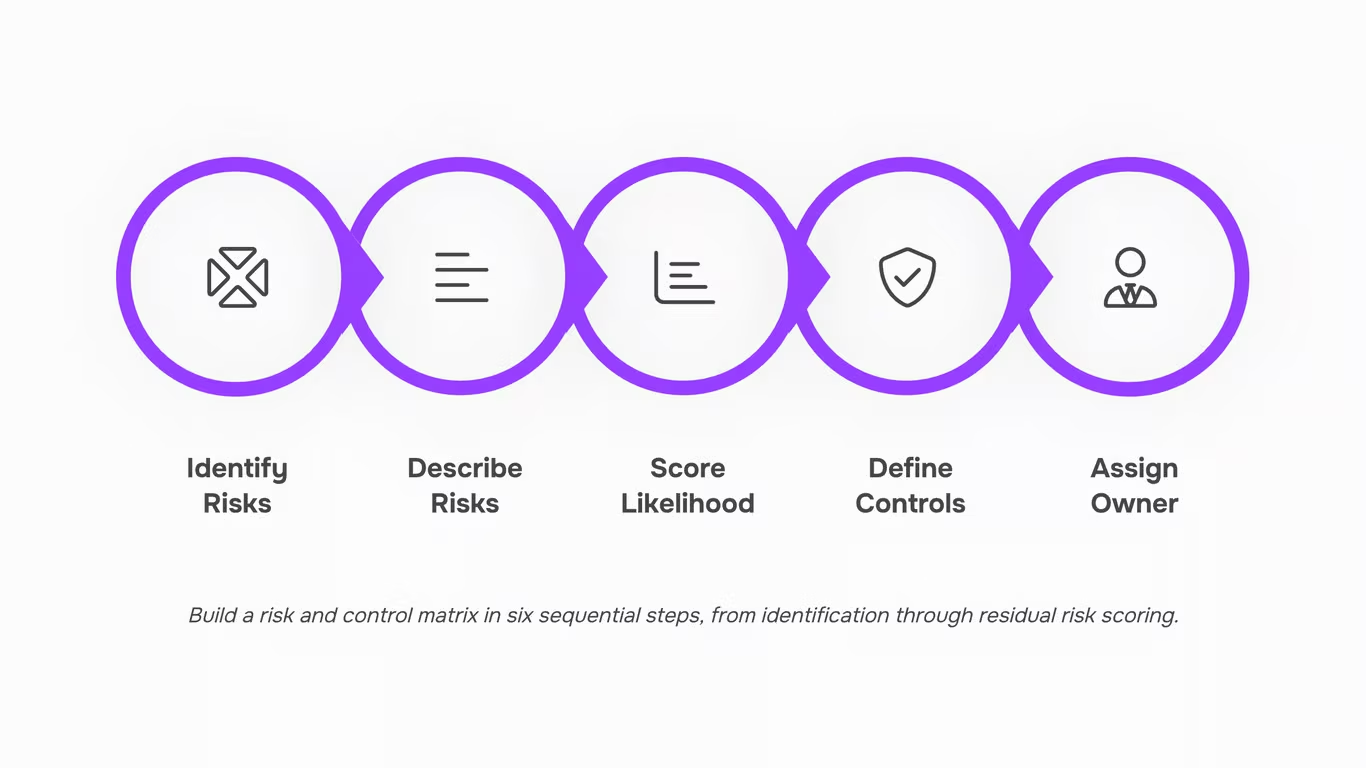
Building a risk and control matrix for the first time feels like it should be complicated. It is not. The process breaks into six steps you can move through in a single working session, then refine over time.
- Identify your risks: Start with a structured risk identification session. Pull in your project leads, IT ops staff, and at least one person who has lived through a previous project failure. Ask one question: what could stop this project from delivering on time, on budget, or within scope? Document every answer without filtering. Common sources include third-party dependencies, security vulnerabilities, resource constraints, and compliance gaps. PMI's Pulse of the Profession (2024) found that 39% of IT projects underperform due to risks that were never formally identified, which means this step alone separates high-performing teams from reactive ones.
- Describe each risk clearly: A vague entry like "security issue" is useless during an audit or a sprint review. Write each risk as a cause-and-effect statement: "If the third-party API vendor delays their release, the integration milestone will slip by two or more weeks." Specific descriptions make the rest of the matrix easier to fill in and harder to misinterpret.
- Score likelihood and impact: Assign each risk a likelihood score (1 to 5) and an impact score (1 to 5). Multiply them to get a raw risk score. A vendor delay that is highly probable and would derail your go-live date scores much higher than a low-probability hardware failure with a quick workaround. This scoring step is where your risk mitigation plan priorities come from, so take it seriously.
- Define the control for each risk: For every risk above your acceptable threshold, document the control that reduces it. Controls fall into three types: preventive (stops the risk from occurring), detective (catches it early), and corrective (limits damage after it occurs). A risk with no assigned control is an open exposure, not a managed one. Be specific: "weekly vendor check-in call" is a control; "monitor vendor" is not.
- Assign a control owner: Every control needs one named person responsible for executing and maintaining it. Not a team. Not a role. A person. This is where accountability clarity lives. Without an owner, controls drift, get skipped during busy periods, and fail silently. For IT project teams, this step often reveals ownership gaps that no one knew existed.
- Score residual risk and set a review date: After the control is in place, re-score the risk. The number that remains is your residual risk. If it is still above your threshold, the control is insufficient and you need a stronger one. ISACA's 2024 guidance recommends reviewing high-residual risks at every major project phase gate, not just quarterly. Set that date in your matrix before you close the session.
If you want a faster way to surface risks before they reach your matrix, Taro flags ownership gaps and risk signals automatically as your project moves. For the broader methodology behind steps three through six, the PMBOK and PRINCE2 risk management comparison is worth reading alongside this process.
A starter template: what each column should include
A functional risk control matrix template needs seven columns. Each one earns its place by answering a specific question your team will ask during a review.
- Risk ID — a short reference code (R-01, R-02) so you can cross-reference the matrix against your risk mitigation plan without hunting through descriptions.
- Risk description — one plain sentence. "Third-party vendor misses API delivery deadline, blocking QA phase" beats "vendor risk."
- Likelihood — score 1 to 5. Use the same scale across every risk so comparisons hold up.
- Impact — score 1 to 5 against cost, schedule, or compliance exposure.
- Control type — preventive (stops the risk) or detective (catches it after it starts). ISO 31000:2018 treats this distinction as foundational to evaluating control effectiveness.
- Control owner — a named person, not a team. Shared ownership is no ownership.
- Residual risk — the likelihood-times-impact score after the control runs. If residual risk stays high, the control is not working and needs to change.
That last column is where most spreadsheet templates fall short. Logging a control without rating its effectiveness turns your matrix into a compliance checkbox rather than a working tool.
Taro surfaces every risk before your team discovers it the hard way by tracking residual risk scores in real time, flagging controls that are losing ground before a project phase closes.
How often you should review and update your matrix
Review frequency is one of the most practical questions in risk management best practices, and the honest answer is: it depends on where your project is, not on a calendar date.
A workable schedule looks like this:
- Project initiation: Build the first version of your matrix before work starts. This is your baseline.
- Each phase gate: Review every risk entry and its associated controls before the team moves to the next phase. New scope means new exposure.
- After any significant change: A vendor swap, a budget cut, or a security incident should trigger an immediate review, not a wait until the next scheduled cycle.
- Quarterly for live systems: Once a project moves into operations, a quarterly review of your risk register keeps residual risk scores current without creating review fatigue.
ISACA's 2023 guidance recommends that high-performing teams review active risk registers at least quarterly, with ad hoc reviews tied to material changes.
"Review regularly" is not a schedule. If your matrix has no next-review date in the header, it will drift. Assign a date, assign an owner, and treat a missed review the same way you would treat a missed risk mitigation step.
Common mistakes that make a matrix useless
Three mistakes drain control effectiveness before the matrix ever reaches a stakeholder.
- First, teams treat the risk and control matrix as a one-time deliverable. They build it during project kick-off, file it, and never open it again. A static document cannot reflect a live project, and stale risk ratings create false confidence.
- Second, controls get listed without named owners. "IT team monitors access logs" sounds like a control. It is not. Without a single accountable person, no one acts when a threshold is breached.
- Third, teams conflate inherent risk (the raw exposure before any control) with residual risk (what remains after the control runs). Mixing the two makes it impossible to judge whether your risk mitigation plan is actually working or just looks good on paper.
- Avoid all three by assigning an owner to every row, scoring inherent and residual risk in separate columns, and following the review schedule from the previous section.
- A static spreadsheet cannot notify your team when a risk score changes or a control deadline passes. Moving your matrix into a work management tool turns a passive document into a live risk mitigation plan with assigned owners, due dates, and automatic alerts.
- Taro applies risk management best practices by mapping each control directly to the team member responsible for it, then surfacing overdue items before they become incidents. Every risk row becomes an actionable task, not a line in a forgotten file.
Taro surfaces every risk before your team discovers it the hard way.
Stop Managing Risk in Arrears — Start Predicting It
- A risk and control matrix only earns its place in your process when it's treated as a living decision tool, not a compliance artifact. Build it with the right scope, map controls to actual failure points, assign clear ownership, and review it on a cadence that matches how fast your project environment changes — and you'll catch problems while they're still cheap to fix.
- The gap most teams hit isn't in building the matrix. It's in what happens after. A spreadsheet filed after a workshop won't alert you when a vendor slips, a dependency shifts, or a risk score quietly crosses a threshold that changes your delivery outlook.
That's where Lio's risk prediction and alerts dashboard moves the needle — turning the static work you've done here into a system that surfaces the right signal at the right time. See how it works.
FAQ
Q. What is the purpose of a risk and control matrix in risk management?
A. A risk and control matrix maps every identified risk to a specific control so you always know what's being done, who owns it, and whether it's working. Without one, risk management is just a list of concerns with no accountability.
Q. How do I create a risk and control matrix for my business?
A. List your highest-risk processes, assign a specific control to each one, and add an owner plus likelihood and impact scores so you can sort by priority. Most teams start in a spreadsheet and migrate to a dedicated tool once the matrix outgrows manual updates.
Q. Can I use a risk and control matrix to identify potential risks?
A. No. The matrix is where risks land after you've identified them, not where you find them. Run a risk assessment first, then feed those findings into your RACM.
Q. How often should I review and update my risk and control matrix?
A. Review quarterly at minimum, and trigger an unscheduled review any time there's a major change like a new vendor, system migration, or audit finding. A matrix untouched for 12 months is almost certainly out of date.
Q. What are the best practices for implementing a risk and control matrix?
A. Start with your highest-impact risks, assign a named individual (not a team) to each control, and set your review cadence before you finalize the first version. A matrix updated quarterly beats ten built once and forgotten.
Q. What is the difference between a risk and control matrix and a risk register?
A. A risk register lists what could go wrong and how severe it would be. A risk and control matrix goes further by pairing each risk with the specific control that mitigates it, so you can see the problem and the solution in one view.
Q. Who should own the risk and control matrix on an IT project?
A. The project manager typically owns the RACM, but each control entry should come from whoever is closest to it, such as a security lead or dev lead. Ownership without that input produces a matrix that looks complete but misses real failure points.



 Ryan Mitchell07 August 2026


