TL;DR: Most invoice management guides hand IT company owners a generic checklist and stop there. This piece maps each practice to a specific cash flow outcome, shows how invoices connect to your projects, deals, and client accounts, and identifies exactly where automation replaces the manual steps that cause payment delays.
What it means to manage invoices well
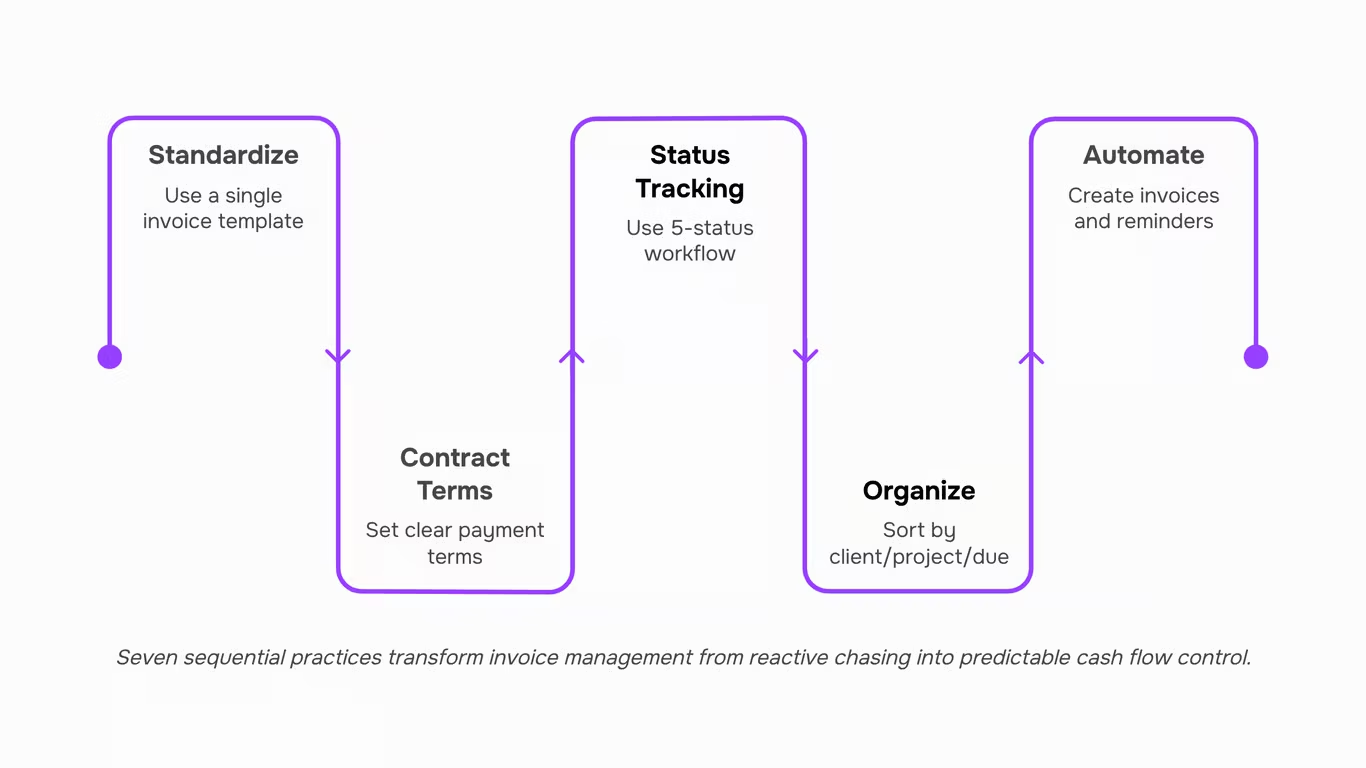
Managing invoices well means controlling when money moves, not just recording that it did. For IT companies, that distinction matters because your billing is tied to deliverables, project milestones, and signed contracts — not simple product transactions. A missed invoice isn't a clerical error; it's a gap in your cash flow.
Good invoice management best practices treat invoicing as a system: one that connects upstream work (completed sprints, approved deliverables, signed SOWs) to downstream payment. That means knowing which invoices are outstanding, which clients are overdue, and which projects haven't been billed yet — all at once, across every active engagement.
This is where most IT owners hit the same three walls: project billing that lags behind delivery, no clear view of payment status across multiple clients, and hours lost each week chasing payments manually. The practices below address each one, in the order that makes the most operational difference.
Why invoice management breaks down for IT companies
Three failure points show up repeatedly when IT company owners try to figure out how to manage invoices across an active client base.
Project billing delays happen when invoices get created after the fact, disconnected from the deliverable that triggered them. A developer closes a sprint, but the invoice doesn't go out for another two weeks because no one owns that handoff. Cash flow takes the hit.
Multi-client status confusion compounds the problem. When you're running five or six active engagements, invoice tracking across all of them inside a spreadsheet or email thread becomes a liability. You lose visibility into what's been sent, what's overdue, and what's still in draft.
Manual follow-up overhead is the third drag. Chasing payment confirmations by hand consumes time that should go toward billable work. Most IT owners underestimate how much of their week disappears into this.
The common thread: invoicing gets treated as an afterthought to the project rather than a step built into it. Understanding what an invoice actually contains and how it reaches the client is the starting point for fixing all three.
Every disputed invoice traces back to the same root cause: the client received something they didn't expect. A consistent format removes that ambiguity before it starts.
For IT project billing, your invoice should include a unique invoice number, the deliverable it maps to (not just "consulting services"), the hours or milestone completed, your payment terms, and a due date. That last item matters more than most owners realize — invoices sent without a stated due date get treated as optional.
One concrete example: an IT company billing a client for a completed sprint should reference the sprint number and the signed statement of work, not just a line item that reads "development work."
This is one of the most reliable invoice management best practices you can apply immediately. If you want a full breakdown of what each field should contain, the core components of a well-structured invoice covers each one.
Practice 2: Set payment terms at the contract stage, not the invoice stage
Payment terms set at the invoice stage are almost impossible to enforce. By that point, the client has already mentally moved on from the contract conversation, and any new condition feels like a surprise.
Define net-15 or net-30 in the contract, before work starts. For IT service companies, the difference matters: net-15 keeps cash moving across active project cycles; net-30 works better for larger retainers where the client's AP process needs more runway. Choose based on your billing cycle, not what feels polite.
Include the payment term in the invoice itself as a restatement, not an introduction. "Payment due within 15 days per contract dated [date]" closes the loop without reopening negotiation.
When you send the invoice, the term should already be agreed. That one shift removes most of the friction that turns a 30-day term into a 60-day wait.
Practice 3: Track every invoice through a defined status workflow
A spreadsheet with "sent" and "paid" columns is not a tracking system. It's a list. The difference matters when you're managing eight active clients and need to know, right now, which accounts are at risk.
The minimum viable workflow has five statuses: draft, sent, viewed, overdue, paid. Each one is a decision gate. A draft sitting for three days means the invoice hasn't gone out yet. A viewed invoice that's two days from due date is your cue to send a short reminder. An overdue invoice with no response is an escalation, not a nudge.
For IT companies, this matters more than it does for product businesses. Your invoices tie to deliverables, not shelf inventory. When a client disputes a charge, the status trail shows exactly when they received and opened the invoice, which closes most disputes before they become conversations.
A complete invoice management system replaces that spreadsheet with a live status view across every client account. Inzo links each invoice to the underlying project or deal, so the status isn't just financial, it's contextual.
One concrete habit: review your "viewed but unpaid" queue every Monday morning. Invoices that have been opened but not paid for more than five days rarely resolve themselves. That queue tells you where to spend ten minutes before the week starts.
Practice 4: Organize invoices by client, project, and due date
Flat file naming and manual sorting collapse fast once you're billing across ten or more active clients. A three-layer structure holds up better: organize first by client, then by project within that client, then by due date within each project.
The client layer keeps accounts from bleeding into each other. The project layer matters specifically for IT work, where one client might have three concurrent engagements — a support retainer, a migration, and a new build — each with its own billing schedule. The due date layer tells you what needs attention this week without scanning every open invoice.
This structure also makes invoice tracking accurate rather than approximate. When an invoice is linked to a specific project rather than just a client name, you can see immediately whether a payment gap ties to a deliverable dispute or a simple oversight.
Inzo links invoices directly to projects, deals, and subscriptions, so the three-layer structure is built into how records are created — not something you reconstruct manually later. For a primer on what belongs on each invoice before you file it, that's worth a quick review.
Practice 5: Automate the steps that cause the most delays
Three manual steps cause most billing delays in IT project work: creating the invoice after a project closes, sending payment reminders, and generating recurring charges for retainer clients.
The first delay happens because invoice creation is a separate task from project completion. When your team closes a project in Taro, that event can trigger Inzo to generate a draft invoice automatically, pulling in the deliverables, agreed rates, and client details. No one has to remember to bill. The invoice exists the moment the work is done.
The second delay is follow-up. Most IT owners either forget to chase overdue invoices or batch the task weekly, which adds days to average collection time. Inzo's reminder scheduling sends follow-ups at intervals you set once, so a net-30 invoice that goes unpaid gets a nudge on day 31 without you touching it.
The third delay is recurring billing. If you have monthly retainer clients, manually recreating the same invoice each cycle is pure overhead. Scheduling those invoices to generate and send automatically removes the task entirely.
The upstream connection matters too. When a new deal closes in Lio, that signal can flow into Inzo to start the billing sequence before the project even kicks off. That's how you automate invoice management end-to-end rather than just speed up one step. If you want to manage invoices online without the manual gaps, automation has to cover the handoffs, not just the invoice itself.
Practice 6: Handle partial payments and multi-invoice clients without losing track
Multi-invoice clients are where reconciliation quietly breaks down. A client running three concurrent projects with staggered deliverables can easily end up with two partially paid invoices, one overdue, and no clear record of which payment applies to which engagement.
The fix is tracking partial payments at the invoice level, not just the account level. Each invoice needs its own outstanding balance, not a rolled-up client total that hides which specific engagement is behind.
For IT companies billing against milestones, this matters more than most invoice management best practices acknowledge. A 30% upfront, 40% mid-project, 30% on delivery structure means three payment events per invoice. Miss one and your month-end reconciliation is off before you start.
Inzo's complete invoice management system tracks partial payments per invoice and flags outstanding balances by client, so you can manage invoices across a full portfolio without manually cross-referencing spreadsheets.
Practice 7: Review your invoice data on a fixed schedule
A fixed review cadence turns your invoice data from a record of what happened into a signal for what to do next. Set a biweekly slot, 30 minutes, to check three numbers: average days to payment by client, total outstanding balance, and overdue invoice count. Those three tell you whether your cash flow is trending or drifting.
For IT companies billing across multiple projects, this rhythm catches problems that partial payment tracking alone misses. A client who always pays in 45 days isn't a problem until that stretches to 60 two cycles in a row.
Inzo's invoice lifecycle tracking surfaces overdue invoices and payment trends without manual pulling, so your review session starts with the data already in front of you. That's the shift from reactive to predictable: you're not chasing invoices, you're reading a pattern and acting early.
If you're still building the foundation, start with understanding what belongs on an invoice before you automate invoice management at scale.
Closing
The IT companies that get paid on time aren't doing anything heroic — they've just stopped letting invoices fall through the gaps between their creation tool, their spreadsheet tracker, and their email follow-up thread.
If you apply what's covered here, you can send invoices the same day work is scoped, know exactly which ones are overdue without chasing your inbox, and automate reminders before a payment becomes a problem. That's not a workflow upgrade — it's recovered revenue.
The companies that don't act on this will keep losing 10–15 days per invoice cycle to manual chasing and status checks that shouldn't require human attention.
Inzo is built to run all seven of these practices in one place — invoice creation, payment tracking, automated follow-up, and financial reporting without the context-switching. Book a 30-minute walkthrough to see how it fits your billing workflow.
FAQ
Q. How can I efficiently manage invoices for my business?
A. Centralize creation, sending, and tracking in one system instead of splitting them across spreadsheets and email. Inzo handles all three from a single dashboard, so fewer handoffs mean fewer things fall through.
Q. What are the best practices for managing invoices online?
A. Use numbered invoices, set payment terms upfront, send immediately after delivery, and automate follow-ups on overdue accounts. Keeping everything in one system makes it easy to see what's paid, pending, or overdue at a glance.
Q. Can I automate invoice management with accounting software?
A. Yes. Most modern tools let you automate recurring billing or trigger invoices when a project closes. Inzo connects with WorksBuddy's project and CRM tools so invoices go out automatically the moment a milestone is marked complete.
Q. What are the benefits of using invoice management tools?
A. They cut manual billing work and give you a real-time view of what's sent, overdue, and paid. You spend less time chasing payments and more time on client work.
Q. How do I organize and track invoices for multiple clients?
A. Link each invoice to its client, project, or deal at creation so you filter by context instead of hunting through a flat list. Inzo connects invoices directly to projects and deals, keeping your full billing history for each client in one place.
Q. What is the difference between an invoice and a bill?
A. An invoice is what you send to a client requesting payment. A bill is what you receive from a vendor. Same document, opposite sides of the transaction.
Q. How do I handle a client who pays only part of an invoice?
A. Record the partial payment against the original invoice and reissue it showing the remaining balance. Inzo tracks partial payments natively, so the outstanding amount updates automatically without manual reconciliation.



 Elena Petrova15 September 2026


