TL;DR: Most content on marketing asset management stops at file organization and tagging. This piece goes further: it connects asset management directly to campaign execution speed, brand consistency, and the manual handoffs that break both. IT company owners will find a practical framework for tightening that loop, including where automation removes the bottlenecks that slow campaigns from brief to send.
What marketing asset management actually means
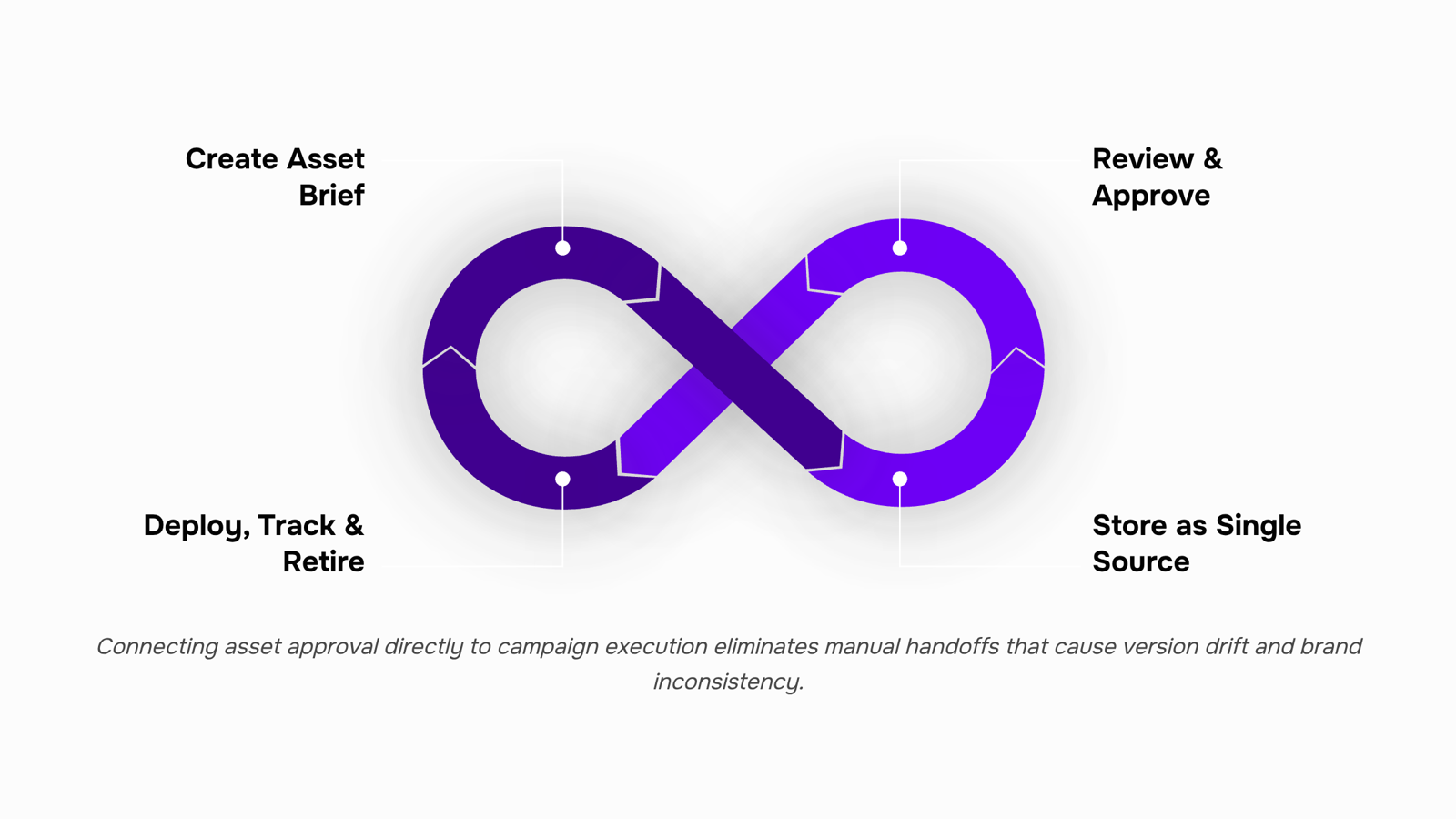
Marketing asset management (MAM) is the system that governs how marketing assets move through their entire lifecycle: created, reviewed, approved, stored, retrieved, and eventually retired. That's a different job from file storage. A shared Google Drive folder stores files. MAM tells your team which version is approved, who can use it, and where it belongs in an active campaign.
For IT company owners running lean marketing operations, the distinction matters. Without a governing system, the same logo exists in four versions across three departments. A sales rep pulls a deck from last quarter. A campaign goes live with an asset that never cleared legal review. These aren't edge cases — they're the default outcome when asset organization relies on folder conventions and memory.
A functioning MAM system has four components working together: a single source of truth for approved assets, a defined approval workflow before anything enters that library, metadata and tagging that make retrieval fast, and a deprecation process that removes outdated files before they cause damage. Some teams also connect MAM directly to execution — how Evox pulls approved assets directly into multi-step email campaigns is one example of that integration closing the gap between asset approval and campaign deployment.
The AI-powered marketing tools that extend asset performance tracking take this further by surfacing which assets actually drive results, not just which ones exist.
Why poor asset management breaks brand consistency
Version drift is one of the most common — and most damaging — failures in marketing operations. A designer updates a logo, but the old file stays in a shared drive folder nobody audited. Six months later, a sales rep pulls that folder for a trade show deck. The outdated logo goes live in front of 500 prospects.
That's not a hypothetical. It's the default outcome when asset management relies on folder structures and tribal knowledge instead of a governed system.
Three failure modes show up repeatedly in IT company marketing:
Version drift: Multiple versions of the same asset circulate without clear indication of which is current. Teams default to whatever they can find fastest.
Off-brand assets in live campaigns: Without approval checkpoints, assets that never cleared brand review get used in emails, ads, and landing pages. Brand consistency in marketing erodes one campaign at a time.
Inconsistent logo and color usage: Different teams pull assets from different sources. The result is a brand that looks fractured across channels, even when the underlying guidelines are solid.
The downstream cost is real. Research from Marq (formerly Lucidpress) found that consistent brand presentation can increase revenue by up to 23%. Inconsistency does the opposite — it signals disorganization to buyers who are already evaluating you against alternatives.
For IT company owners running lean marketing operations, these failures are compounding. Rework eats hours. Approval cycles restart. Campaigns slip.
Marketing asset management best practices exist specifically to close these gaps — by making the approved version the only accessible version, and by connecting assets directly to the channels where they get used. Tools like Evox pull approved assets directly into multi-step email campaigns, removing the manual retrieval step that introduces version risk.
The core benefits of a structured asset management system
A structured asset management system pays off in three specific places: how fast campaigns ship, how often your team revisits the same work, and how much of the approval queue is just "wrong version" noise.
When approved assets live in a single, organized library, campaign turnaround shortens because designers and marketers aren't digging through shared drives or Slack threads to find the right file. Marketing asset organization that uses consistent folder taxonomy and clear naming conventions cuts that search time significantly. Bynder research suggests marketing teams spend roughly 20% of their time searching for or recreating assets that already exist.
Fewer approval cycles follow directly from better version control. When everyone pulls from the same source of truth, the "can you send me the latest?" requests disappear. A typical B2B campaign asset goes through multiple revision rounds partly because the wrong version circulates early. Lock that down with a structured system and you reduce rework before it starts.
The downstream gains compound when your asset library connects to execution tools. How Evox pulls approved assets directly into multi-step email campaigns is a practical example of this: assets don't sit idle after approval, they move into active campaigns without a manual handoff step.
Performance tracking is the benefit most MAM guides skip. Tagging assets with campaign metadata lets you identify which creative formats actually convert, which feeds better briefs for the next round. AI-powered marketing tools that extend asset performance tracking can close that loop further.
Six best practices that actually hold up at scale
Good marketing asset management practices aren't complicated in theory. They're just rarely implemented with enough specificity to hold up once your campaign volume doubles.
Here are six that do:
Build taxonomy before you upload anything. A folder structure that made sense for 10 assets breaks at 500. Define your naming convention first: [Brand]_[Asset type]_[Campaign]_[Date]_[Version] is a workable pattern for most B2B teams. Apply it consistently from day one, or you'll spend more time renaming than creating.
Enforce version control with a single source of truth. Every asset should have one canonical location. When a designer updates a product one-pager, the old version gets archived, not deleted, and the new one replaces it in the active library. Teams that skip this step routinely send prospects outdated pricing or retired brand marks — both of which erode trust faster than most teams realize. Lucidpress research found that brand inconsistency costs companies measurable revenue, partly because off-brand materials signal internal disorganization to buyers.
Set access permissions by role, not by individual. Granting access person-by-person creates permission debt: people leave, roles change, and suddenly contractors have access to unreleased campaign assets. Role-based permissions (creator, reviewer, approver, viewer) are easier to audit and easier to revoke.
Wire approval workflows into the asset library, not into email threads. When approvals live in inboxes, version history disappears and accountability is unclear. Build a defined review stage into your MAM system so every approval is logged, timestamped, and attached to the asset record.
Retire assets on a schedule, not when someone remembers. Set expiry dates on time-sensitive assets at upload: seasonal promotions, event materials, and anything referencing a product version that's been superseded. An unretired asset used in a live campaign is a compliance or brand risk waiting to surface.
Tag assets for performance, not just for search. Most marketing asset organization systems stop at descriptive tags. Add a performance layer: which assets drove the highest click-through in email, which ones stalled in approval, which formats your audience actually engages with. That data shapes what your team builds next quarter.
When assets are tagged for performance and connected to campaign execution, the loop closes. Evox connects asset libraries directly to email campaign workflows, so the right version of an asset reaches the right audience without a manual handoff in between.
Most marketing stacks have a connection problem, not a content problem. Your assets live in one place, your CRM in another, your email platform somewhere else. When those systems don't talk, someone on your team is manually downloading a file, renaming it, re-uploading it, and hoping they grabbed the right version.
That manual handoff is where brand consistency breaks and campaigns slow down.
The integrations that matter most
Not every tool connection delivers equal value. For lean IT marketing teams, these are the ones worth prioritizing:
Asset library to email automation: When assets are tagged by campaign, audience segment, or content type, they can be pulled directly into campaign builders. No manual retrieval. No version guessing. The asset is already approved, already sized, already formatted.
MAM system to CRM: When a lead's behavior triggers a nurture sequence, the email that fires should automatically reference assets tied to that funnel stage. Without this connection, someone manually matches assets to sequences, and that matching is exactly where outdated versions slip through.
Asset library to performance tracking: When your MAM connects to analytics, performance data flows back to the source. You learn which assets actually convert, not just which ones got used.
What disconnected tools actually cost you
The failure mode is predictable. A sales rep pulls a one-pager from a shared drive that hasn't been updated since last quarter. A campaign goes out with a logo that was retired two months ago. These aren't careless mistakes. They're structural ones caused by systems that were never connected.
Version drift is a byproduct of manual handoffs, not human error.
What a connected system looks like in practice
When your asset library integrates with your email automation platform, the workflow changes in a concrete way. Your team configures the campaign, not the files. Evox, for example, pulls approved assets directly into multi-step email sequences, so the asset moving from library to live campaign never leaves the governed system. No download, no rename, no re-upload.
The result is faster campaign execution and fewer brand consistency errors, without adding headcount to manage the gap between tools.
For IT company owners running lean operations, that kind of structural fix matters more than any organizational habit or naming convention. Integrations remove the step where things go wrong.
Where automation changes the asset management equation
Manual asset retrieval is a campaign execution tax most teams don't track. A rep building an email sequence stops, opens the DAM, searches for the approved banner, downloads it, reformats it, then re-uploads it to the campaign builder. That sequence adds 20-40 minutes per campaign and compounds across every send.
Email marketing automation removes that detour. When your campaign builder connects directly to your asset library, approved files are available inside the workflow itself. You select, you configure, you send. The asset-retrieval step disappears.
The practical difference shows up in launch speed. Teams that wire up marketing tool integration between their DAM and campaign platform typically cut campaign setup time in half, because the approval state travels with the asset. No version confusion, no "is this the latest logo" back-and-forth.
Evox is built around this directly. Its multi-step campaign builder pulls approved assets into email sequences without requiring a separate download-upload cycle, so your team moves from brief to live campaign faster. The asset discipline you built earlier in your MAM process pays off here, at the moment it actually matters.
Closing
The real test of marketing asset management isn't whether your assets are organized—it's whether they actually get used in campaigns without creating friction. Most teams build solid libraries and then watch them sit idle because pulling assets into active work still requires manual steps, approval handoffs, and version verification. That gap is where brand consistency breaks down and campaign speed stalls. The hardest part of MAM isn't the system you build; it's making sure that system stays connected to execution. Tools like Evox close that gap by pulling approved assets directly into multi-step email campaigns automatically, so the framework you've built actually gets used—and your team stops recreating work that already exists in your library.
FAQ
Q. What is the purpose of marketing asset management?
A. MAM governs how marketing assets move through their entire lifecycle—created, reviewed, approved, stored, retrieved, and retired. It ensures teams use approved versions, maintain brand consistency, and eliminate rework from version drift and manual retrieval.Q. How can marketing asset management improve brand consistency?
A. A structured MAM system makes the approved version the only accessible version, preventing outdated logos, off-brand assets, and inconsistent color usage from reaching live campaigns. Research shows consistent brand presentation increases revenue by up to 23%.Q. What are the benefits of using a marketing asset management system?
A. Campaigns ship faster because teams aren't searching for files, approval cycles shorten with single-source-of-truth version control, and rework drops significantly. Marketing teams typically spend 20% of time searching for or recreating assets that already exist—MAM eliminates that waste.Q. How does marketing asset management integrate with other marketing tools?
A. Modern MAM systems connect directly to execution platforms—tools like Evox pull approved assets into multi-step email campaigns automatically, removing manual handoffs. This integration closes the gap between asset approval and campaign deployment.Q. What are the best practices for marketing asset management?
A. Define taxonomy before uploading, enforce version control with a single source of truth, set role-based access permissions, wire approval workflows into the system, retire assets on schedule, and tag assets with campaign metadata for performance tracking.


 Elena Petrova15 September 2026


