If you are using HubSpot for your CRM, Asana for project management, and QuickBooks for invoicing, you are not doing it wrong. Those are solid tools. A lot of businesses run on exactly that combination.
But here is the thing nobody tells you when you are setting it all up. Three good tools running separately are still three separate tools. Your sales team closes a deal in HubSpot. Someone has to manually create the project in Asana. Someone else has to remember to raise the invoice in QuickBooks when the work is done. And if any of those handoffs get missed, which they do, the client feels it before you do.
That gap between your tools is not a workflow problem. It is a systems problem. And the answer is not to add another tool to bridge them. The answer is a business operating system.
What Is a Business Operating System, and Why Does It Matter?
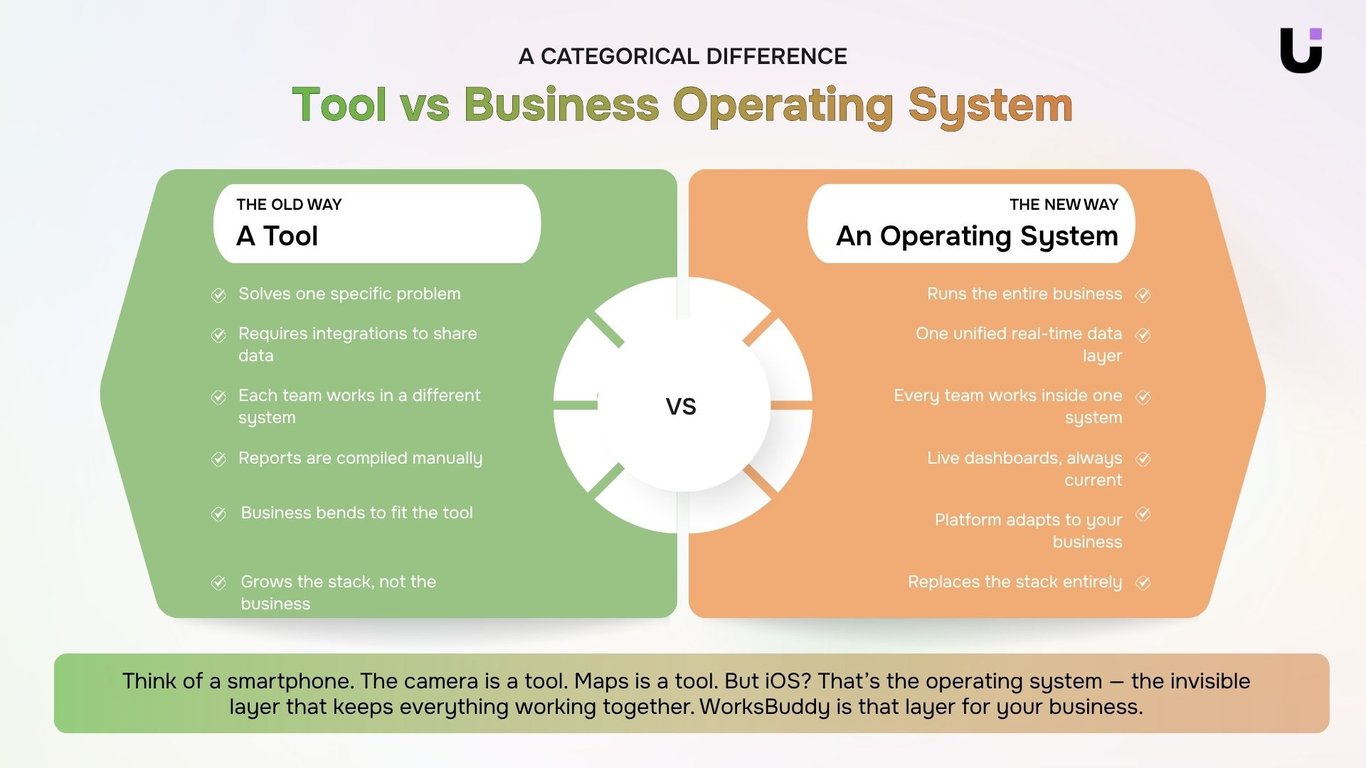
Think about your smartphone. The camera is a tool. The maps app is a tool. But iOS or Android? That is the operating system. The invisible layer that keeps everything running together without you ever having to think about it.
A business operating system works the same way. It is not another app sitting in your stack. It is the layer that replaces the stack, where your leads, tasks, projects, invoices, contracts, emails, and automations all live in one place and actually talk to each other.
Most businesses never build this. They just keep adding tools and hoping the integrations hold up. WorksBuddy was built to be that foundation instead.
The Real Cost of Running HubSpot, Asana, and QuickBooks Separately
Let us be direct about what the fragmented setup is actually costing you, beyond the three subscription fees.
-
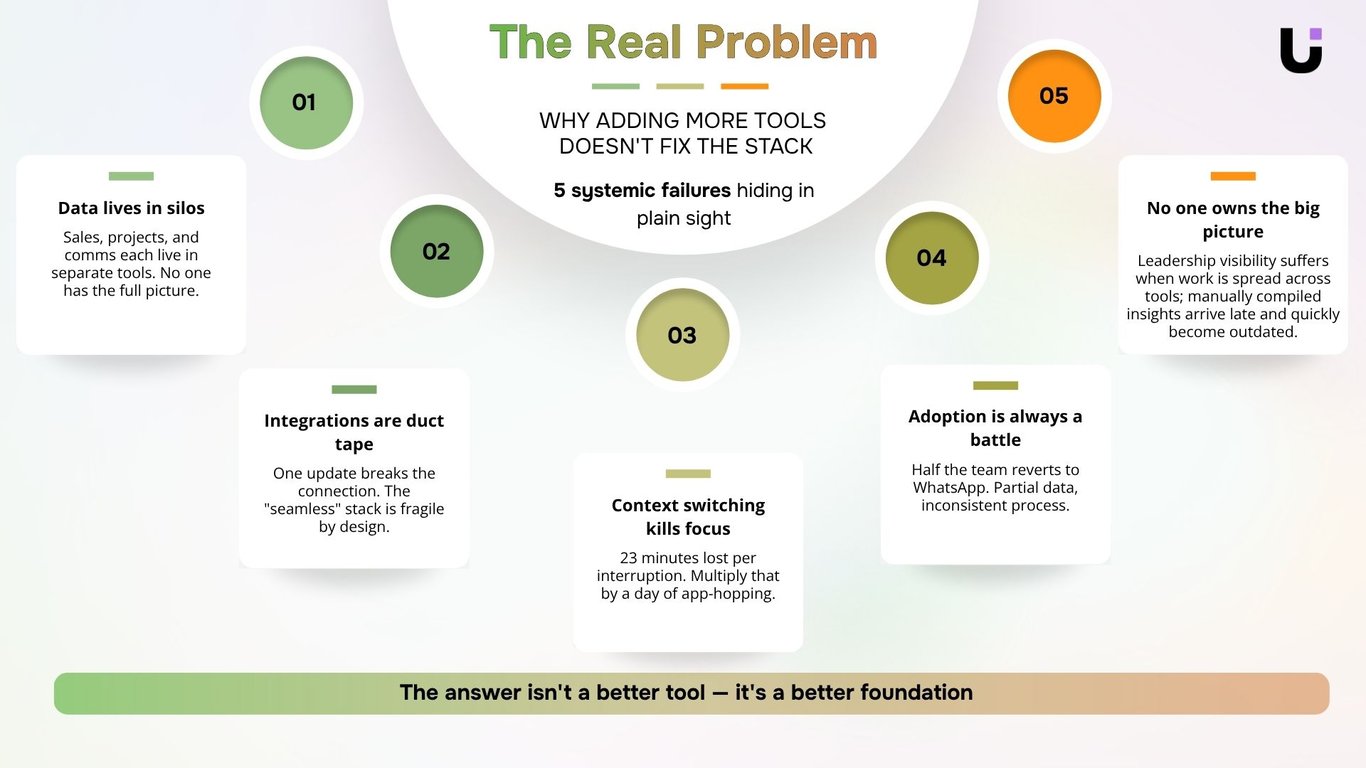
Every deal close creates manual work. When a deal closes in HubSpot, someone has to go into Asana and build the project from scratch. Then someone else has to set up the invoice in QuickBooks. Two manual handoffs for every single client win. On a busy week, that is the reason things fall through the cracks.
-
Your data never tells the full story. HubSpot knows the client relationship. Asana knows the project status. QuickBooks knows the money. None of them know what the others know. So when a client asks a question that crosses all three, someone has to manually piece together the answer.
-
Your integrations are one update away from breaking. Zapier workflows that connect your tools feel clever until one API update breaks the sync. Every integration you rely on is a maintenance cost waiting to happen.
-
Context switching is quietly bleeding your team dry. Research shows it takes 23 minutes to regain full focus after switching between apps. Your team switches tools dozens of times a day. That is hours of productive time, per person, per week, lost to nothing more than tool-hopping.
How WorksBuddy Works Differently
WorksBuddy is not asking you to rip out everything and start over. It is asking you to think about what you actually need versus what you have stitched together out of necessity.
Here is what the six AI agents look like in practice, and what they each replace:
| WorksBuddy Agent |
What It Does |
Replaces |
| LIO |
Captures, qualifies, scores, and routes every lead automatically |
HubSpot CRM |
| TARO |
Builds the project plan and assigns the team the moment a deal closes |
Asana |
| INZO |
Auto-generates and sends invoices when a milestone is completed |
QuickBooks invoicing |
| EVOX |
Runs personalised email sequences to keep clients and prospects warm |
Mailchimp / ActiveCampaign |
| SIGI |
Sends contracts for signature, flags risk, and triggers billing on signing |
DocuSign |
| REVO |
Builds no-code automations that connect every agent natively |
Zapier |
Six agents. One platform. Every part of the business connected by design, not by duct tape.
Want to see all six agents in action before reading further? Watch the 1-minute WorksBuddy overview to see how LIO, TARO, INZO, EVOX, SIGI, and REVO work together inside one workspace.
[Watch the Overview Video]
What a Deal Looks Like Inside WorksBuddy
This is where it gets tangible. Here is the same client workflow, before and after.
Before WorksBuddy:
-
Deal closes in HubSpot
-
Someone manually creates the project in Asana
-
Team sets up tasks and timelines from scratch
-
Milestone is delivered, someone remembers to open QuickBooks
-
Invoice is raised manually, sometimes weeks late
-
Client follow-up depends on someone's calendar reminder
Inside WorksBuddy:
-
Deal closes in LIO
-
SIGI sends the contract for signature automatically
-
TARO generates the project plan, assigns the team, sets milestones - all triggered by the signed contract
-
Milestone is delivered, INZO generates and sends the invoice immediately
-
EVOX keeps the client relationship warm throughout with automated personalised sequences
-
REVO ensures every custom trigger fires exactly when it should
Not a single manual handoff. Not one step that depends on someone remembering.
What Actually Changes When You Switch
When a business moves from a fragmented stack to WorksBuddy, the impact shows up fast and in specific places:
-
Handoffs disappear. Deal closes, project starts, invoice goes out, contract is signed - all in sequence, automatically.
-
Leadership gets one clear view. No more pulling data from three dashboards before Monday's meeting. Everything is visible in real time, in one place.
-
The team stops losing hours to tool-switching. When everything lives in one system, the daily context switching tax disappears.
-
Clients notice before you do. Invoices go out on time. Projects kick off the same day a deal closes. Nothing slips because nothing relies on a manual handoff.
Migrating to WorksBuddy Is Simpler Than You Think
The most common concern is the migration. How do you move the data? What breaks in the meantime?
WorksBuddy is built to pull in your existing data cleanly. Your contacts from HubSpot, your active projects from Asana, your invoicing history from QuickBooks. You are not starting from scratch. You are starting from where you already are, inside a system built to hold it all together.
Most teams are fully operational within a week.
Ready to See What It Looks Like for Your Business?
One login. One data model. Six agents doing the work of connecting everything you have been connecting manually.
Start your 14-day free trial today. No credit card required. No painful migration. No long implementation project. Just bring your existing data across and see what your operation looks like when everything finally works together.
Prefer to see it in action first? Book a free demo and we will walk you through exactly how WorksBuddy replaces your current stack and what the transition looks like for a team your size.
[Book a Free Demo]


 Elena Petrova15 September 2026


