TL;DR: Most CRM lead generation guides stop at capture. This one covers the seven operational strategies that prevent leads from stalling between entry and first follow-up, specifically for IT company owners whose pipeline dies in the routing and qualification gap, not the top-of-funnel.
What CRM lead generation actually means
CRM lead generation is the practice of using your CRM as an operational engine, not a contact database, to capture, route, qualify, and track leads from first touch through closed deal. General lead generation stops at getting someone's attention. CRM lead generation starts where that attention lands: the form submission, the chatbot reply, the referral email.
The distinction matters for IT company owners pulling leads from multiple sources (website forms, partner referrals, LinkedIn, events). Without CRM lead capture wired to routing rules and ownership assignment, those leads sit in inboxes or spreadsheets until they go cold.
A CRM handling lead generation operationally does three things: it timestamps every inbound lead, assigns it to a rep based on rules you set, and tracks every follow-up attempt. That's CRM lead tracking, and it's what separates pipeline visibility from pipeline guesswork.
If your current system stores contacts but doesn't move them forward automatically, you have a database, not a lead engine. The difference between the two determines whether your lead management process compounds or stalls.
How a CRM improves lead generation for IT companies
Most IT company owners run lead capture across four or five channels: website forms, LinkedIn DMs, referral emails, event signups, and partner introductions. Without CRM lead tracking pulling those into one view, leads sit in individual inboxes until someone remembers to follow up.
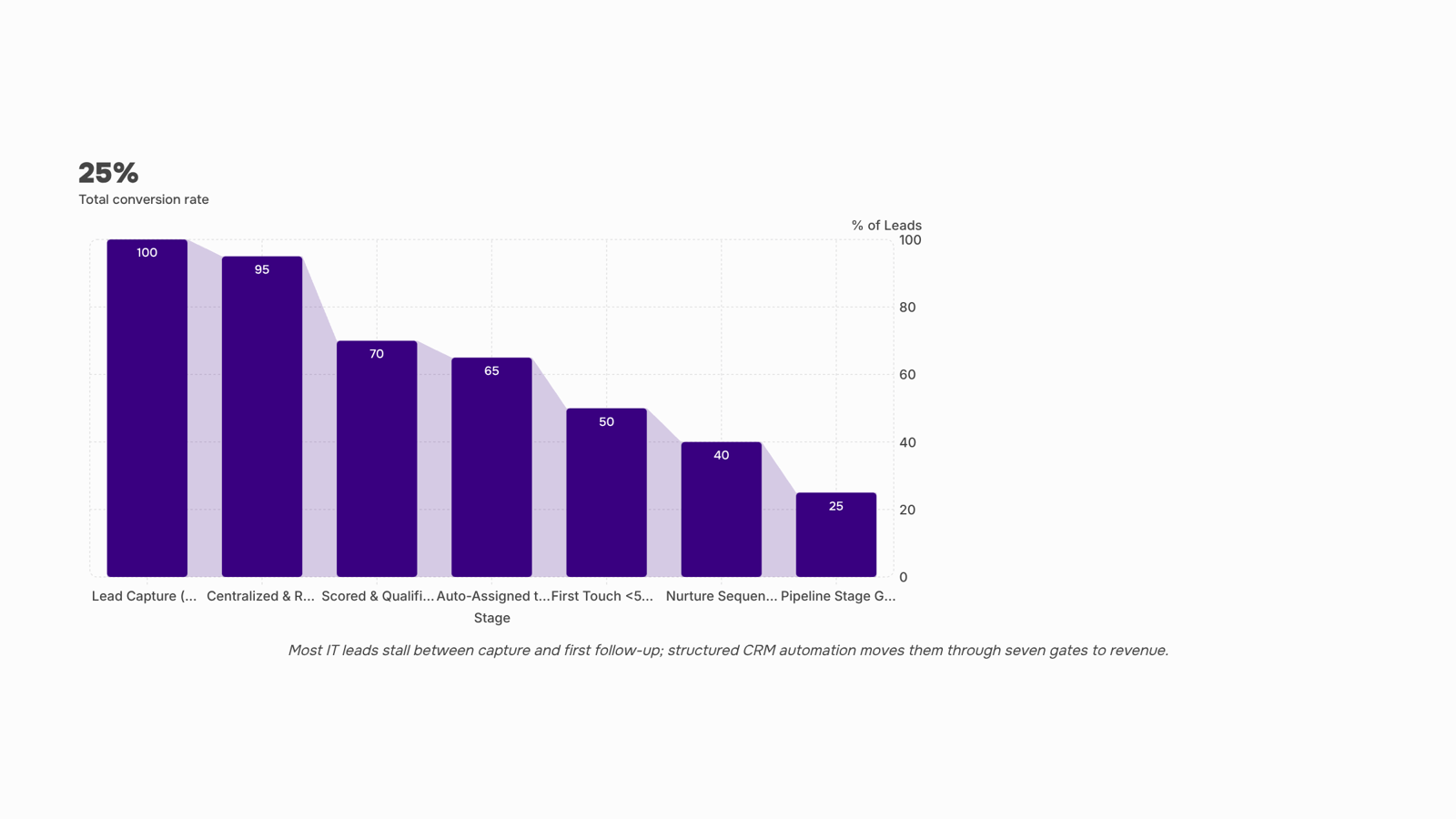
A CRM changes four things that directly affect pipeline health:
Response time drops from hours to minutes. When a form submission or chatbot conversation triggers an instant assignment, your rep gets a notification before the prospect opens a competitor's site. Most B2B teams still respond in hours, not minutes, and that gap is where deals die.
Lead visibility becomes shared, not personal. Every touchpoint, email open, and call note lives on the contact record. If a rep leaves or goes on vacation, nothing disappears. This matters more for IT firms where sales cycles stretch weeks and involve multiple stakeholders.
Lead qualification inside the CRM replaces gut calls. Scoring rules based on company size, budget signals, and engagement history tell reps which leads deserve a call today versus a nurture sequence. That's lead qualification CRM logic doing the prioritization your team currently does manually.
Pipeline predictability improves because you measure inputs, not just outputs. You see how many leads entered, how fast they moved, and where they stalled.
If your current process relies on spreadsheets or disconnected tools, implementing structured lead management is the first operational upgrade worth making.
7 CRM lead generation strategies that move leads to revenue
These seven strategies work as a connected sequence, not a checklist you cherry-pick from. Each one feeds the next, and the compounding effect is where pipeline velocity actually comes from.
1. Centralize every capture point into one CRM record. Most IT companies collect leads from four or more sources: website forms, LinkedIn messages, referral emails, and event sign-ups. When those land in separate spreadsheets or inboxes, you lose context and duplicate effort. The fix is routing every CRM lead capture channel into a single contact record with source attribution. If a managed services prospect fills out your website form and later replies to a cold email, both interactions should live on one timeline. This is where effective lead management starts.
2. Score leads by fit and behavior, not gut feel. Assign numeric values based on two dimensions: firmographic fit (company size, industry, tech stack) and engagement signals (pages visited, emails opened, proposal downloaded). An IT company owner selling $8K/month contracts should weight "visited pricing page twice" higher than "opened newsletter." Scoring removes the guessing that lets warm leads sit while reps chase cold ones.
3. Set up automated lead routing by deal size and territory. When a lead crosses your score threshold, it should land in the right rep's queue within minutes, not hours. Configure routing rules based on criteria that matter to your business: annual contract value, geographic region, or service line. A 50-person MSP might route leads above $5K ARR to senior reps and smaller ones to an inside sales track. Automated lead routing eliminates the "who's handling this?" lag that kills conversion.
4. Trigger a follow-up sequence the moment a lead qualifies. Speed matters more than most teams realize. The gap between capture and first outreach is where deals die. Build a three-touch sequence (email, then email, then call task) that fires automatically when a lead hits qualified status. For an IT consulting firm, that first email might reference the specific service page the prospect viewed. Lead nurturing automation turns your CRM from a database into an engine that moves contacts forward without manual intervention.
5. Use pipeline stage gates to enforce next actions. Define what must happen before a lead advances from "Qualified" to "Discovery" to "Proposal Sent." For example: a lead cannot move to Discovery until a 15-minute call is logged and a pain point is documented. Stage gates prevent reps from pushing unqualified leads forward to inflate pipeline numbers, which is a common problem in IT sales teams where deal cycles run 30 to 90 days.
6. Re-engage stalled leads with timed nurture campaigns. Not every qualified lead buys in the first cycle. Build a segment for leads that went cold after the proposal stage and trigger a monthly value-add email (case study, ROI calculator, or industry benchmark). One IT staffing firm found that 20 percent of their closed deals in a quarter came from leads that had stalled 60 or more days earlier. Your CRM should flag these automatically based on days since last activity.
7. Measure by velocity, not just volume. Track how fast leads move through each stage, not just how many enter the top. If your average time from capture to first meeting is 4.2 days but your close rate drops after day 2, you have a speed problem that more leads won't fix. Build a dashboard showing stage-to-stage conversion rates and median days in each stage. This tells you exactly which crm lead generation strategies are working and which stages need attention.
The through-line across all seven: your CRM does the remembering and the triggering so your team does the selling. If you are still evaluating which tools support this workflow, prioritize platforms that connect scoring, routing, and sequencing natively rather than bolting them on through third-party integrations. The fewer handoffs between systems, the fewer leads slip through.
Automate your CRM lead generation workflow
Yes, CRM lead generation can be automated, but only if you treat it as a connected chain rather than isolated toggles.
The logic works in three links:
CRM lead capture fires the first trigger. A form fill, chatbot conversation, or inbound email creates a record. That creation event triggers automated lead routing, assigning the lead to the right rep based on criteria you define (territory, deal size, service type).
Routing fires the second trigger. Once assigned, the rep's sequence starts automatically. Lead nurturing automation kicks in with a multi-step follow-up (email one at 5 minutes, email two at 24 hours, call task at 48 hours). No manual "remember to follow up."
Status change fires the third trigger. When the lead replies or hits a scoring threshold, the system moves them to a new pipeline stage and adjusts the sequence accordingly.
Most IT company owners wire up step one and stop there. The compounding value comes from connecting all three. Tools like Revo handle trigger-based automation from your CRM, while Evox manages the lifecycle sequences those triggers initiate.
If you want to automate lead generation for your business, start by mapping these three triggers before you touch any settings.
Most CRMs handle contacts fine but choke on the intake layer. Here's what separates a real lead management tool from a basic CRM with a form bolted on:
Dimension | Basic CRM | Dedicated lead management layer |
|---|
Multi-source capture | Manual entry or single web form | Pulls from ads, chat, web forms, referrals into one queue |
Real-time routing | Round-robin or manual assign | Routes by source, deal size, or territory in under 60 seconds |
Lead scoring | Static fields (company size, title) | Behavioral + firmographic scoring that updates on each interaction |
Source tracking | UTM tags stored but rarely used | Full CRM lead tracking from first touch through close, per source |
Automation triggers | Basic status-change alerts | Chained sequences: capture triggers routing triggers follow-up |
Tools like Freshsales offer freshsales CRM lead generation capabilities including built-in scoring, but most IT company owners still find gaps when leads arrive from five or six sources simultaneously. That's where a dedicated layer matters. Lio's web form capture feeds directly into lead qualification CRM workflows, so nothing sits unrouted while your team context-switches.
For agencies evaluating options, the best lead generation tools for digital marketing agencies covers this distinction in more depth.
Measure what your CRM lead generation actually produces
Four metrics tell you whether your CRM lead generation is working or just logging names.
Lead-to-contact time. Pull the timestamp from lead creation and first rep activity. If the gap exceeds 30 minutes, your pipeline is leaking. The CRM fields: "created date" and "first outbound activity date."
Source-to-close rate. Track which capture channel (webinar, referral, paid ad) actually produces signed contracts, not just form fills. CRM lead tracking at the source level prevents you from over-investing in high-volume, low-close channels.
Qualification rate by source. Your lead qualification CRM data should show what percentage of leads per source move from "new" to "qualified." If a source generates volume but qualifies below 15%, cut it.
Rep response time. Measure minutes between assignment and first touch. Teams averaging under five minutes convert at significantly higher rates. The field: "assigned timestamp" vs. "first activity timestamp."
These four metrics turn your CRM from a contact database into a lead management system that reveals which crm lead generation strategies deserve your budget.
Common mistakes that stall CRM lead generation
Most IT company owners treat their CRM as a contact log, not a workflow tool. That single habit stalls crm lead generation more than any missing strategy.
Three operational failures to self-diagnose:
No automated lead routing rules. Without automated lead routing, new leads sit unassigned for hours. By the time a rep responds, the prospect has moved on.
No lead status discipline. If every contact is "open" or "new" indefinitely, you cannot measure pipeline velocity or spot bottlenecks.
No nurture sequence tied to stage changes. A CRM that doesn't trigger follow-ups based on status is just a spreadsheet with a login screen.
Strategy alone won't fix these. You need effective lead management processes baked into your CRM before adding new lead sources.
Closing
CRM lead generation isn't about collecting more leads—it's about moving the ones you have faster. The seven strategies above work as a sequence: centralize capture, score by fit, route automatically, trigger follow-ups, enforce stage gates, re-engage stalled deals, and measure velocity. Most IT companies leave money on the table not because they lack leads, but because those leads sit unrouted or unqualified for hours or days. Start by auditing where your leads actually stall—is it capture, routing, qualification, or follow-up? That one bottleneck is where your next operational win lives. What does your current lead handoff look like from form submission to first rep outreach?
FAQ
How can CRM systems improve lead generation?
A CRM operationalizes lead capture, routing, and qualification so leads move to reps in minutes, not hours. Pipeline visibility, faster response times, and shared context across your team compound conversion rates where spreadsheets and inboxes leave deals to stall.
What are the best strategies for CRM lead generation?
Centralize all capture sources into one record, score leads by fit and engagement, automate routing by deal size and territory, trigger follow-ups on qualification, enforce stage gates, re-engage stalled deals, and measure by velocity, not volume. Each feeds the next.
Can CRM lead generation be automated?
Yes, when you wire capture, routing, and sequencing as a connected chain. Form fills trigger assignment; assignment triggers follow-up sequences; engagement triggers re-qualification. The automation is only as good as the logic you build into it.
How do I measure the effectiveness of CRM lead generation?
Track stage-to-stage conversion rates and median days in each stage, not just volume. If leads enter fast but stall in discovery, you have a qualification or discovery-call problem. Velocity reveals exactly where your pipeline breaks.
What are the key features to look for in a CRM lead generation tool?
Native scoring, automated routing rules, built-in sequencing, stage-gate enforcement, and real-time assignment notifications. Avoid platforms that bolt these on through integrations—the handoffs between systems are where leads slip through.
What is the difference between a CRM and a lead management tool?
A CRM stores contacts and tracks deals; a lead management tool operationalizes the capture-to-qualification journey with scoring, routing, and sequencing built in. Most CRMs can add lead management, but not all do it natively.
How fast should a CRM route a new lead to a sales rep?
Within minutes of capture. Most B2B teams respond in hours; that gap is where deals die. Instant assignment and notification keep your rep ahead of the prospect's inbox and competitors.


 Elena Petrova15 September 2026


