TL;DR: Most content on AI task managers lists features and stops there. This one explains the mechanism: why AI prioritization improves throughput, the specific conditions where it breaks down, and what your team needs in place before it helps. You'll get the cause-and-effect chain, including the tradeoffs most comparisons skip.
What an AI Task Manager Actually Does
Most task management tools let you log work. An AI task manager does something different: it reads the state of your project and acts on it.
The mechanism has four parts. First, smart task creation — the AI parses a brief, a meeting note, or a project description and generates discrete tasks with owners, due dates, and dependencies already attached. You're not filling in fields; the structure is inferred. Second, assignment — the AI maps tasks to the right people based on current workload, not just role or availability. Third, prioritization — the system re-orders the queue continuously as conditions change, not just when someone remembers to update a spreadsheet. Fourth, tracking — progress is monitored against the plan, and gaps surface before they become missed deadlines.
This matters most for IT teams, where manual prioritization methods tend to break down under shifting client demands and uneven workload distribution across engineers. When one developer carries three blockers and another has capacity, a standard task tracker won't catch that. An AI task management system will.
Taro's structured task model that includes owners, due dates, and dependencies gives the AI the data it needs to reason accurately. Without that structure, the AI is guessing. With it, the next section covers exactly how Taro re-orders your backlog using AI reasoning when priorities shift mid-sprint.
How AI Prioritization Works Under the Hood
The reasoning process behind ai backlog prioritization isn't magic — it's a scoring model running on three inputs simultaneously: dependency chains, due date proximity, and owner capacity.
Dependency mapping comes first. The AI reads which tasks block other tasks. If deploying a staging environment is a prerequisite for QA testing, and QA testing gates the client demo, the AI surfaces the staging task regardless of when it was created. Manual prioritization methods typically catch this through a weekly standup, if at all. The AI catches it continuously.
Due date proximity adds a time dimension. Tasks don't get ranked by deadline alone — they get ranked by how much lead time remains relative to their estimated effort. A task due in five days that takes four days of work ranks higher than a task due tomorrow that takes thirty minutes.
Owner capacity is the third variable. This is where most standard task trackers fall short. They show you what's overdue; they don't tell you that three of those overdue items belong to one engineer who is already at 110% utilization. AI task management cross-references current workload against open assignments before surfacing a recommendation, which is how Taro's workload balancing redistributes tasks before a deadline slips rather than after.
For any of this to work accurately, the data conditions have to exist. The AI needs a structured task model that includes owners, due dates, and dependencies attached to every item. A backlog full of tasks with no assignee and no due date gives the model nothing to score against.
How Taro re-orders your backlog using AI reasoning shows the specific scoring logic in practice — useful if you want to see what the model surfaces when the data is clean versus incomplete.
Where AI Task Management Breaks Down
AI task management fails quietly. The tool runs, the dashboard looks active, and nothing actually improves — because the underlying data was never clean enough to reason over.
The three conditions that break it most often:
No task owner assigned: AI workload balancing has nothing to distribute. Every suggestion becomes a guess.
Missing due dates: Dependency mapping and deadline proximity are the two inputs how Taro re-orders your backlog using AI reasoning relies on most. Without them, prioritization is random.
No dependency links: The system can't see that Task B is blocked by Task A, so it surfaces the wrong work at the wrong time.
Most teams hit these gaps because they migrated from spreadsheets or a basic tracker where loose structure was fine. It isn't fine in ai project management software. The AI amplifies whatever structure exists — good or bad.
Before adopting any ai task manager, audit your task model. Every task needs an owner, a due date, and at least one dependency or milestone link. A structured task model that includes owners, due dates, and dependencies isn't optional setup — it's the prerequisite.
If you're still working out manual prioritization methods before switching to AI, fix the data hygiene problem first. The tool can't compensate for it.
What Changes for the Team When AI Manages Workload
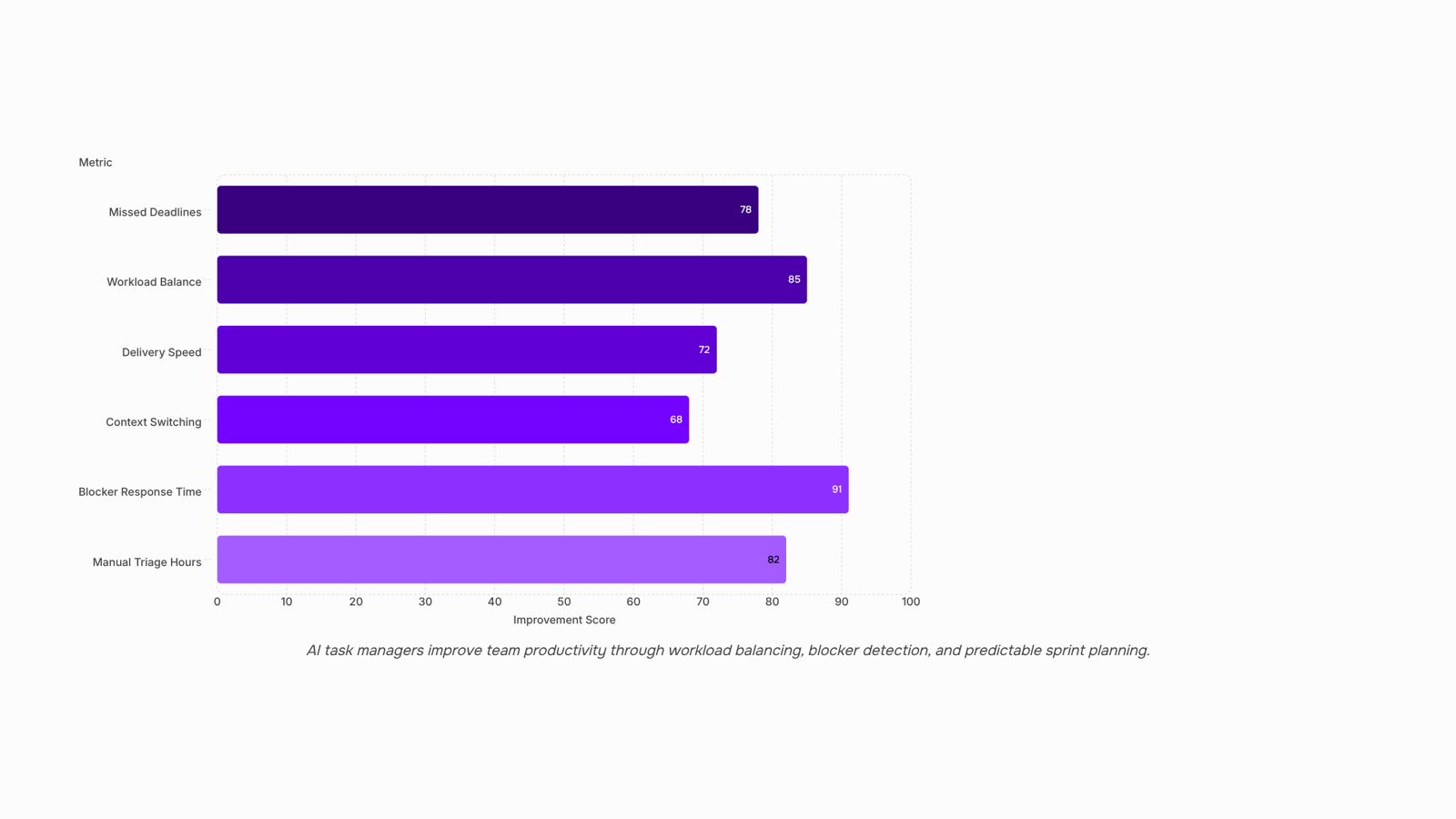
When a team switches from manual prioritization to an ai task manager, the first visible change isn't speed — it's evenness. Workload distribution across engineers stops depending on who spoke up in standup. The system reads task volume, estimated effort, and current assignments, then flags when one engineer is carrying 60% of the sprint while another has capacity sitting idle.
That rebalancing has a direct effect on context switching. When tasks are distributed based on actual capacity rather than gut feel or seniority, engineers stay in fewer work streams at once. Fewer context switches means deeper focus blocks, which is where most technical work actually gets done. Manual prioritization methods teams use before switching to AI tend to optimize for urgency, not cognitive load — and that distinction matters.
The second change is faster blocker response. When a dependency is unresolved and a deadline is approaching, most teams find out in the weekly review, after the slip has already happened. AI workload balancing surfaces that gap in real time, not retrospectively. The team lead sees it before it cascades.
Third: sprint load becomes predictable. Taro uses AI reasoning to re-order and redistribute work based on changing conditions, so the sprint plan at Monday standup still reflects reality by Thursday — instead of becoming a historical artifact by Tuesday afternoon.
What IT company owners actually measure — deadline hit rate, engineer utilization, time-to-resolve blockers — all move when the underlying workload model is accurate. The gains aren't from working faster. They come from a structured task model that includes owners, due dates, and dependencies that the system can reason against, rather than a flat list it can only display.
Can an AI Task Manager Replace a Human Project Manager
No, but that's the wrong question to be asking.
An ai task manager handles the operational layer well: status rollups, deadline drift detection, workload redistribution when someone's sprint overflows. The work that used to take a project manager 5-10 hours a week in manual triage gets handled automatically. That's real time recovered.
What AI doesn't do is walk into a room and tell a CFO why the infrastructure migration slipped. It doesn't read the subtext when a client says "we're fine" but means "we're frustrated." It doesn't make the call to cut scope when two priorities collide and neither team wants to give ground.
The boundary is clearer than most teams expect:
AI owns: task sequencing, blockers, capacity flags, progress reporting, sprint load balancing
Human PMs own: stakeholder negotiation, scope tradeoffs, ambiguity resolution, trust-building
Teams that try to use ai project management software as a PM replacement usually run into the same problem: the tool surfaces the right data, but nobody's accountable for acting on it.
The better framing is that AI handles the operational triage so your PM can focus on the judgment calls that actually determine whether a project lands. That's where AI genuinely improves productivity at the team level, not by replacing human judgment, but by protecting the time needed to exercise it.
What Features to Look for in an AI Task Manager
Not every feature on a vendor's checklist actually moves the needle. These five are the ones that do.
AI backlog prioritization is the first thing to verify. A capable ai task manager doesn't just sort by due date — it weighs dependencies, team capacity, and business impact to re-order what gets worked on next. See how Taro re-orders your backlog using AI reasoning for a concrete example of what that logic looks like in practice.
Smart task creation removes the friction of manual entry. When someone can type "build login screen for client portal, due Friday, assign to Priya" and get a structured task model that includes owners, due dates, and dependencies automatically, your team stops losing work to informal Slack messages.
AI workload balancing is where most tools fall short. Look for a system that flags when one engineer is carrying 40 hours of assigned work while another has 12 — and suggests redistribution before the sprint starts, not after someone burns out.
Time tracking built into the task layer matters because disconnected time logs create reporting gaps. Tracking should happen where work happens.
Kanban and Scrum support shouldn't require choosing one or the other. Teams running mixed workflows — some squads on sprints, others on rolling backlogs — need both views on the same data.
If you're still weighing options, comparing AI task managers against standard task trackers covers where the gap actually shows up in day-to-day use.
Benefits of AI Task Management for Team Projects
The clearest team-level benefit of an ai task management system isn't speed — it's predictability. When priorities shift automatically based on deadlines, dependencies, and current workload, your team stops losing hours to manual triage and starts shipping on schedule.
Three outcomes show up consistently once teams make the switch:
Fewer missed deadlines: Manual prioritization methods tend to break down when two high-priority items land on the same day. AI surfaces conflicts before they become delays.
Balanced workload across engineers: Uneven distribution is one of the quieter burnout drivers in IT teams. AI project management software flags overloaded team members and suggests redistribution before someone's sprint collapses.
Faster delivery cycles: When every task carries a structured model with owners, due dates, and dependencies, blockers get caught early rather than discovered in a Friday standup.
The compounding effect matters most. Each of those gains reinforces the others. Less triage time means more focus time. More focus time means fewer last-minute scrambles. Fewer scrambles means your team actually trusts the plan — which is what sustainable delivery looks like in practice.
Closing
An AI task manager only works when three conditions are met: every task has an owner, a due date, and dependency links. Without that structure, the AI has nothing to reason against. If your team is still running on loose task creation and manual prioritization, start there. Once the data hygiene is solid, the system surfaces blockers before they slip, distributes work based on actual capacity instead of gut feel, and keeps your sprint plan accurate through Thursday instead of Tuesday. The payoff isn't speed — it's evenness, focus, and predictability. Ready to see how this works in practice? Check out Taro's task management and auto-prioritization features to see the specific scoring logic and workload balancing in action.
FAQ
How does an AI task manager improve productivity?
It redistributes work based on actual capacity, surfaces blockers before they slip, and keeps sprint plans accurate as conditions change. The gains come from fewer context switches and faster blocker response, not from working faster.
What features should I look for in an AI task manager?
Smart task creation with owners and due dates pre-attached, workload balancing across team members, dependency mapping, and continuous re-prioritization as conditions shift. The tool must also support a structured task model with owners, dates, and dependencies.
Can an AI task manager replace a human project manager?
No. It handles the operational layer well — status rollups, deadline drift detection, workload redistribution — but not the strategic decisions, stakeholder negotiation, or team coaching that project managers do.
What are the benefits of using an AI task manager for team projects?
Workload distribution stops depending on who spoke up in standup, context switching decreases, blockers surface in real time instead of retrospectively, and sprint plans remain accurate through the week.
Does AI task management work for software development sprints?
Yes, especially for IT teams where shifting client demands and uneven workload distribution are common. The AI catches when one developer carries three blockers while another has capacity, which manual methods miss.
What data does an AI task manager need to prioritize work accurately?
Every task must have an owner assigned, a due date, and at least one dependency or milestone link. Without this structured data, the AI has nothing to score against and prioritization becomes random.


 Megan Foster15 September 2026


