TL;DR: Most content on flowchart AI stops at the diagram. This article shows IT company owners what happens after generation: how AI-powered flowcharts feed into real decisions, where they fail under operational pressure, and how they connect to the automation workflows you're already running.
What is flowchart AI?
Flowchart AI is software that uses large language models and machine learning to generate, analyze, and update process diagrams from natural language input or live data, without requiring manual drag-and-drop diagramming.
Traditional flowcharts are static. You build them once, they go out of date, and someone has to redraw them when the process changes. An AI flowchart generator removes that maintenance burden by reading a text description, an existing document, or a connected data source and producing a structured process map automatically.
For IT company owners, the practical difference matters. Your team can describe a client onboarding workflow in plain language and get a visual process map in seconds, one that can feed directly into AI pipeline workflows that connect process maps to automated execution. That connection is where flowchart AI moves beyond diagramming into actual operations.
The technology also makes process gaps visible that manual mapping misses. When the AI traces a workflow end-to-end, it surfaces missing decision branches, undefined owners, and redundant steps. Those are the same gaps that cause delayed projects and unclear accountability.
Most diagramming tools stop at the visual. Flowchart AI connects the diagram to execution, so the map and the work stay in sync. That is the capability gap worth understanding before evaluating any specific tool, including how it integrates with AI task management tools that act on flowchart-defined process steps.
How does flowchart AI work?
Most AI flowchart generators follow the same core sequence, regardless of which tool you use.
You start with input: a text prompt ("map our client onboarding process"), a data export from your CRM, or an existing document. The AI parses that input using a large language model to identify entities (steps, roles, decisions, outcomes) and the relationships between them. It then renders those relationships as a structured process map, with nodes, branches, and conditional logic already placed.
That last part is where the real difference from traditional diagramming shows up. You're not dragging boxes. The model infers sequence, ownership, and branching logic from context, then generates a draft you edit rather than build from scratch.
From there, the output becomes actionable in two ways. First, the diagram itself surfaces bottlenecks and ownership gaps that were invisible in a text-heavy process doc. Second, most enterprise-grade tools expose the flowchart as a data object, meaning it can connect directly to AI pipeline workflows that link process maps to automated execution, or feed into AI task management tools that act on each defined process step.
For IT company owners, this is where business process automation stops being theoretical. The flowchart isn't a static document you file away. It becomes the trigger layer for downstream work, approvals, and handoffs, all without rebuilding the logic manually each time a process changes.
How AI-powered flowcharts improve business decision-making
The clearest way to see how flowchart AI improves decisions is to trace what changes at each friction point.
Approval bottlenecks slow down most IT operations not because people disagree, but because no one can see the full decision path at once. An AI-powered flowchart surfaces every condition, dependency, and owner in a single view. When a stakeholder can see that step 4 requires legal sign-off before engineering starts, they stop waiting for someone to tell them that.
Ownership gaps are the second failure mode. Manual process maps go stale within weeks of being drawn. AI decision-making tools regenerate the map from live workflow data, so when a role changes or a step gets added, the chart reflects it. No one inherits a process diagram that describes a team that no longer exists.
Decision speed improves because the AI flags ambiguity before it becomes a delay. If two branches in the process lead to the same outcome under different conditions, the tool surfaces that redundancy. Teams that would have spent two meetings resolving the conflict resolve it in the flowchart before the meeting is scheduled.
These gains compound when the flowchart connects to execution. AI pipeline workflows that link process maps to automated execution mean a decision node can trigger a task, an approval request, or a handoff automatically. AI task management tools built on flowchart-defined process steps close the gap between "we mapped the process" and "the process actually runs."
For IT company owners, the practical outcome is fewer escalations, faster cycle times, and process documentation that stays accurate without a dedicated person maintaining it.
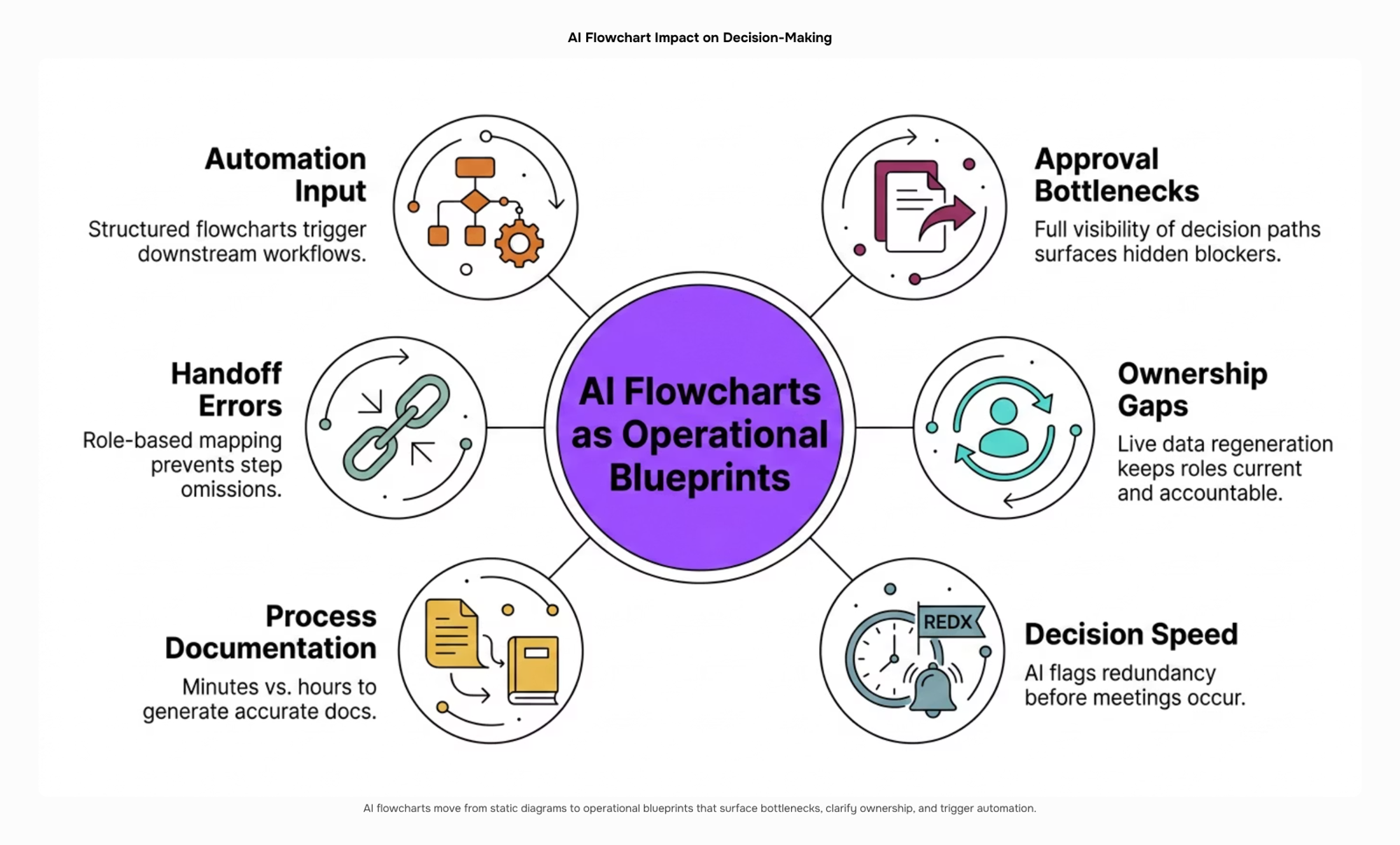
AI-powered flowcharts do more than visualize a process. They actively reduce the manual work that slows decisions down.
Here is what teams consistently gain:
Faster process documentation: AI generates draft flowcharts from plain-language descriptions in minutes, cutting the time it takes to map a new workflow from hours to under 30. That speed matters most when a process is changing and the team can't afford a documentation lag.
Fewer handoff errors: When ownership is mapped visually and tied to roles, not names, steps don't fall through gaps during staff changes or cross-team projects.
Cleaner inputs for workflow automation: A well-structured AI flowchart gives your automation layer something it can actually act on. If you're building an AI pipeline workflow, the flowchart is the blueprint that makes the automation predictable.
Faster onboarding: New hires follow a visual process map instead of asking five people how something works.
Reduced rework from misaligned decisions: When decision logic is explicit and shared, teams stop re-litigating choices that were already made.
For IT company owners, the compounding benefit is alignment: fewer meetings spent clarifying process, more time spent executing it.
How flowchart AI integrates with other business software
Most flowchart AI tools don't stop at the diagram. The real value shows up when the process map connects to the systems your team already runs.
The most common integration pattern starts with your CRM. When a flowchart AI tool maps a sales qualification process, it can push decision-branch outputs directly into contact records, trigger stage changes, or flag leads that fall outside defined criteria. That's AI decision-making tools doing work that would otherwise require a manual handoff.
Project management is the second connection point. A mapped onboarding or delivery process exports as task sequences, with ownership and dependencies already defined. AI task management tools that read flowchart-defined steps can assign work automatically rather than waiting for a manager to translate the diagram into tickets.
Invoice and billing workflows are where the integration pays off most visibly for IT company owners. A process map that defines service delivery milestones can trigger billing events downstream. When AI-powered financial workflows like Inzo receive those milestone signals, invoices go out on time without anyone manually checking whether a project phase closed.
The underlying mechanism in each case is the same: flowchart AI produces structured, machine-readable process outputs. Business process automation tools consume those outputs and act on them. The diagram stops being documentation and starts being an instruction set.
That integration chain only holds, though, when the process inputs are clean — which is where the next section picks up.
Limitations of using AI in flowchart creation
AI flowchart generators work best when the process they're mapping is already well-defined. Feed one an ambiguous input — "how we handle client escalations" described verbally by three different people — and the output reflects that ambiguity back at you, formatted neatly.
Three specific failure points come up repeatedly:
Garbage-in, garbage-out on process inputs: If your source data is a mix of Slack threads and tribal knowledge, the AI maps what it finds, not what you intended.
Over-automation of judgment calls: Flowchart AI tends to flatten decision nodes that actually require human discretion. A branch labeled "approve or reject" hides weeks of context a diagram can't carry.
Maintenance lag: Processes change faster than most teams update their diagrams. An AI-generated flowchart that's six months stale is worse than no flowchart — it actively misleads.
These aren't reasons to avoid the tool. They're reasons to treat AI-generated diagrams as a starting draft, not a finished system. Pair the output with a review step before it feeds into AI pipeline workflows that connect process maps to automated execution, and make sure AI task management tools acting on those process steps are working from a validated version, not a first pass.
Closing
AI-powered flowcharts do more than visualize a process—they connect your team's decision logic directly to execution. When ownership is explicit, bottlenecks are visible, and the map stays current without manual maintenance, decisions move faster and handoffs stop falling through gaps. The real shift happens when that flowchart feeds into your task management, CRM, and automation layers, turning a static diagram into an operational blueprint your team actually runs against every day.
If you've already mapped a process with AI but your team is still translating it manually into tasks and assignments, you're leaving efficiency on the table. Prax connects AI-generated workflow logic to project planning, task assignment, and team execution in one place—without rebuilding the process from scratch. Start a free trial and see how your flowchart becomes your operating system.
FAQ
Can AI generate flowcharts automatically?
Yes. AI flowchart generators parse text descriptions, CRM exports, or existing documents and automatically render them as structured process maps with nodes, branches, and conditional logic—no manual drag-and-drop required. Most tools produce a draft in minutes.
How can AI-powered flowcharts improve business decision-making?
They surface approval bottlenecks, ownership gaps, and redundant decision branches in a single view, eliminating delays caused by unclear process paths. When flowcharts connect to execution layers, decisions trigger automatic tasks and handoffs, compressing cycle time and reducing escalations.
What are the benefits of using AI-driven flowchart tools?
Key gains include faster process documentation (minutes vs. hours), fewer handoff errors through role-based ownership, cleaner inputs for workflow automation, and reduced rework from misaligned decisions. Teams also onboard faster and spend less time clarifying process.
How does flowchart AI integrate with other business software?
Flowchart AI tools export process maps to CRMs (triggering stage changes and lead flagging), project management systems (creating auto-assigned task sequences), and automation platforms. This connection turns diagrams into operational triggers rather than static documents.
What are the limitations of using AI in flowchart creation?
AI flowcharts work best with clear, well-documented processes. Complex workflows with many conditional branches may require manual refinement. Without integration to execution systems, the flowchart remains a visualization tool rather than an operational blueprint.


 Kayla Morgan15 September 2026


