TL;DR: Most guides on invoice workflow automation list tools and stop there. This one shows IT company owners the trigger-based logic behind each step, from deal close to payment reconciliation, so the entire cycle runs without manual intervention. You'll leave with a framework you can wire up inside your existing stack this week.
What invoice workflow automation actually means
Most businesses that think they've automated invoicing have only automated document creation. They're using accounting software to generate a PDF and call it done. That's not invoice workflow automation. That's a template with a send button.
Invoice workflow automation means the entire billing sequence runs on triggers, not tasks. A deal closes in your CRM, and an invoice drafts automatically. A payment clears, and the client record updates without anyone touching it. A due date passes with no payment, and a follow-up goes out on its own. No one has to remember any of it.
The distinction matters because the failure points in manual billing aren't usually in creating the invoice. They're in what happens before and after: the missed handoff from sales to finance, the follow-up that slips through, the retainer that goes out three days late because someone was heads-down on a project. Automated invoice processing closes those gaps by wiring the billing sequence to upstream events, not to someone's calendar.
For IT company owners specifically, those upstream events are predictable: a project milestone completes, a support contract renews, a client onboards. Each one is a natural trigger. How invoice workflow software replaces each manual billing step shows exactly where those triggers slot in.
This is also where tools like Revo, which runs trigger-based automation inside WorksBuddy, differ from standalone invoicing apps. The automation isn't isolated to billing. It connects to the rest of your operations, so a closed deal or a signed contract can kick off the invoice sequence without a human in the middle.
Why manual invoicing costs IT teams more than they realize
Manual invoicing looks manageable until you add up what it actually costs.
A typical IT service business spends 5 to 8 hours per week on invoice-related tasks: pulling project data, formatting documents, chasing approvals, and following up on overdue payments. That's time a billing coordinator or project manager could spend on work that moves revenue forward. Across a 10-person ops team, those hours compound fast.
The cash flow hit is harder to see but more damaging. When invoices go out late because someone forgot to trigger the process, your days sales outstanding (DSO) climbs. A 30-day project can turn into a 50-day payment cycle simply because the invoice sat in a queue. Research consistently shows that businesses adopting invoice automation reduce DSO by 30% or more, which for an IT firm billing $500K annually can mean tens of thousands of dollars in working capital freed up each quarter.
Manual invoice creation also introduces errors at a rate that automated systems don't. Wrong line items, misapplied tax rates, and duplicate charges erode client trust and trigger disputes that delay payment further. Each dispute costs additional back-and-forth, often involving a senior resource who has better things to do.
The follow-up problem is just as costly. Most IT teams have no consistent invoice tracking system. A missed payment sits unnoticed until end-of-month reconciliation. By then, the client has moved on mentally, and the conversation gets awkward.
This is where automating invoice creation changes the math. Triggers fire the moment a project closes or a contract is signed. Invoices go out the same day, with the right data, to the right contact. No queue. No manual chase.
For IT teams running retainer-based work, automating recurring invoices removes the problem entirely at the source.
How the trigger-based logic works
Trigger-based invoicing works on a simple principle: a defined business event fires an action, and that action creates and sends an invoice without anyone touching it manually.
The event is the trigger. The invoice is the output. Everything in between is the logic you configure once.
Here is what that looks like in practice. A deal closes in your CRM, a project milestone gets marked complete, or a contract gets signed. Any one of those events can fire a trigger that pulls the right client details, applies the correct line items, generates the invoice, and sends it, all within seconds. No one has to remember. No one has to open a billing tab.
The trigger types most IT service businesses use fall into three categories:
CRM-based triggers: a deal stage change or contract close fires the invoice automatically (Revo connects to Lio for this)
Project completion triggers: a task status update or milestone approval creates a project-based invoice without manual handoff
Document triggers: a signed agreement kicks off the billing cycle the moment the signature lands, rather than days later when someone notices
What makes this more than a scheduling shortcut is the conditional logic underneath. You can set rules: if the project type is retainer, generate a recurring invoice; if it is fixed-fee, generate a one-time invoice; if the client is on net-30 terms, schedule the reminder sequence accordingly. How invoice workflow software replaces each manual billing step covers how those rules map to real billing scenarios.
For teams using email-based approval workflows, Revo also connects to Evox, so an inbound approval email can itself become the trigger that releases an invoice downstream.
The result is that automated invoice processing removes the gap between "work is done" and "invoice is sent." That gap is where cash flow slows and follow-ups pile up. Understanding this mechanism is what makes the build phase, covered in the next section, straightforward rather than guesswork.
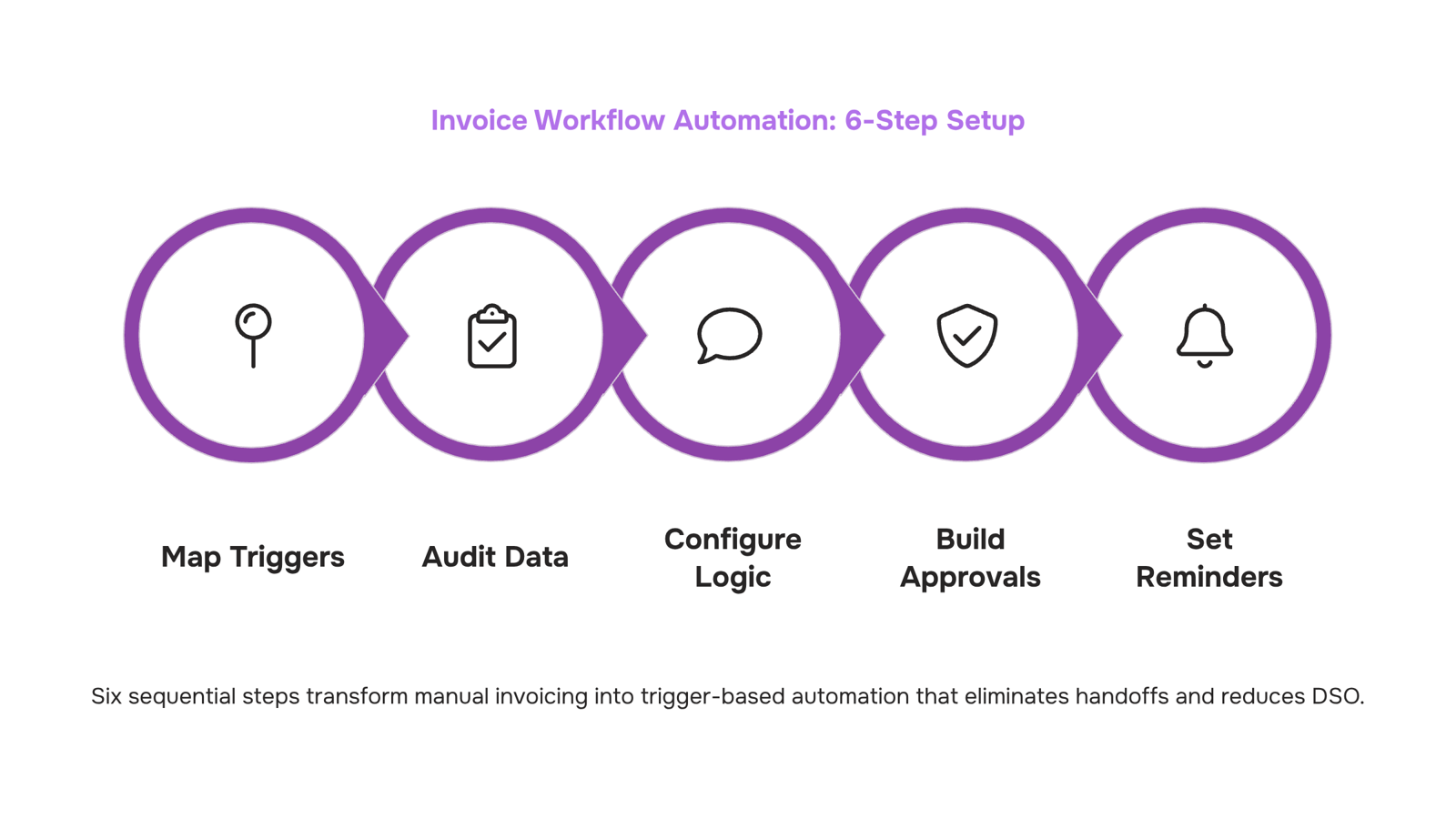
Set up your invoice workflow automation in 6 steps
Before you touch any automation tool, spend 30 minutes writing down every billing event your business generates. That list becomes the foundation everything else is built on.
Step 1: Map every billing trigger in your current process
A billing trigger is any business event that should produce an invoice: a deal marked "closed-won" in your CRM, a project milestone signed off, a retainer period rolling over, or a contract countersigned. Most IT service businesses discover they have four to seven distinct trigger types when they actually write them down.
Go through the last 90 days of invoices and tag each one with its source event. If you can't identify the source, that's your first data quality problem to fix before you automate anything. Garbage in, garbage out applies here more than anywhere else in your billing stack.
Step 2: Audit your data before you build
Automation fails at the data layer, not the workflow layer. Before you configure a single rule, check that your CRM deal records include the fields your invoice template needs: client name, billing address, line items, payment terms, and the correct contact for delivery.
Run a sample of 20 recent records and flag every missing or inconsistent field. If your project names don't match your invoice line items, fix the naming convention now. This step feels slow, but it's the difference between automation that runs clean for months and one that breaks in week two. For a detailed look at how invoice workflow software replaces each manual billing step, that breakdown is worth reading before you proceed.
Step 3: Choose your trigger-to-invoice logic
Now you're ready to configure. For each trigger type you identified in Step 1, define exactly what fires the invoice and what populates it.
A closed deal in your CRM fires a one-time invoice. A retainer contract fires a recurring invoice on a set cadence — first of the month, net-30, whatever your terms are. A completed project milestone fires a project-based billing event tied to the deliverable, not the calendar. These are three different logic paths, and most teams conflate them at setup, which creates duplicate invoices or missed charges later.
Recurring invoice automation for retainer clients works best when the cadence and amount are fixed. Project-based billing automation requires a milestone flag in your project tool to act as the trigger. Map these separately.
Step 4: Build the approval layer (don't skip this)
Not every invoice should go straight to the client. Invoices above a certain value, invoices for new clients, or invoices tied to disputed scope all benefit from a one-step internal review before they send.
Set a threshold. For most IT service businesses, anything above $5,000 or any first invoice to a new client routes to a manager for a 10-minute review. Below that threshold, the invoice sends automatically. This rule keeps your automation fast for routine billing while protecting you on the edge cases that create client friction.
If you skip this step, you will eventually send an incorrect invoice automatically, at scale, to a client who notices. That's harder to recover from than a two-hour setup.
Step 5: Configure payment reminders and escalation sequences
The invoice sending is only half the workflow. The follow-up sequence is where most of the manual time actually lives. Configure at least three automated touchpoints: a confirmation email when the invoice sends, a reminder three days before the due date, and an overdue notice 24 hours after.
For clients on retainer, automating recurring invoices means the reminder sequence runs without anyone checking a calendar. For project-based clients, tie the reminder to the invoice date, not a fixed day of the month.
Revo handles this trigger-to-reminder sequence inside a single workflow, so the invoice creation, delivery, and follow-up chain all fire from the same originating event. That matters because disconnected tools create gaps where invoices send but reminders don't, or reminders fire for invoices that were already paid.
Step 6: Activate reconciliation and close the loop
The final step is connecting payment confirmation back into your workflow. When a client pays, that event should update the invoice status in your billing tool, notify your account manager, and stop any pending reminder sequences.
If you're on a project, payment confirmation should also update the project record so your team knows the billing cycle closed. This is the step most teams skip, which is why finance and delivery teams often have different answers about whether a client has paid.
Run a test cycle before you go live: fire a test trigger, confirm the invoice generates with the correct fields, approve it through your review layer, send it to an internal email address, mark it paid, and verify the status updates everywhere it should. The full cycle should take under five minutes to verify. If it takes longer, something in your data layer or logic mapping needs fixing.
For a full picture of the ROI of switching from manual to automated invoice processing, including what to measure in the first 90 days, that's covered in detail separately. Once your workflow is live, the metrics tell you quickly whether the setup is clean or whether Step 2 needs another pass.
Common mistakes that break invoice automation early
Most teams that abandon invoice workflow automation don't have a tool problem. They have a setup problem. Three mistakes account for the majority of early failures.
Dirty data before migration: If your existing client records have inconsistent billing terms, duplicate contacts, or missing payment details, automation inherits every one of those errors and scales them. Before you activate any automated invoice processing, audit your client list: confirm billing cycles, payment terms, and contact emails are accurate for every active account. One afternoon of cleanup prevents months of failed sends and disputed invoices.
No approval rules defined: Automation moves fast, which means an invoice without a defined approval path goes out unchecked. Teams that skip this step often discover the problem when a client receives an invoice with the wrong line items or an unapproved discount. Map your approval logic before you configure the workflow: who signs off on invoices above a certain threshold, who handles project-based billing that requires a scope check, and what happens when the approver is unavailable.
No fallback for exceptions: Every invoice workflow has edge cases: a client on a custom payment plan, a disputed line item, a project that ended mid-cycle. If your automation has no exception path, those invoices either fail silently or go out wrong. Build a simple rule that flags anything outside standard parameters for human review rather than forcing it through the default flow.
These three gaps are also why teams revert to manual work. How invoice workflow software replaces each manual billing step covers the structural fix in detail, and how the underlying mechanics of invoice automation reduce errors explains why clean inputs matter at each stage.
Invoice workflow automation vs. basic invoicing software
Basic invoicing software does one thing: it creates and sends invoices. That's the whole job. You enter data, click send, and then manually track whether the invoice was opened, whether payment arrived, and whether a follow-up is needed. Every step after "send" is still yours to manage.
Invoice workflow automation is a connected system, not a document tool. The difference shows up clearly across four dimensions:
Dimension | Basic invoicing software | Invoice workflow automation |
|---|
Trigger capability | Manual — you initiate every invoice | Automatic — a CRM deal closing, a project milestone, or a contract signature fires the invoice |
Cross-tool integration | Standalone; data entered by hand | Pulls client data from your CRM, project tool, or contracts system |
Error rate | High — manual invoices contain errors at significantly higher rates than automated ones | Low — data flows from source systems without re-entry |
Time to payment | Slower — approval delays and missed follow-ups extend DSO | Faster — automated reminders and approval routing cut days off collection cycles |
The upstream trigger point is where most teams underestimate the gap. When a deal closes in your CRM, an automation-connected system can generate, route for approval, and send the invoice without anyone touching a keyboard. A static tool waits for a human to notice the deal closed.
For IT service businesses running recurring contracts or project-based billing, that gap compounds fast. If you want to automate invoice creation end-to-end and keep invoice tracking off your team's plate, the tool you choose needs to connect to the events that trigger billing — not just format the document after the fact.
Closing
The core insight is this: invoice workflow automation isn't about tools—it's about removing the human decision point from a repeatable sequence. Once you've mapped your triggers, audited your data, and wired the rules, the entire cycle runs on its own. Your team stops managing invoices and starts managing exceptions. If you have the workflow mapped, Inzo is where you run it. See how each step of this framework connects inside a single workspace, or schedule a brief demo to watch it in action with your billing cycle.
FAQ
How can Inzo automate my recurring invoice workflow?
Inzo fires invoices on a schedule you define—daily, weekly, or monthly—based on contract terms, retainer periods, or subscription cycles. Once set, recurring invoices generate and send without manual intervention, eliminating the most common billing bottleneck for IT service teams.
What invoice automation features does Inzo offer for scheduling?
Inzo lets you schedule invoice generation on fixed intervals, tie invoices to contract renewal dates, and set conditional rules—like generating different invoice types based on project or client category. You can also automate reminder sequences for overdue payments.
Can I automate invoice creation from project completion with Inzo?
Yes. Inzo connects to project management and CRM triggers, so when a milestone is marked complete or a deal closes, an invoice drafts and sends automatically with the correct line items and client details pulled from your project record.
How does invoice workflow automation save time for my business?
Automation removes the 5–8 hours per week most IT teams spend on manual invoice tasks: pulling data, formatting, chasing approvals, and following up on overdue payments. That time shifts to revenue-generating work, and DSO typically drops 30% or more.
What is the difference between invoice automation and basic invoicing software?
Basic invoicing software generates a PDF on demand. Invoice workflow automation fires invoices on triggers—deal close, project completion, contract signature—and connects to the rest of your operations so the entire billing cycle runs without manual intervention.
What triggers can I use to fire an invoice automatically?
Common triggers include CRM deal stage changes, project milestone completions, contract signatures, subscription renewal dates, and approval emails. You can also set time-based triggers for recurring invoices tied to retainer periods or billing cycles.


 Natalie Brooks14 September 2026


