TL;DR: Automating your sales team's workflow starts with mapping the steps your reps repeat most — lead capture, qualification, follow-up, pipeline updates — and replacing them with trigger-based logic. This guide covers which steps to automate first, in what order, and what breaks when you skip sequencing.
How Can I Automate My Sales Team's Workflow?
Automating your sales team's workflow means replacing manual, repeatable steps in your sales process with logic-driven sequences that run without human input.
Most teams approach this as a feature to switch on rather than a process to design. That's why so many automation projects underdeliver: the software works, but the underlying process was never mapped clearly enough to automate well.
Every sales workflow automation runs on three parts. First, a trigger: something that happens in your sales process, like a form submission, a deal stage change, or no reply after three days. Second, a condition: a rule that determines whether the trigger should fire. Third, an action: the thing that happens automatically, such as a task created, an email sent, or a CRM field updated.
According to Salesforce's 2024 State of Sales report, sales reps spend only 28% of their week actually selling. The rest goes to data entry, follow-up scheduling, and internal handoffs — exactly the steps automation targets first.
The sequencing of what you automate first matters more than the volume of automations you build. Automating follow-up before your lead qualification data is clean, for example, produces fast noise rather than fast results.
How Sales Workflow Automation Works Step by Step
Every automation in a sales workflow follows the same three-part logic: a trigger fires, a condition filters, and an action executes. Getting that sequence right is the difference between automation that closes deals faster and automation that floods reps with irrelevant alerts.
Here's how it maps to real sales stages:
Stage 1: Lead capture triggers the first action
A new form submission, inbound email, or CRM record creation fires the trigger. The condition checks lead source, company size, or score threshold. The action assigns the lead to the right rep, sends an acknowledgment email, and creates a follow-up task, all within seconds. Companies that automate this first stage cut lead response time from hours to under five minutes.
Stage 2: Qualification filters before any rep time is spend
If a lead scores below threshold, it routes to a nurture sequence. If it qualifies, it advances to discovery and triggers a calendar invite or demo scheduling link. Skipping this filter and automating follow-up before qualification data is clean is the most common failure point in sales automation deployments.
Stage 3: Pipeline stage changes drive next actions
When a deal moves from "Proposal Sent" to "Negotiation," the trigger fires automatically. The action might update the close date, notify the sales manager, or send a contract template. A custom sales pipeline builder lets you define exactly which stage transitions carry which automated actions, so nothing falls through between handoffs.
Stage 4: Closed or lost triggers re-engagement or CRM hygiene
A deal marked lost can automatically tag a reason, schedule a 90-day re-engagement, and remove the contact from active sequences.
The manual sales tasks you can eliminate with this model include data entry, task creation, and follow-up scheduling, which together account for the majority of time reps spend on non-selling work each week.
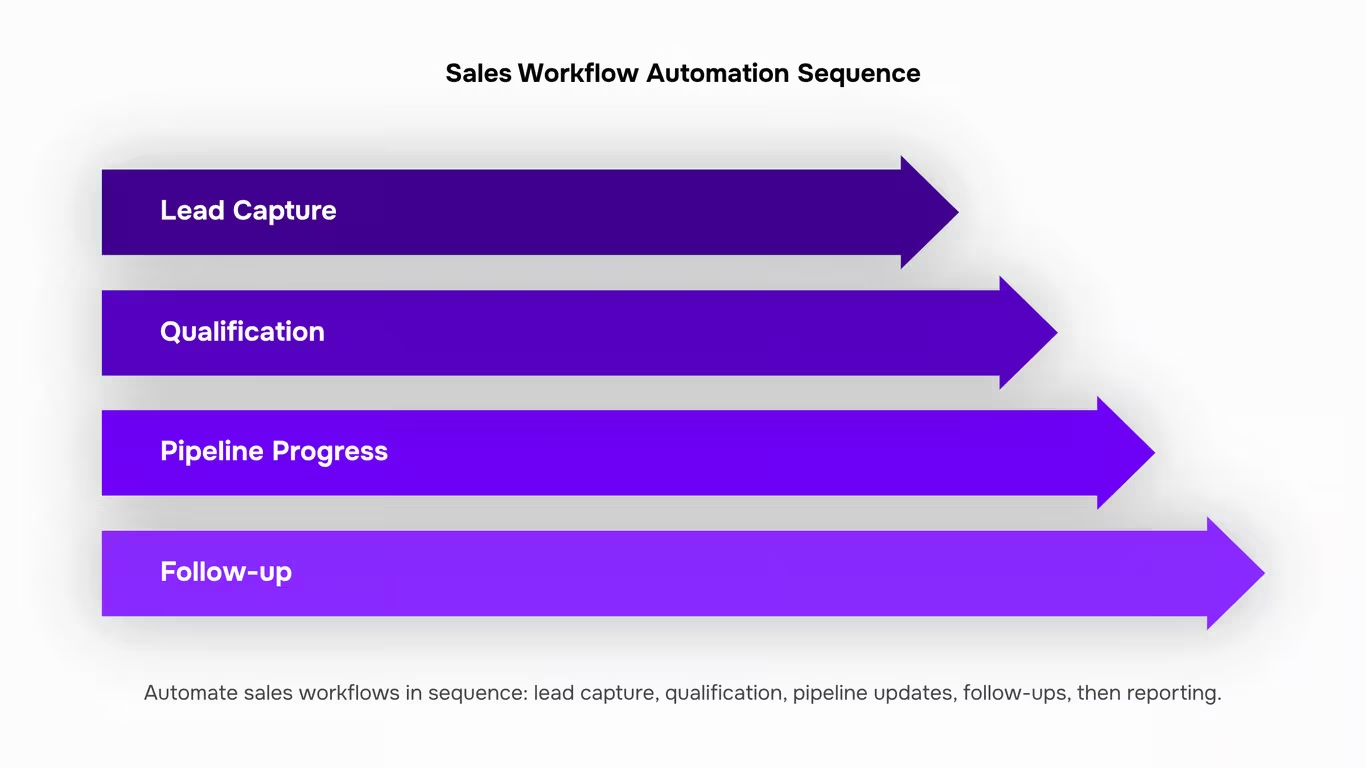
Which Sales Tasks to Automate First and in What Order
Most teams try to automate everything at once and end up with a fragile system that breaks the moment a rep changes a subject line or a lead source shifts. The smarter approach is sequencing: automate in the order that removes the most friction without depending on a process that isn't clean yet.
1. Lead response and assignment: This is the highest-leverage first step because speed to lead directly affects close rates, and it requires no upstream data to be perfect. When a new lead comes in, an automated rule can assign it to the right rep, send an acknowledgment email, and create a CRM task, all within seconds.
2. Data entry and CRM logging: Reps lose hours each week manually updating contact records, logging calls, and moving deals between stages. Cleaning up logging before you automate follow-up sequences matters because bad data in means bad sequences out.
3. Follow-up sequences: Build these only after your lead qualification fields are consistently filled. If "lead source" or "company size" is blank half the time, your segmented sequences will fire to the wrong people. Fix the data layer first, then build the sequences on top of it.
4. Pipeline stage progression: When a proposal is sent or a demo is booked, the deal stage should update automatically. This is where a custom sales pipeline builder pays off: stage-based triggers only work reliably when your pipeline stages map to real sales actions.
5. Reporting and forecast updates: This is last because it depends on everything above being accurate. Automated dashboards built on dirty pipeline data produce confident-looking numbers that are wrong.
Benefits of Sales Workflow Automation for Growing Teams
The clearest case for automating your sales team's workflow isn't efficiency in the abstract. It's the hours your reps spend on work that doesn't move deals forward.
Speed to lead: Companies that respond to inbound leads within 5 minutes are 100x more likely to connect than those that wait 30 minutes, per the Lead Response Management study. Manual handoffs make that window nearly impossible to hit consistently. Automated routing and instant follow-up sequences close that gap without requiring a rep to watch their inbox.
Pipeline accuracy: When stage progression depends on a rep remembering to update a record, it doesn't happen reliably. Trigger-based stage updates keep your pipeline data honest. That matters for forecasting, not just optics.
Rep capacity: Automation doesn't replace rep judgment; it removes the clerical work surrounding it. A rep who isn't manually logging calls or copy-pasting contact data into a CRM has more time for discovery calls and negotiation. That's where quota gets hit.
| Task |
Manual Approach |
Automated Approach |
| Lead assignment |
Rep checks inbox, assigns manually |
Trigger fires on form submit, assigns instantly |
| Follow-up scheduling |
Rep sets personal calendar reminder |
Sequence fires automatically after set interval |
| Deal stage update |
Rep updates CRM at end of week |
Stage advances when email opened or meeting booked |
| CRM data entry |
Rep copies contact data between tools |
Record created and populated on lead capture |
| Reporting |
Manager pulls data manually each Friday |
Dashboard updates in real time from pipeline triggers |
Common Mistakes That Break Sales Automation Workflows
Three mistakes account for most failed sales workflow automation rollouts.
Automating before cleaning your data: If your CRM has duplicate contacts, missing company fields, or leads with no source tag, automation amplifies the mess. A follow-up sequence that fires on every "new lead" record will reach contacts who've already closed or never qualified. Clean the data first, then automate against it.
Skipping qualification logic: Many teams wire up automation that treats every inbound lead identically. Without a qualification gate — company size, budget signal, product fit — reps get notified about leads that will never convert, and the automation loses credibility fast. Map your automated sales funnel stages before you build any triggers.
No fallback for edge cases: What happens when a lead replies mid-sequence? When a deal stalls at a stage for 30 days? Automation without exit conditions creates awkward experiences — prospects receiving generic follow-ups after a sales call already happened. Every rule needs an exception path that routes to a human review queue, not a dead end.
Sales Workflow Automation in Practice: IT Company Example
Take an IT services firm with 8 sales reps. Before automating their sales team workflow, each rep spent roughly 45 minutes daily on manual tasks: logging call notes, sending follow-up emails, and updating deal stages in the CRM. That's 6 hours of selling time lost across the team every single day.
Here's what the workflow looked like before:
- Inbound lead arrives via website form
- Rep manually creates a CRM contact (5 to 8 minutes)
- Rep sends a templated intro email by hand
- Deal stage updated only when someone remembers
- Follow-up scheduled in a personal calendar, not the CRM
After mapping the sequence and using sales automation tools to address each step in order:
- Lead captured, CRM contact created automatically
- Qualification score assigned based on company size and service interest
- Intro email sent within 3 minutes of form submission
- Deal stage advances when the prospect opens the email or books a call
- Follow-up task created automatically if no response in 48 hours
Lead response time dropped from 4+ hours to under 5 minutes. Pipeline visibility improved because deal stages updated in real time rather than at end-of-week catch-ups.
The key wasn't automating everything at once. The team started with the highest-repetition step (contact creation), confirmed the data was clean, then moved to follow-up sequencing. That sequencing decision is what most generic automation guides skip entirely.
How AI Is Changing Sales Workflow Automation in 2026
AI is shifting sales workflow automation from rule-based triggers to intent-based decisions. Traditional automation fires when a condition is met. AI-assisted automation evaluates context before deciding whether to fire at all.
The practical difference shows up in follow-up sequencing. A rule-based system sends the next email after 48 hours of no reply, regardless of what the prospect did in the meantime. An AI layer checks whether the prospect visited the pricing page, opened a previous email, or matches a pattern associated with high-intent buyers, then adjusts the sequence accordingly.
According to Gartner's 2025 Sales Technology report, by 2026 more than 50% of B2B sales organizations will use AI-guided selling tools that recommend next actions based on deal context, not just pipeline stage. That shifts the automation question from "what should happen next?" to "what is most likely to move this deal forward?"
For sales teams, the near-term implication is that AI doesn't replace the trigger-condition-action model. It makes the condition layer smarter. Teams that have already mapped their pipeline stages and cleaned their CRM data are the ones positioned to benefit from that shift. Teams still doing manual data entry will spend 2026 catching up on the foundation before they can use the AI layer on top of it.
Your Pipeline Stages Are the Automation Map — Start There
Every manual step your sales team repeats is a trigger waiting to be defined. Once you can name the action — a form submitted, a deal moved, a follow-up due — you can remove the human from the middle of it.
The highest-return automations follow a clear order: lead capture first, then qualification routing, then follow-up sequences, then CRM updates. Teams that work through that sequence stop losing leads to slow response times and stop losing hours to data entry that adds no judgment to the process.
The teams that don't act on this keep patching the same gaps manually, quarter after quarter.
If your team is dealing with slow lead response times, inconsistent pipeline data, or reps spending more time on admin than on calls, book a 30-minute walkthrough of how Revo handles your specific pipeline stages without custom code or duct-taped integrations. Free plan available. No credit card required.
FAQ
Q. How can I automate my sales team's workflow?
A. Map the steps your team repeats most — lead assignment, follow-up reminders, deal stage updates, CRM data entry — then automate the highest-frequency ones first. A tool like Revo handles the triggers and actions automatically, so reps spend time selling instead of updating records.
Q. What are the main benefits of sales workflow automation?
A. Fewer hours lost to repetitive tasks, faster follow-up with leads, and fewer gaps where deals go cold. The compounding effect is a sales process that runs consistently, regardless of team capacity.
Q. Can sales workflow automation improve productivity?
A. Yes. Removing manual steps like logging calls and updating deal stages gives each rep several hours back per week. Across a full pipeline, that adds up fast.
Q. What tools support sales workflow automation?
A. Most teams start with their CRM's built-in automation (HubSpot Sequences, Salesforce Flow), then add a dedicated workflow layer for cross-tool processes. Platforms like Revo, inside WorksBuddy, connect your CRM, email, and internal tools into one automated flow.
Q. How do I get started with sales workflow automation?
A. Clean your CRM data first, then map the manual steps your team repeats most. Automate the highest-frequency ones before building anything complex. Most teams have their first workflow running within a day.
Q. What is the difference between sales automation and CRM automation?
A. CRM automation handles actions triggered by data changes inside your CRM, like assigning a lead when a form is submitted. Sales automation covers the broader deal motion — follow-up sequences, task creation, pipeline updates. Most teams need both.




 Natalie Brooks07 August 2026


