TL;DR: Most BPM content explains what automation is and stops there. This one shows IT company owners exactly where manual processes break down, which workflows to automate first, and how to go from a mapped process to a running workflow without a three-month implementation project. You'll leave with a clear prioritization framework and a practical starting point.
What Is Business Process Management Workflow Automation?
Business process management (BPM) is the discipline of mapping, measuring, and improving how work moves through your organization. Workflow automation is the technology that executes those processes without manual intervention. They're related, but not the same thing — and conflating them is where most implementations go wrong.
BPM gives you the blueprint. Workflow automation runs it. Without BPM, you're automating chaos. Without automation, your process maps stay documentation that nobody reads.
The intersection is where the real value lives. When you define a process clearly — who owns each step, what triggers the next one, what counts as done — and then wire it up to automate business processes end-to-end, you get consistency that manual execution can't match. McKinsey research suggests that knowledge workers spend roughly 60% of their time on repetitive coordination tasks that structured automation could handle.
For IT company owners specifically, this matters at the handoff layer: ticket routing, approval chains, onboarding sequences. These are the processes where a missed step costs real time.
One important distinction: automating a broken process doesn't fix it. It accelerates the failure. BPM workflow automation only pays off when the underlying logic is sound first.
Where BPM Breaks Down Without Automation
BPM documentation tells you what a process should look like. Without automation, that's where the system stops.
Manual handoffs are the first place things fall apart. A ticket gets resolved, but the next team isn't notified until someone remembers to send an email. That gap, repeated across dozens of workflows, adds up to days of lost cycle time per project. For workflow automation for IT teams specifically, this shows up in change request queues, onboarding checklists, and incident escalations that stall mid-process.
Approval bottlenecks compound the problem. When a manager is the only path forward and they're in back-to-back meetings, the process waits. There's no trigger, no escalation rule, no fallback. The documented process says "approved by department head" but nothing enforces a timeline.
Inconsistent execution is the quietest failure. When people follow a process from memory or a PDF, steps get skipped. One team runs the full checklist; another skips three items because they seem redundant. The process exists on paper but not in practice.
The real danger: if you automate repetitive processes before fixing these gaps, you don't solve the problem. You accelerate it. A flawed handoff automated at scale produces flawed outputs faster.
This is why business process management workflow automation only works when the live system enforces the process, not just describes it. The benefits of process automation only materialize once the broken steps are addressed first.
How Workflow Automation Improves Business Process Management
Each failure point from the previous section has a direct automation fix — and the fix produces a measurable outcome, not just a cleaner process diagram.
Manual handoffs are the easiest win. When a task completion in one tool automatically triggers the next step in another, handoff delays drop from hours to seconds. McKinsey research suggests that knowledge workers spend roughly 20% of their week on coordination tasks — status updates, chasing approvals, forwarding information. Automating those triggers gives that time back.
Approval bottlenecks break because they depend on someone remembering to act. Automated routing sends the right request to the right person the moment a condition is met, with escalation logic that fires if no response arrives within a set window. Cycle times that ran three to five days manually often fall below 24 hours once the routing is automated.
Inconsistent execution is where business process management workflow automation earns its keep most clearly. When the process runs in BPM software rather than in someone's memory, every instance follows the same logic. Fewer variations mean fewer errors, and fewer errors mean fewer rework cycles that quietly inflate your delivery costs.
For IT company owners, the practical order is: fix the handoff first, then automate the approval chain, then lock down execution consistency. Each layer builds on the one before it.
Tools like Revo let you automate business processes across connected apps without writing custom integration code, which matters when your team's time is already thin. A six-step framework for implementing this is covered in a separate guide if you want the full build sequence.
Which Business Processes Should You Automate First?
The honest answer to "what should we automate first?" is: the processes you already understand completely.
A useful filter has three criteria. The process should be rule-based (the same inputs produce the same outputs every time), high-frequency (it runs daily or weekly, not once a quarter), and low-exception (edge cases are rare enough that a human rarely needs to intervene mid-flow). Ticket routing, software access provisioning, status update emails, and invoice generation all clear this bar. Strategic vendor negotiations and incident escalations do not.
The trap most IT company owners fall into is automating a broken process. If your onboarding workflow requires three people to manually reconcile data because the original design was flawed, automating it doesn't fix the reconciliation problem. It just produces wrong outputs faster. Before you automate business processes, map the current state and confirm the process actually works when humans run it correctly.
A practical starting list for workflow automation for IT teams:
Employee onboarding task sequences (account creation, tool access, welcome emails)
Internal IT helpdesk ticket triage and assignment
Recurring client report generation and delivery
Software license renewal reminders and approval chains
Timesheet collection and project status rollups
These are high-frequency, low-ambiguity, and painful when done manually. Revo is built specifically for this category: connecting your existing tools and running these sequences without manual handoffs.
Processes with frequent exceptions, judgment calls, or regulatory nuance belong later in your roadmap, once you have confidence in your automation infrastructure. Start with the repeatable work. The complex cases will still be there.
How to Get Started With BPM Workflow Automation
Start with the process map, not the software. Picking BPM software before you understand your current workflows is the fastest way to automate the wrong thing.
Here's a sequence that works for most IT teams:
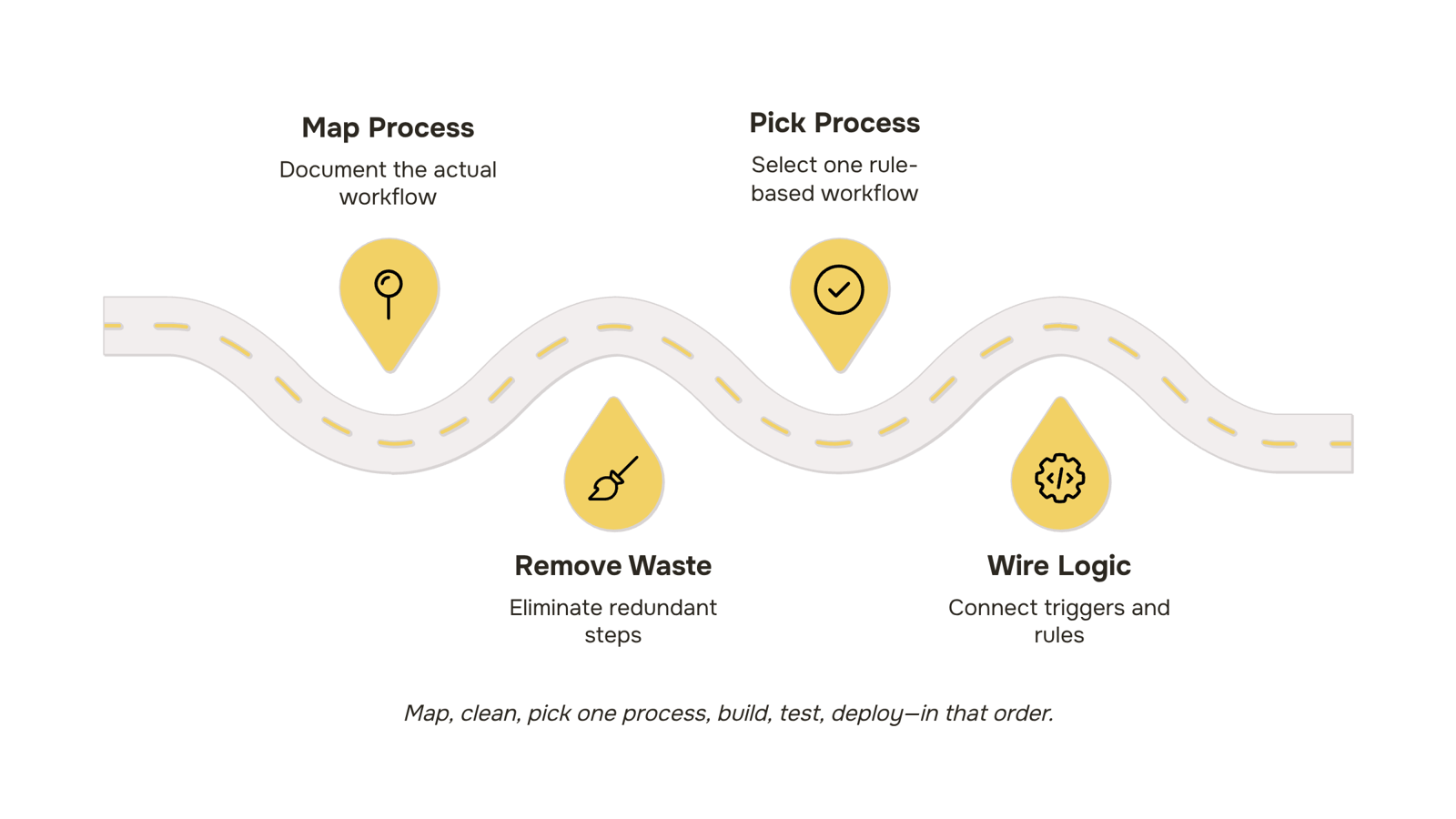
Map what actually happens: Document the real process, not the intended one. Shadow the person doing the work, or record a screen session. You're looking for every handoff, every manual step, every place someone copies data from one tool to another.
Clean before you build: If a step is redundant or unclear, remove it now. Automating a messy process doesn't fix the mess — it runs it faster. This is the broken-process trap the previous section flagged.
Pick one process to start: Choose something rule-based and high-frequency: ticket routing, onboarding checklists, approval notifications. A single successful automation builds more internal buy-in than a sprawling rollout that half-works.
Build and connect your tools: This is where business process management workflow automation actually starts. Wire the trigger, define the logic, map the outputs. If your team needs a practical framework here, the 6-step automation framework for IT teams covers this in detail.
Test with real data: Run the automation in parallel with the manual process for one to two weeks. Compare outputs. Look for edge cases your logic didn't account for.
Deploy and monitor: Set a review checkpoint at 30 days. Track cycle time and error rate, not just "is it running."
The process automation benefits compound once you have one stable automation in place — each one teaches you where the next bottleneck is. Start narrow, prove the value, then expand.
Can Workflow Automation Actually Increase Productivity?
Yes — but only if the process you're automating is already clean. Automating a broken handoff just produces broken results faster.
For IT teams specifically, the productivity gains from business process management workflow automation show up in three places:
Cycle time: Approval chains that take 2-3 days manually can resolve in minutes when triggers fire automatically on task completion.
Error rate: Manual data handoffs between systems — think ticket creation, client onboarding, or invoice generation — introduce transcription errors that automated workflows eliminate by design.
Capacity recovery: When you automate repetitive processes like status updates, access provisioning, or SLA alerts, engineers stop context-switching and return to work that actually requires judgment.
The process automation benefits compound once you connect more than one workflow. A ticket resolved in your helpdesk can automatically trigger a client notification, log a billing entry, and update a project status — no one touches it manually.
If you want a structured path to get there, the 6-step framework for automating business processes covers exactly that sequence.
What to Look for in BPM Workflow Automation Software
Before you evaluate any BPM software, settle on three criteria: integration depth, workflow control, and scalability. Everything else is secondary.
Integration depth means the tool connects to your existing stack without custom middleware. For IT teams, that typically means native connectors to your ticketing system, ITSM platform, and internal databases — not just Slack and Google Drive.
Workflow control is where most tools fall short. You need the ability to pause, abort, or reroute a running process mid-flight. Without that, a single bad input can cascade through every downstream step before anyone catches it. This is especially critical for workflow automation for IT teams managing change requests or incident response.
Scalability means the tool handles volume increases without manual reconfiguration. If adding a new service line requires rebuilding your workflows from scratch, it's not scalable BPM software.
One practical test: ask the vendor to demo a mid-process abort. If they can't show it in under two minutes, the feature probably doesn't exist. For a deeper business process management workflow automation framework, the six-step guide covers how to sequence these decisions before you sign anything.
Closing
Workflow automation only delivers when it runs a process that's already sound — and when you have controls to pause, resume, or abort if something goes wrong. The sequence matters: fix handoffs first, then approvals, then lock down execution consistency. After you've mapped your current state and identified which processes are rule-based and high-frequency, you need a platform that lets IT teams automate without risking live operations. Revo is built for exactly this: connecting your existing tools with pause, resume, and abort controls so you can run complex multi-step sequences safely. Ready to see which of your workflows should automate first?
FAQ
How can workflow automation improve business process management?
Workflow automation executes BPM blueprints consistently without manual handoffs, approval delays, or skipped steps. It turns process documentation into live, enforced logic that produces measurable cycle time reductions and fewer rework cycles.
What are the benefits of automating business processes with BPM software?
Handoff delays drop from hours to seconds, approval bottlenecks fall below 24 hours, and execution becomes consistent across every instance. Knowledge workers reclaim roughly 20% of their week spent on coordination tasks.
Can business process management workflow automation increase productivity?
Yes. McKinsey research shows knowledge workers spend 60% of their time on repetitive coordination tasks automation can handle. Fewer manual handoffs and approval delays directly increase throughput and reduce rework.
How do I get started with business process management workflow automation?
Map your current process first, identify rule-based high-frequency workflows, confirm the process works when humans execute it correctly, then automate handoffs before approvals. Start with ticket routing, onboarding, or report generation.
What is the difference between BPM and workflow automation?
BPM gives you the blueprint—mapping and measuring how work moves through your organization. Workflow automation is the technology that executes those processes without manual intervention. BPM without automation stays documentation; automation without BPM accelerates chaos.


 Elena Petrova11 September 2026


