TL;DR: Most guides on document management treat storage and workflow as separate problems. This one shows IT company owners exactly where a manual document management system workflow breaks down, stage by stage, and what automation replaces at each point. You'll leave with a clear map from upload to signed completion, including the specific triggers that remove human bottlenecks.
What is a document management system workflow?
A document management system workflow is the sequence of automated steps that moves a document from creation or upload through review, approval, and final storage — with rules governing who acts on it, in what order, and what triggers the next step.
Most teams treat their document system as a filing cabinet. They upload contracts, proposals, and forms, then rely on email threads and memory to push those files toward completion. That gap between storage and action is where work stalls.
The workflow layer is what closes that gap. When a document enters your system, the workflow determines what happens next: who gets notified, which approval gates it must pass, whether a signature is required before an invoice can be raised. Without that layer, you have organized storage. With it, you have a process that runs without manual intervention.
This matters more for IT company owners than most. Your team handles service agreements, vendor contracts, and client onboarding forms constantly. Document workflow automation removes the coordination overhead that builds up when each of those document types follows a different informal process.
The distinction is worth being precise about: a document management system handles where files live and who can access them. A document management system workflow handles what happens to those files over time. Storage is passive. Workflow is active.
The five stages that make up a complete workflow — capture, classify, route, approve, store — are what the next section covers.
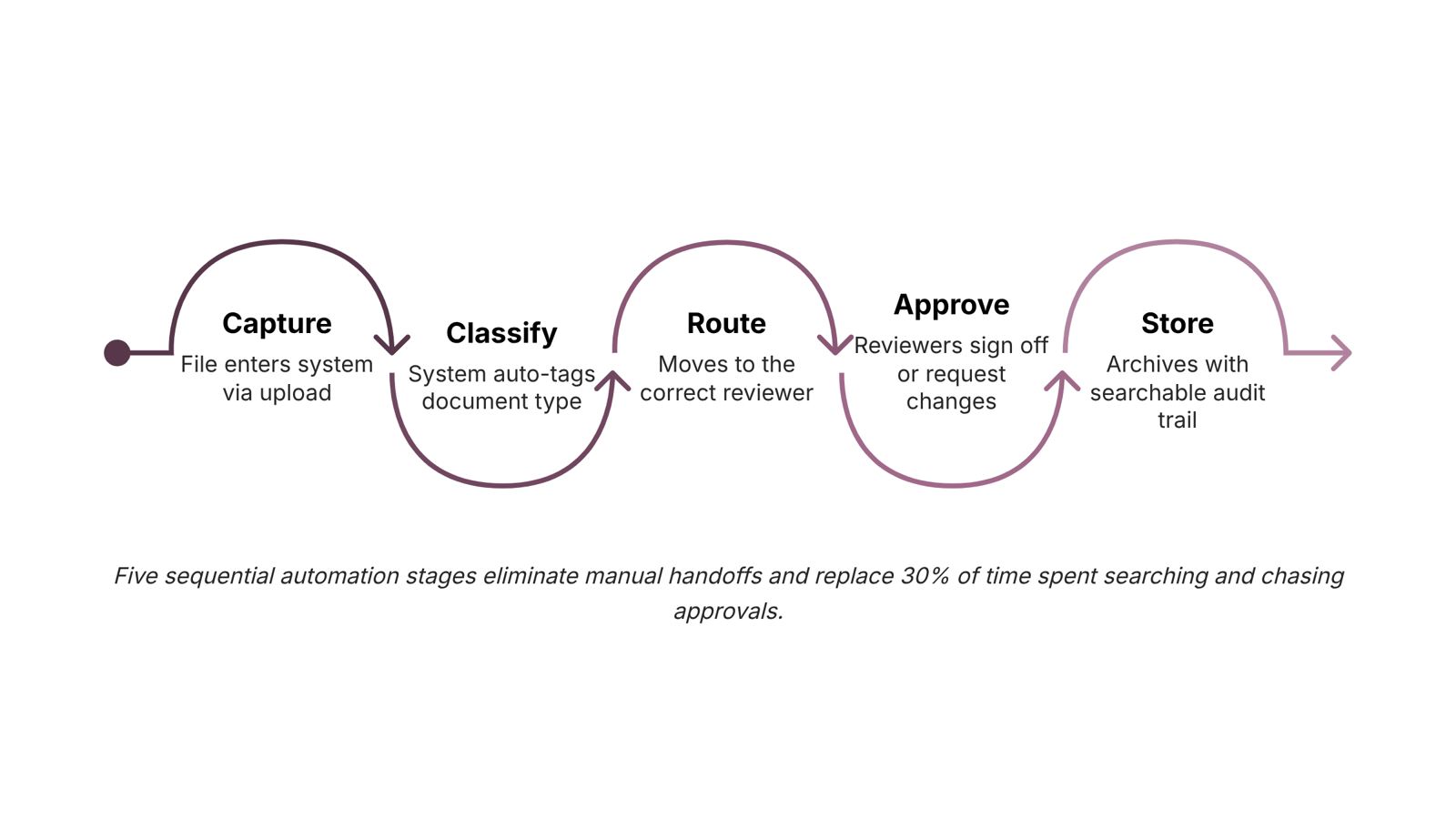
How a document management system workflow operates
A document management system workflow moves every file through five sequential stages. Skip one and you get the failure modes covered in the next section. Run all five and you have a repeatable, auditable process that scales without adding headcount.
Capture. A file enters the system, whether through digital document upload and management, email attachment parsing, or a scanned physical form. The trigger here matters: a good DMS fires a workflow the moment a document lands, not when someone remembers to move it manually.
Classify. The system reads metadata, file type, or content to tag the document correctly. An IT service agreement gets labeled differently from a vendor invoice. Without this step, document routing and approval breaks down immediately because the system doesn't know where to send what.
Route. Based on classification, the file moves to the right person or queue automatically. A contract above a certain value goes to the legal reviewer. A standard NDA goes straight to the account manager. Routing rules are where you automate document workflow in a meaningful way, removing the manual hand-off that creates delays.
Approve. Reviewers receive a notification, open the document in context, and sign off or request changes. The approval chain can be sequential (one after another) or parallel (all at once), depending on your process. This is the stage most IT teams configure last and should configure first.
Store. Once approved, the document archives automatically with a timestamped completion record. Version history locks. Audit trail closes.
For a deeper look at how these stages connect to broader process design, the business process workflow automation framework covers the same logic applied across IT operations. You can also see how document management platforms for small businesses handle each stage differently depending on team size.
Where manual document workflows break down for IT teams
Manual document workflows fail in predictable ways. Recognizing the pattern is the first step toward fixing your document management system workflow before it costs you a client or an audit.
Stalled approvals are the most visible failure. A contract sits in someone's inbox while a project waits. There is no automatic escalation, no visibility into who has it, and no record of when it arrived. IT service agreements routinely miss signing windows this way.
Misrouted files are quieter but just as damaging. When routing depends on someone remembering the right folder path or the right person's name, files end up in the wrong hands or nowhere at all. A new hire's onboarding paperwork lands in a shared drive no one monitors. A vendor NDA goes to the wrong account manager.
Version conflicts compound quickly once two people edit the same document offline. By the time the final version surfaces, no one is certain which changes made it in. Improving your workflow and document management requires eliminating this ambiguity entirely, not managing it.
Missed audit trails are the failure that hurts most during compliance reviews. Manual processes leave no timestamped record of who approved what and when. For IT companies handling client data agreements or vendor contracts, that gap is a liability.
According to AIIM, workers spend roughly 30% of their time searching for documents in manual environments. Document workflow automation removes these four failure points by replacing memory-dependent steps with triggered, tracked, and logged actions.
Key features to look for in a document management system
The difference between a file store and a true document management system workflow comes down to whether the system can act on a document, not just hold it.
Here are the features that matter for IT company owners specifically:
Structured upload with metadata tagging. Digital document upload and management only works if files land in the right folder with the right context attached. Without it, you're back to searching by filename at 11pm before a client call.
Document routing and approval chains. The system should move a document to the next reviewer automatically once the previous step is done, with configurable order. This is what eliminates stalled approvals — the failure point covered in the previous section.
Version control with a clear audit trail. Every edit, comment, and approval gets logged against the document, not buried in an email thread. For IT firms handling client contracts or compliance docs, this is non-negotiable.
Collaborative review without file duplication. Reviewers should be able to comment directly on the document rather than downloading, marking up, and re-uploading a copy. Version conflicts die here.
Activity tracking at the document level. You need to see who opened a file, when, and what they did. Not just "file accessed" — actual step-by-step visibility tied to your workflow.
E-signature built into the workflow, not bolted on. When signing is a separate tool, the approval chain breaks at the last step. Sigi handles signing, routing, and completion certificates inside the same system, so the workflow closes cleanly.
If you want a broader look at how these features fit together across different team sizes, the document management platforms comparison for small businesses covers the tradeoffs worth knowing before you commit to a stack.
How to automate your document management system workflow
Automating your document management system workflow comes down to five steps executed in the right order. Skip one and the chain breaks.
Set an upload trigger. Define what starts the workflow: a new file dropped into a specific folder, a form submission, or a CRM deal reaching a certain stage. The trigger is the foundation. Without it, automation doesn't start — someone manually kicks off every process instead.
Apply automatic classification. Once a file lands, the system should tag it by document type (contract, NDA, invoice, onboarding form) without human input. Classification drives every routing decision downstream, so getting this right early saves correction time later.
Configure your approval chain. Map who reviews what, in which order, and what happens if they don't respond within a set window. A typical IT services contract might route to the account manager first, then legal, then the client. Build in an escalation rule for anything unsigned after 48 hours.
Send for signature with status tracking. Once approvals clear, the document goes to signers automatically. You should be able to see in real time who has opened it, who has signed, and where it's stalled — without emailing anyone to ask. This is where tools like Sigi remove the manual follow-up loop entirely.
Auto-archive with a completion certificate. After the final signature, the system files the document in the right folder, attaches a tamper-proof certificate, and closes the associated task or deal. No one needs to remember to do it.
If you want the full process-level view before wiring this up, the business process workflow automation framework covers how to map dependencies before you configure any triggers. Getting that map right is what separates a workflow that runs itself from one that breaks on the first exception.
How AI is changing document management workflows in 2026
Three shifts are reshaping how AI handles document management system workflow in 2026, and they go well beyond basic OCR.
Intelligent classification means documents are tagged and sorted the moment they land, without manual input. A contract uploads and the system already knows it needs a legal review queue, not a general inbox.
Predictive routing takes that a step further. Instead of waiting for a human to decide who reviews next, the system reads document type, deal size, and team availability, then assigns it. AIIM research consistently shows that workers spend significant time searching for files rather than acting on them. Predictive routing cuts that delay at the source.
Anomaly detection flags irregularities in document trails, such as a signature appearing out of sequence or an approval step being skipped. For IT company owners managing client contracts at volume, that kind of audit visibility matters.
If you want the process-level view of how these capabilities connect, the business process workflow automation framework covers the build sequence in detail.
Frequently asked questions about document management system workflows
What is a document management system workflow? A document management system workflow is the automated sequence that moves a file from digital document upload and management through review, approval, and storage without manual handoffs. It replaces ad-hoc email chains with defined rules: who acts next, under what condition, and by when. For IT company owners, this means contracts and SOWs route themselves rather than sitting in someone's inbox.
Closing
The difference between a document system that stores files and one that moves them forward comes down to automation at each stage — capture, classify, route, approve, store. When those five stages run without manual handoffs, the 30% of time your team spends searching for documents and chasing approvals disappears. IT teams using a connected system like Sigi can configure upload triggers, approval routing, and auto-archiving without building custom integrations — turning your document process into something that scales without adding headcount. The next step is straightforward: spend 15 minutes mapping your current document flow (where contracts land, who reviews them, where they get signed, how they're archived) and see whether Sigi's workflow configuration matches what you actually do.
FAQ
What is a document management system workflow and how does it improve efficiency?
A document management system workflow automates the sequence from upload through approval to storage, with rules governing who acts on documents and what triggers the next step. It removes manual handoffs — eliminating stalled approvals, misrouted files, and the 30% of time teams spend searching for documents.
What features should I look for in a document management system?
Prioritize structured upload with metadata tagging, automatic document routing and approval chains, version control with audit trails, collaborative review without duplication, document-level activity tracking, and e-signature built into the workflow — not bolted on as a separate tool.
Does Sigi support document management system workflows?
Yes. Sigi handles upload triggers, approval routing, e-signature, and auto-archiving inside one system, so your workflow closes cleanly without custom integrations or separate tools.
What is the difference between a document management system and a workflow automation tool?
A document management system handles where files live and who accesses them — storage is passive. A workflow automation tool handles what happens to those files over time — routing, approvals, signing — making the process active and auditable.
How long does it take to automate a document management workflow?
Mapping your current document flow and configuring upload triggers, approval chains, and routing rules in a connected system like Sigi typically takes 15 minutes to get started, with full deployment scaling based on document complexity.


 Marcus Thompson15 September 2026


