TL;DR: Most buying guides for marketing management software lead with tool comparisons before you've defined what you actually need. This one builds the decision framework first: identify your workflow gaps, match capabilities to those gaps, then evaluate tools against a concrete checklist. By the end, you'll know exactly what to look for before you open a single pricing page.
What marketing management software actually does
Marketing management software is a category of tools that connects campaign planning, task execution, and performance tracking inside one system. That's different from a generic project tool (which tracks work but has no marketing context) or a standalone campaign platform (which runs emails or ads but doesn't own the tasks behind them).
The gap matters because most IT company owners running marketing operations are stitching together three to five disconnected tools. A campaign brief lives in one place, task ownership in another, and results in a spreadsheet no one updates on time. Integrated marketing management software closes that loop: the campaign, the tasks behind it, and the reporting all share the same data layer.
In practice, that means a campaign doesn't slip because ownership was unclear at the task level. It means your task-level tracking for marketing campaigns connects directly to delivery timelines. And it means reporting pulls from live data instead of a manually assembled deck.
If you're also evaluating where email marketing campaign tools fit into this stack, that question belongs inside this decision, not separate from it.
Why your team needs it now, not later
When campaigns slip, the cause is almost never strategy. It's ownership gaps, disconnected tools, and reporting that lives in someone's personal spreadsheet.
Four outcomes shift once you have the right system in place:
Campaigns stop stalling at handoffs. When tasks, approvals, and deadlines sit in one place, no one can claim they didn't know what was theirs. Task-level tracking for marketing campaigns makes ownership visible before a deadline passes, not after.
Reporting becomes a pull, not a project. Instead of assembling data from three platforms every Friday, your numbers update as work moves. That alone reclaims several hours a week for most small teams.
Follow-up actually happens. Disconnected tools mean leads and campaign responses fall into gaps between platforms. Integrated marketing management software closes those gaps by keeping triggers, tasks, and contact data in the same system.
You can run more campaigns without adding headcount. Marketing management software for small business teams is built for this constraint: fewer people, more moving parts. The right platform lets a two-person team manage what used to require four.
If your current setup relies on spreadsheets and manual status updates, the cost isn't just time. It's campaigns that underperform because no one caught the gap early enough to fix it.
What features to look for in marketing management software
Not every feature in a vendor's demo matters equally. The ones below are the filters worth applying before you spend time on a trial.
Campaign and task ownership is the baseline. If the tool can't assign a specific person to a specific deliverable with a due date, campaigns will slip the same way they do in a shared doc. Look for task-level tracking for marketing campaigns that ties each task to a campaign, not just a project.
Cross-channel reporting in one view. Spreadsheet-based reporting breaks down the moment you're running email, paid, and organic simultaneously. Integrated marketing management software pulls those numbers into a single dashboard so you're not stitching CSVs together every Monday.
Native integrations, not just Zapier workarounds. Zapier connections work until they don't. For an IT company owner, the more important question is whether the tool connects directly to your CRM, your best email marketing campaign tools for 2026, and your billing system without a middleware layer in between.
Workflow automation for follow-ups. If a lead fills out a form and no one follows up for three days, the tool failed you. Look for rule-based automation that triggers the next action without manual intervention.
Sprint or milestone planning. Marketing teams running product launches need something closer to a sprint-ready project management tool than a simple calendar. Milestone tracking keeps launch timelines honest.
A marketing project management tool that covers all five areas is genuinely harder to find than vendors make it sound. Use this list as your filter, not their feature page.
Most decision frameworks for picking software stop at "make a list of features you need." That's not a decision — it's a delay. These seven steps move you from confused to committed.
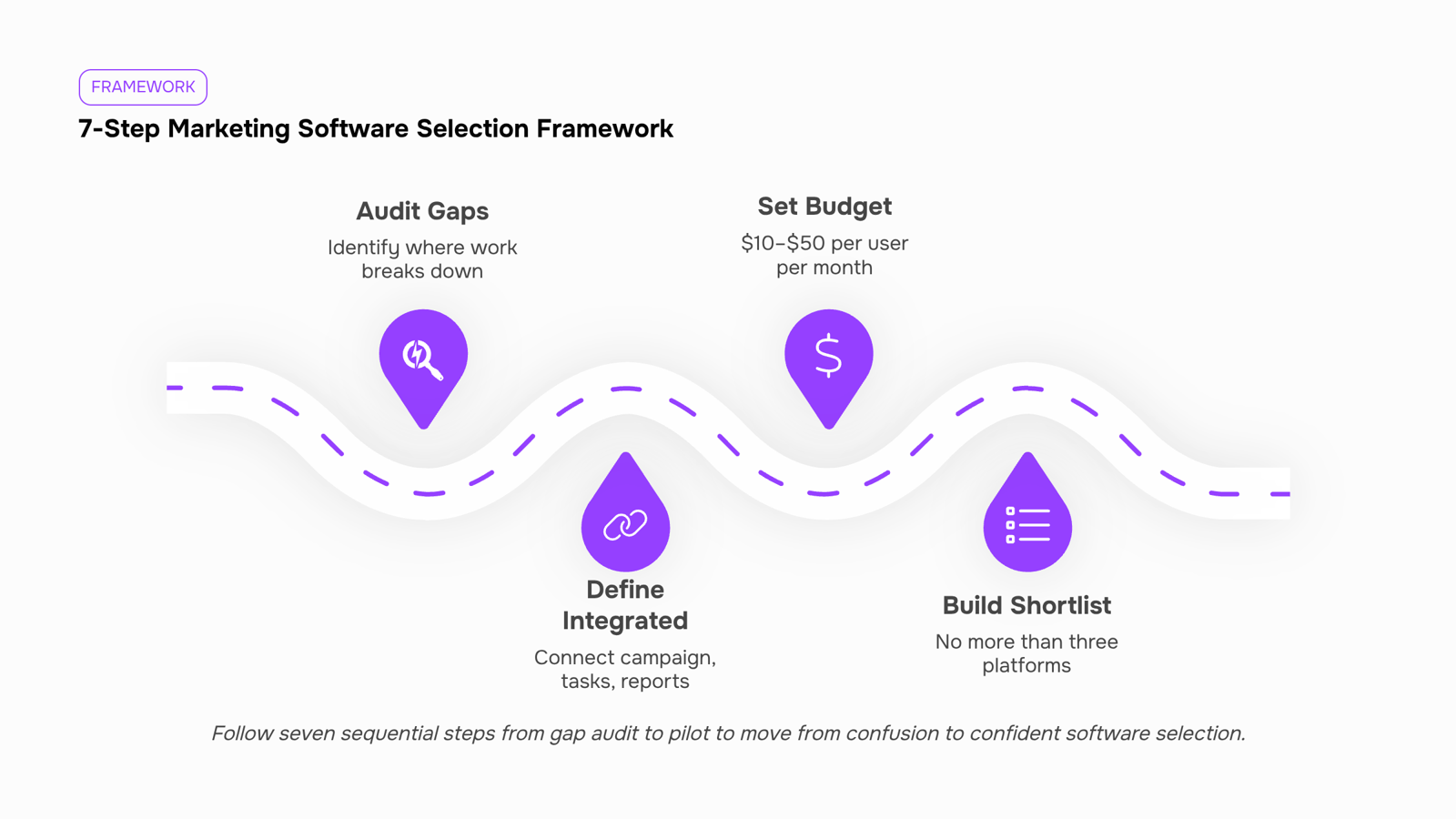
Audit your current gaps first: Before you look at a single vendor, write down where work is actually breaking down. Are campaigns missing deadlines? Is reporting manual? Are tasks falling through because they live in three different tools? Your gap list becomes your evaluation filter.
Decide what "integrated" means for your team: The biggest mistake small business buyers make is treating campaign tracking, task execution, and reporting as separate purchases. They aren't. If your task-level tracking for marketing campaigns doesn't connect to your timeline view, you'll spend Friday afternoons reconciling spreadsheets instead of reading results.
Set a hard budget range before you see pricing pages: Marketing management software for small business teams typically runs $10–$50 per user per month at the SMB tier. Knowing your ceiling stops you from falling in love with an enterprise platform that will cost three times your budget once you add users.
Build a shortlist of three, not ten: More than three options creates decision paralysis, not confidence. Use the feature checklist from the previous section to eliminate any platform missing your top two must-haves. What's left is your shortlist.
Map each shortlist platform to your actual campaign workflow: Don't evaluate features in isolation. Take one live campaign — ideally one mid-flight right now — and trace it through each platform. Can you set up the brief, assign tasks, track spend, and pull a performance report without switching tools? If you need a workaround at any step, note it.
Check integration depth, not just integration count: A platform that lists 200 integrations but requires Zapier for every connection is not the same as one with native two-way sync. If email is central to your work, verify that the platform connects properly with your stack — the best email marketing campaign tools for 2026 piece covers what good native integration actually looks like.
Run a two-week pilot with a real project, not a demo: Ask your top two vendors for a full trial. Assign one actual campaign to each platform. At the end of two weeks, ask your team two questions: where did you hit friction, and would you use this without being asked? Their answers will tell you more than any feature comparison table.
For teams evaluating sprint-ready project management tools alongside marketing campaign tracking software, step five is where the two requirements often conflict — and where most buyers realize they need a single platform rather than two separate ones stitched together.
How marketing management software tracks your campaigns
Good campaign tracking works at three levels: task, timeline, and reporting. Most teams only get one of two.
At the task level, you need visibility into who owns each campaign asset, what's blocked, and what's due. Without that, a missed deliverable doesn't surface until after launch.
At the timeline level, the software should show you how individual tasks roll up into campaign milestones. A content piece delayed by three days shouldn't be invisible until it breaks your send date.
At the reporting level, this is where integrated marketing management software earns its place. Open rates, click events, and reply tracking need to live in the same view as your delivery timeline, not in a separate tool you check separately. When those signals are disconnected, you're always explaining performance after the fact rather than adjusting during the campaign.
For a practical foundation on structuring this, the best practices for marketing campaign management covers how to set up tracking checkpoints before a campaign goes live.
Marketing campaign tracking software that unifies these three layers cuts the back-and-forth that slows most teams down between execution and results.
Is marketing management software right for a small business
For most teams under 20 people, the answer is yes. But the condition matters: the tool has to replace something you are already paying for, not sit on top of it.
The minimum viable setup for marketing management software at the small business level covers three things:
A shared campaign calendar your whole team can see and update
Task-level ownership so every deliverable has one person's name on it
A basic reporting view that shows what is working without requiring a data analyst
You do not need an enterprise suite. You need those three things in one place instead of scattered across a spreadsheet, a chat thread, and a separate analytics tab.
The real cost is not the subscription fee. It is the hours your team spends copying data between tools, chasing status updates in Slack, and manually compiling reports that are already outdated by the time you read them. A single integrated platform removes that loop entirely.
Where Evox changes the equation for small teams
Most small IT businesses hit the same wall: follow-ups fall through the cracks, email sequences get sent inconsistently, and no one has time to manually track who responded to what. That is the exact workflow problem Evox is built to remove.
Evox is WorksBuddy's automated outreach and follow-up agent. In plain terms, it runs your cold email sequences, nurture campaigns, and follow-up workflows without requiring someone to manage them manually each day. Here is what that looks like in practice:
Evox sends timed follow-up sequences based on prospect behavior, so no lead goes cold because someone forgot to circle back
It connects directly with Lio (WorksBuddy's lead scoring agent) so your outreach prioritizes the contacts most likely to convert
Campaign activity syncs back into your shared workspace, which means your campaign calendar and task ownership stay current without manual updates
You get a reporting view of open rates, reply rates, and sequence performance in one place, not spread across three tabs
Once Evox is running, your team's day shifts. Instead of starting each morning by checking who needs a follow-up email, your team starts by reviewing replies that already came in overnight. The manual coordination work is gone. The focus moves to actual decisions.
For a small IT business, that shift matters more than any feature checklist. You are not buying software for what it can theoretically do. You are buying back the hours your team currently spends doing work a system should handle.
Start with task-level tracking for your campaigns and connect Evox to handle outreach and follow-up. That combination covers most of what a small team actually needs, without buying a platform built for a 200-person marketing department.
Common mistakes teams make when picking this software
The most common regret: buying a campaign-only tool that has no connection to task execution. Your team ends up managing deadlines in one place and campaign performance in another, which means nothing actually syncs.
A close second is skipping the integration audit before signing. If your CRM, analytics stack, and project tools aren't on the compatibility list, you'll spend the first month building workarounds instead of running campaigns. Check the native integrations first, then verify what lives behind a paid Zapier connection.
Third, teams often evaluate integrated marketing management software on feature count rather than workflow fit. A marketing project management tool with 40 features you won't use beats a simpler one that matches how your team actually works — until it doesn't, because adoption stalls.
Finally, don't buy for your current team size. A tool that handles five people cleanly but breaks at fifteen will cost you a second migration inside a year.
Closing
The real test of marketing management software isn't how many features it lists—it's whether your team can run a campaign from brief to report without switching tools or assembling spreadsheets. Once you've walked through the seven-step framework, you'll know exactly what to look for. The next move is seeing how your top candidates actually perform against a live campaign. That's where the decision stops being theoretical and starts being real. Ready to map your workflow against a platform built for task-level marketing delivery? Check out Evox features and see how it connects campaign planning to execution.
FAQ
Q. What are the top marketing management software solutions in 2026?
A. The best fit depends on your specific gaps, not generic rankings. Use the seven-step framework to evaluate candidates: audit your workflow breaks, set your budget ceiling ($10–$50/user/month for SMB tier), and pilot with a real campaign before committing.Q. How do I choose the best marketing management software for my business?
A. Follow the seven-step process: identify your gaps, define what integration means for your team, set budget, shortlist three vendors, map each to a live campaign workflow, verify integration depth, and run a two-week pilot with actual work—not just a demo.Q. What features should I look for in marketing management software?
A. Prioritize campaign and task ownership with due dates, cross-channel reporting in one view, native integrations (not just Zapier), workflow automation for follow-ups, and sprint or milestone planning. Missing any of these five will leave you stitching tools together.Q. Is marketing management software suitable for small businesses?
A. Yes—it's built for your constraint. The right platform lets a two-person team manage what used to require four by eliminating manual status updates and spreadsheet reconciliation. Most SMB-tier solutions run $10–$50 per user per month.Q. How can marketing management software help me track my marketing campaigns?
A. It connects campaign briefs, task ownership, deadlines, and performance data in one system. Campaigns stop slipping because ownership is clear at the task level, and reporting pulls live data instead of requiring manual assembly every Friday.Q. What is the difference between marketing management software and a CRM?
A. A CRM tracks contacts and sales interactions; marketing management software owns campaign planning, task execution, and performance reporting. They're complementary—good marketing software integrates with your CRM but doesn't replace it.


 Elena Petrova15 September 2026


