TL;DR: Most guides on the best platforms for managing client affidavits hand you a feature list and leave the hard decisions to you. This one gives IT company owners a concrete evaluation framework: six steps that match a platform to your actual affidavit workflow, covering the security requirements, compliance checkpoints, and signature routing questions that generic comparisons skip.
What managing client affidavits actually requires
Affidavit management sits in a specific gap that general document storage doesn't cover. A file in Google Drive has no chain of custody. Dropbox doesn't enforce signing order, capture witness acknowledgments, or generate a tamper-evident audit trail tied to a specific legal declaration. Those aren't nice-to-haves for affidavits — they're the difference between a document that holds up and one that doesn't.
Client affidavit management software needs to do four things a generic tool skips:
Enforce a defined signing sequence (declarant before notary or witness)
Log every access, edit, and signature event with timestamps
Meet the validity requirements of the ESIGN Act and UETA for e-signed legal documents
Store completed affidavits in a format that's exportable for court or compliance review
A secure document management platform also needs to separate access by role. Your client shouldn't see another client's affidavit because they share a folder link.
Most IT company owners evaluating the best platforms for managing client affidavits start by comparing e-signature software options, then realize the real question is whether the platform handles the full workflow — intake, signing, audit, and retrieval — or just one step of it.
That distinction shapes every decision in the framework ahead.
Run this sequence against every tool you shortlist, and you'll have a defensible answer before you spend a dollar.
Step 1: Map your actual workflow before you open a single demo.
Write out what happens to an affidavit from the moment a client submits it to the moment it's filed or archived. Note every handoff, every person who touches it, and every point where something can go wrong. Most IT company owners skip this and end up buying a platform that solves the easy parts while leaving the painful ones untouched. A five-minute process map saves you from a six-month contract you'll regret.
Step 2: Confirm legal validity, not just e-signature support.
Not every e-signature tool meets the bar for affidavits. Under the ESIGN Act and UETA, a valid electronic signature requires demonstrable intent, a clear audit trail, and tamper-evident records. Some platforms offer a signature widget with none of that infrastructure behind it. Ask vendors directly: does your platform produce a court-admissible audit log? If they can't answer that in one sentence, move on. For a deeper look at what separates a compliant signing tool from a basic one, choosing the right online document signing platform covers the criteria worth checking.
Step 3: Test the affidavit tracking tool against a real scenario.
Don't evaluate tracking features in the abstract. Take one affidavit from your current backlog and try to move it through the platform's workflow. Can you see its status at every stage? Can you set an automatic reminder when a client hasn't signed after 48 hours? Can you pull an audit report showing who viewed, signed, or modified the document and when? If any of those answers require a manual workaround, that's a gap that will cost you time every week.
Step 4: Evaluate document workflow automation as a first-class feature, not a bolt-on.
Document workflow automation is the difference between a platform that reduces admin and one that just digitizes it. Look for native automation: automatic routing after signature, conditional logic that flags incomplete affidavits, and status updates that push to your CRM or case management system without requiring a separate Zapier layer. Every integration point you add manually is a failure point you'll have to maintain.
Step 5: Work through the free-vs-paid tradeoff honestly.
Free tiers on most platforms cap you at a low document volume or strip out audit trail features entirely. For affidavit workflows, that's not a minor inconvenience; it's a compliance risk. Platforms with e-signature and audit trail features in 2025 typically run $25 to $80 per user per month at the mid-market tier, based on published G2 and Capterra pricing data. If a free tool is genuinely sufficient for your volume, confirm in writing what happens to your stored documents if you exceed the limit or the vendor changes their pricing model.
Step 6: Score security and access controls before you score anything else.
Affidavits contain personally identifiable information and, in many cases, legally privileged content. The platform needs role-based access controls, encryption at rest and in transit, and a clear data residency policy. Ask where your documents are stored, who at the vendor can access them, and what happens to your data if you cancel. These are not edge-case questions. They are the baseline for any of the best platforms for managing client affidavits that a serious IT company owner should consider.
Run each shortlisted tool through all six steps and score them side by side. The next section translates this process into a concrete feature checklist so you know exactly which capabilities are non-negotiable versus which ones you can live without.
Not every platform that handles documents handles affidavits well. The difference shows up in a handful of specific capabilities, and knowing which ones are non-negotiable saves you from paying for an expensive folder with a logo.
Non-negotiable for affidavit workflows:
Legally valid e-signature for affidavits. The platform must comply with the ESIGN Act and UETA, which means capturing signer intent, identity verification, and a tamper-evident record. A basic "draw your signature" tool does not meet this bar. Check the 7 best e-signature software options for contract management if you need a vetted shortlist.
Audit trail at the document level. Every view, edit, send, and signature event should be timestamped and tied to a user. This is what separates client affidavit management software from a shared Drive folder.
Controlled access by client or matter. You need permission settings that isolate one client's documents from another's, not just folder-level sharing.
Status tracking across multiple affidavits. If you manage more than five active clients, you need a dashboard that shows which affidavits are drafted, sent, signed, or overdue, without opening each file.
Useful but not essential on day one:
Template libraries for recurring affidavit types
Automated reminders for unsigned documents
CRM or case management integrations
The free-vs-paid question is real for IT company owners. Most free tiers on the best platforms for managing client affidavits cap you at a handful of monthly sends and strip out audit trails entirely. For affidavit work, that makes the free tier functionally unusable. Budget for a paid plan from the start, and evaluate whether the platform, like Sigi, connects signature workflows to the rest of your client operations rather than sitting as a standalone tool.
How security and compliance requirements narrow your options
Affidavits carry legal weight, which means the platform holding them has to meet a higher bar than ordinary document storage.
Start with audit trails. Every view, edit, and signature event should be timestamped and tied to a specific user. Without that log, you cannot prove chain of custody if a document is challenged. Most general-purpose storage tools don't produce audit trails that hold up in a legal context.
Next, check e-signature legality. Under the ESIGN Act and UETA, a valid electronic signature requires demonstrable intent, consent, and a tamper-evident record. Not every e-signature tool meets all three. Before shortlisting any platform, confirm it produces a certificate of completion that captures IP address, timestamp, and signer identity. The best online document signing platforms publish this explicitly in their compliance documentation.
Access controls matter too. A secure document management platform should let you restrict who can view or download a specific affidavit, not just who can access the folder. Role-based permissions at the document level are non-negotiable for most IT compliance environments.
Encryption is table stakes: look for AES-256 at rest and TLS in transit. If a vendor's security page doesn't name the encryption standard, treat that as a gap.
When evaluating any affidavit tracking tool, ask the vendor for their SOC 2 Type II report or equivalent. That single document tells you whether their security claims have been independently verified, which is more reliable than a feature checklist. For teams that also need contract workflows, the 7 best e-signature tools for contract management covers platforms that combine both.
General project management tools handle affidavit-adjacent tasks reasonably well: assigning review steps, setting deadlines, tracking who approved what. If your workflow is mostly "send document, wait for response, file it," a tool like Asana or Monday can cover that loop.
The breakdown happens at the document layer. Task tools don't generate legally formatted affidavits, don't embed ESIGN Act-compliant e-signatures, and don't produce the timestamped audit trail a court or compliance review expects. You can bolt on integrations, but each handoff between a task tool, a signature app, and a storage folder is a gap where documents get lost or version history disappears.
Purpose-built platforms close that gap with document workflow automation built in: template generation, signature capture, and audit logging in one system. That matters most when you're managing affidavits at volume or under a compliance obligation.
If you're evaluating the best platforms for managing client affidavits alongside your existing project stack, the honest question is whether your current tool can produce a defensible audit trail. If it can't, a task tool is the wrong foundation.
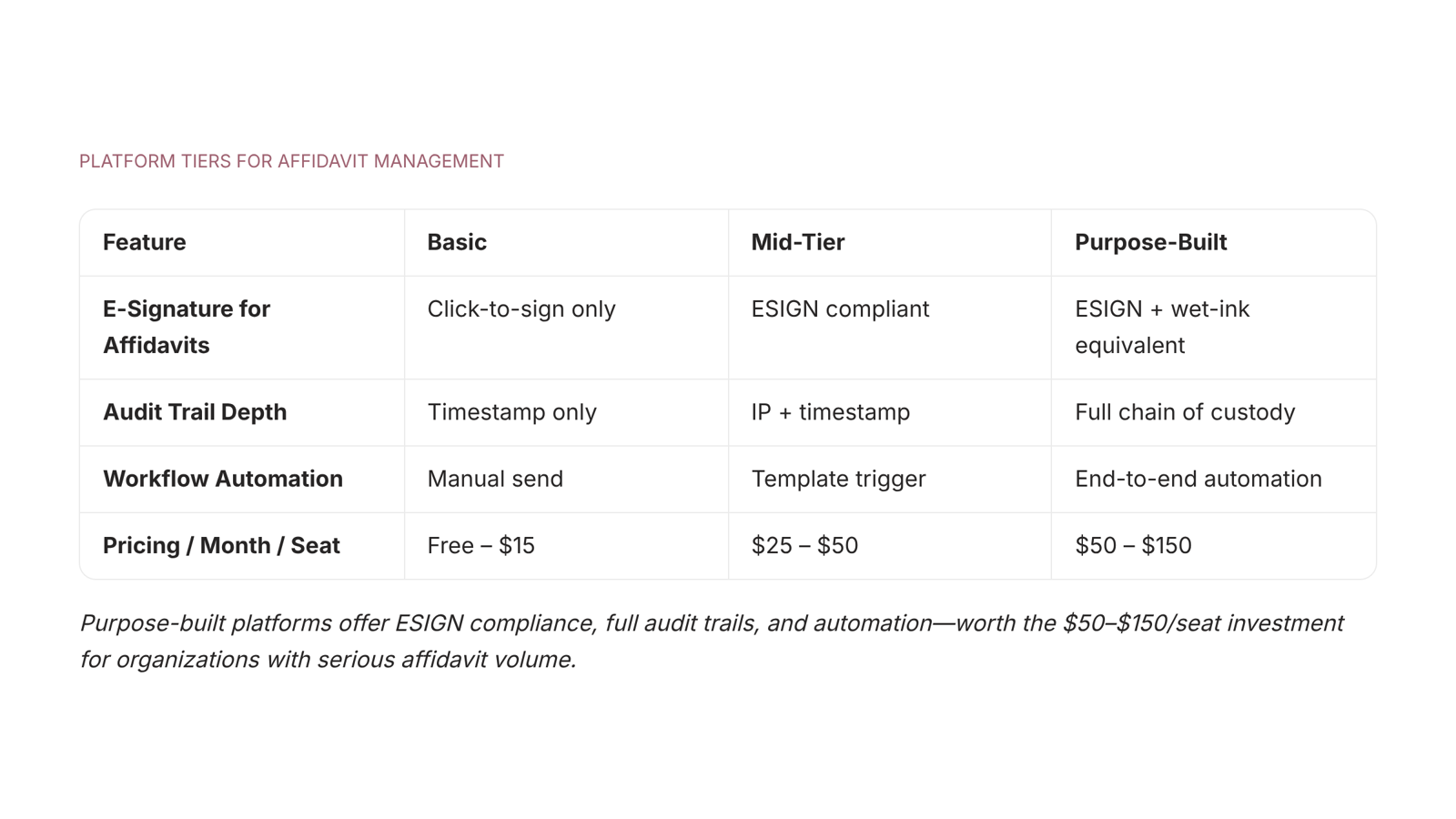
Not all client affidavit management software is built for the same team. Before you pick, map your actual constraints against four dimensions that separate adequate from purpose-built.
Dimension | Basic tier | Mid-tier | Purpose-built |
|---|
E-signature for affidavits | Click-to-sign only | ESIGN/UETA-compliant | ESIGN/UETA + identity verification |
Audit trail depth | Timestamp only | IP + timestamp | Full event log with tamper-evident hash |
Workflow automation | Manual send | Template triggers | Conditional routing + auto-reminders |
Pricing (per month) | Free–$15/seat | $25–$50/seat | $50–$150/seat |
If your affidavits require legal defensibility, the audit trail column matters most. A timestamp alone won't satisfy a compliance review.
For teams evaluating document signing platforms or e-signature software for contract management, the best platforms for managing client affidavits combine all four dimensions rather than trading one off against another.
Closing
The six-step framework above narrows your search from dozens of generic platforms down to tools actually built for legal workflows. The non-negotiables are simple: legally valid e-signatures, document-level audit trails, role-based access, and status tracking. Everything else is a nice-to-have. Once you've scored your shortlist, the next move is testing one platform end-to-end with a real affidavit from your backlog. Sigi is purpose-built for exactly this workflow—signing, tracking, and storing client affidavits in one place with full ESIGN Act compliance and an audit trail that holds up in court. Start with the Sigi feature overview to see how it handles the full lifecycle, or if you're already weighing options against DocuSign, the side-by-side comparison will show you where Sigi removes the friction that generic tools leave behind.
FAQ
How do I know if a document platform is secure enough for legal affidavits?
Check for role-based access controls, encryption at rest and in transit, and a clear data residency policy. Ask the vendor where documents are stored and who can access them. If they can't answer in writing, it's not secure enough.
What's the difference between a document management platform and e-signature software for affidavits?
Document management stores files; e-signature software captures legally valid signatures with audit trails. For affidavits, you need both: a platform that enforces signing order, logs every access event, and produces court-admissible records.
How much does affidavit management software typically cost for a small IT firm?
Mid-market platforms with e-signature and audit trail features typically run $25 to $80 per user per month. Free tiers strip out audit trails entirely, making them unsuitable for legal workflows.
How do I migrate existing client affidavits to a new platform without losing audit history?
Most platforms allow bulk upload of completed documents, but the audit history only begins after migration. Store the old audit trail separately in case you need to prove chain of custody for pre-migration affidavits.
What compliance standards should an affidavit management platform meet?
The platform must comply with the ESIGN Act and UETA, which require demonstrable signer intent, identity verification, and tamper-evident records. Confirm this in writing before signing a contract.


 Elena Petrova15 September 2026


