What sprint planning actually is in Agile
Sprint planning is a time-boxed collaborative session where the Scrum team decides what to build in the next sprint and how to approach that work — not a status update, not a review of what went wrong last sprint.
The Scrum Guide defines sprint planning as the event that initiates the sprint by laying out the work to be performed. That framing matters: it's a decision-making session with a fixed output, not an open-ended discussion. The time-box is capped at 8 hours for a one-month sprint, and proportionally shorter for the 1- and 2-week sprints most IT teams run.
Every sprint planning session produces three concrete outputs:
- Sprint goal — a single sentence describing what the team intends to achieve. Not a list of tasks. One coherent objective that gives the team a north star when priorities shift mid-sprint.
- Sprint backlog — the specific product backlog items the team commits to completing, pulled based on capacity and priority. Choosing the right items from the product backlog is where most teams lose time if the backlog isn't well-groomed going in.
- Delivery forecast — a realistic assessment of what will be done by sprint end, not a promise carved in stone.
Where teams go wrong is treating sprint planning as a ceremony to get through rather than a decision point to get right. A common failure mode: backlog items land in the sprint without enough detail, and the team spends the first two days clarifying scope that should have been resolved before the meeting started.
Understanding the purpose of a sprint planning meeting in Scrum helps teams separate the inputs they need to prepare from the decisions they need to make inside the room.
How sprint planning differs from traditional project planning
Traditional project planning locks scope upfront. A requirements document gets approved, a timeline gets set, and the team executes for months. Changing direction means formal change requests and schedule renegotiation.
Sprint planning works from the opposite assumption: requirements will change, so commit only to what the team can deliver in the next two weeks.
The key structural differences:
- Time-box: The Scrum Guide 2020 caps sprint planning at eight hours for a one-month sprint. That ceiling forces a narrower question: what can the team complete by end of sprint, not by Q4.
- Commitment model: Waterfall teams commit to scope. Scrum teams commit to a sprint goal, then pull supporting items from the product backlog. Overestimates get resolved inside the sprint, not through a change order.
- Decision horizon: Sprint planning is a short-horizon, team-owned decision. Problems surface in days, not months.
For IT owners moving from waterfall, the adjustment is cognitive more than procedural. Sprint planning is not a lighter project kickoff. Understanding the purpose of a sprint planning meeting in Scrum makes that shift easier to internalize.
Key elements every sprint planning session needs
Four things must exist before the sprint planning meeting starts. Without them, the session turns into a negotiation about basics rather than a commitment to work.
-
A refined backlog: Items at the top of the backlog should be estimated, described clearly, and small enough to complete within a sprint. If the team spends the first 30 minutes of planning asking "what does this ticket actually mean," backlog refinement didn't happen. The Scrum Guide treats refinement as ongoing work, not a one-time event — teams that skip it consistently pull half-understood items into sprints and miss their goals.
-
Team capacity numbers: Velocity from the last two or three sprints, planned time off, and any cross-team commitments all affect how much work the team can realistically take on. Committing without capacity data is guessing. Most teams that chronically over-commit aren't bad at estimation — they're planning without knowing how many hours they actually have.
-
A clear definition of done: Every item pulled into the sprint should be measured against the same exit criteria. When the definition of done is vague or assumed rather than written, "finished" means something different to the developer, the QA engineer, and the product owner. That gap shows up in the review, not during planning — which is the worst time to discover it.
-
A product owner who can make priority calls: Sprint planning in Scrum requires someone with authority to say which items matter most and to answer scope questions in real time. A proxy who needs to "check with the stakeholder" blocks the entire sprint planning process. Decisions deferred out of the meeting tend to stay deferred.
Taro surfaces backlog items with their refinement status and team capacity side by side, so the team walks into planning with both already visible rather than reconstructing them on the spot.
How long a sprint planning session should actually last
Sprint planning session length follows a simple rule from the Scrum Guide: 8 hours maximum for a one-month sprint, scaled down proportionally for shorter cycles.
| Sprint Length |
Time-Box Ceiling |
| 1 week |
2 hours |
| 2 weeks |
4 hours |
| 4 weeks |
8 hours |
Those ceilings are not targets. They are the upper bound.
The real driver of session length is backlog readiness, not sprint length. A well-refined backlog, where stories are sized, acceptance criteria are written, and dependencies are flagged, can cut a 2-week sprint planning session to under 90 minutes. A backlog where half the candidate items still need clarification will push the session toward its ceiling regardless of how long the sprint runs.
One practical signal to watch before the session opens:
- Fewer than 30% of items need discussion: The backlog is ready, and the session should run short.
- More than 30% of items require significant discussion: The backlog was not ready. That is a refinement failure, not a planning problem.
- Solving refinement gaps inside sprint planning wastes the entire team's time and is the primary reason the ceremony develops a reputation as the meeting everyone dreads.
For sprint planning in Agile to stay inside its time-box, the pre-work has to be done before the room opens. Teams that skip refinement consistently run long, and the meeting absorbs the cost of that shortcut.
Taro tracks backlog readiness and capacity data before the session starts, so the meeting itself stays focused on commitment rather than catching up on missing context.
Running the session: from backlog to sprint commitment
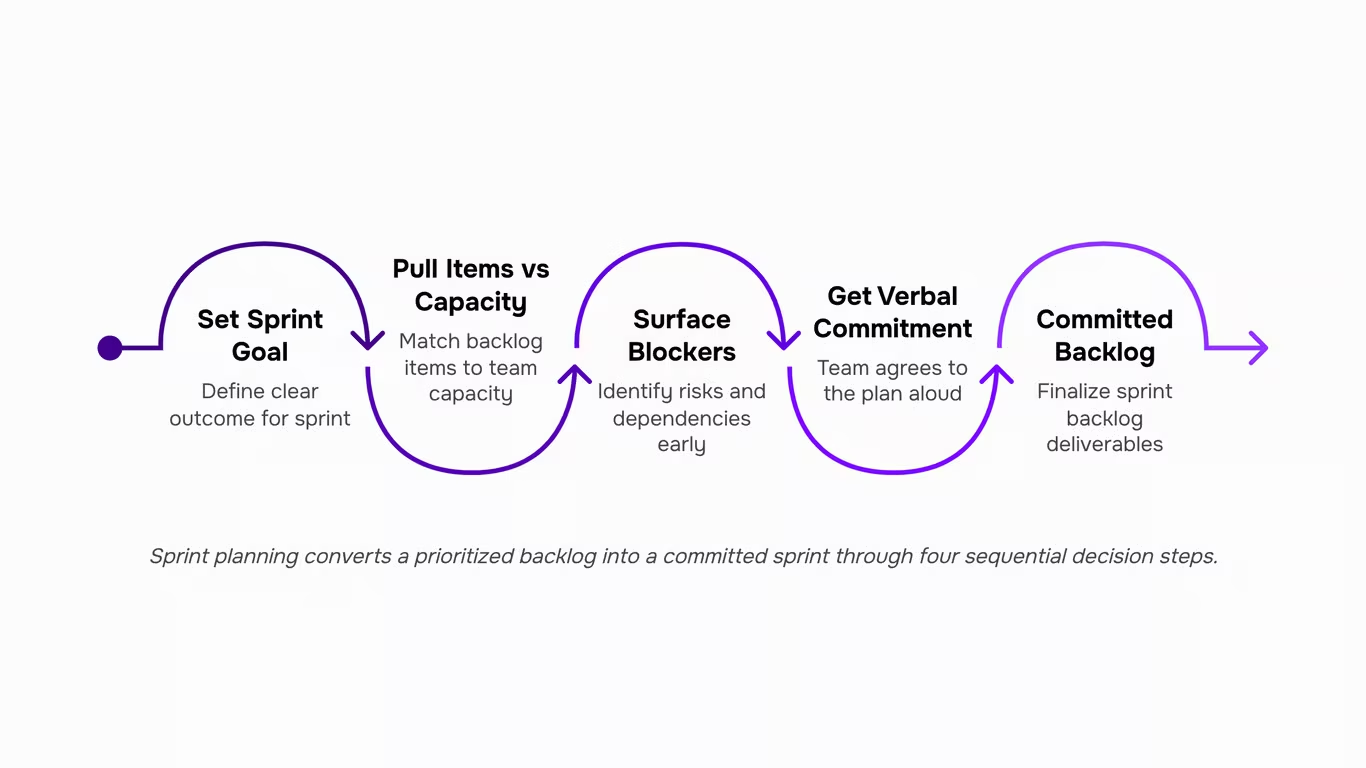
The session has one job: turn a prioritized backlog into a committed sprint. Doing that well requires a specific sequence, and skipping steps is where most teams lose time.
- Start with the sprint goal, not the task list. Before pulling a single item, the team and product owner agree on what success looks like for this sprint — one or two sentences that describe the outcome, not the output. A clear sprint goal keeps the team from loading the sprint with unrelated items just because they're at the top of the backlog.
- Pull items against capacity, not optimism: Once the goal is set, the team works down the backlog, selecting items that support the goal and fit within actual available hours. Capacity means hours after meetings, support rotations, and planned leave — not the theoretical 40-hour week. Most teams underestimate this by 20-30%, which is how sprints end with 3 items rolled over every cycle. If backlog refinement happened in the days before, items should already have estimates and acceptance criteria. If they don't, the sprint planning session slows to a crawl while the team writes definitions on the fly.
- Surface blockers before committing: For each item pulled in, ask one question: is there anything that would prevent this from being completed this sprint? Dependencies on another team, a missing API credential, an unresolved design decision — these come out now, not on day four. This is the step most ceremony-style checklists skip entirely, and it's the one that prevents mid-sprint surprises.
- Get verbal commitment, not passive agreement: The sprint plan isn't final until each developer confirms they understand what they're taking on. A quick round-the-room confirmation catches misassigned items and unrealistic estimates before the sprint starts.
The manual overhead in this process — calculating capacity, matching items to developers, tracking which backlog items are ready — is where teams lose 20-30 minutes per session. Taro's sprint planning and backlog management handles capacity tracking and item assignment automatically, so the session stays focused on decisions rather than spreadsheet math. Teams using a tool built around the full sprint lifecycle spend the session on the goal and the blockers, not on updating columns.
For tools that support this workflow end to end, the difference between a 45-minute session and a 2-hour one usually comes down to how much prep work the software does before the team sits down.
Benefits of sprint planning that show up in delivery, not just process
Most articles on sprint planning in agile list "alignment" and "transparency" as the headline benefits. Those are real, but they're not what IT leads notice on Friday when the sprint closes.
The measurable outcomes show up differently.
- Fewer mid-sprint scope changes. When the team sets a sprint goal before pulling items, there's a shared filter for what belongs in the sprint and what doesn't. Requests that arrive mid-week get evaluated against that goal, not against whoever asks loudest. Teams that skip the goal-setting step lose this filter entirely — and scope creep fills the gap.
- Faster blocker identification. Surfacing dependencies during planning, rather than on day four when a ticket is already in progress, compresses the time between "blocker exists" and "blocker is assigned to someone." The Agile Alliance notes that sprint planning gives the team a shared understanding of what they'll work on — that shared understanding is what makes blockers visible before they stall delivery.
- Less re-work from misunderstood scope. When acceptance criteria are confirmed during planning, developers and QA start from the same definition of done. Without that confirmation, teams often build to assumption, not to requirement. That's where re-work accumulates.
- Predictable velocity over time. Capacity-aware planning — accounting for leave, meetings, and carry-over — produces sprint commitments the team can actually hit. Consistent delivery builds the kind of velocity data that makes pulling the right items from your product backlog into the sprint a data-driven decision rather than a guess.
These outcomes don't require a perfect process. They require the right decisions made in the right order.
Common sprint planning mistakes and how to fix them
Three failure modes account for most broken sprint planning processes — and each has a direct fix.
-
No sprint goal defined: Teams that skip the goal and jump straight to task assignment give themselves no filter for mid-sprint decisions. When a new request lands on day three, there's nothing to test it against. Fix: open every what is sprint planning meeting with a single sentence that describes what the team will have achieved by the end of the sprint. Everything else flows from that.
-
Backlog items not refined before the meeting: This is the failure mode most articles skip. When stories arrive at sprint planning without acceptance criteria or sizing, the meeting becomes a refinement session — and the sprint planning process stalls for an hour before a single item gets committed. Fix: treat backlog refinement as a prerequisite, not a warm-up. Pulling the right items from your product backlog into the sprint before the meeting is what keeps the session to its time-box.
-
Capacity not accounted for: Teams plan to full velocity without subtracting holidays, on-call rotations, or carry-over work. The sprint starts overloaded. Fix: calculate available person-days before the meeting, not during it.
Taro's sprint planning and backlog management features surface unrefined items and flag capacity gaps before the meeting starts, so the session stays focused on commitment rather than discovery. For more on the purpose of a sprint planning meeting in Scrum, that context helps frame what a well-run session should actually produce.
Closing
Sprint planning only works when it's treated as a decision point, not a ceremony to rush through. The teams that execute their sprints cleanly aren't the ones with perfect estimates — they're the ones who walk into planning with a refined backlog, clear capacity numbers, and a product owner ready to make calls. That preparation collapses the meeting from a negotiation into a commitment.
If your team is still tracking capacity and backlog readiness in spreadsheets, you're adding friction before the meeting even starts. Taro's sprint and backlog management pulls both into one view, so you can see what's ready to commit and how much capacity you actually have — no manual reconstruction needed. Ready to run sprint planning without the overhead? Explore how Taro handles the full sprint lifecycle in one place.
FAQ
Q. How do I conduct effective sprint planning meetings?
A. Start with a refined backlog, clear capacity data, and a product owner who can make priority calls in real time. Pull items based on team capacity, define a single sprint goal, and commit only to what the team can realistically complete by sprint end.
Q. What are the key elements of a successful sprint planning process?
A. A refined backlog with clear descriptions and estimates, accurate team capacity numbers, a written definition of done, and a product owner with decision-making authority. Without these, planning becomes a negotiation about basics instead of a commitment to work.
Q. How long should a sprint planning session typically last?
A. The Scrum Guide caps it at 8 hours for a one-month sprint, scaled proportionally shorter for 1- and 2-week sprints. A well-refined backlog can cut a 2-week planning session to under 90 minutes; if you're hitting the ceiling consistently, your backlog refinement needs work.
Q. What are the benefits of sprint planning in Agile project management?
A. Sprint planning surfaces problems in days instead of months, lets teams adjust mid-sprint instead of filing change orders, and creates a clear north star with the sprint goal. Short time-boxes force answerable questions instead of vague long-term commitments.
Q. How does sprint planning differ from traditional project planning?
A. Waterfall locks scope upfront for months; Scrum commits only to what fits in the next sprint. Waterfall uses change requests for scope shifts; Scrum adjusts inside the sprint. The hard time-box forces faster, narrower decisions.
Q. What happens if the team can't finish all sprint backlog items?
A. That's expected — the sprint goal is the commitment, not every item. Incomplete work stays in the backlog, gets re-estimated if needed, and pulls into the next sprint. The team reviews what blocked them and adjusts capacity or scope planning next cycle.
Q. Does sprint planning require a fully refined backlog beforehand?
A. Yes. Items at the top of the backlog must be estimated, clearly described, and small enough to complete in one sprint. If more than 30% of candidates need significant discussion during planning, refinement wasn't done — and the meeting will run long.



 Elena Petrova15 September 2026


