What a user story actually is in agile
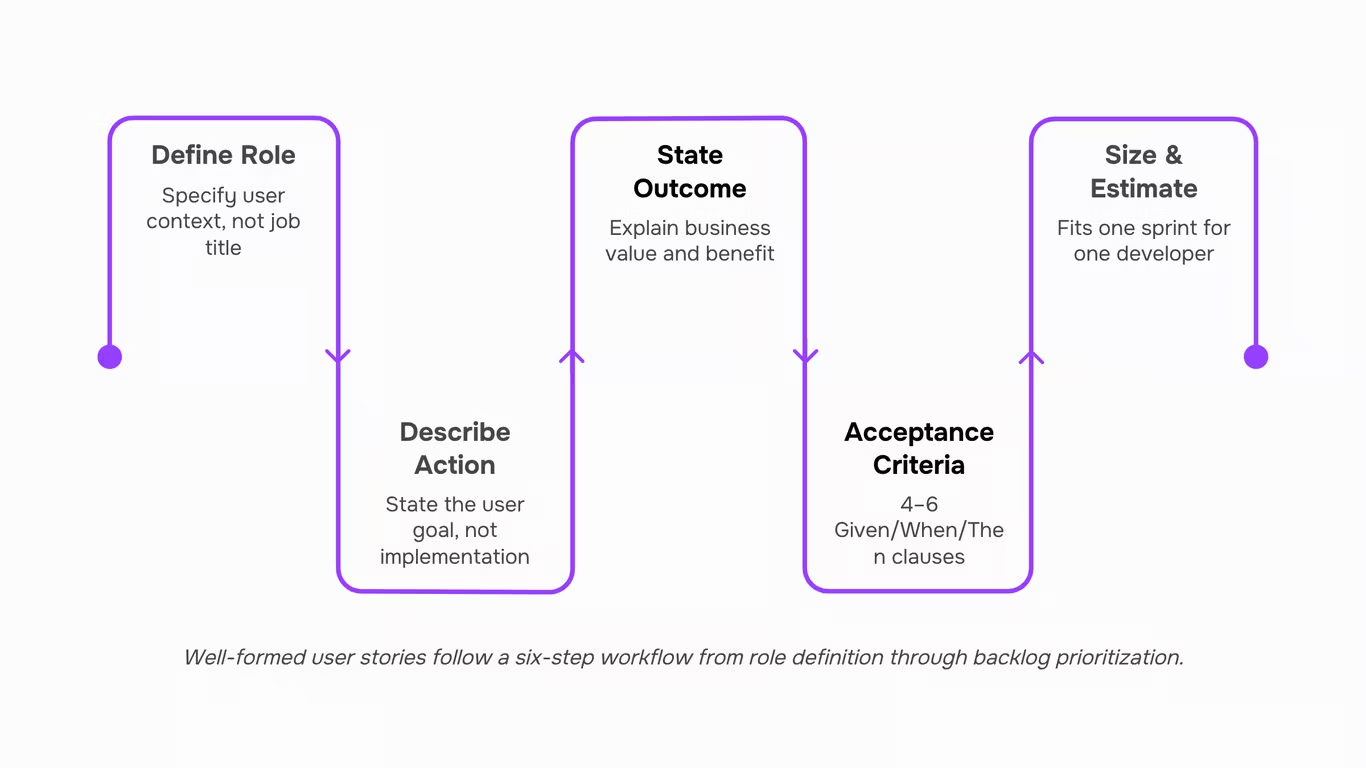
A user story is a short description of how a piece of work will directly benefit the customer and meet their needs, usually written in one to two sentences.
That definition, from ICAgile, is deliberately minimal. A user story isn't a requirements document, a use case, or a ticket title. A requirements document describes system behavior from the system's perspective. A use case maps every interaction path. A user story does neither — it captures one slice of value from one user's perspective, small enough to deliver in a single sprint.
The Agile Alliance defines user stories as functional increments the team divides work into, in consultation with the customer or product owner. That word "consultation" matters. A story isn't written once and handed down. It's a placeholder for a conversation between the team and whoever owns the outcome.
This is where most teams go wrong early. They treat the story as the deliverable rather than the starting point. The story gets written, added to the backlog, and never discussed again until a developer picks it up — at which point the vagueness becomes a problem.
One practical test: if you can't explain the story's business reason in one sentence without referencing the UI, it probably isn't a user story yet. It's a task dressed up in story format.
The agile user story format gives you structure to avoid that trap, but structure alone doesn't prevent vague outcomes. Converting a user story into an executable task requires the story to be specific enough first — which is what the next section covers.
The standard user story format and why each part matters
The three-part user story format — "As a [role], I want [action], so that [outcome]" — answers three questions in sequence: who needs this, what they need to do, and why it matters. According to Mountain Goat Software, this structure works because it forces the team to think about the user's goal, not just the feature to build.
Each part carries a specific job. When one part is vague, the whole story breaks down.
The role ("As a…")
This is not a job title. "As a user" tells a developer nothing useful. The role should describe a person with a specific context and goal — "As a project manager running sprints for a 10-person dev team" is more useful than "As a user." The more precisely you define the role, the easier it is to make decisions about scope and priority later. Vague roles produce features that satisfy no one in particular.
The action ("I want…")
This part describes what the person wants to accomplish, not how the system should implement it. "I want to filter tasks by assignee" is a valid action. "I want a dropdown with checkboxes that queries the database" is a technical specification — it belongs in the acceptance criteria, not the story. When teams write implementation details here, they cut off design options before the conversation starts.
The outcome ("so that…")
This is the most commonly skipped part of the agile user story format, and skipping it is expensive. The outcome explains the business or user value the action delivers. Without it, a developer can build exactly what was asked and still miss the point entirely. "So that I can see who is overloaded before the sprint starts" gives the team a way to evaluate whether their solution actually works.
A complete user story template keeps all three parts specific. If any part can be answered with "anyone," "anything," or "because we need it," the story needs more refinement before it enters a sprint. Once the format is solid, converting a user story into an executable task becomes straightforward — the work is already scoped.
Acceptance criteria: the part most teams skip
Acceptance criteria are the specific, testable conditions a user story must meet before it can be called done. The Scrum Alliance defines them as the conditions that must be satisfied for a product, user story, or increment of work to be accepted. Without them, "done" means something different to the developer who built the feature, the QA engineer testing it, and the product owner signing off.
Most agile user story templates include a slot for acceptance criteria. Most teams leave it blank, or fill it with something like "works correctly" — which is not a criterion, it's a wish.
The Given/When/Then format (also called Gherkin) fixes this. Each criterion follows a three-part structure:
- Given [the starting context or precondition]
- When [the user takes an action]
- Then [the expected result]
This format forces specificity. You can't write "works correctly" in Gherkin without immediately realizing it says nothing. A developer reads the Then clause and knows exactly what to build. A QA engineer reads the same clause and knows exactly what to test. Both reach the same conclusion from the same sentence.
A practical rule: aim for 4 to 6 acceptance criteria per story. Fewer than 4 usually means the story is under-defined. More than 8 or so is a signal the story is too large and should be split.
Here's what that looks like for a login feature:
- Given the user is on the login page and has a registered account
- When they enter a valid email and password and click "Sign in"
- Then they are redirected to their dashboard within 2 seconds
That single criterion eliminates a whole category of ambiguous conversations during sprint review.
One more thing the standard agile user story template rarely mentions: acceptance criteria also make converting a user story into an executable task much faster, because each criterion maps directly to a testable unit of work. Teams using AI-assisted backlog ordering get even more from this — well-defined criteria give the model enough signal to rank stories accurately against sprint capacity.
A concrete agile user story example from start to finish
Here's a complete agile user story example built around a realistic IT scenario: a client portal for a managed services provider.
User story: As a client administrator, I want to view all open support tickets in a single dashboard so that I can track resolution status without emailing our account manager.
Acceptance criteria (Given/When/Then):
- Given a client administrator is logged in, When they navigate to the Support tab, Then they see a list of all open tickets sorted by priority, each showing ticket ID, status, and last-updated timestamp.
- Given a ticket status changes, When the page is refreshed or auto-refreshed every 60 seconds, Then the updated status appears without requiring a manual reload.
- Given a client administrator filters by "Critical" priority, When the filter is applied, Then only Critical tickets remain visible and a count badge updates accordingly.
Story points: 5 (moderate complexity — read-only view, real-time polling, role-based access check required)
Definition of Done: UI matches approved mockup, all three acceptance criteria pass QA, no console errors on Chrome and Firefox, code reviewed and merged to main.
This is a scrum user story example your team can adapt directly. Notice what the format does: the role is specific (client administrator, not "user"), the action is bounded (view open tickets, not "manage support"), and the outcome is tied to a real pain point (eliminating back-and-forth emails).
The acceptance criteria leave no room for interpretation. A developer building the filter behavior and a QA engineer testing it will reach the same conclusion — which is exactly what Atlassian describes as the core purpose of a well-formed user story.
Once the story is approved, converting it into executable tasks in Taro takes the definition of done and breaks it into assignable work items automatically.
How to split a story that is too large for one sprint
Stories get pushed to the next sprint for one reason more than any other: the story was never small enough to fit in the first place. The fix isn't to work faster — it's to cut the story differently before sprint planning starts.
Three splitting patterns handle most cases.
- Split by workflow step: Take one step from the end-to-end flow and make it its own agile user story. Before: "As an IT admin, I want to onboard new employees so that they have access to all required systems." After: Story 1 covers account creation; Story 2 covers permission assignment; Story 3 covers confirmation email. Each step delivers real value independently, which is the test any vertical slice must pass — as Mike Cohn's SPIDR framework at Mountain Goat Software describes it, a good split should still deliver working software at every layer.
- Split by data type: If a feature handles multiple input types — CSV, API feed, manual entry — ship one data type per story. Same user story format, narrower scope.
- Split by user role: One story for the requester, a separate story for the approver. The role changes; the action and system stay the same.
A quick test before committing any story to a sprint: can one developer own it start to finish within the sprint? If not, apply one of the three patterns above before it lands in the backlog. Once the story is sized correctly, converting it into executable tasks becomes straightforward rather than a planning-day negotiation.
How to prioritize user stories in a product backlog
Backlog prioritization collapses into a three-hour argument when teams treat it as a debate instead of a decision framework. Three criteria cut through that: user value, technical dependency, and delivery risk.
- User value asks how directly a story moves the needle for the person using the product. Stories that unblock a core workflow or remove a friction point in the primary user journey rank above nice-to-haves. If your agile user story template includes a "so that" clause, that clause is your value signal — use it.
- Technical dependency is often ignored until it causes a sprint failure. A story that five other stories depend on belongs near the top regardless of its standalone user value. Map dependencies before the grooming session, not during it.
- Delivery risk covers stories where the acceptance criteria are unclear, the estimate has a wide range, or the implementation touches a fragile part of the codebase. High-risk stories should either move up so the team resolves uncertainty early, or get split further before they enter a sprint.
To apply all three without a long meeting: score each criterion on a simple 1-3 scale, sum the scores, and sort. Premier Agile recommends treating urgency, importance, and size as the core axes — which maps directly to this approach.
The manual scoring step is also where AI-assisted backlog ordering earns its place. Taro's auto-prioritization reads dependency chains and flags stories with incomplete acceptance criteria before the session starts, so the team spends the meeting making decisions rather than gathering information.
Can you use user stories outside software projects
Yes — with real caveats.
- The "As a [user], I want [action], so that [outcome]" format transfers well to any context where a person needs something from a system or process. Product operations teams use it to request dashboard changes. IT teams write infrastructure requests in the same structure. HR teams have used agile user story templates to capture onboarding workflow improvements.
- Where it breaks down: when there's no clear "user" and no clear outcome. A compliance audit task or a server migration doesn't have a beneficiary in the traditional sense. Forcing the format onto those items produces awkward stories that nobody reads.
- The practical rule: if you can answer "who benefits and how," the format works. If the task is purely technical or regulatory, skip the story structure and write a plain task instead.
- User story templates designed for software teams adapt to non-software contexts with one adjustment — replace "user" with the actual stakeholder, even if that's an internal team.
Closing
Writing user stories that actually ship means nailing three things: a specific role with real context, a clear action separated from implementation, and an outcome that proves the work mattered. Add acceptance criteria in Given/When/Then format, and suddenly your sprint reviews stop bouncing stories back — developers and QA speak the same language, and the product owner knows exactly what "done" means.
Once your user stories are written correctly with clear roles, outcomes, and testable acceptance criteria, the next bottleneck is backlog ordering and sprint execution. That's where most teams lose momentum — grooming takes hours, priorities shift mid-sprint, and high-value work gets buried. Taro's auto-prioritization reads your full backlog and surfaces what to build first based on story quality and capacity, so your team spends less time debating order and more time shipping. Ready to stop rewriting stories in sprint? Start with one well-structured story this week and watch how much faster it moves through review.
FAQ
Q. How do I write a good user story in agile development?
Use the format: "As a [specific role], I want [action], so that [outcome]." Then add 4–6 acceptance criteria in Given/When/Then format. If any part is vague or could be answered with "anyone" or "because we need it," refine it before the story enters a sprint.
Q. What is the purpose of a user story in software development?
A. A user story captures one slice of customer value from one user's perspective, small enough to deliver in a single sprint. It's a placeholder for conversation between the team and product owner, not a requirements document handed down and forgotten.
Q. How do user stories differ from use cases?
A. Use cases map every interaction path and system behavior. User stories describe one small, valuable outcome from the user's perspective. Stories are intentionally minimal; use cases are exhaustive.
Q. Can I use user stories for non-software projects?
A. Yes. The format works anywhere you need to break work into small, user-focused increments. The role, action, and outcome structure applies to marketing campaigns, operations, and design work — anything with a clear user benefit.
Q. How do I prioritize user stories in a product backlog?
A. Rank by business value and user impact first, then by dependencies and sprint capacity. Well-written stories with clear acceptance criteria are easier to prioritize accurately — AI-assisted tools can read the full backlog and surface high-impact work automatically.
Q. How many user stories should fit in a single sprint?
A. That depends on story size and team velocity. A typical sprint holds 5–15 stories, but the real measure is capacity in story points, not story count. Smaller, well-scoped stories fit more sprints than large, ambiguous ones.
Q. What is the difference between a user story and an epic?
A. A user story is a single, deliverable piece of work (one sprint). An epic is a large feature or goal that spans multiple sprints and breaks down into several user stories. Epics are the container; stories are the work inside.



 Elena Petrova15 September 2026


