TL;DR: Most DocuSign vs Adobe Sign pricing comparisons stop at tier names and monthly rates. This one runs the per-envelope math at three realistic send volumes — 50, 200, and 500 documents per month — so you can see what the actual invoice looks like before you sign a contract. You'll also get the specific plan limits that quietly inflate costs at scale.
DocuSign and Adobe Sign charge you in fundamentally different ways, and that difference matters before you look at a single plan price.
DocuSign pricing plans are built around envelopes. Each envelope is one sent document, regardless of how many signers or pages it contains. Your plan includes a fixed envelope allowance per year, and once you exceed it, you pay an overage fee per additional envelope. That fee is rarely advertised upfront, which is where teams get surprised mid-contract.
Adobe Sign pricing works differently depending on which product you're buying. The standalone Adobe Sign tiers charge per transaction, where a transaction is roughly equivalent to a sent document. But Adobe Sign is also bundled inside Adobe Acrobat Pro, which means some teams are already paying for it without realizing it. If your team uses Acrobat Pro for PDF workflows, your e-signature access may already be included.
The practical implication: DocuSign costs scale with sending volume. Adobe Sign costs can scale with users or fold into an existing Acrobat subscription. A team sending 50 documents a month faces a different calculation than one sending 500.
For a fuller picture of how these structures stack up against other tools, how DocuSign pricing compares to other e-signature tools is worth reading before you commit to a tier.
DocuSign pricing plans broken down
DocuSign offers four main tiers. Here's what each one actually costs and where the limits bite.
Personal runs $15/month (billed annually) or around $25/month on a monthly plan. You get five envelopes per month and one user seat. That's it. Fine for a sole trader signing the occasional contract; not viable for any team with real volume.
Standard is $45/user/month (annual) or roughly $65 monthly. It includes unlimited envelopes and supports up to five users. This is where most small businesses land when comparing docusign pricing plans, and it covers the basics: reminders, notifications, and mobile signing.
Business Pro sits at $65/user/month (annual). You get everything in Standard plus payment collection, bulk send, and advanced fields. If your team sends more than 50 contracts a month or needs conditional routing, this is the tier that makes sense for docusign vs adobe sign for business comparisons.
Enhanced Plans (formerly called Enterprise) move to custom pricing. DocuSign doesn't publish rates at this tier. You'll negotiate based on volume, SSO requirements, advanced API access, and compliance needs like 21 CFR Part 11.
The number most buyers miss: if you're on Personal and exceed five envelopes in a month, DocuSign charges per additional envelope, typically $2 to $3 each depending on your account region. That overage cost is buried in the plan details and can quietly double your bill in a busy month.
Annual billing saves roughly 30 to 40% compared to monthly across all tiers, so the choice of billing cycle matters as much as the plan itself.
If the per-envelope model feels restrictive, affordable DocuSign alternatives worth considering covers options with flat-rate structures. You can also see how Sigi stacks up against DocuSign on features and price before committing to a plan.
Adobe Sign pricing plans broken down
Adobe Sign's pricing structure is less standardized than DocuSign's, and that matters when you're trying to forecast costs across a team.
The Individual plan runs around $12.99/month (billed annually) and covers one user with basic sending and signing. Transaction limits are modest, making it viable only for low-volume solo use.
The Small Business plan starts at approximately $34.99/month for up to five users. You get unlimited transactions at this tier, which is a meaningful advantage over DocuSign's envelope caps. That said, "unlimited" applies to standard agreements — bulk send and advanced workflows cost more.
The Business tier is where Adobe Sign pricing starts to blur. Pricing is typically quoted per user per month, and Adobe often bundles this tier with Acrobat Pro (currently around $19.99/user/month for Acrobat alone). If your team already pays for Creative Cloud or Acrobat Pro, you may already have e-signature access included, which changes the real cost comparison significantly.
Enterprise pricing is a custom quote. Adobe doesn't publish rates, and the feature set — advanced authentication, custom branding, API access at scale, Salesforce and Workday integrations — varies by negotiation. This is the tier where is Adobe Sign more expensive than DocuSign for large enterprises becomes genuinely hard to answer without a sales call from both vendors.
A few things worth tracking as you evaluate:
Overage fees at the Individual and Small Business tiers apply when you exceed transaction thresholds mid-cycle
API transaction limits are separate from the UI-based sending limits and priced differently
Adobe's bundling with Acrobat can obscure the true per-signature cost if you're comparing line items
If you want a cleaner cost picture before committing, affordable DocuSign alternatives worth considering covers tools with more transparent per-user pricing at every tier.
Side-by-side pricing comparison
Here is the full docusign vs adobe sign pricing picture in one table so you can stop cross-referencing tabs.
Plan | Tool | Monthly (billed monthly) | Monthly (billed annually) | Envelope / transaction limit | Users | Overage fee |
|---|
Personal / Individual | DocuSign | ~$15 | ~$10 | 5 envelopes/mo | 1 | Pay-per-envelope |
Individual | Adobe Sign | ~$13 | ~$10 | Unlimited transactions | 1 | N/A |
Standard | DocuSign | ~$45 | ~$25 | Unlimited | 1 | N/A |
Small Business | Adobe Sign | ~$30 | ~$23 | Unlimited | Up to 5 | N/A |
Business Pro | DocuSign | ~$65 | ~$40 | Unlimited | 1 | N/A |
Business | Adobe Sign | Custom quote | Custom quote | Unlimited | 5+ | N/A |
Enterprise | DocuSign | Custom quote | Custom quote | Unlimited | Multiple | Negotiated |
Enterprise | Adobe Sign | Custom quote | Custom quote | Unlimited | Multiple | Negotiated |
A few things stand out in this e-signature pricing comparison. DocuSign's Personal plan caps you at five envelopes per month, and once you cross that limit, you pay per additional envelope. That hidden overage cost catches small teams off guard more than any other line item. Adobe Sign's Individual plan avoids this by offering unlimited transactions at a comparable price point.
For teams of five, Adobe Sign's Small Business plan undercuts DocuSign's Standard plan by roughly $2 to $10 per month depending on billing cycle. Once you move past five users, both tools push you toward custom quotes, which means the pricing transparency ends at exactly the point where costs start climbing.
If you want to see how a third option holds up on both price and features, see how Sigi stacks up against DocuSign on features and price or compare Sigi and Adobe Sign side by side.
Which is cheaper at low, medium, and high send volumes
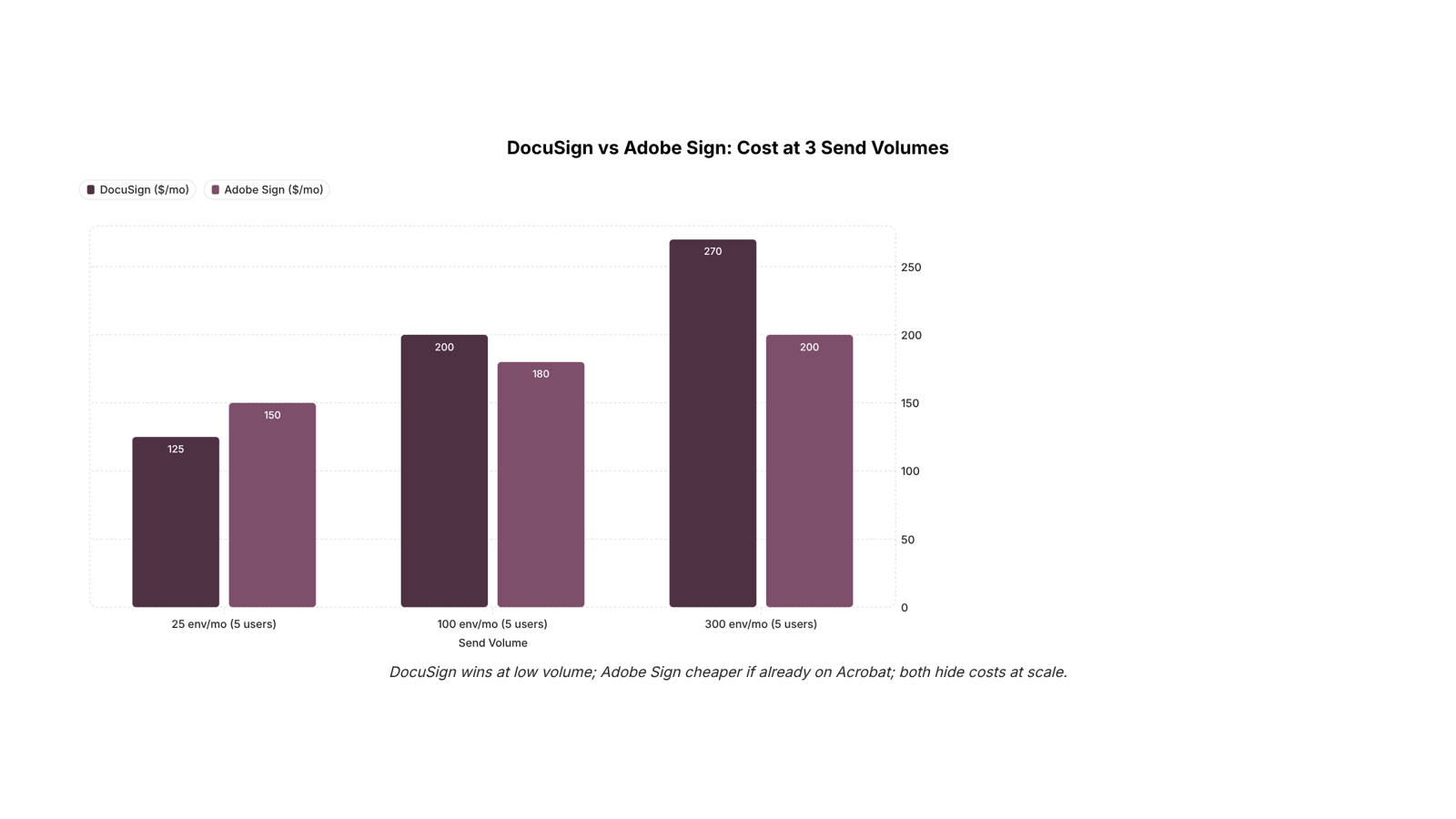
Three volume tiers tell most of the story for a 5-user team comparing docusign vs adobe sign pricing.
25 envelopes per month (low volume)
DocuSign's Standard plan runs around $25/user/month billed annually, covering 100 envelopes per user. For 5 users, that's roughly $125/month. Adobe Sign's Small Business plan sits in a similar range but bundles fewer sends at this tier. At low volume, Adobe Sign can edge out DocuSign slightly on annual cost, especially if your team already pays for Adobe Acrobat Pro, where Sign is included.
100 envelopes per month (medium volume)
This is where envelope math starts mattering. DocuSign Business Pro covers unlimited envelopes but jumps to around $40/user/month, putting a 5-user team at $200/month. Adobe Sign's Business tier is comparable but requires a custom quote for larger seat counts, which adds friction when you're trying to make a fast decision. At this tier, costs are roughly equivalent, but DocuSign's pricing is more transparent.
300 envelopes per month (high volume)
Both tools push you toward enterprise pricing at this volume. DocuSign's overage fees on lower-tier plans can reach $0.40 to $1.00 per envelope beyond the limit, which adds up fast on 300 sends. Adobe Sign's enterprise tier is custom-quote only, so you can't self-serve a number. For high-volume teams, the hidden overage cost is the real differentiator, not the headline plan price.
If overage exposure concerns you, affordable DocuSign alternatives worth considering includes options with flat-rate unlimited sends. You can also see how Sigi stacks up against DocuSign on features and price before committing to either.
When DocuSign costs less and when Adobe Sign does
Adobe Sign wins on price if your team already pays for Adobe Acrobat Pro or Creative Cloud — e-signature capability is bundled in, so your marginal cost is zero. That's a meaningful edge for IT shops already running Adobe licenses across the team.
DocuSign costs less when your needs are straightforward: a small team sending under 100 envelopes per month, no Adobe subscription in place, and no compliance requirements beyond a standard audit trail. The Personal plan at roughly $15/month covers light use without forcing you into a higher tier.
Adobe Sign becomes expensive fast once you exceed transaction limits at the Individual tier and hit the Business tier's custom-quote wall. That pricing opacity is a real friction point for IT company owners trying to budget predictably.
The cleaner way to frame this e-signature pricing comparison: Adobe Sign is cheaper if you're already in the Adobe ecosystem; DocuSign is cheaper if you're not. Volume and compliance needs shift that calculus — affordable DocuSign alternatives worth considering are also worth a look if neither plan structure fits your send patterns.
Is there a better-value option for IT teams
If both tools feel like a poor fit — envelope caps you'll exceed, or enterprise tiers requiring a sales call — it's worth knowing other options exist. Sigi is one alternative IT teams consider when docusign vs adobe sign pricing comparisons reveal hidden overage costs or opaque custom quotes. No envelope arithmetic, no mystery tiers. Check the full alternatives breakdown before committing to either platform.
Closing
DocuSign and Adobe Sign charge fundamentally differently — one scales with envelopes sent, the other with users or bundles into Acrobat — which means the cheaper option depends entirely on your team's sending volume and existing software stack. At 50 documents a month, Adobe Sign's Individual plan wins. At 200+, DocuSign's per-envelope overages and Adobe's transaction limits both start to pinch, and that's where most IT teams discover the headline price doesn't match the actual invoice.
Here's the reality: teams sending more than 100 documents per month often find that envelope caps on both platforms add up faster than advertised. Before you lock into an annual contract, run the math at your actual send volume — and consider how a tool priced for unlimited sends at every tier might change the equation. Ready to see the difference? Check how Sigi prices for unlimited sends before committing to either platform.
FAQ
Which is cheaper, DocuSign or Adobe Sign?
It depends on volume. Adobe Sign's Individual plan undercuts DocuSign's Personal tier, but DocuSign's Standard plan ($25/month annual) beats Adobe Sign once you factor in user seats. Both hide costs at scale through overages and custom enterprise pricing.
How does the pricing of DocuSign compare to Adobe Sign?
DocuSign charges per envelope sent with fixed monthly allowances; Adobe Sign charges per transaction or bundles into Acrobat Pro. DocuSign's Personal plan caps at 5 envelopes/month with overage fees; Adobe Sign's Individual offers unlimited transactions at similar cost.
What are the costs of using DocuSign versus Adobe Sign for businesses?
DocuSign Standard is ~$25/month (annual) for unlimited envelopes, 1 user. Adobe Sign Small Business is ~$23/month for up to 5 users, unlimited transactions. Both shift to custom quotes above 5 users, where true enterprise costs emerge.
Is Adobe Sign more expensive than DocuSign for large enterprises?
Both move to custom pricing at enterprise scale, so direct comparison becomes impossible without vendor quotes. Adobe's bundling with Creative Cloud can lower real cost if your team already subscribes; DocuSign's per-envelope model scales predictably but can spike with volume.
Does Adobe Sign include Adobe Acrobat in its pricing?
Adobe Sign is sold standalone, but the Business tier and above often bundle with Acrobat Pro (~$19.99/user/month). If your team already pays for Acrobat or Creative Cloud, e-signature access is typically included, lowering your effective Adobe Sign cost.


 Natalie Brooks15 September 2026


