TL;DR: TL;DR: Most content on AI and automation stops at definitions. This one shows IT company owners exactly how AI makes automation smarter than rule-based triggers, where the real implementation decisions happen, and a six-step path you can start this week.
What AI and automation actually mean together
Digital network visualization of AI automation systems with interconnected nodes and robotic interface elements
Automation is a system that executes a predefined sequence of steps without human intervention. AI is a system that learns from data and makes decisions when the input doesn't fit a clean rule. Separately, each solves a narrow problem. Together, they cover the full range of business process automation: the structured work and the judgment calls.
The mechanism works like this. Automation handles the repeatable steps: move this file, send this email, update this record. AI handles the moments where the next step depends on context. A rule-based system routes every support ticket to the same queue. An AI-powered one reads the ticket, infers urgency, and routes it to the right person before anyone touches it. The automation executes the action; the AI decides which action is correct.
That distinction matters for IT company owners because most real workflows contain both types of work. A contract renewal process has fixed steps (send reminder, collect signature, archive document) and variable ones (assess whether the client is at risk, flag for account review). Rule-based tools stall at the variable steps. AI and automation together don't.
Before building anything, it helps to identify which business processes are ready to automate so you're applying the right layer, rules or intelligence, to the right task.
How AI is used in automation
AI plays three distinct roles inside an automated system, and each one handles a different type of problem.
Pattern recognition is where AI earns its place. Rule-based automation can only act on conditions you've already defined. AI watches incoming data, finds patterns humans wouldn't think to program, and flags or routes accordingly. A support ticket triage system, for example, doesn't need a human to read every ticket if an AI model has learned to classify urgency from subject line, sender history, and keyword combinations. That classification feeds directly into the ai workflow automation routing logic downstream.
Decision-making under ambiguity is the role that separates AI from a simple if/then chain. When an invoice arrives with a vendor name that almost matches a record but not exactly, a rule-based system either errors out or routes to a human. An AI model resolves the ambiguity by scoring the match probability and acting accordingly, only escalating when confidence falls below a defined threshold.
Continuous improvement closes the loop. Each decision the system makes, right or wrong, feeds back into the model. Over weeks, accuracy improves without anyone rewriting the rules. This is why teams that identify which business processes are ready to automate early see compounding returns rather than flat efficiency gains.
In practice, these three roles stack. A single ai and automation services workflow might recognize a pattern, make a routing decision, and log the outcome for model retraining, all within the same triggered run. You can set up your first automated workflow on a schedule to see this cycle in action.
What your business gains by combining AI and automation
The clearest way to measure the value of combining AI and automation is to look at what changes operationally, not just what sounds appealing in a pitch deck.
Speed. Rule-based automation runs processes on a fixed schedule. AI removes the schedule entirely, triggering actions the moment conditions are met. A ticket routed in seconds instead of sitting in a queue until someone checks it.
Accuracy. AI flags anomalies that static rules miss. Before you identify which business processes are ready to automate, most errors come from manual handoffs. AI-assisted workflow automation catches those gaps at the source.
Cost reduction. Fewer manual steps means fewer hours spent on work that doesn't require judgment. Most teams find that automating even three to five recurring processes frees up 5 to 10 hours per person per week.
Scalability. A workflow that handles 50 tasks handles 5,000 without additional headcount. You can explore AI and automation services built for IT teams to see how this scales across departments.
Team focus. When repetitive work runs automatically, your team's attention shifts to decisions that actually need human judgment: client relationships, architecture choices, escalations.
The gains compound. Speed produces faster feedback. Accuracy reduces rework. Reduced rework frees time for higher-value work. That's the operational case for ai and automation, not as a cost-cutting move, but as a structural improvement to how work gets done.
Real examples of AI and automation across industries
Three patterns show how the same AI-and-automation logic plays out differently depending on the operation.
IT services. A managed service provider running 50-person support operations typically handles ticket triage manually: a technician reads each ticket, assigns a priority, and routes it to the right queue. With an AI classifier trained on historical ticket data, that triage step runs automatically. New tickets get categorized, prioritized, and routed in under 30 seconds, before any human touches them. Teams using this pattern report cutting first-response time by roughly 40%. If you want to explore AI and automation services built for IT teams, the architecture behind it follows the same trigger-classify-route structure.
Healthcare. Prior authorization is one of the most time-consuming administrative tasks in clinical settings. AI and automation in healthcare now handles document extraction, eligibility checks, and submission to payers without manual data entry. Some health systems have reduced authorization processing time from days to hours.
Finance and accounting. Invoice matching against purchase orders used to require a staff member to reconcile line items. AI reads both documents, flags discrepancies, and posts matched invoices automatically. Error rates drop; month-end close accelerates.
The pattern across all three: AI handles the classification or extraction step, Revo handles the cross-tool routing, and humans handle only the exceptions that genuinely need judgment.
6 steps to get started with AI and automation in your company
Before you automate anything, know what you're automating. These six steps give you a repeatable path from identifying the right processes to measuring real time savings.
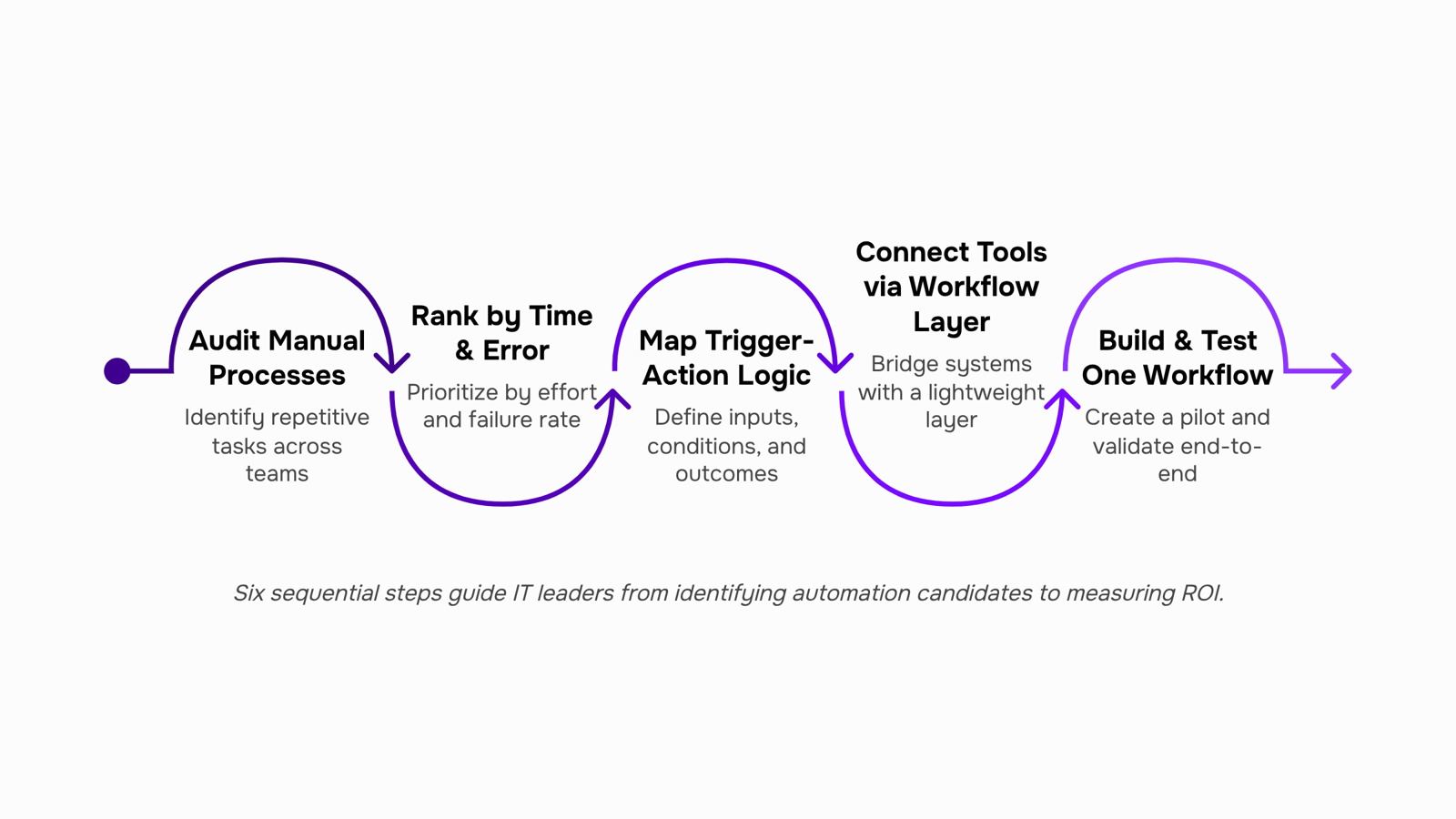
Step 1: Audit your manual processes
List every task your team repeats more than twice a week. Focus on data entry, status updates, approval requests, and report generation. These are the highest-value targets for business process automation. A good starting point is to identify which business processes are ready to automate before touching any tooling.
Step 2: Rank by time cost and error rate
Not every repetitive task is worth automating first. Prioritize processes where human error is frequent or where the task blocks downstream work. A billing team waiting on a manual status update from IT is a bottleneck that compounds daily.
Step 3: Map the trigger-action logic
For each candidate process, write out: what starts it, what happens next, and what the output should be. "When a new support ticket is created, assign it to the on-call engineer and notify the client within 5 minutes." If you can write it as a sentence, you can automate it.
Step 4: Connect your tools with a workflow automation layer
This is where most teams stall. Individual apps have their own automation features, but they don't talk to each other. Revo handles cross-tool workflow automation by connecting your internal and external apps into a single process flow, so a trigger in one system can drive an action in three others without manual handoffs. If you want to see how scheduled triggers work in practice, set up your first automated workflow on a schedule to understand the mechanics before building anything complex.
Step 5: Build and test one workflow first
Resist the urge to automate everything at once. Pick the highest-priority process from Step 2, build it, and run it in parallel with the manual version for one to two weeks. Compare outputs. Fix edge cases. Only then move to the next workflow.
Step 6: Measure, adjust, and expand
Track time saved, error rate, and cycle time before and after. Most teams running ai workflow automation see meaningful gains within the first month on their pilot process. Once the first workflow is stable, use the same trigger-action mapping from Step 3 to build the next one.
If you're evaluating the broader infrastructure this sits inside, choose the right IT automation platform for your setup before committing to a stack.
Can AI and automation replace human workers
The short answer: no, not in the way most teams fear.
AI and automation handle high-volume, rule-based work well. Routing support tickets, generating invoice drafts, flagging anomalies in usage data, syncing records across tools. These tasks follow predictable logic, and machines execute them faster and with fewer errors than people do.
What they don't do is judge ambiguity. A client escalates with a vague complaint. A project scope shifts mid-sprint. A vendor contract has a clause that needs interpretation. Those moments require context, relationship awareness, and accountability that no workflow can replicate today.
The realistic frame for IT company owners: AI handles the repeatable work so your team focuses on the judgment-heavy work. Understanding how an AI task manager improves productivity makes this clearer — the tool surfaces priorities, but a person still decides what matters most.
Displacement risk is lowest for roles built around client trust, technical problem-solving, and decisions with real consequences.
AI automation vs. traditional rule-based automation
The core difference comes down to what happens when reality doesn't match the script.
Dimension | Rule-based automation | AI automation |
|---|
Adaptability | Breaks on unexpected input | Adjusts to new patterns |
Setup complexity | Low — map the rules once | Higher upfront, easier long-term |
Error handling | Stops or routes to a human | Self-corrects within defined bounds |
Cost over time | Rises as edge cases multiply | Drops as the model learns |
Rule-based workflow automation fits well when your process is stable and the inputs are predictable — think invoice routing where every field is standardized. AI automation earns its place when inputs vary: unstructured support tickets, contract language, or multi-step approvals where context changes the outcome.
For most IT company owners, the practical starting point is hybrid: rule-based for high-volume, low-variance tasks; AI for the exceptions those rules can't handle. Understanding what ai and automation services actually deliver at each layer helps you decide where to invest first.
Closing
The real power of AI and automation isn't in replacing people—it's in removing the decision paralysis that slows teams down. You now have a clear six-step framework: audit your processes, rank them by impact, map the workflow, connect your tools, run the automation, and measure the results. Steps 4 through 6 are where most teams stumble because they're juggling multiple tools and trying to stitch workflows together manually. That's exactly where Revo steps in—it handles the connections, runs the workflows, and surfaces the metrics that prove ROI. The next logical move is to see a workflow built live so you can picture how this works in your environment. Ready to move from planning to implementation?
FAQ
How is AI used in automation?
AI handles pattern recognition, decision-making under ambiguity, and continuous improvement within automated workflows. While automation executes predefined steps, AI learns from data to classify, route, and escalate tasks intelligently—only routing to humans when confidence falls below your threshold.
What are the benefits of combining AI and automation in business?
Combined, they deliver speed (instant triggering, not scheduled runs), accuracy (catching anomalies rules miss), cost reduction (5–10 freed hours per person weekly), scalability (same workflow handles 50 or 5,000 tasks), and team focus on high-judgment work instead of repetition.
Can AI and automation replace human workers?
No. They eliminate repetitive tasks, freeing teams to focus on decisions requiring judgment—client relationships, architecture, escalations. The operational shift is from "do the work" to "decide what matters," not workforce reduction.
What are some examples of AI and automation in industry?
IT services use AI to triage tickets automatically, cutting first-response time by 40%. Healthcare automates prior authorization, reducing processing from days to hours. Finance uses AI to match invoices against POs, eliminating manual reconciliation and accelerating close cycles.
How do I get started with AI and automation in my company?
Audit manual tasks repeated 2+ times weekly, rank by time cost and error impact, map the workflow, connect your tools to execute it, run the automation, then measure time saved and accuracy gains. Start with one high-impact process this week.
What is the difference between AI automation and traditional automation?
Traditional automation runs predefined rules on a fixed schedule. AI automation learns from data, makes decisions when conditions are ambiguous, and improves continuously. Together, they handle both structured work and judgment calls in a single workflow.
How is AI and automation used in healthcare?
AI extracts data from clinical documents, checks eligibility, and submits prior authorizations to payers automatically. Healthcare systems have reduced authorization processing time from days to hours, eliminating manual data entry and reducing administrative burden.


 Elena Petrova15 September 2026


