TL;DR: Most AI-in-accounting articles stop at "it saves time." This one shows IT company owners exactly which tasks AI handles today, how cash flow forecasting works inside these tools, and a numbered process for adopting AI without replacing your existing accounting setup.
What artificial intelligence in accounting actually means
Most people use "AI in accounting" to mean any software that saves time on numbers. That's too broad to be useful.
The cleaner split: rule-based automation executes a fixed script (if invoice matches PO, approve it). It's fast and reliable, but it breaks the moment something falls outside the script. True artificial intelligence in accounting goes further. Machine learning models train on historical transaction data to recognize patterns, flag anomalies, and adjust their output as new data arrives. That's why AI can catch a duplicate vendor payment buried in 50,000 rows, where a rule-based filter would miss it entirely.
The three capabilities that matter in practice are pattern recognition (spotting what's normal), anomaly detection (flagging what isn't), and predictive modeling (estimating what comes next, like cash flow gaps). How AI flags financial anomalies and risk signals explains the detection layer in detail.
This distinction matters before you evaluate any tool. A system that only automates rules will still need a human to handle every exception. A system with real ML reduces the exceptions themselves. For a broader view of where this applies, see practical applications of AI across business operations.
Why accounting teams are adopting AI now
Four reasons explain why adoption is accelerating, and none of them are about following a trend.
Manual data entry eats real hours: Finance teams at small and mid-size companies spend a significant portion of their week keying in invoices, receipts, and transaction records by hand. AI financial automation removes that loop entirely, reading documents, extracting fields, and posting entries without a human in the middle. That time goes back to analysis.
Reconciliation errors compound quietly: A mismatched line item in week one becomes a reporting problem in week four. Machine learning catches those mismatches at the transaction level, before they reach the close. Teams using AI report meaningful drops in reconciliation rework, though exact figures vary by volume and system.
Month-end close shrinks: When accounting tasks automated with AI handle categorization and matching continuously, the close is mostly validation rather than data collection. Many teams cut their close cycle by days, not hours.
Cash visibility improves: Pattern recognition across receivables, payables, and historical cycles gives finance leads a forward view, not just a backward one. You can see a cash gap forming two weeks out instead of discovering it on day one. For IT company owners managing project-based billing, that signal matters. See how AI handles invoice processing step by step and how AI flags financial anomalies and risk signals for the mechanics behind both.
What accounting tasks AI can automate
The five tasks below account for the bulk of manual accounting hours — and each one has a measurable cost when done by hand.
Invoice processing: AI reads, classifies, and routes invoices without human input. Teams that rely on manual keying typically spend 10–15 minutes per invoice; AI-powered invoice management cuts that to under two minutes and reduces entry errors by catching mismatched PO numbers before they reach approval. AP automation workflows show how that plays out end-to-end.
Expense categorization: AI maps transactions to the correct GL codes using historical patterns. What used to require a finance analyst reviewing receipts line by line runs automatically at the point of card swipe or upload.
Bank reconciliation: AI matches bank statement lines to ledger entries in bulk. A process that takes a mid-size IT firm two to three days at month-end can close in hours.
Report generation: AI pulls data from multiple sources and assembles standard reports — P&L, cash flow, aging receivables — on a set schedule, without someone manually exporting and formatting spreadsheets.
Anomaly flagging: AI monitors transaction patterns continuously and surfaces outliers: duplicate invoices, unusual vendor payments, spend that falls outside policy. Manual spot-checks catch these inconsistently; AI catches them before they compound.
Together, these are the accounting tasks most commonly automated with AI, and they share a common trait: high volume, low judgment, high cost when wrong.
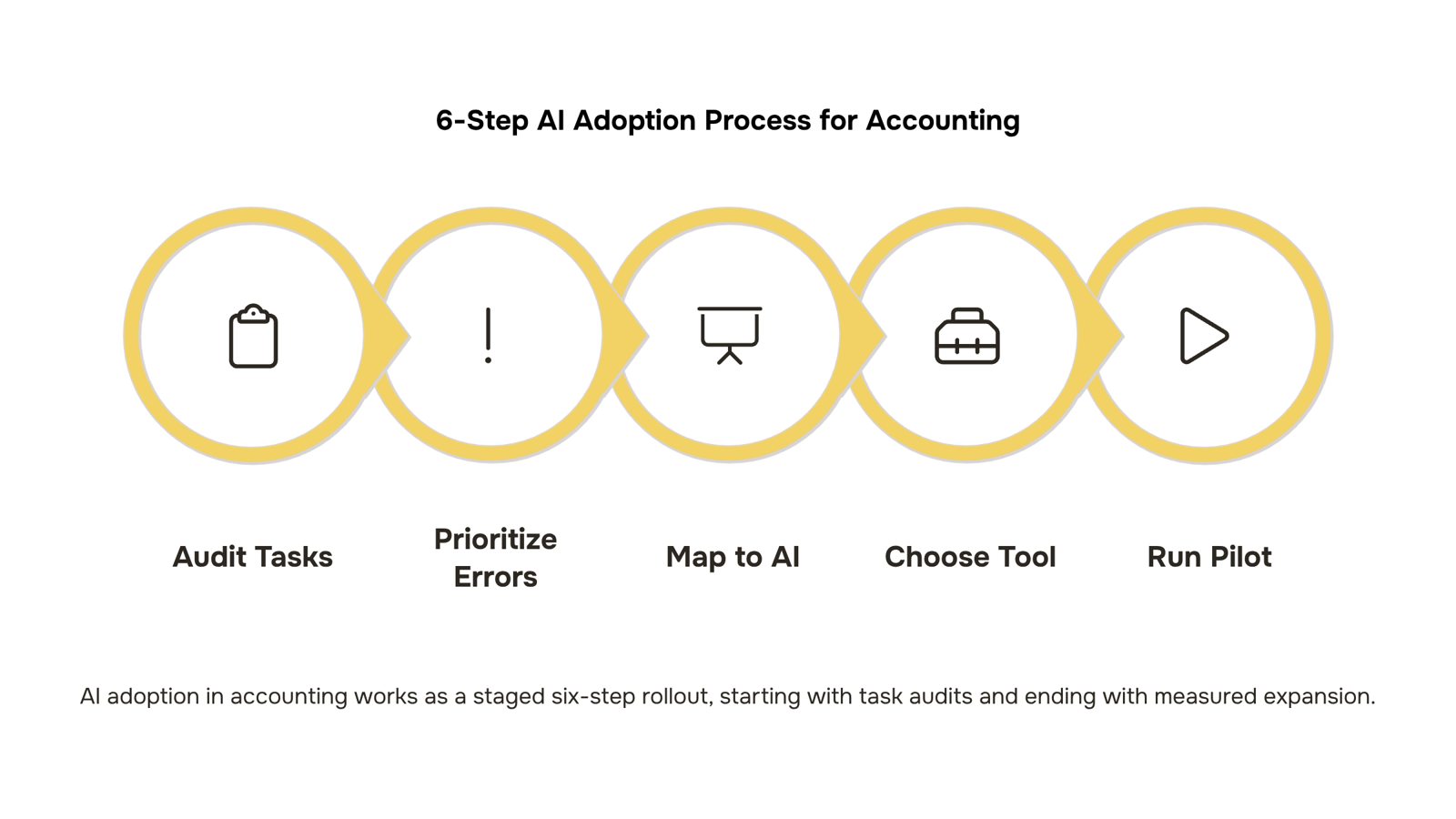
How to use AI in accounting: 6 steps
Start where the pain is clearest: your team's manual work log.
Step 1: Audit your manual accounting tasks
List every task your finance team repeats weekly — data entry, invoice matching, expense coding, reconciliation, report pulls. Time each one. You're looking for tasks that are high-frequency, rule-based, and error-prone. Those are your automation targets. If your team spends more than a few hours a week on any single one of these, that's where AI pays back fastest.
Step 2: Prioritize by error cost, not just time
Not all manual tasks carry equal risk. Invoice processing errors, for example, can trigger late payment penalties or damage vendor relationships. Reconciliation gaps can distort your cash position for weeks. Rank your audit list by what goes wrong when a human makes a mistake, not just by how long the task takes. AI financial automation tends to deliver the clearest ROI when it removes both the time cost and the downstream error cost at once.
Step 3: Map tasks to AI capabilities
Match each priority task to a specific AI function:
Invoice processing and three-way matching → AI-powered document extraction and validation
Expense categorization → ML classification models trained on your chart of accounts
Bank reconciliation → pattern-matching against transaction rules
Anomaly detection → statistical outlier flagging across your ledger
Financial reporting → automated data aggregation with narrative generation
If you're unsure how AI handles invoice processing step by step, that's a good place to start before selecting a tool.
Step 4: Choose a tool that fits your existing stack
Avoid tools that require a full data migration before you see any value. Look for solutions that connect to your existing accounting software and can ingest historical transaction data on day one. Inzo is built for exactly this — it sits inside WorksBuddy and handles invoicing, payments, expense tracking, and financial reporting without replacing your current workflow from scratch.
Step 5: Run a controlled pilot on one task
Pick one task from your priority list — invoice matching is a common first choice — and run AI alongside your manual process for two to four weeks. Track error rates, processing time, and exception volume. This gives you a clean before-and-after comparison and builds internal confidence before you expand.
Step 6: Measure, adjust, and expand
Once your pilot shows consistent results, document the time and error savings, then roll out to the next task on your list. AI in accounting and finance compounds: each automated task frees up capacity for the next one. Knowing how AI flags financial anomalies and risk signals helps you set the right exception thresholds as you scale.
Artificial intelligence in accounting works best when you treat it as a staged rollout, not a single switch to flip.
How AI improves cash flow forecasting specifically
Spreadsheet-based cash flow projections work by looking backward. You pull last quarter's numbers, adjust for known invoices, and make an educated guess. The problem: that guess ignores the patterns hiding inside your data.
AI cash flow forecasting works differently. Instead of a static model you update manually, it reads continuous signals: receivables aging, invoice payment history, seasonal billing cycles, and client-specific delay patterns. A client who reliably pays 12 days late isn't a surprise to the model. It's already priced in.
The mechanism has three layers:
Historical pattern recognition — the model trains on months or years of payment data to identify which clients, invoice sizes, and billing periods carry the most timing risk.
Receivables aging signals — outstanding invoices are weighted by probability of collection, not just dollar value. A 45-day-overdue invoice from a slow payer gets discounted differently than one from a client with a clean record.
Scenario modeling — you can test "what if 20% of Q3 invoices come in late?" before it happens, not after.
This is where AI-powered invoice management changes the forecast quality directly. When invoice data is clean and timestamped accurately, the model has better inputs. Inzo feeds that data automatically, so your cash flow view reflects reality rather than whatever someone last updated in a spreadsheet.
For IT company owners billing on project milestones or retainers, this matters. Milestone slippage and scope changes create irregular cash timing that static projections consistently miss. AI catches those patterns early enough to act on them.
Common mistakes when rolling out AI in accounting
The most common failure in AI financial automation isn't the technology. It's what happens before the technology runs.
Automating a broken process just produces wrong answers faster. If your invoice approval workflow has three redundant steps, AI inherits all three.
Skipping data cleanup is the next trap. AI cash flow models read historical patterns, so dirty data (duplicate vendors, miscategorized expenses, inconsistent payment terms) trains the model on noise. Garbage in, confident garbage out.
Treating AI output as final is where real damage happens. AI flags anomalies and generates forecasts, but a finance lead still needs to review before anything posts or pays.
Siloing the rollout compounds all three. Teams that deploy one AI tool for invoicing and another for reporting end up with the same data-fragmentation problem they started with, just more expensive. This connects directly to how AI-based asset management compares to traditional methods — integration gaps undermine accuracy regardless of the use case.
Standalone AI tools for accounting create a familiar problem: your invoice data lives in one place, your cash flow model in another, and your expense approvals somewhere else entirely. That fragmentation is what makes artificial intelligence in accounting unreliable in practice, not the AI itself.
Inzo connects invoicing, payment tracking, and vendor management in one place, so the AI draws from a single, clean data source. Pair it with Revo for workflow automation and approvals happen without manual handoffs. You can see how AI handles invoice processing step by step and how AI flags financial anomalies and risk signals when the underlying data is unified rather than scattered.
One platform. One data layer. Reliable outputs.
Closing
AI in accounting isn't about replacing your team—it's about freeing them from the repetitive work that masks the real problems. When invoice processing, reconciliation, and anomaly flagging run automatically, your finance lead can actually forecast cash instead of chasing last month's numbers. Start by timing your team's manual tasks this week, then pick the one that hurts most when it goes wrong. That's your pilot. Once you see the error rate drop and the time reclaim, scaling becomes obvious. The question isn't whether to adopt AI—it's which task to automate first. If cash visibility is your immediate pain, explore how Inzo handles invoice management and cash flow forecasting inside a single platform, so you're not scrambling to know where you stand until it's too late.
FAQ
What accounting tasks can be automated with artificial intelligence?
Invoice processing, expense categorization, bank reconciliation, report generation, and anomaly flagging are the five highest-impact tasks. Each one is high-volume, rule-based, and error-prone—exactly what AI handles best.
How can artificial intelligence improve cash flow forecasting in accounting?
AI uses pattern recognition across receivables, payables, and historical cycles to predict cash gaps two weeks out instead of discovering them after they hit. You see the signal forming before the crisis.
How does AI help accountants predict future cash flow more accurately?
Machine learning models train on your transaction history to recognize seasonal patterns, vendor payment cycles, and collection timing. That predictive layer replaces guesswork with data-backed forecasts.
What are the benefits of using AI-powered cash flow forecasting tools?
Earlier visibility into gaps, fewer reconciliation errors, faster month-end close, and time freed up for strategic analysis instead of data entry. For IT company owners, that forward view is critical when billing cycles are project-based.
Is AI in accounting only useful for large finance teams?
No. Mid-size and small teams see the fastest payback because they spend the most time on manual entry. A team of three doing invoices by hand gains more from automation than a team of ten with partial automation already in place.
How do I know if my accounting data is ready for AI tools?
If you can connect your existing accounting software and have at least three to six months of historical transaction data, you're ready. Look for tools that don't require a full migration before delivering value.


 Megan Foster15 September 2026


