TL;DR: Most guides on LinkedIn profile data extraction stop at "here's a scraper tool." This one walks through a complete five-step workflow, from raw profile URL to enriched lead record, using compliant third-party enrichment APIs that don't touch LinkedIn's infrastructure directly. You'll leave with a working automation blueprint your team can configure this week.
LinkedIn profile data extraction automation is the process of pulling structured data from LinkedIn profiles (name, title, company, location, contact details) into your CRM or sales workflow without manual copy-paste. A sales rep triggers it; the system does the rest.
That's different from scraping. Scraping typically means sending automated HTTP requests to LinkedIn's servers to harvest data in bulk without user authorization. LinkedIn's User Agreement explicitly prohibits that. What IT company owners are actually looking for is something narrower: tools that work through LinkedIn's official APIs or browser-based enrichment flows that respect rate limits and user consent. You can extract LinkedIn profile data without scraping by using enrichment layers that operate within compliant boundaries.
There are two distinct workflow modes worth separating here. Single-profile enrichment means you're on a prospect's profile and want their data in your CRM in seconds, pulled automatically without switching tabs. Bulk URL import means you have a list of 500 to 1,000 LinkedIn profile URLs and want them processed in one pass, imported as structured lead records rather than entered one by one.
Both modes fall under linkedin profile data extraction automation. The compliance difference between them and illegal scraping comes down to authorization, rate limits, and whether a human initiated the request.
Why sales teams automate this process instead of doing it by hand
Manual LinkedIn prospecting has a real cost. A sales rep copying name, title, company, and contact details from individual profiles can burn 5 to 10 hours a week on data entry alone, time that comes directly out of actual selling.
When you automate LinkedIn lead capture, three things improve at once.
Data accuracy goes up. Manual entry introduces typos, outdated titles, and missing fields. Enrichment-based automation pulls directly from the source at the moment of capture, so the record in your CRM reflects what the profile actually says today.
Response speed improves. A lead who visits your page or matches a saved search can be enriched, scored, and routed to a rep within minutes instead of sitting in a spreadsheet until someone processes the batch. That gap between "identified" and "contacted" is where most pipeline leaks.
Volume becomes manageable. Paste URL, get everything in seconds is the difference between enriching one profile at a time and processing a full prospect list. For teams running outbound at any real scale, importing 500 to 1,000 leads in one flow changes what a single SDR can cover in a week.
The compounding effect is what makes automated lead data collection worth the setup. Less time on admin, faster first contact, and cleaner data all push in the same direction: more conversations from the same headcount. Most LinkedIn outreach fails before it starts because the data behind it is st
What data you can actually pull from a LinkedIn profile
Enrichment-based automation pulls structured data from a LinkedIn profile and maps it directly into your CRM or outreach tool. Here is what you actually get:
Full name and headline — the job title as the person wrote it, not a normalized guess
Current company and department — useful for account-based targeting
Location — city and country, helpful for territory routing
Years in role and seniority level — signals buying authority
Email address — available when the profile is connected or verified through a third-party enrichment layer, not guaranteed on every record
What you do not get through compliant LinkedIn lead enrichment: private messages, connection lists, or any data the member has hidden from public view. That boundary matters when choosing a method.
Single-profile enrichment works for one-off lookups. For prospecting at scale, importing hundreds of leads at once is the practical path. Most teams underestimate how much the field coverage differs between these two workflows before they commit to one.
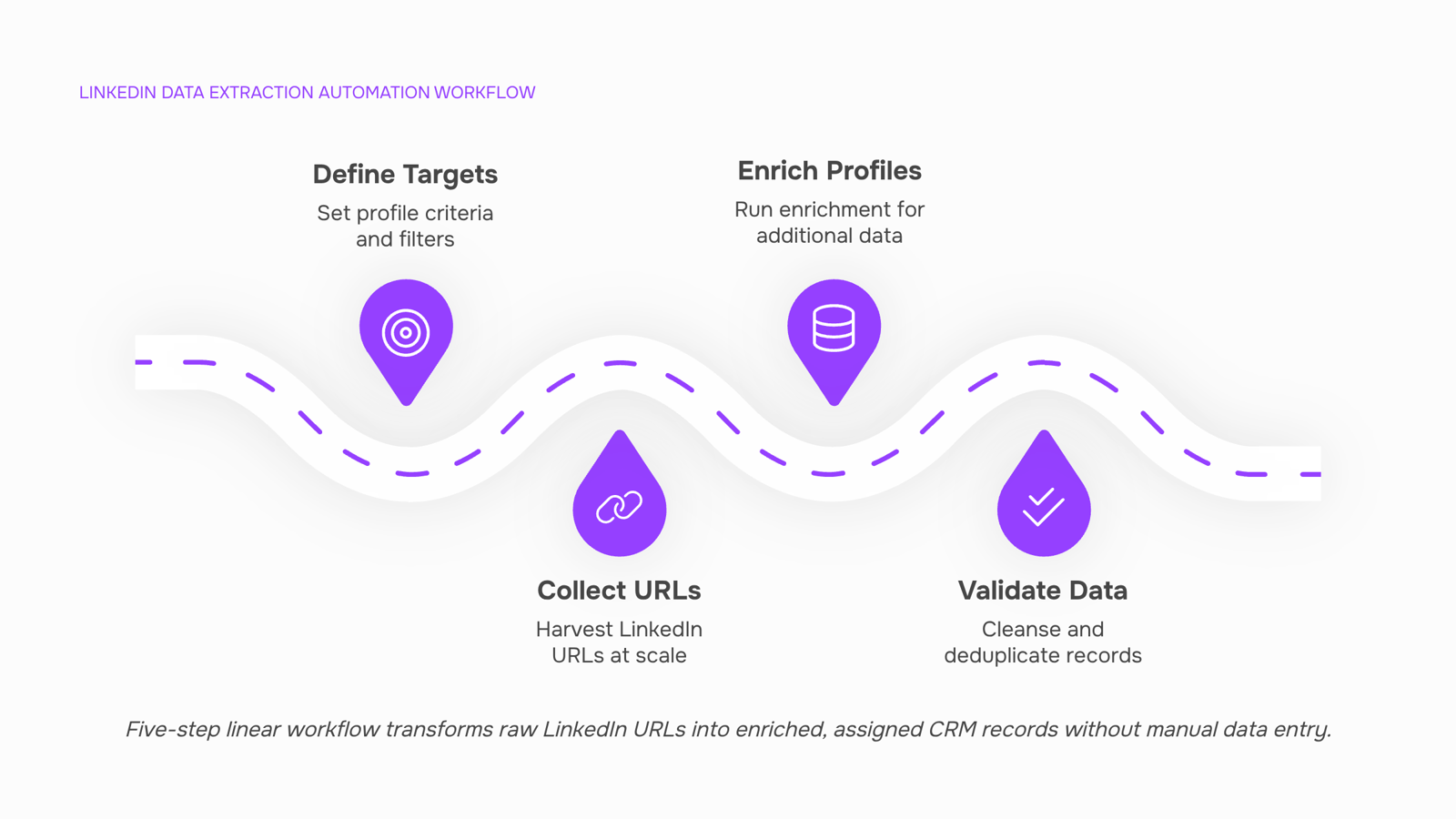
The workflow breaks into five distinct actions. Each one is worth getting right, because a mistake at step one (targeting the wrong profiles) compounds through every step that follows.
Step 1: Define your target profile criteria
Before you touch any tool, write down exactly who you are trying to reach: job title, seniority level, industry, company size, and geography. Vague targeting produces vague lists. A concrete example: "VP of Engineering at B2B SaaS companies with 50–200 employees in North America" gives your enrichment tool a real filter to work against, rather than pulling thousands of loosely matched contacts you will never use.
Step 2: Collect LinkedIn URLs at scale
Once your criteria are set, gather the profile URLs for people who match. LinkedIn Sales Navigator's search filters are the most reliable way to do this at volume. Export your search results, and you have a spreadsheet of profile URLs ready for the next stage. This is where single-profile enrichment and bulk LinkedIn URL import diverge as workflows: if you are working a list of 500 prospects, importing all URLs in one batch saves hours compared to running profiles one at a time.
Step 3: Run enrichment against each profile
Feed your URL list into an enrichment platform. The tool matches each URL to its data sources and returns the fields covered in the previous section: full name, current title, company, location, and email address when available. Paste a URL and get the enriched record back in seconds, rather than opening each profile manually and copying fields into a spreadsheet. For a list of 200 contacts, that difference is roughly the gap between a 10-minute task and a two-hour one.
Step 4: Validate and deduplicate before import
Enriched data is not always clean. Duplicate records, outdated titles, and missing emails are common, especially when pulling from a large list. Run a deduplication pass before you push anything to your CRM. Most enrichment platforms flag low-confidence records; filter those out or route them to a manual review queue. Skipping this step means your CRM inherits the mess, and sales reps end up calling the wrong person or emailing a role that no longer exists.
Step 5: Push enriched records to your CRM and assign ownership
Once the list is clean, import it directly into your CRM with ownership rules already configured. Assign records by territory, vertical, or rep capacity, depending on how your team is structured. The goal is that a sales rep opens their CRM in the morning and finds a set of enriched, assigned leads ready to work, with no manual data entry involved. That is what linkedin profile data extraction automation is actually for: removing the gap between "found a prospect on LinkedIn" and "rep has a complete record and knows it is theirs."
If your current process has any manual steps between steps three and five, that is where most teams lose time. Understanding why most LinkedIn outreach workflows break down often comes down to exactly that gap: enriched data sitting in a spreadsheet instead of flowing into the system where reps actually work.
Three tool categories handle LinkedIn data extraction automation, and they're not interchangeable.
Enrichment platforms (like Apollo, Clay, or Lusha) pull structured data from a LinkedIn URL and return name, title, company, email, phone, and firmographic fields in one call. They're built for bulk LinkedIn URL import, compliance documentation is usually available, and most connect directly to Salesforce, HubSpot, or Pipedrive. The tradeoff: they run on third-party data licenses, so field coverage varies by region and industry.
Browser extensions work profile-by-profile inside LinkedIn's interface. They're fast for single-profile enrichment but don't scale to automated lead data collection across hundreds of records. Most lack native CRM push; you export a CSV and import it manually. Compliance posture here is the weakest category, since extensions interact directly with LinkedIn's front end in ways that can conflict with its User Agreement.
API-based tools sit at the other end of the spectrum. They require developer setup but give you the most control: custom field mapping, webhook triggers, and the ability to import 500–1,000 leads in one seamless flow into your CRM without manual steps. Compliance depends entirely on which data provider backs the API.
Category | Compliance posture | Bulk capability | CRM integration |
|---|
Enrichment platforms | Moderate to strong | Yes | Native connectors |
Browser extensions | Weakest | No | Manual CSV export |
API-based tools | Depends on provider | Yes | Custom via webhooks |
For most IT company owners who want to automate LinkedIn lead capture without engineering overhead, enrichment platforms hit the right balance. If you want to get enriched profile data in seconds and have it land in your CRM automatically, that's where to start.
Three errors account for most failed linkedin profile data extraction automation setups.
Ignoring LinkedIn's Terms of Service is the most expensive mistake. LinkedIn's User Agreement explicitly restricts automated scraping of profile data. Tools that extract LinkedIn profile data without scraping — using official APIs or permission-based enrichment — stay compliant. Tools that simulate browser sessions or harvest data in bulk without authorization risk account suspension or legal exposure. Check your vendor's compliance posture before you run a single workflow.
Skipping data validation means dirty records flow straight into your CRM. A missing job title or wrong company domain corrupts every downstream sequence that depends on it. Build a validation step that flags incomplete or mismatched fields before records sync.
Extracting without a lead assignment process is where most teams lose time. Data lands in a CRM with no owner, no follow-up trigger, and no urgency. If your outreach workflow has gaps like this, the extraction work was wasted.
Stop Enriching Leads Manually — Your CRM Deserves Better Data
Manual LinkedIn data extraction is a solved problem. The five-step workflow in this article gives your team a repeatable system that runs without anyone copying cells between tabs or chasing down outdated job titles before a call.
The practical outcome is straightforward. Your sales team works from records that are current, complete, and consistent. Outreach gets more targeted because the data behind it is accurate. And the hours your team spent on manual lookups go back to work that actually moves deals forward.
Teams that skip this step tend to accumulate stale data faster than they can clean it. That compounds into worse pipeline visibility, missed signals, and outreach that lands at the wrong person with the wrong message.
The five steps that make this work:
Define the exact fields your CRM needs before you touch any tool
Set up compliant extraction using a browser extension or third-party enrichment layer
Map extracted fields directly to your CRM schema so nothing lands in a freeform notes field
Automate enrichment triggers so new URLs kick off the workflow without manual input
Validate output on a regular cadence to catch drift before it affects pipeline quality
Each step removes a specific failure point. Skip one and the system still breaks at that joint.
If you want to see this workflow running end to end, Lio handles it without custom code. Paste a single LinkedIn URL and get a fully enriched lead record in seconds. Or import up to 1,000 URLs at once for bulk prospecting runs. Either way, the record lands in your CRM clean, mapped, and ready for your sales team to act on.


 Elena Petrova15 September 2026


