TL;DR: Most burndown chart guides show you how to draw the ideal line and leave interpretation to guesswork. This one gives IT team leads a working framework: how to build a scrum burndown chart correctly, and how to read the four deviation patterns that show up in real sprints, with a specific response for each one.
What a Burndown Chart Does in Scrum
A burndown chart is a visual tracker that shows how much work remains in a sprint versus how much time is left. The horizontal axis is time (sprint days), the vertical axis is remaining work (usually story points or hours). As the team completes tasks, the line drops. When it reaches zero by the last day, the sprint delivered on plan.
The purpose of a burndown chart in project management is early warning, not retrospective reporting. If the line flattens on day three, you know scope is stuck before the sprint is half over. That's the window where a Scrum team can still act: re-prioritize, remove blockers, or renegotiate scope with the product owner.
The 2020 Scrum Guide doesn't mandate burndown charts specifically. It requires that the team track progress toward the Sprint Goal, but leaves the format to the team. Burndown charts are the most common format because they make delivery risk visible at a glance, not buried in a status update.
For a deeper look at how the sprint burndown chart works inside an agile workflow, the mechanics translate directly to daily standup decisions.
Two things the chart doesn't show: individual contributor output and task quality. It measures remaining work, nothing else. Teams that treat it as a performance scorecard tend to game the numbers, which defeats the point entirely.
The next section covers the two main chart types, because a sprint burndown chart and a release burndown chart answer different questions.
Sprint Burndown vs. Release Burndown: Which One You Need
The two types serve different questions, so picking the wrong one wastes your team's time.
A sprint burndown chart tracks remaining work within a single sprint, typically measured in story points or hours. It answers one question: is this sprint on track to finish what was committed? Your axes run from day one to the last day of the sprint. This is the agile burndown chart most Scrum teams check in daily standups. For a deeper look at how it functions inside a sprint, see sprint burndown chart in agile project management.
A release burndown chart zooms out to the full release, plotting remaining backlog items across multiple sprints. It answers a different question: will the product ship by the target date given current velocity? Teams use it for roadmap conversations with stakeholders, not daily standups.
Dimension | Sprint burndown | Release burndown |
|---|
Time horizon | One sprint (1–4 weeks) | Multiple sprints (months) |
Y-axis unit | Story points or hours | Backlog items or story points |
Primary audience | Dev team | Product owner, stakeholders |
Update frequency | Daily | End of each sprint |
If you're managing day-to-day delivery risk, use the sprint version. If you're answering "when will this ship," use the release version. Most teams need both, just not in the same meeting.
How to Build a Scrum Burndown Chart Step by Step
Before you touch a chart, you need two things settled: your unit of measurement and your sprint scope. Most teams use story points; some use hours. Either works for a burndown chart scrum setup, but mixing them mid-sprint breaks the chart. Pick one and lock it in during burndown chart sprint planning.
Here's the exact build sequence:
Total your sprint backlog: Add up every story point (or hour) committed for the sprint. A two-week sprint for a five-person team typically lands between 30 and 60 points, depending on velocity history.
Plot the ideal burndown line: Draw a straight line from your total on Day 1 to zero on the last day of the sprint. This is your reference, not a target. The 2020 Scrum Guide doesn't mandate burndown charts, but this line is what makes the chart readable.
Set up your axes: X-axis: sprint days (or working days only, if your team doesn't count weekends). Y-axis: remaining work in your chosen unit. Label both clearly before you share the chart with stakeholders.
Update remaining work daily: At the end of each day, subtract completed work and replot the actual line. The key word is remaining, not completed. If a task is 50% done, it still counts as 100% remaining until it meets your team's definition of done.
Adjust for scope changes immediately: If the product owner adds or removes work mid-sprint, update the total and note it on the chart. An unexplained spike in remaining work confuses everyone reviewing the chart later.
For a deeper walkthrough on how to create an agile burndown chart with template options, that guide covers tooling choices from spreadsheets to dedicated scrum software.
The chart itself is just data. What matters is what the shape tells you — which is exactly what the next section covers when it walks through the four deviation patterns your actual line will produce.
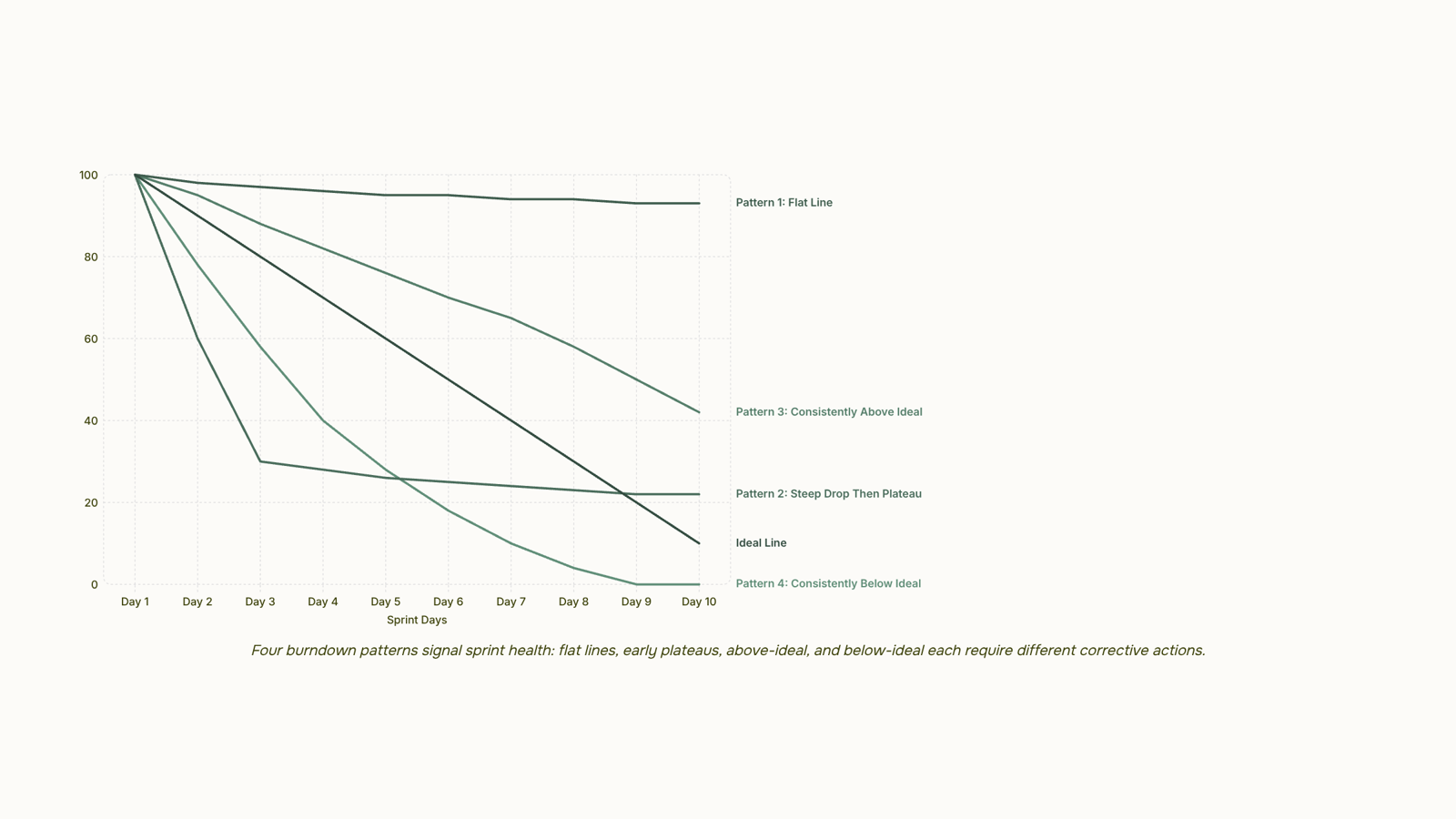
How to Interpret a Burndown Chart: Four Patterns That Matter
Reading a burndown chart takes about 30 seconds once you know the four patterns. Each one maps to a specific sprint condition — and confusing them leads to the wrong response.
Pattern 1: Flat line
The remaining work line stops moving for two or more days. Work isn't getting done, or completed work isn't being logged. Before assuming a productivity problem, check the tracking first. If updates are current, the team has hit a blocker — dependency, unclear acceptance criteria, or a technical wall. A flat line mid-sprint on your sprint burndown chart in agile project management is the earliest signal that the sprint is in trouble.
Pattern 2: Steep early drop, then plateau
The line falls fast in days one through three, then levels off. This usually means the team front-loaded easy tasks and left the complex ones for later. It looks like progress but often masks scope risk. By day seven or eight, the remaining work is harder per point than what was burned early, and the team runs out of runway.
Pattern 3: Consistently above the ideal line
The actual line tracks above the ideal line for most of the sprint. Work is burning slower than planned. Common causes: story points were underestimated, the team lost capacity (unplanned leave, incidents, meetings), or stories turned out to be larger than scoped. This is the most common deviation pattern in agile burndown charts — most teams have experienced a sprint where the line simply never catches the ideal.
Pattern 4: Consistently below the ideal line
The actual line runs below the ideal, meaning work is completing faster than planned. This sounds like good news. Sometimes it is. But it often signals that stories were overestimated, the sprint was under-committed, or the team is burning points by marking work done before it meets the definition of done. If this pattern repeats across sprints, revisit your estimation process rather than celebrating the velocity.
One way to sharpen your reading: compare the pattern against your velocity history. A single sprint above the ideal line is noise. Three consecutive sprints above it is a capacity or estimation signal worth addressing in planning.
For a deeper look at how these patterns connect to sprint structure, how to create an agile burndown chart covers the setup decisions that make interpretation easier from day one. And if you're choosing between tracking formats, types of boards used in project management puts burndown charts in context alongside kanban and other visual tools.
What to Do When the Chart Shows a Problem
Reading a pattern is only useful if it changes what you do next. Here's how to act on each signal.
Flat line: Work is stuck. Before assuming the team is blocked, check whether tasks are actually being updated. If the board is current and the line still won't move, run a quick capacity check — someone may have been pulled into unplanned work. Redistribute or descope before day four.
Steep early drop: The sprint looks healthy, but scope creep is the usual culprit when the line flattens after day three. Revisit the backlog mid-sprint and confirm no new items were added without removing equivalent story points.
Consistently above ideal: The team took on more than their velocity supports. The honest fix is scope negotiation with the Product Owner — cut lower-priority items now rather than carrying them into the next sprint as incomplete work.
Consistently below ideal: The sprint was underloaded, or estimates were too generous. Use this as re-estimation data, not a win. Tighten point sizing before the next planning session.
One principle applies to all four: the burndown chart scrum teams trust is one reviewed mid-sprint, not just at the retrospective. Waiting until the end removes every option except regret.
For a deeper look at what are the benefits of using a burndown chart beyond sprint tracking, the sprint burndown chart in agile project management guide covers team-level and portfolio-level applications.
Common Mistakes That Make Burndown Charts Misleading
Three data errors account for most cases where a sprint burndown chart looks healthy but isn't.
Mid-sprint scope additions are the most common. When new stories get added without adjusting the ideal line, the chart shows the team burning down faster than reality. The remaining work drops, but the baseline was wrong from day one.
Bulk updates at sprint end produce the classic flat-then-cliff shape. Tasks sit at 100% remaining for eight days, then drop to zero on day nine. That pattern tells you nothing useful about how to interpret a burndown chart mid-sprint, which is the only time the data can actually change outcomes.
Partial-completion counting is subtler. Some teams log 50% done when a task is "in progress." Story points are binary in Scrum: done or not done. Counting partials creates a smooth downward slope that masks the real risk, which is that nothing is actually shippable yet.
All three errors share the same root cause: the team is updating the chart to look good rather than to reflect reality. A burndown chart scrum teams can trust requires a simple rule: update task status daily, in small increments, and count only completed work.
For a deeper look at how these patterns show up across different chart types, building a burn down chart in agile covers the structural setup that prevents them.
Closing
A burndown chart only works if your team reads it consistently and acts on what it shows. The four deviation patterns—flat lines, early drops with plateaus, consistently above the ideal, and consistently below—each tell a different story about sprint health. Once you spot the pattern, you know whether to unblock work, re-estimate, or adjust scope before the sprint ends.
After you've built and read a few burndown charts manually, consider automating the process. Taro generates the sprint burndown automatically from task completion data, so your team sees deviation patterns in real time without updating a spreadsheet after every standup. Try it on your next sprint and watch how much faster your team catches delivery risk.
FAQ
How do I create a burndown chart in Agile?
Total your sprint backlog, plot a straight line from your total on Day 1 to zero on the last day, set up your axes (days and remaining work), then update remaining work daily by subtracting completed tasks. Adjust immediately if scope changes mid-sprint.
What is the purpose of a burndown chart in project management?
A burndown chart provides early warning about sprint delivery risk. If the line flattens mid-sprint, you can still act—re-prioritize, remove blockers, or renegotiate scope before it's too late.
How do I interpret a burndown chart?
Watch for four patterns: flat lines signal blockers, steep drops followed by plateaus hide scope risk, lines consistently above the ideal show capacity or estimation gaps, and lines below the ideal suggest overestimation or premature task completion claims.
What are the benefits of using a burndown chart?
Burndown charts make delivery risk visible at a glance, enable faster standup decisions, catch blockers early, and reveal estimation or capacity problems before they derail the sprint.
Can I use a burndown chart for non-Agile projects?
Yes. Any project with a fixed scope, timeline, and measurable work units can use a burndown chart. It's not exclusive to Scrum, though Scrum teams use it most often.
What is the difference between a burndown chart and a burnup chart?
A burndown chart shows remaining work dropping to zero. A burnup chart shows completed work rising to the total. Both track the same data; burnup is easier for stakeholders to read because it emphasizes progress rather than what's left.
How often should a burndown chart be updated during a sprint?
Update it daily, ideally at the end of each day or before standup. The chart loses its early-warning value if updates lag by more than a day.


 Elena Petrova11 September 2026


