TL;DR: Most guides on lead management solutions hand you a feature matrix and call it a decision. This one gives IT company owners a framework tied to specific process failures — slow response times, misrouted leads, no follow-up visibility — so you can match a solution to the exact breakdown in your pipeline, not the longest checklist.
What a lead management solution actually does
A lead management solution is purpose-built software that moves a prospect from first contact to qualified opportunity without manual handoffs. A generic CRM stores contacts. A lead management solution acts on them: it captures incoming leads from every source, scores them against your ideal customer profile, and routes them to the right rep automatically.
The distinction matters because the failure points are different. CRMs break down when data entry is inconsistent or follow-up falls through the cracks. Lead management software breaks down when qualification criteria are vague or routing rules don't match how your team actually works. Knowing which system you're evaluating tells you which problems you're solving.
The core workflow has three connected stages: capture, qualify, and assign. Each stage feeds the next. A lead captured without a score sits in a queue. A scored lead without a routing rule waits for someone to notice it. Sales lead tracking only produces results when all three stages run together.
For IT company owners, this usually means replacing a spreadsheet or a CRM used as a spreadsheet. If you want to understand how to implement effective lead management across those three stages, the next section gives you a diagnostic to find exactly where your pipeline is breaking first.
Signs your current process needs a solution
Most IT company owners don't realize their pipeline is broken until a deal slips. By then, the damage is already done. These signals tell you where the failure lives before you start evaluating any lead management solutions.
Leads go quiet after the first touchpoint: If your team relies on manual reminders to follow up, some leads will always fall through. Automated lead follow-up removes that dependency entirely.
No one owns the lead qualification process: When qualification criteria live in someone's head rather than a defined system, reps score leads differently and sales forecasts become guesswork.
Response time is measured in hours, not minutes: Research consistently shows that leads contacted within the first five minutes convert at significantly higher rates than those reached an hour later. If your current setup can't trigger an immediate response, you're losing deals on timing alone.
You can't see where leads stall: If your pipeline visibility ends at "open" and "closed," you have no way to diagnose drop-off or fix it.
Spreadsheets or your CRM are doing double duty: A generic CRM tracks relationships; it wasn't built to capture, score, and route inbound leads in real time. Using it that way creates gaps.
If two or more of these describe your team, the sales lead management process you have now has structural gaps, not just execution problems.
Five benefits tied to real sales outcomes
Speed is the most measurable benefit. Research from Harvard Business Review found that contacting a lead within an hour makes you nearly seven times more likely to qualify them than waiting even 60 minutes longer. A lead management solution removes the manual handoff that creates that gap.
The five outcomes worth building a case around:
Speed to first contact: Automated routing gets leads to the right rep in seconds, not hours. That alone moves conversion rates in a direction your CFO will notice.
Pipeline visibility: Every lead has a status, a score, and an owner. No more "I thought you were following up on that."
Conversion rate: Scored leads mean reps work the highest-probability deals first instead of whoever emailed last. Prioritization is a conversion strategy.
Cross-team alignment: When marketing, sales, and ops share one system, handoff disputes disappear. The sales lead management process stops living in someone's inbox.
Scalability: A cloud-based lead management setup handles ten leads or ten thousand without adding headcount. The workflow scales; your team's bandwidth doesn't have to.
Each benefit compounds the others. Faster response improves conversion. Better visibility improves alignment. Alignment makes scaling less chaotic. If you want to see how these capabilities connect in practice, how to implement effective lead management walks through the sequencing.
The next section covers which features actually deliver these outcomes.
Features you actually need in a lead management solution
Most feature lists for lead management software read like a spec sheet. They tell you what the software does, not which capabilities actually change how your team operates. Here's how to cut through that.
Must-have capabilities are the ones that remove manual work from the critical path:
Multi-source lead capture pulls inquiries from web forms, email, ads, and third-party integrations into one place automatically. Without it, someone on your team is copy-pasting leads from five tabs, and some fall through.
Automatic lead routing assigns each lead to the right rep the moment it arrives, based on territory, product line, or capacity. This is the mechanism behind faster response times, and lead capture and routing done well is what separates a 5-minute response from a 5-hour one.
Lead scoring ranks contacts by fit and intent so your team works the right deals first, not just the newest ones.
Sales lead tracking gives every rep a single view of where each contact sits, what was said, and what happens next. No spreadsheet archaeology.
Pipeline visibility lets managers see conversion rates, stage-by-stage drop-off, and rep workload at a glance.
Nice-to-have features add value once the core is working:
AI-generated follow-up suggestions
Predictive close probability
Advanced reporting dashboards
The interaction between these layers matters more than any single feature. Capture feeds routing. Routing feeds tracking. Tracking feeds scoring. When those four work together, your sales lead management process runs without manual intervention between steps.
Lio connects all four in one platform, which is worth understanding before you evaluate standalone tools. For a broader comparison, the best lead management tools for sales teams breaks down how these capabilities stack up across options.
How a lead management solution automates your sales process
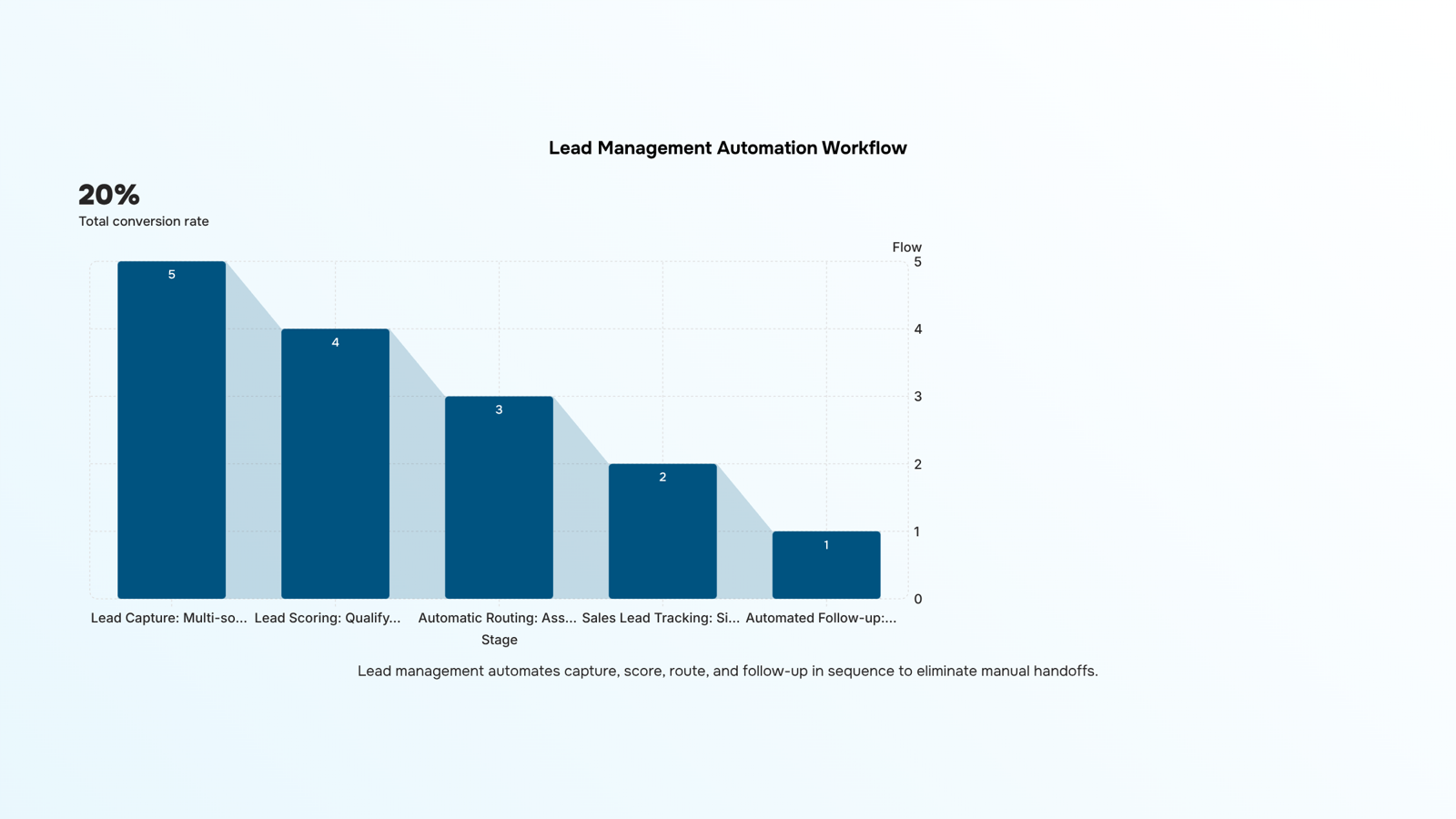
Automation in lead management works in a specific sequence, and understanding that sequence is what separates teams that respond in minutes from those that respond in hours.
The lifecycle starts at lead capture. A prospect fills out a form, clicks an ad, or replies to an email. Without automation, that lead sits in a spreadsheet or inbox until someone notices it. With a lead management solution, it enters a pipeline immediately, tagged by source, channel, and any qualifying data the form collected.
Next comes scoring. The system evaluates each lead against criteria your team defines: company size, job title, page visits, or budget signals. Leads that hit a threshold move forward. Leads that don't get queued for nurture sequences instead of clogging your rep's calendar.
Then routing. This is the mechanism that actually cuts response time. Instead of a sales manager manually assigning leads each morning, the system matches each lead to the right rep based on territory, product line, or capacity, and notifies that rep immediately. Research on lead response time consistently shows that the first team to respond wins the conversation, and real-time routing is what makes that possible.
Finally, automated lead follow-up kicks in. If a rep hasn't contacted a lead within a set window, the system sends a reminder or triggers a follow-up sequence automatically. Nothing falls through because someone was busy.
Lio handles this entire flow in one place: capture, score, route, and follow-up without manual handoffs between tools. If you want a practical walkthrough of wiring this up for your team, how to implement effective lead management covers the setup step by step.
Six steps to choose the right solution for your team
Before you compare any tools, map where your current process actually breaks. Most teams skip this step and end up buying features they don't need while the real gap goes unfixed.
Identify your biggest drop-off point: Pull your last 90 days of lead data and find where leads stop moving. Is it at capture (leads not logged), qualification (no consistent scoring), or follow-up (reps responding too late)? The answer tells you which capability to prioritize first.
Define your lead qualification process before you shop: A tool can only score leads as well as your criteria allow. Write down what a qualified lead looks like for your team: company size, budget signal, role, behavior. If that definition doesn't exist yet, no software fixes it.
Decide whether cloud-based lead management fits your setup: For most IT companies running distributed sales teams, cloud-based deployment removes the infrastructure overhead and keeps data accessible across locations. If your team has strict data residency requirements, verify compliance before shortlisting.
Map the handoff: Leads die between systems. Sketch the exact moment a lead moves from marketing to sales, and ask each vendor how their tool handles that transfer. Real-time routing is the mechanism that matters here, not just a CRM field update.
Test with your actual data, not a demo dataset: Import 20 to 30 real leads from last quarter and run them through the qualification and routing logic. A tool that looks clean in a demo often breaks on edge cases your team sees every week.
Score vendors against your gaps, not their feature list: Build a simple table: your three biggest process gaps in the left column, each vendor's specific answer in the right. This is what separates a useful lead management solutions evaluation from a checkbox exercise.
For a deeper look at how to implement effective lead management once you've picked a tool, that guide covers the rollout side in detail.
Manage your leads in one place with Lio
If the framework from the previous section flagged gaps in capture speed, qualification consistency, or follow-up timing, those are exactly what Lio is built around. Multi-source lead capture pulls every inbound channel into one view. Real-time routing assigns each lead the moment it arrives, so your team isn't manually triaging a queue. Automated lead follow-up runs without a rep having to remember.
Most lead management software separates these steps. Lio connects them, so a lead captured at 9am is scored, assigned, and followed up before 9:15. For a deeper look at building this into your process, see how to implement effective lead management.
Closing
A lead management solution only works when it's built around your actual failure points: slow response times, fragmented lead sources, and invisible follow-up. The six-step framework above gives you a way to diagnose which breakdown is costing you deals, then match a solution to it. The result isn't just faster pipelines—it's a system that scales without adding headcount or chaos. Start by mapping your current process against the failure signals in the article. Then take a look at how Lio handles lead capture and routing across your channels—it's built specifically to solve the two problems that kill most IT company pipelines.
FAQ
What are the best lead management solutions for sales teams?
The best solution matches your specific failure points: slow response times, misrouted leads, or missing follow-up visibility. Lio specializes in multi-source capture and automatic routing; compare it against your team's actual bottleneck, not feature checklists.
How can lead management solutions improve conversion rates?
Scored leads let reps work high-probability deals first instead of whoever emailed last. Automatic routing cuts response time from hours to seconds, and Harvard research shows contacting leads within five minutes makes you seven times more likely to qualify them.
What features do I need in a lead management solution?
Must-haves: multi-source capture, automatic routing, lead scoring, sales tracking, and pipeline visibility. These four work together to remove manual handoffs; nice-to-haves like AI suggestions add value once the core is running.
How does a lead management solution automate the sales process?
Leads are captured automatically from all sources, scored against your criteria, routed to the right rep instantly, and tracked through every stage. Each step feeds the next without manual intervention, removing delays and visibility gaps.
What are the benefits of using a cloud-based lead management solution?
Cloud-based systems scale without adding headcount, handle ten leads or ten thousand with the same workflow, and give your entire team real-time visibility from anywhere. No spreadsheets, no manual syncing, no bottlenecks.
What is the difference between a lead management solution and a CRM?
A CRM stores contacts and relationships. A lead management solution captures leads from multiple sources, scores them, routes them automatically, and tracks them through qualification. It acts on leads; a CRM just records them.


 Natalie Brooks14 September 2026


