TL;DR: Most PERT chart guides stop at the definition and a diagram. This one walks you through the full six-step build, including time estimates, critical path calculation, and dependency mapping, then clarifies when a PERT chart actually outperforms a Gantt chart for IT project planning.
What is a PERT chart
Abstract 3D PERT chart visualization with connected nodes and flowchart elements in blue and gray
A PERT chart (Program Evaluation and Review Technique) is a network diagram that maps every task in a project, shows how those tasks depend on each other, and estimates how long the whole project will take — even when individual task durations aren't certain.
The U.S. Navy and Booz Allen Hamilton developed PERT in 1958 to manage the Polaris submarine program. The core insight was that task duration is rarely a single fixed number. PERT handles this with a three-point formula: Expected Time = (Optimistic + 4 × Most Likely + Pessimistic) / 6. That weighted average gives you a realistic estimate rather than an optimistic guess.
In a PERT chart, nodes represent project milestones or tasks. Arrows show dependencies — which tasks must finish before others can start. Follow the longest path through the network and you've found your critical path: the sequence that determines the earliest possible completion date.
IT project managers reach for PERT charts specifically when scope is new or task durations are genuinely unknown — a software migration, a first-time infrastructure rollout, or any project where past data is thin. If you're still deciding which work to prioritize before diagramming dependencies, project prioritization methods for IT teams covers that decision layer first.
Why your team needs a PERT chart
PERT charts earn their place on IT projects by making four things visible that a simple task list hides.
Dependency visibility. Every arrow in a PERT chart shows which task must finish before the next one can start. On a software rollout, that means your team sees immediately that user acceptance testing can't begin until both the staging environment and test data preparation are complete — not after someone misses the handoff.
Realistic time estimates. The three-point formula (Optimistic + 4 × Most Likely + Pessimistic) ÷ 6 forces honest duration planning instead of best-case guessing. Most IT projects that run over schedule do so because estimates assumed everything goes right.
Critical path identification. Once you map the network, the longest sequence of dependent tasks becomes clear. That sequence sets your hard deadline. Shorten anything off it and the project end date doesn't move.
Risk surfacing. Tasks with wide gaps between optimistic and pessimistic estimates signal uncertainty before it becomes a delay. You can pair this with project prioritization methods to decide where to add buffer or resources early.
A pert chart example from a server migration project typically surfaces two or three risks that weren't visible in the original scope. That's the case for building one before committing to a timeline.
How to create a PERT chart in 6 steps
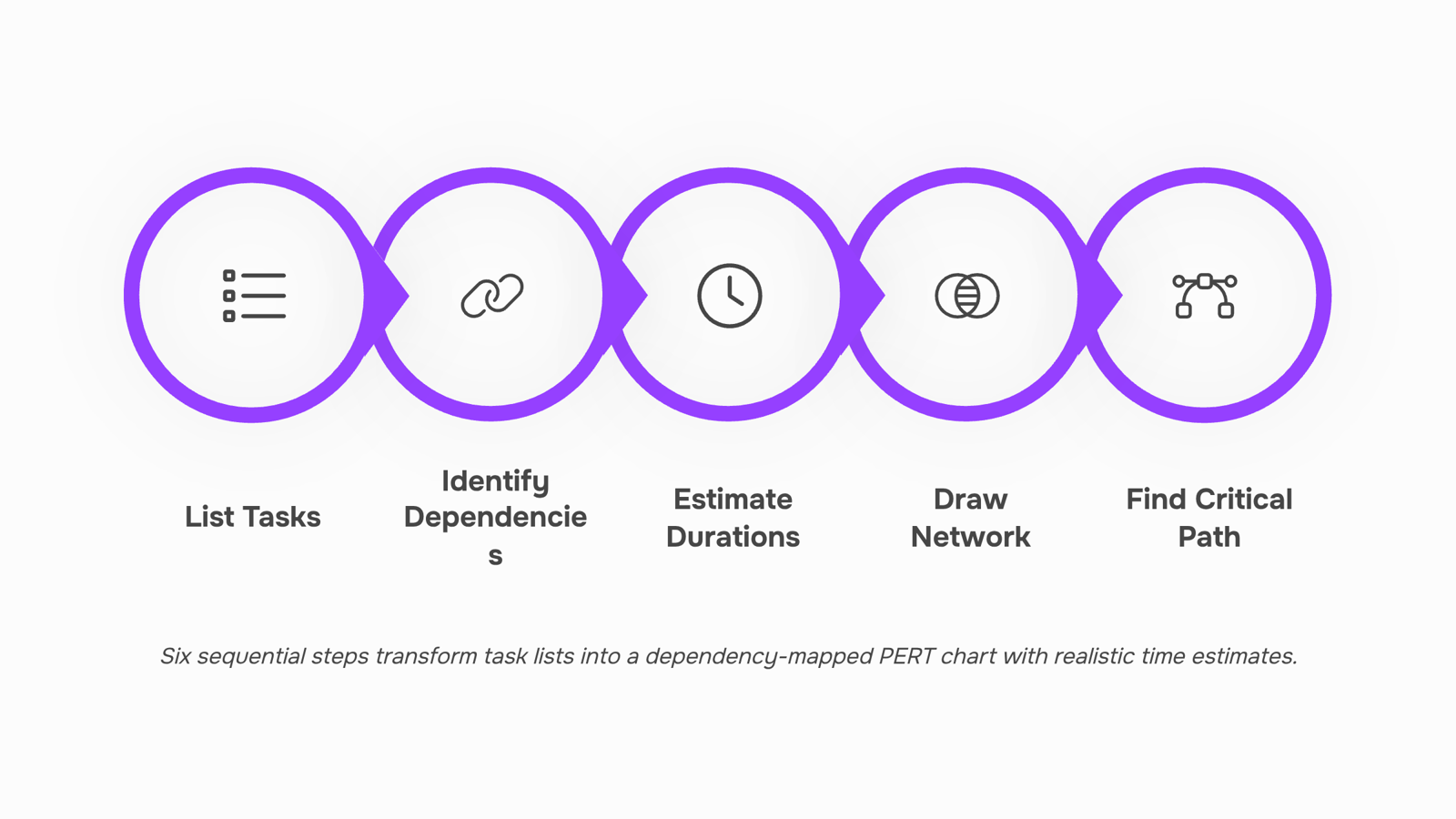
Building a PERT chart from scratch takes about an hour for a mid-sized IT project. Here's the exact process.
Step 1: List every task in the project
Write down all deliverables and work packages before touching a diagram. For a software migration project, that means items like environment setup, data mapping, UAT, and go-live cutover — not just "migration." Miss a task here and your network diagram will misrepresent the actual schedule.
Mini example: An IT team migrating a CRM platform lists 22 discrete tasks, from vendor contract sign-off through post-migration monitoring.
If you're starting from scratch, a project charter is the fastest way to surface all required deliverables before you build.
Step 2: Identify dependencies between tasks
For each task, ask: what must finish before this can start? This produces a predecessor list. Most IT projects have a mix of finish-to-start dependencies (Task B can't begin until Task A is done) and parallel tracks (security review and UI testing can run simultaneously).
Mini example: Database schema design must finish before data migration scripts can be written — a hard finish-to-start dependency.
Step 3: Estimate durations using the three-point formula
This is where PERT separates from a basic task list. For each task, collect three estimates:
Optimistic (O): Best-case duration if nothing goes wrong
Most Likely (M): Realistic duration under normal conditions
Pessimistic (P): Worst-case duration if problems occur
Then apply the standard formula:
Expected Time = (O + 4M + P) / 6
The 4× weight on Most Likely reflects that typical conditions are more probable than extremes. This formula was built into the original PERT methodology developed by the U.S. Navy and Booz Allen Hamilton in 1958.
Mini example: For API integration testing — O: 3 days, M: 5 days, P: 11 days — Expected Time = (3 + 20 + 11) / 6 = 5.7 days.
Step 4: Draw the network diagram
Place each task as a node (box or circle). Connect nodes with arrows that follow your dependency list. Tasks with no predecessors sit at the left; the final deliverable sits at the right. Parallel paths run on separate horizontal tracks.
Mini example: Security audit and performance benchmarking run as parallel nodes between "environment build complete" and "UAT start."
Step 5: Calculate the critical path
Add up the expected durations along every path from start to finish. The longest path is your critical path — any delay on it delays the whole project. Tasks not on the critical path have float, meaning they can slip without affecting the end date.
Mini example: In the CRM migration, the critical path runs through data mapping → migration scripts → UAT → cutover, totaling 34 days. A parallel security audit path totals 28 days, giving it 6 days of float.
Step 6: Review with the team
Walk the diagram with the people doing the work, not just project leads. Engineers often catch missing dependencies or wildly optimistic estimates that look fine on paper. Once the team validates the diagram, set it as your baseline and connect it to your project tracking dashboard so slippage on critical-path tasks triggers an immediate flag.
Mini example: During review, a backend developer flags that API credentials require a 3-day procurement cycle — a predecessor task nobody had listed.
PERT chart vs. Gantt chart: which one fits your project
Both tools visualize project schedules, but they answer different questions. A Gantt chart answers "when does each task happen?" A PERT chart answers "what has to happen before this can start, and how long might it actually take?"
The table below maps the real differences across four dimensions so you can pick the right one — or decide when to use both.
Dimension | PERT Chart | Gantt Chart |
|---|
Timeline format | Network of nodes and arrows; no fixed calendar axis | Bar chart on a calendar timeline; dates are explicit |
Dependency mapping | Built around dependencies — the whole structure is a dependency map | Dependencies can be shown but are secondary to the schedule |
Uncertain durations | Uses three-point estimation (optimistic, most likely, pessimistic) to calculate expected time | Assumes fixed durations; uncertainty isn't built into the format |
Best fit | Complex projects with unclear timelines, many interdependencies, or first-time work | Repeatable projects with known durations, clear milestones, and stakeholder reporting needs |
For most IT projects — a new infrastructure rollout, a custom software build, a multi-team integration — the pert chart and gantt chart comparison often ends with teams using both: PERT during planning to map dependencies and stress-test the schedule, Gantt during execution to communicate progress to stakeholders.
If your project has firm deadlines and a known task list, start with Gantt. If you're scoping something new where duration estimates are genuinely uncertain, PERT gives you structure the Gantt chart can't. For a deeper look at how Gantt compares to other visual planning formats, see Gantt vs Kanban for IT project management.
Common mistakes to avoid when building a PERT chart
Four errors show up repeatedly in PERT charts that fail mid-project.
Skipping the three-point estimate. The formula — (Optimistic + 4 × Most Likely + Pessimistic) ÷ 6 — exists because single-point estimates ignore variance. When you assign one duration to a task without accounting for the range, your expected project end date is optimistic by default. Use all three inputs, every time.
Omitting external dependencies. Vendor APIs, client sign-offs, third-party audits — these sit outside your team's control but still block successors. Leave them off the chart and your critical path calculation is wrong before work even starts.
Treating the critical path as fixed. It isn't. A delay on a near-critical path can shift which sequence now drives the end date. Recalculate after any significant schedule change, not just at kickoff. Pairing your PERT chart with a project tracking dashboard makes this easier to catch early.
Building the chart before the project charter is solid. PERT charts inherit their accuracy from the scope definition beneath them. If deliverables are still vague, your task list will be too. Nail the project charter elements first, then map the dependencies.
Move your PERT chart into a live project plan
A static PERT chart is accurate on day one. By week two, task durations shift, a vendor slips, and the critical path you drew no longer matches reality. Most teams respond by redrawing the chart manually — which takes hours and usually happens too late to change anything.
Moving your PERT chart example into Taro solves this by turning the dependency map into a live task graph. You enter each task, link predecessors, and set the three-point estimates directly in the tool. Taro recalculates the critical path automatically when any duration changes, so you see float erosion in real time instead of at the retrospective.
The practical steps: build your task list in Taro, set dependency relationships (finish-to-start is the default for most IT sequences), assign owners, and connect the plan to your project charter so scope boundaries stay visible alongside the schedule.
When a task slips, Taro flags downstream impact immediately. No redraw. No stale diagram pinned to a wall while the real plan lives in someone's head.
Closing
A PERT chart forces your team to name every dependency, surface hidden risks through three-point estimation, and identify which tasks actually control your deadline. The six-step build takes an hour and catches the scheduling mistakes that slip through a basic task list. Once your diagram is solid, the real work begins: turning those dependencies and estimates into a live, assignable project plan that tracks slippage in real time. That's where Taro steps in — it converts your finished PERT diagram into a tracked schedule with automatic critical-path flagging and team assignments. Ready to move from diagram to execution? Start with Taro's project management platform and see how your PERT structure becomes your operational baseline.
FAQ
How do I create a PERT chart?
List all tasks, map dependencies, estimate each task using three-point formula (Optimistic + 4×Most Likely + Pessimistic)÷6, draw nodes and arrows, calculate critical path, then validate with your team.
What is the difference between a PERT chart and a Gantt chart?
PERT maps dependencies and handles uncertain durations; Gantt shows tasks on a calendar timeline with fixed dates. Use PERT for complex, first-time work; Gantt for repeatable projects with known timelines.
How do I use a PERT chart to manage dependencies in my project?
Arrows in your PERT diagram show which tasks must finish before others start. Review the diagram with your team to catch missed dependencies, then track critical-path tasks for slippage.
What are the advantages and disadvantages of using a PERT chart?
Advantages: surfaces hidden dependencies, handles uncertainty, identifies critical path. Disadvantages: requires upfront effort, assumes three-point estimates are accurate, harder to communicate to non-technical stakeholders.
Can I use a PERT chart for agile project management?
PERT works best for fixed-scope projects with uncertain durations. Agile teams typically use burndown charts and sprint planning instead, though PERT can help estimate epic-level timelines.
What does the critical path mean in a PERT chart?
The critical path is the longest sequence of dependent tasks from start to finish. Any delay on it delays your entire project; tasks off it have float and can slip without affecting the end date.
How do I calculate task duration estimates for a PERT chart?
Collect three estimates per task: Optimistic (best case), Most Likely (realistic), Pessimistic (worst case). Apply the formula: Expected Time = (O + 4M + P) ÷ 6. The 4× weight on Most Likely reflects real-world probability.


 Elena Petrova15 September 2026


