TL;DR: Most guides on making a digital signature stop at "upload your ID and draw your name." This one gives IT company owners a decision framework, the SIGN Readiness Matrix, that matches signature method to document risk level. You'll know exactly when a free drag-and-drop tool is fine and when it will get your contract thrown out.
Digital signature vs. electronic signature: what actually differs
The terms get used interchangeably, but they describe different things with different legal weight.
An electronic signature is any digital indication of intent to sign: a typed name, a drawn squiggle, an uploaded image of your handwriting. The U.S. ESIGN Act (2000) and the EU's eIDAS Regulation both recognize these as legally binding for most everyday business contracts.
A digital signature is a specific subset. It uses public-key cryptography to attach a unique, verifiable certificate to the document. That certificate confirms who signed, when, and that the document hasn't been altered since. It's traceable in a way a typed name simply isn't.
For most contracts — vendor agreements, NDAs, client onboarding paperwork — an electronic signature is sufficient and faster to collect. For a digital signature for official documents like regulated financial filings, government submissions, or cross-border contracts under eIDAS's qualified tier, you need the cryptographic version.
The practical test: ask whether the document needs tamper-evidence and identity verification that would hold up under audit. If yes, you need a digital signature. If no, an electronic signature gets the job done.
What is the best way to create a digital signature online covers the specific tools for each scenario.
Four fast ways to create a digital signature without software
The easiest way to make a digital signature depends on what you're signing. Here are four methods that require no dedicated software, ranked from fastest to most friction.
Typed signature: Type your name in a script font inside any signing tool or document editor. Takes under ten seconds. Appropriate for internal approvals, low-stakes vendor forms, and anything where intent matters more than identity verification.
Image upload: Sign on paper, photograph it, crop the background, and upload the PNG. Works in Adobe Acrobat, Google Docs, or any PDF editor that accepts image overlays. Good for external documents where a handwritten appearance builds trust, but offers no tamper evidence once placed.
Browser-based drawing tool: Most e-signature platforms let you draw directly with a mouse or trackpad. No download required. The result looks handwritten and is captured as an image, so the same limits apply: it signals intent but doesn't cryptographically bind your identity to the document. For a deeper comparison of browser tools, see tools for creating digital signatures for PDFs.
Mobile signing: On iOS or Android, your finger on a touchscreen produces a cleaner result than a mouse. Most platforms, including DocuSign and SignNow, support mobile drawing natively. Useful when you're away from a desk and the document can't wait.
All four methods let you create a digital signature online for free. None of them satisfy the legal threshold for high-risk documents, which the next section covers directly.
What makes a digital signature legally binding
A legally binding digital signature rests on three conditions, not one.
Intent: The signer must affirmatively agree to sign. Clicking "I agree" or drawing in a signature field satisfies this. A signature image pasted into a PDF without any consent mechanism may not.
Identity: The signature must be attributable to a specific person. A typed name in a free browser tool carries weak identity evidence. A platform that captures IP address, email authentication, and a timestamped audit trail carries strong evidence.
Tamper evidence: The signed document must be sealed so any post-signature alteration is detectable. This is where most casual methods fail. An image dropped into a Word file offers no tamper detection; a cryptographically sealed PDF does.
Under the US ESIGN Act (2000) and the EU's eIDAS Regulation, all three conditions must be demonstrably met for a signature to hold up in a dispute. For most routine documents, a simple method clears the bar. For contracts, employment agreements, or anything requiring a digital signature for official documents, the audit trail behind the signature matters as much as the signature itself.
Method choice is really evidence choice.
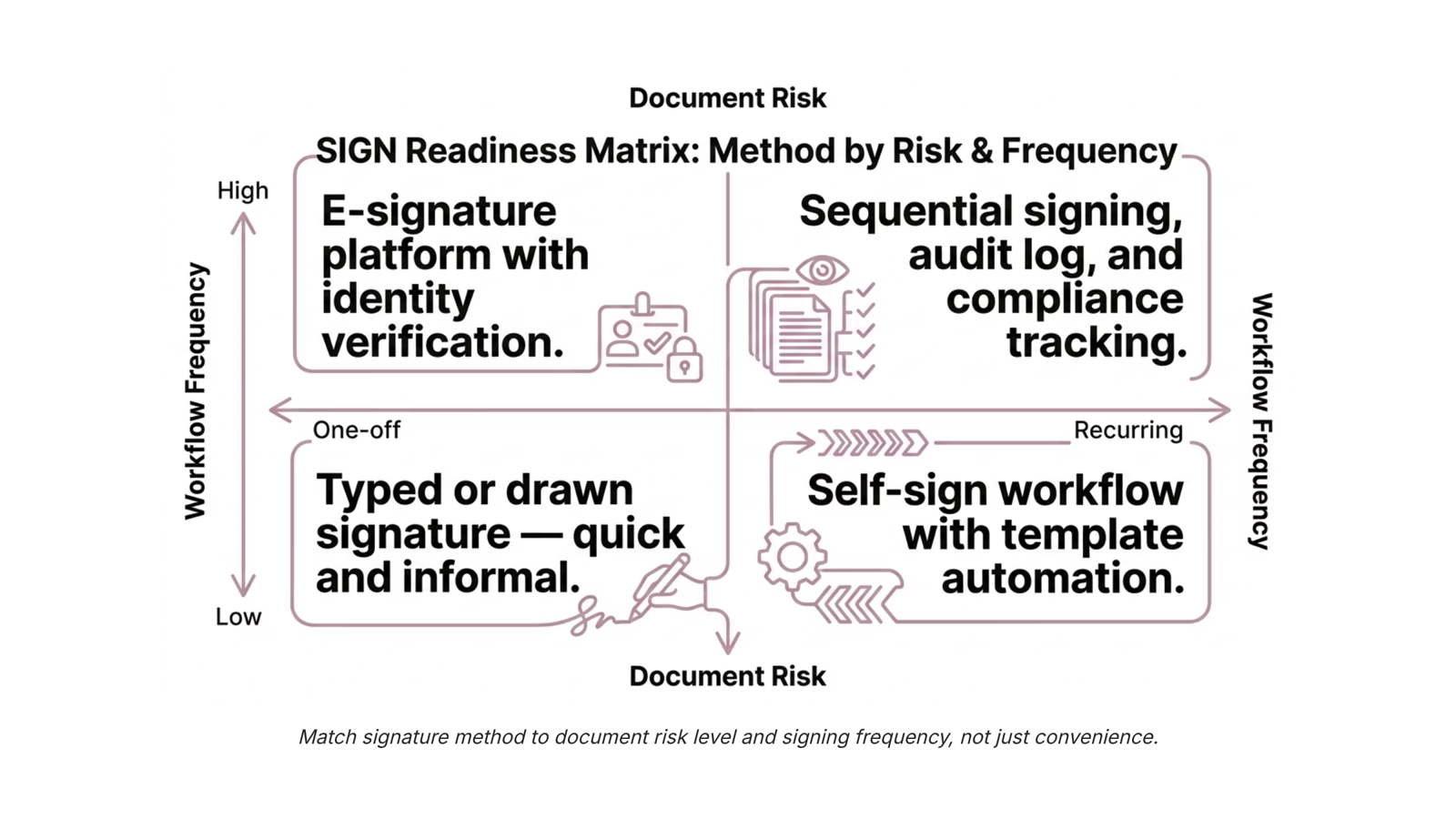
The SIGN Readiness Matrix: match your method to your document
The right signature method isn't about what's fastest — it's about what the document actually requires. A quick typed name works fine for an internal expense approval. It will not hold up for a client services agreement under the ESIGN Act or eIDAS.
The SIGN Readiness Matrix maps two variables: Document Risk (low vs. high) and Workflow Frequency (one-off vs. recurring). Where those two axes intersect tells you which method to use and which tool fits.
| One-off | Recurring |
|---|
Low risk | Typed or drawn signature (Google Docs, Preview on Mac) | Simple self-sign workflow; no audit trail required |
High risk | Dedicated e-signature platform with identity verification and tamper evidence | Full document workflow automation (sequential signing, audit log, secure link delivery) |
Low risk + one-off: An internal sign-off, a meeting agenda acknowledgment, a quick vendor NDA with a known contact. A typed name or drawn signature is the easiest way to make a digital signature here, and it's proportionate. Tools like Adobe Acrobat or Preview handle this without an account.
Low risk + recurring: Think weekly timesheets or routine internal approvals. You want a repeatable self-sign workflow, not a manual process you rebuild each time. A lightweight e-signature platform with template support covers this without overhead.
High risk + one-off: Client contracts, employment agreements, or any digital signature for official documents where a dispute could arise. Here you need a legally binding digital signature — one with a verifiable identity trail and tamper-evident certificate. A drawn image does not qualify.
High risk + recurring: This is where document workflow breaks down for most IT company owners. Sequential signing across multiple parties, automated reminders, and a full audit log are not nice-to-haves — they're the difference between a contract that holds and one that gets challenged. Sigi's sequential signing workflow and secure public signing link handle this without the manual coordination that stalls deals.
Before you create a digital signature online, place your document in the matrix. The quadrant tells you whether convenience is enough or whether you need something that will survive scrutiny.
How to add a digital signature to a PDF or Word document
For most documents, the process is straightforward once you know which format you're working with.
To add a digital signature to a PDF, Adobe Acrobat is the most direct path: open the file, select "Fill & Sign," and either draw, type, or upload your signature. Smallpdf and DocuSign both handle the same steps in a browser if you don't have Acrobat installed. For a deeper walkthrough of format-specific options, the guide on what is the best way to digitally sign a PDF covers each method with screenshots.
To electronically sign a Word document, open the file in Microsoft Word, go to Insert, then Signature Line, and follow the prompts. This embeds a signature field directly in the .docx file. Alternatively, export to PDF first, then sign using any of the PDF methods above. Most IT teams find the export route more reliable when the document is going to an external party, since PDF formatting doesn't shift across devices.
A few things apply to both formats:
Save a copy before signing. Some tools flatten the document on signing, making edits impossible after.
If the document crosses a compliance threshold (contracts, NDAs, regulated data), a typed or drawn signature may not satisfy audit requirements. The next section covers exactly where that line sits.
For recurring document workflows, manual signing per file adds up fast. That's where a structured e-signature platform earns its keep.
The risks of using image-based signatures for business documents
Image-based signatures — a scanned signature pasted into a PDF, or a screenshot dropped into a Word document — are the easiest way to make a digital signature look present on a page. They are not the same as a legally binding digital signature, and on high-stakes documents, that distinction matters.
The core problem is authentication. An image carries no cryptographic proof of who placed it or when. Anyone with access to the file can copy, reposition, or replace it. Under the ESIGN Act (US) and eIDAS (EU), an electronic signature must be attributable to the signer and tamper-evident after signing. An embedded image satisfies neither requirement.
Specific document types make this concrete. Real estate transfers, notarized affidavits, court filings, and regulated financial agreements typically require a verifiable audit trail. An image-based method produces none. If a dispute arises, you cannot prove the signature was placed by the named party at a specific time.
The distinction between digital signature (cryptographically verified) and electronic signature (any digital mark) is where most guides go quiet. Before you create a digital signature online, confirm which standard your document actually requires. For routine internal approvals, an image is often fine. For contracts with legal or financial consequences, it is not.
How Sigi removes the friction that DIY signing methods create
DIY signing works fine until it doesn't. Screenshot signatures fail audit trails. Scanned PDFs break sequential workflows. The moment a document needs two signers in a specific order, or four people signing in parallel before a deadline, the manual approach collapses into email chains and version confusion.
Sigi handles both demanding quadrants directly. For sequential signing, it routes the document to each signer in the defined order, locks the file between steps, and timestamps every action. No one signs out of turn. For parallel signing, it dispatches to all parties simultaneously and closes the workflow once the last signature lands, without manual chasing.
The practical difference: what takes 6–8 manual steps (export, email, wait, chase, re-upload, verify) becomes a configured workflow you trigger once. That's the easiest way to make a digital signature process actually stick at scale, not just on low-stakes one-offs.
Sigi also connects with other WorksBuddy agents. If a contract triggers an invoice, Inzo picks that up automatically once Sigi records the completed signature.
For teams that need to create a digital signature online, add a signature box to a PDF, or electronically sign a Word document, Sigi covers each format without switching tools or rebuilding the workflow from scratch.
Closing
The easiest way to make a digital signature is often the wrong way. A typed name takes ten seconds and works fine for internal approvals. But the same method on a client contract creates audit risk and legal exposure you won't see until a dispute surfaces. The SIGN Readiness Matrix forces you to ask one question before you sign: what happens if this document gets challenged? Answer that, and you'll know whether to reach for a free tool or a platform that captures identity, timestamps, and tamper evidence. Place your next contract in the matrix. Which quadrant does it land in?
FAQ
What is the difference between a digital signature and an electronic signature?
An electronic signature is any digital indication of intent (typed name, drawn squiggle, uploaded image). A digital signature uses cryptography to attach a verifiable certificate proving who signed, when, and that the document hasn't been altered. For most business contracts, electronic is sufficient; for regulated filings or cross-border deals, digital is required.
How do I create a digital signature for free?
Type your name in a script font, draw with a mouse or trackpad in any browser-based tool, or upload a photo of your handwritten signature. All four methods are free. None provide cryptographic verification or tamper evidence, so they work only for low-risk, internal documents.
Can I use a digital signature for official documents?
Only if it meets three conditions: demonstrable intent, verifiable identity, and tamper evidence. A typed name or image upload fails the last two. Official documents require a platform that captures identity verification and creates an audit trail.
How do I add a digital signature to a PDF document?
Open the PDF in Adobe Acrobat, Google Docs, or Preview (Mac). Click the signature field, then choose to type, draw, or upload an image. For legally binding signatures, use a dedicated e-signature platform that embeds identity and tamper-detection data into the PDF.
What are the steps to make a digital signature in Adobe Acrobat?
Open the PDF, click Tools > Fill & Sign, select the signature field, then type, draw, or upload an image. Save the file. This method is fast for low-risk documents but does not create cryptographic proof of identity or prevent post-signature edits.
When is a typed or drawn signature legally sufficient?
For internal approvals, low-stakes vendor forms, and any document where intent matters more than identity verification. Under the ESIGN Act, a typed or drawn signature is binding if the signer clearly consents. For client contracts or official filings, identity verification and tamper evidence are required.
What are the risks of using an image-based signature on a contract?
An image offers no tamper detection, so anyone with the file can edit it after you sign. It carries weak identity evidence if challenged. For high-risk documents, a contract signed with an image-only method may not hold up in dispute.


 Ryan Mitchell14 September 2026


