TL;DR: Most content on AIOps platforms lists capabilities without connecting them to the operational problems they actually solve. This piece gives IT company owners a feature-by-feature breakdown, an honest look at what separates accurate anomaly detection from noise, and a practical integration checklist you can run against any vendor demo. You'll finish with a clear way to evaluate platforms against your real environment, not a sales deck.
AIOps (Artificial Intelligence for IT Operations) is software that applies machine learning to the continuous stream of logs, metrics, events, and alerts your infrastructure generates, then acts on patterns your team would never catch manually.
The practical problem it solves: mid-market IT operations teams routinely process thousands of alerts per day. The majority are noise. Engineers spend hours triaging events that resolve themselves, which delays response to the ones that actually matter. IT operations automation is the mechanism AIOps platforms use to break that cycle, correlating related alerts into a single incident, suppressing duplicates, and routing only actionable signals to the right person.
What separates AIOps from a standard monitoring dashboard is the feedback loop. The platform learns from how your team responds, adjusting thresholds and correlation rules over time. A monitoring tool shows you data. An AIOps platform tells you what the data means and, in many cases, triggers a remediation workflow before anyone opens a ticket.
For IT company owners evaluating tools, that distinction matters before you look at any feature list. The next section covers which specific capabilities separate capable aiops platforms from basic monitoring, and why anomaly detection accuracy is the one feature most buyers undertest.
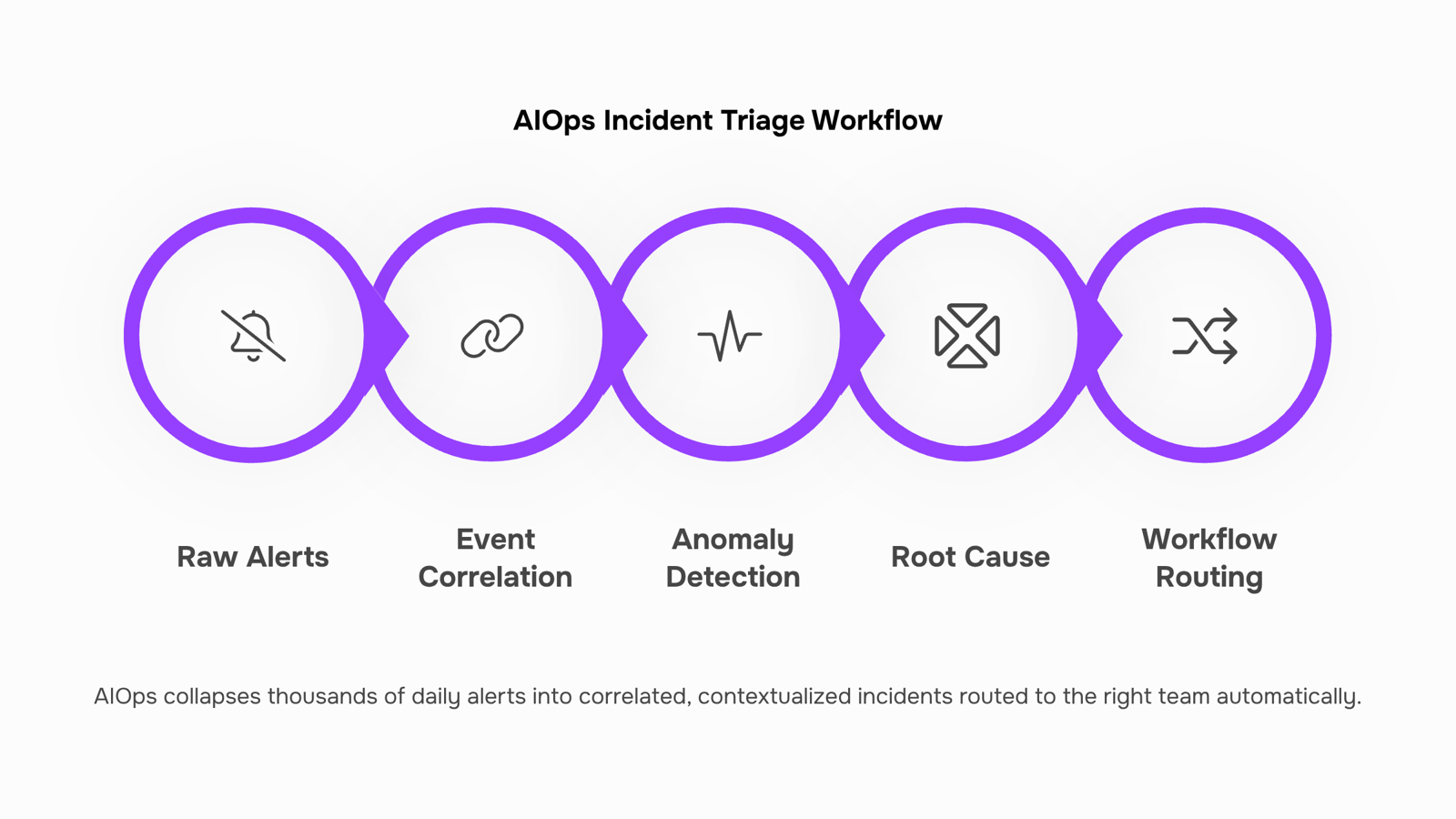
Most monitoring tools tell you something broke. AIOps platforms tell you why, when it started, and which alert out of 4,000 you actually need to act on. That gap comes down to six features — and one of them is almost always undertested during vendor evaluations.
Event correlation and noise reduction groups thousands of raw alerts into a handful of actionable incidents. A mid-market IT team running 20-30 services can receive thousands of alerts daily; correlation engines collapse those into a fraction of real issues by mapping alerts to shared root causes. The practical result is fewer tickets, not just fewer notifications.
Anomaly detection is where aiops platforms anomaly detection accuracy comparison becomes critical during procurement. Most buyers test detection rate (did it catch the anomaly?) but skip precision (how often did it fire on something that wasn't an anomaly?). A platform with 90% detection but 40% false-positive rate creates more noise than it removes. Before signing, run a two-week parallel test against your actual traffic, not a vendor-supplied dataset.
Root cause analysis (RCA) maps the incident back to the originating change or failure, not just the symptom. Without automated RCA, a senior engineer manually traces logs for 30-60 minutes per incident. With it, that trace happens in seconds.
Predictive alerting uses historical baselines to flag degradation before users notice. This is the feature that shifts IT operations automation from reactive to preventive — your team fixes the disk before it fills, not after the service goes down.
Topology mapping shows how services, infrastructure, and dependencies connect in real time. When a payment service slows, topology mapping tells you immediately whether the database, a third-party API, or a network hop is the actual bottleneck.
Workflow automation closes the loop by triggering runbooks, escalations, or ticket creation without human handoff. For smaller IT teams, this is where the time savings are most visible. If you're evaluating how this layer connects to broader automation, the best IT automation platform for workflow efficiency guide covers the decision criteria in detail. For scheduled automation specifically, how Revo handles timer-based workflows shows what that looks like in practice.
The feature most buyers undertest is anomaly detection accuracy. Detection rate is easy to demo. Precision against your own environment's normal variance is not — and that's the number that determines whether your on-call engineer sleeps.
The operational gains from aiops platforms show up in three places your team will notice immediately: alert volume, triage time, and escalation rate.
Most mid-market IT operations teams deal with hundreds to thousands of alerts per shift. The majority are noise — duplicate events, threshold breaches that self-resolve, or cascading alerts triggered by a single upstream issue. AIOps platforms collapse those into correlated event groups, so your team sees one actionable ticket instead of forty redundant ones. That reduction alone changes how your on-call rotation feels on a Tuesday night.
IT workflow automation handles the steps that currently eat analyst time before a human even looks at a problem. When an anomaly fires, the platform can automatically pull service dependency maps, check recent deployment logs, and tag the probable root cause — all before the ticket reaches a person. That's 10-20 minutes of manual triage removed from every incident.
Faster detection compounds into faster resolution. When context arrives with the alert rather than after it, engineers skip the "what changed recently" conversation and move straight to the fix. For aiops incident management specifically, that sequence — detect, correlate, contextualize, route — is where most of the MTTR improvement comes from.
Integration is where this gets practical for smaller IT teams. AIOps platforms don't replace your existing stack; they sit above it. If you're already running a best IT automation platform for workflow efficiency, AIOps feeds enriched, pre-triaged incidents into those workflows rather than raw alert floods.
The next section covers aiops incident management in detail, including the specific triage steps the platform automates and what that does to mean time to detect.
The highest-urgency problem in IT operations isn't the incident itself. It's the 20 minutes your team spends figuring out whether it's real.
AIOps incident management addresses this directly by automating the triage steps that currently burn engineer time. Instead of a human correlating three separate alerts from your monitoring stack, the platform groups them into a single incident, identifies the probable root cause, and routes it to the right person, before anyone has opened a ticket.
The measurable outcomes are specific. Organizations using AIOps report significant reductions in mean time to detect and resolve incidents, with some teams cutting MTTR by 50% or more after replacing manual correlation with automated anomaly detection. Alert noise drops sharply too, because the platform learns which signals are genuine and which are a server "breathing too hard," as one common pattern goes.
For a mid-market IT team handling hundreds of daily alerts, that noise reduction alone changes the workload. Engineers stop triaging false positives and start working on actual failures.
The mechanism matters here. Anomaly detection compares current behavior against a learned baseline, not a static threshold. A threshold fires at 90% CPU. Anomaly detection fires when 70% CPU is unusual for that service at that time of day. That distinction cuts false positives without raising the bar for real incidents.
If you want to see how this fits into a broader automation stack, the best IT automation platforms for workflow efficiency cover the surrounding toolchain in detail.
Most aiops platform integration projects fail at step one: teams connect the platform before they know what data they actually have. Here is a four-step checklist that prevents that.
1. Map your data sources before touching any API. List every system that generates operational data: your monitoring stack (Datadog, Nagios, Prometheus), your ticketing system (ServiceNow, Jira), your log aggregators, and your cloud infrastructure. Categorize each by data type, volume, and update frequency. This inventory becomes your integration scope. Skip it and you will spend weeks untangling duplicate event streams later.
2. Establish API connectivity and authentication. Most AIOps platforms connect via REST APIs or pre-built integrations. Confirm your existing tools expose the endpoints the platform needs, then configure authentication (OAuth 2.0 or API keys depending on the vendor). Test each connection in a staging environment before pointing it at production data. If your team is also evaluating broader IT workflow automation options, this is the right moment to audit which workflows could run on a timer or trigger rather than manual execution.
3. Define workflow routing rules. Decide which alert types get auto-remediated, which get escalated to a human, and which get suppressed as known noise. This is where aiops platforms earn their keep: a routing policy that sends a disk-space warning to auto-remediation and a production outage to your on-call engineer in under 60 seconds is the practical output of this step.
4. Validate with a 30-day pilot. Run the platform alongside your existing tools, not instead of them. Track false-positive rate, escalation volume, and mean time to detect on a weekly basis. If the numbers are not moving by week three, the routing rules need adjustment, not the platform.
For teams that want the same logic applied to scheduled tasks and email workflows, Revo's timer-based automation handles that layer without requiring engineering resources.
Before you schedule a vendor demo, build a short scorecard around these four criteria.
Anomaly detection accuracy. Ask every vendor for precision and recall numbers from an environment similar to yours in alert volume and stack diversity. A platform that reduces alert noise by 50% sounds good until you learn it's suppressing real incidents. Request a proof-of-concept on your own data, not a curated demo dataset. This is where aiops platforms anomaly detection accuracy comparison matters most in practice.
Integration depth, not just connectivity. Any platform can claim API support. What you want to know is whether it writes back to your ticketing system, triggers runbooks in your existing tools, and handles bidirectional data flow. Ask for a diagram of how data moves, not a logo wall.
Time-to-value on a realistic dataset. Pilots that use synthetic data hide the messy reality of mid-market IT environments. Set a 30-day POC window with your actual log sources and measure mean time to detect on incidents you already know happened.
Workflow routing flexibility. The platform should route alerts to the right team without manual triage. If routing logic requires a professional services engagement to configure, that cost belongs in your TCO calculation.
For a broader framework on choosing an IT automation platform that fits your size and stack, that guide covers the decision criteria in more depth.
Closing
AIOps platforms work best when they're paired with a workflow automation layer that acts on what they detect. Your platform correlates alerts and identifies root causes—but without a system to route those insights into tasks, notifications, and automated responses, you're still asking engineers to manually translate detection into action. Revo bridges that gap by taking enriched incidents from your AIOps platform and turning them into triggered workflows, escalations, and automated remediations without handoffs. Start by auditing your current alert volume and triage time, then run a parallel test of any platform against your actual traffic for two weeks. Ready to see how detection connects to automation? Check out Revo's workflow features and request a demo to see the full loop in action.
FAQ
What are the key features of AIOps platforms?
Event correlation, anomaly detection, root cause analysis, predictive alerting, topology mapping, and workflow automation. The critical one most buyers undertest is anomaly detection precision—detection rate alone doesn't matter if false positives create more noise than they eliminate.
How can AIOps platforms improve IT operations and management?
They collapse thousands of daily alerts into actionable incidents, automate triage steps that currently consume analyst time, and shift operations from reactive to preventive. The result is fewer tickets, faster triage, and engineers working on real problems instead of noise.
What are the benefits of using AIOps platforms for incident management?
Automated correlation and root cause analysis eliminate the 20-minute triage phase before anyone opens a ticket. Organizations report MTTR reductions of 50% or more, with alert noise dropping sharply as the platform learns which signals are genuine.
Can AIOps platforms be integrated with existing IT systems?
Yes. AIOps platforms sit above your existing stack and feed enriched, pre-triaged incidents into your current workflows and ticketing systems rather than raw alert floods, making them compatible with most mid-market IT environments.
How do I test anomaly detection accuracy before choosing an AIOps platform?
Run a two-week parallel test against your actual traffic and environment, not vendor-supplied datasets. Measure both detection rate and precision—a 90% detection rate with 40% false positives creates more noise than it removes.
What is the difference between AIOps and traditional IT monitoring?
Monitoring tools show you data; AIOps tells you what the data means, why it matters, and triggers remediation before anyone opens a ticket. The feedback loop is the key difference—AIOps learns and adjusts over time.
Do small IT teams need an AIOps platform or is it only for large enterprises?
Mid-market IT teams benefit most because they process hundreds to thousands of daily alerts but lack the headcount to manually triage noise. The alert volume reduction and automation of triage steps directly address the workload problem smaller teams face.


 Kayla Morgan15 September 2026


