TL;DR: Most email management guides stop at folders and batch processing. This one connects individual inbox habits to team-wide automation workflows that eliminate manual triage, so your team stops losing leads and context in cluttered inboxes.
What are email management strategies
Organized email inbox management system on modern desk with filing, calendars, and structured digital interface
Email management strategies are the repeatable rules, automations, and workflows a team uses to sort, prioritize, and act on incoming messages without relying on individual discipline alone. Instead of hoping each person keeps their inbox tidy, these strategies operate at the system level: shared labels, automated routing, response-time standards, and unified inboxes that prevent messages from falling through cracks.
For IT company owners running lean teams, the distinction matters. Personal inbox tips (batch checking, keyboard shortcuts) help individuals. Email management strategies help the team maintain consistent response quality even when someone is on leave, slammed with project work, or onboarding.
A functional strategy typically covers three layers:
The next section breaks down what happens when these layers are missing, from lost leads to compounding team burnout.
Why inbox overload costs more than time
Inbox overload is not a personal productivity problem. It is a revenue problem. McKinsey research found knowledge workers spend roughly 28% of their workweek reading and answering email. For a five-person sales team, that is more than one full-time salary absorbed by inbox activity alone.
The cost compounds in three directions:
Missed leads. Harvard Business Review data shows that responding to a new inquiry within an hour makes you seven times more likely to qualify that lead. When inbound messages sit buried under internal threads and vendor newsletters, response windows close silently.
Slow internal decisions. Approvals, handoffs, and client questions stall when the relevant message is lost in a cluttered inbox. Teams that cannot manage email inbox overload end up duplicating work or dropping tasks entirely.
Burnout and context switching. Constant email checking fragments deep work. Over weeks, this erodes output quality and increases turnover risk. The goal is not inbox zero as a vanity metric. It is to reduce email stress so your team operates with clear signal, not noise.
You can start reclaiming visibility by connecting your accounts to a unified inbox view, which eliminates the tab-switching that lets messages slip through. From there, the next step is building triage rules that sort automatically, not manually.
7 email management strategies that reduce volume and protect focus
Most guides tell you to "check email less." That advice ignores the reality: your inbox is also your sales pipeline, your support queue, and your team's coordination layer. These seven email management strategies target volume at the source and protect focus where it actually breaks down.
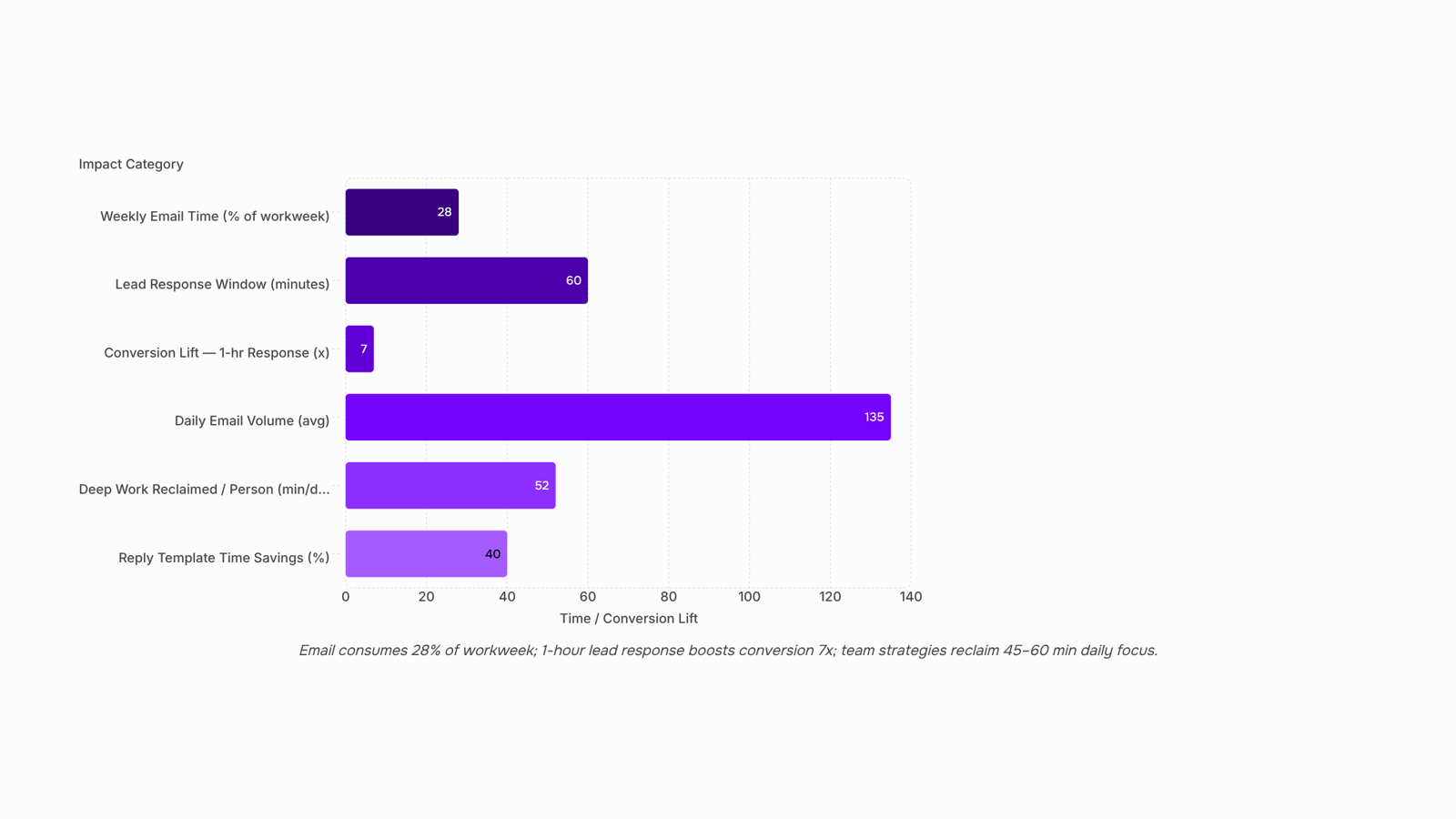
1. Set fixed triage windows (and defend them). Block two or three 25-minute windows per day for email processing. Outside those windows, close the tab. A team of five that switches to triage windows typically reclaims 45 to 60 minutes of deep work per person per day. The key is making this a team norm, not a solo experiment.
2. Build priority filters that sort before you read. Create rules that auto-tag inbound mail by sender domain, subject-line keywords, or thread participants. Client emails land in one folder, internal updates in another, newsletters in a third. You process the client folder first, always. If you sync your Gmail or Outlook inbox into a unified view, filters apply across accounts without duplicating rules.
3. Deploy canned templates for repeating replies. Audit your sent folder for the last 30 days. You will find five to eight messages you write repeatedly with minor variations. Turn each into a template. This alone can cut reply composition time by 40%.
4. Assign delegation rules by topic. Not every email needs you. Define ownership: billing questions route to finance, onboarding questions route to CS. Forwarding is not delegation. Use shared inboxes or automation rules so the right person sees the thread first, not second.
5. Run a monthly unsubscribe audit. Newsletters and vendor updates account for a surprising share of daily volume. Spend 15 minutes once a month unsubscribing from anything unopened twice in a row. For email open rate benchmarks on your own sends, the same principle applies in reverse: remove contacts who never engage.
6. Consolidate threads instead of spawning new ones. Reply within the existing thread. Rename subjects only when the topic genuinely changes. Fewer threads means fewer inbox lines to scan during triage.
7. Enforce send-time discipline. Sending emails at 11 PM trains your team to check at 11 PM. Schedule delivery for the next triage window. You can monitor every outgoing email in the delivery queue to confirm nothing fires outside agreed hours.
Inbox zero is not about emptiness. It is about knowing that every message either has an owner, a scheduled reply, or a reason it was archived. These strategies get you there without requiring heroic willpower.
How to implement email management strategies across your team
Rolling out email management for teams fails when it stays at the individual level. Here's a five-step plan that turns personal inbox habits into a shared operating standard.
Define shared triage rules. Agree on categories (urgent client, internal FYI, vendor noise) and map each to a response window. A 15-person IT services team might set "client request = 2-hour SLA" and "internal update = end of day." Write these down in a one-page doc everyone can reference.
Assign ownership by thread type. Every inbound email category gets a named owner. Support queries go to ops. Proposal follow-ups go to the assigned rep. When ownership is ambiguous, emails sit unanswered. McKinsey research suggests knowledge workers spend roughly 28% of their week on email. Clear routing cuts that significantly.
Set measurable SLAs. "Respond quickly" means nothing. "First reply within 4 business hours for prospects" is enforceable. You can monitor every outgoing email in the delivery queue to verify your team actually hits these targets.
Centralize visibility. Individual inboxes create blind spots. When you sync your Gmail or Outlook inbox into a unified view, managers see which threads are stalling without hovering over anyone's shoulder.
Review and adjust weekly. Block 15 minutes each Friday to check what's working. Which SLAs got missed? Which categories need re-routing? Email management strategies only stick when they evolve with your team's actual volume.
The difference between personal productivity tips and real team-level implementation is accountability. Rules without visibility are suggestions. Pair both, and inbox overload becomes a solved operational problem rather than a recurring complaint.
Automating email triage so your team stops sorting manually
Manual sorting is where most email management strategies collapse. Your team spends 28% of the workweek reading and responding to email (McKinsey, 2023), and a chunk of that is pure triage: deciding what needs attention now, what can wait, and what belongs to someone else. Automation removes that decision layer entirely.
How automated triage works in practice:
Connect inboxes to a single routing layer. When you sync your Gmail or Outlook inbox into a unified view, every incoming message hits one system instead of scattering across personal inboxes. No more "I thought you were handling that client."
Set queue-based sending and receiving rules. A queue system holds outbound messages and routes inbound ones based on criteria you define: sender domain, subject-line keywords, deal stage. You can monitor every outgoing email in the delivery queue to confirm nothing stalls silently.
Layer in sequence logic for follow-ups. Instead of a rep remembering to ping a lead three days later, email automation fires the next step in a sequence with built-in delays. The rep only re-engages when a lead replies or hits a score threshold.
This is where Evox fits. Its queue system and sequence automation handle the sorting-and-sending loop that eats your team's mornings. Leads get routed by behavior, follow-ups fire on schedule, and reps see only the conversations that need a human decision.
The result: you manage email inbox overload at the system level, not the willpower level. Your team stops triaging and starts closing. For related tactics on what to do once those emails land, see these email marketing tips that drive results.
How email management strategies improve work-life balance
Email management strategies reduce email stress when they move from personal discipline to team-level agreements. Three mechanisms do the most work:
Notification boundaries. Define "off hours" at the team level, not individually. When outbound emails queue for delivery during business hours only, recipients stop feeling pressure to respond at 9 PM. You can monitor every outgoing email in the delivery queue to confirm nothing fires outside agreed windows.
Async norms. Agree that internal emails get 4-hour response windows, not instant replies. This single rule reclaims deep-work blocks without anyone feeling ignored.
Response-time agreements by priority. Tag client-facing threads as "2-hour SLA" and internal updates as "end of day." When everyone knows the expectation, nobody refreshes their inbox compulsively.
The shift matters because knowledge workers spend roughly 28% of their week on email (McKinsey, 2023). Cutting even a third of that reactive checking frees hours for revenue work, not just inbox maintenance.
Closing
Email management strategies only work when they operate at the system level, not individual willpower. The seven strategies above—triage windows, priority filters, templates, delegation rules, unsubscribe audits, thread consolidation, and send-time discipline—reclaim focus by removing manual triage. But they still require someone to monitor delivery, sync accounts, and track which threads are stalling. Tools like Evox eliminate that overhead by unifying inboxes across Gmail and Outlook, automating follow-up queues, and giving you real-time visibility into every outgoing email without leaving your workflow. If your team is still toggling between tabs or manually routing messages, your next step is to see how inbox automation removes the friction these strategies still carry.
FAQ
What are the most effective email management strategies for busy professionals?
Fixed triage windows, priority filters, canned templates, delegation rules, and monthly unsubscribe audits. The key is pairing personal habits with team-level automation so nothing falls through cracks when someone is unavailable.
How can I use email management strategies to reduce stress?
Stress comes from uncertainty—not knowing if a message was missed or who owns a reply. Clear SLAs, shared triage rules, and unified inbox visibility remove that ambiguity so your team operates with signal, not noise.
What are some best practices for managing email inbox overload?
Build priority filters that auto-sort before you read, consolidate threads instead of spawning new ones, enforce send-time discipline, and audit newsletters monthly. Process email in fixed windows, not constantly.
Can email management strategies improve my work-life balance?
Yes. Teams that defend triage windows and automate routing typically reclaim 45 to 60 minutes of deep work per person daily. Less context switching means less burnout and more time for meaningful work.
How do I implement email management strategies in my team?
Define shared triage rules and response SLAs, assign ownership by thread type, centralize visibility so managers see stalling threads, and review weekly. Pair these with a unified inbox so automation enforces rules consistently.


 Elena Petrova15 September 2026


