What an invoice email actually is
- An invoice email is the message you send to a client when requesting payment. The invoice itself — the formal document listing services, amounts, and due dates — is the attachment or linked file. The email is the wrapper: it sets context, confirms what was delivered, and tells the client exactly what to do next.
- Most IT service businesses treat the two as interchangeable, which creates a real problem. A bare attachment with no message body leaves the client guessing about project scope, payment method, or who to contact with questions. That ambiguity slows payment.
- Think of it this way: the invoice records the transaction; the professional invoice email moves it forward. Both documents have distinct jobs, and both need to be right.
- If you want a full walkthrough of the sending process, this step-by-step guide on how to send an invoice via email covers the sequence from draft to delivery.
What to include in every invoice email
Most invoice emails fail to get paid on time because they make the client work to figure out what they owe, when it's due, and how to pay. Every field in your invoice email template has a job. Here's what belongs in each one.
- Subject line: Include the invoice number and due date directly, for example: "Invoice #1042 — Due May 15." The best practice is to include your business name and the specific invoice number right in the subject line so the email is findable when an accounts payable team searches their inbox weeks later.
- Opening line: One sentence naming the project or engagement. This connects the invoice to the work the client approved, which reduces "what is this for?" replies.
- Invoice summary: State the total amount, the due date, and the payment terms (net 15, net 30, etc.) in plain text inside the email body. Don't make the client open an attachment to find the number.
- Payment instructions: Name the exact method: bank transfer with account details, a payment link, or a credit card portal. Vague instructions ("please remit payment") add a step and delay the process.
- Invoice attachment or link: Attach a PDF or include a direct link to the invoice. For IT service businesses billing on project milestones, a PDF keeps a clean record on both sides. If you want to understand what belongs inside the invoice document itself, that's a separate question from what the email needs to say.
- Contact detail. One line: who to reach if there's a question, and how. This removes the excuse of "I wasn't sure who to contact."
For a full walkthrough of how to send an invoice via email, including timing and follow-up cadence, that guide covers
Three invoice email templates you can use today
Each template below is annotated so you know what every field is doing, not just what to write in it.
Template 1: Standard project invoice
Subject: Invoice #1042 – [Project Name] – Due [Date]
Hi [Client Name],
Please find attached Invoice #1042 for [Project Name], covering [brief scope description] completed between [start date] and [end date].
Amount due: $[X]
Due date: [Date]
Payment methods: [Bank transfer / credit card / ACH]
[Pay now link or attachment note]
If you have questions about any line item, reply to this email and I'll clarify within one business day.
Thank you,
[Your name]
Why it works: The subject line contains the invoice number, project name, and due date — three things a client's accounts payable contact needs to file and action it without opening the body. The scope description in the first line removes the most common "what is this for?" delay. Including a direct pay link (rather than only a PDF attachment) shortens the path from open to payment. If you want a deeper look at what each component does for payment speed, the invoice components breakdown covers this in full.
Template 2: Retainer invoice
Subject: Monthly Retainer Invoice #R-22 – [Month] – Due [Date]
Hi [Client Name],
This is your monthly retainer invoice for [Month] as outlined in our agreement dated [contract date].
Retainer amount: $[X]
Period covered: [Month start] – [Month end]
Due date: [Date]
[Pay now link]
[Your name]
Why it works: Retainer emails can be shorter because the client already agreed to the amount. Referencing the original contract date removes any "I didn't expect this" friction. Keep the body to five lines maximum — this is a routine transaction, not a proposal.
Template 3: Past-due follow-up
Subject: Friendly reminder: Invoice #1042 is now [X] days past due
Hi [Client Name],
Invoice #1042 for $[X], originally due [date], hasn't been received yet. I've attached it again for convenience.
If payment has already been sent, please disregard this note. If there's a question or issue, I'm happy to sort it out quickly.
[Pay now link]
[Your name]
Why it works: The subject names the invoice number and the delay without being aggressive. Offering an "if you've already paid" exit keeps the tone professional. For the full invoice follow-up email sequence — including when to escalate — see the step-by-step sending guide.
Tone across all three should stay consistent with your other client communication. The email et
How to customize the template for your business
Yes, you can — and for IT service businesses, you should. A generic invoice email template leaves money on the table. Four variables make the biggest difference.
Tone. Project-based billing involves ongoing relationships. Match your language to that. A managed services client you've worked with for two years gets a warmer, more direct message than a new client receiving their first invoice. Both should still be professional, but "Hi Sarah, attached is invoice #1047 for the April retainer" reads better than a form letter.
Payment terms. Spell out the due date in plain language — "Payment due May 15" — not just "Net 30." Clients read emails fast. Buried terms get missed, and missed terms slow payment. If your [invoice email template doesn't surface the due date in the first two lines, move it up.
Line item detail. IT invoices often cover multiple workstreams: development hours, hosting fees, support retainers. Break them out. Vague line items generate questions; questions delay payment.
Branding. Your logo, your color palette, your standard footer with contact details. Clients who recognize the sender at a glance open faster and dispute less. Inzo lets you set these defaults once so every invoice email goes out consistently, without manual formatting each time.
For the full sending workflow, see how to send an invoice via email.
Best practices for sending invoice email
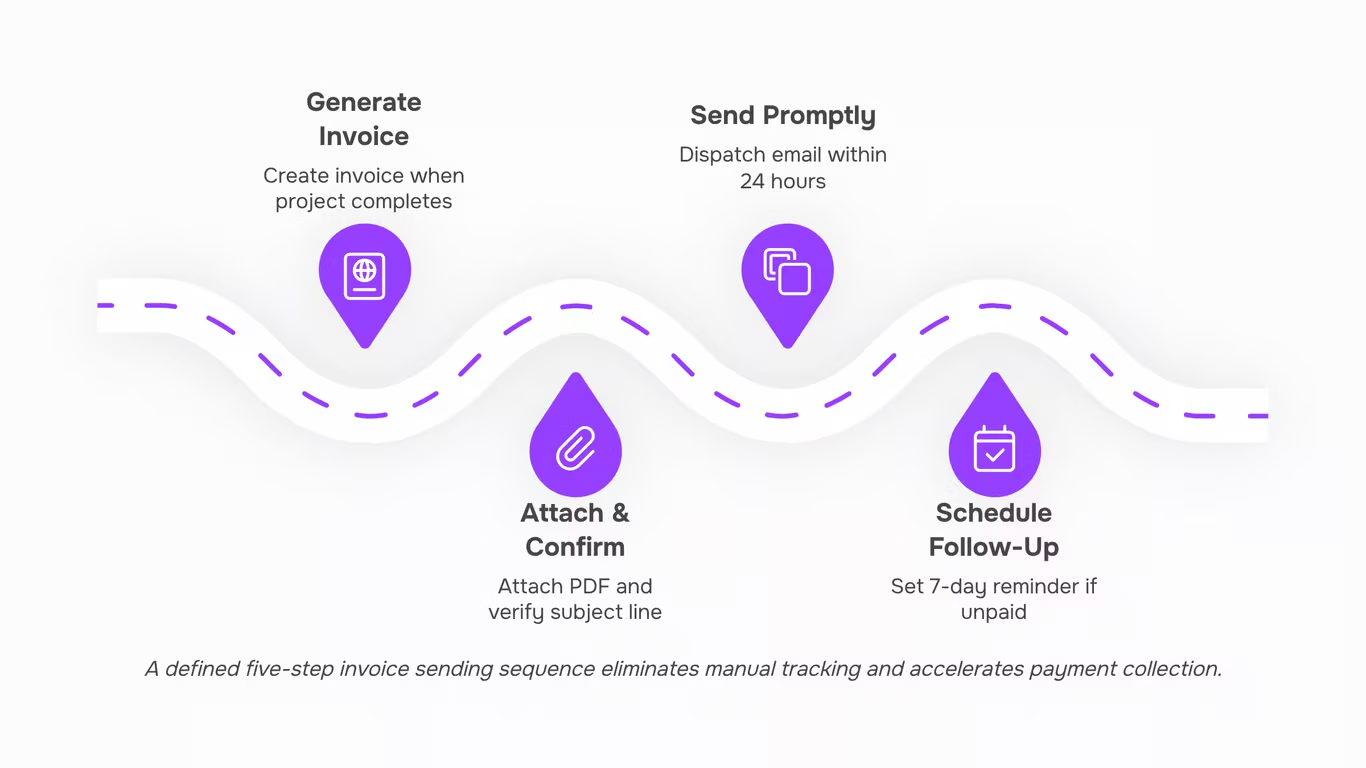
Five rules that consistently produce faster payment and fewer back-and-forth emails.
1. Write a subject line that contains the invoice number and due date: "Invoice #1047 — Due March 15" tells the client exactly what this email is, before they open it. Generic subjects like "Invoice attached" get buried. GoCardless recommends including all critical information in the subject line so the client can act without digging through the body.
2. Put payment instructions in the body, not just on the attachment: If your client has to open a PDF to find out how to pay, you've added a step that some won't take. State the amount, due date, and payment method in the email body itself. One sentence is enough: "Please pay $4,200 via bank transfer by March 15 — details are on the attached invoice."
3. Attach a PDF, not a link to a web portal, for first-time invoices: PDF attachments are easier to forward to a finance team, print, and file. For repeat clients with established logins, a portal link is fine. For new clients, a PDF removes the friction of account creation. Inzo generates formatted PDF invoices you can attach directly from the same screen where you draft the email.
4. Send within 24 hours of project completion or milestone delivery: Timing matters more than most IT service businesses realize. Sending an invoice the same day the work is delivered keeps the project fresh in the client's mind and signals that your billing process is as organized as your delivery. Delays past 48 hours often push payment into the next billing cycle.
5. Confirm receipt if you don't see a payment acknowledgment within 48 hours: A short follow-up — "Just checking this reached the right inbox" is not aggressive. It catches delivery failures before they become 30-day overdue situations. For a full walkthrough of the sending process, see how to send an invoice via email.
Good email etiquette applies here too: keep the tone professional, address the right contact, and avoid attachments that exceed 5MB.
Build a repeatable invoice sending process
A template gets you started. A process keeps you paid on time.
The difference between IT businesses that chase payments and those that collect them predictably usually comes down to one thing: whether invoicing runs on a defined sequence or on whoever remembers to send it. A defined sequence means every project milestone, retainer renewal, or one-time engagement follows the same steps, every time.
Here is what that sequence looks like in practice:
- Generate the invoice immediately when the trigger occurs, whether that is project completion, a billing date, or a milestone sign-off.
- Attach or link the PDF and confirm the subject line includes the invoice number and amount due.
- Send within 24 hours of the trigger. Delays create payment delays.
- Schedule the follow-up at the point of sending, not after the due date passes. A 7-day invoice follow-up email reminder should be automatic, not optional.
- Log the status so you know at a glance what is outstanding.
Manual execution of this sequence is where most IT service businesses slip. Inzo handles PDF invoice generation and email sending inside a single workflow, so the sequence runs without someone tracking it in a spreadsheet. For a deeper look at what a complete invoice should contain before it goes out, that is worth reviewing first.
Closing
The difference between invoices that get paid on time and ones that sit in a client's inbox comes down to one thing: removing friction from the payment path. When your email clearly states what was delivered, how much is owed, when it's due, and exactly how to pay, you've eliminated the guesswork that delays payment. The templates and practices in this guide work because they treat the invoice email as a workflow step, not an afterthought.
But templates alone don't solve the follow-up problem. If you're manually tracking opens, resending past-due invoices, and chasing clients through email threads, you're losing time on work that should be automatic. Inzo generates your invoice PDF, sends it with your branding intact, tracks whether the client opened it, and triggers follow-ups without you lifting a finger. Explore Inzo's invoice sending and tracking features to turn this template into a repeatable, hands-off process.
FAQ
Q. What should I include in an invoice email template?
A. Include a subject line with the invoice number and due date, a one-sentence project description, the total amount due, payment terms, payment method instructions, the invoice attachment or link, and a contact detail for questions.
Q. How do I create a professional invoice email template?
A. Start with a clear subject line naming the invoice number and due date, keep the body to five lines maximum, state the amount and due date in plain text (not just the attachment), and include a direct payment link. Match your tone to your client relationship.
Q. What are some best practices for sending invoice emails?
A. Surface the due date in the first two lines, spell it out in plain language ("Due May 15"), break out line items to avoid questions, include a direct pay link, and keep the tone professional but warm for ongoing relationships.
Q. Can I customize an invoice email template for my business?
A. Yes. Adjust tone to match your client relationship, spell out due dates clearly, break down line items by workstream, and add your branding (logo, colors, footer). Consistency across all invoices builds recognition and reduces disputes.
Q. What are some examples of effective invoice email templates?
A. The article provides three: a standard project invoice (includes scope and due date), a retainer invoice (shorter, references the contract), and a past-due follow-up (names the delay without aggression and offers an out if payment was already sent).
Q. How do I write a subject line for an invoice email?
A. Include the invoice number, project name or type, and due date. Example: "Invoice #1042 – Project Name – Due May 15." This makes the email findable when accounts payable searches their inbox weeks later.
Q. What should I do if a client does not respond to an invoice email?
A. Send a follow-up with the subject "Friendly reminder: Invoice #[number] is now [X] days past due." Reattach the invoice, offer an exit if payment was already sent, and include a direct pay link. Escalate if the delay continues.


 Elena Petrova15 September 2026


