TL;DR: Most workflow automation content lists categories and stops there. This article maps each example to a specific trigger, action, and outcome so you can evaluate which processes in your business are ready to automate before you configure a single tool. You'll also see where gaps between tools create the manual work that automation is supposed to eliminate.
What workflow automation means in practice
Workflow automation is a system where a defined trigger fires an action, and that action produces a measurable result, without anyone manually starting the process.
A form submission triggers a welcome email. A new hire record triggers an onboarding checklist. An overdue invoice triggers a payment reminder. Each of those is a complete workflow automation example: one input, one automated action, one output.
The trigger-action-result structure matters because it forces precision. "We automated our HR process" tells you nothing. "When a candidate accepts an offer, the system creates their accounts, assigns onboarding tasks, and notifies IT" tells you exactly what changed. That specificity is what separates business process automation that actually reduces work from automation that just moves the manual step somewhere else.
Every example in this article follows that same structure. If you want to see how automated actions improve workflow efficiency across specific departments, the next section maps ten of them.
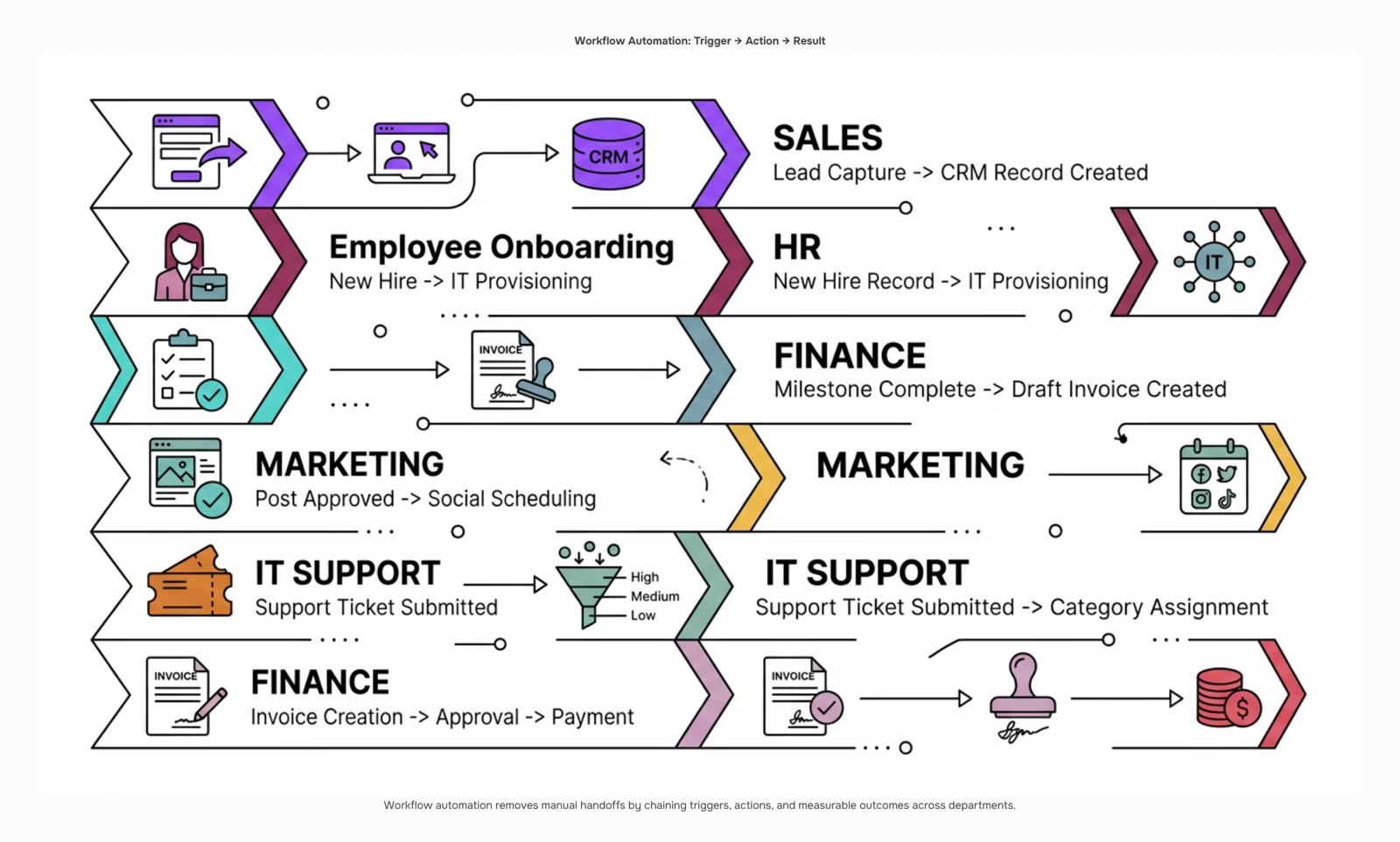
10 workflow automation examples across core business functions
The ten examples below follow the same trigger-action-result structure introduced earlier. Scan the list, find the ones that match where your team is losing time, and treat each as a starting point you can adapt.
1. Lead capture and routing (Sales) Trigger: A prospect submits a contact form on your website. Action: The automation creates a CRM record, scores the lead based on company size and role, and assigns it to the right rep. Result: Reps receive qualified leads with context already attached, not raw form submissions they have to sort manually. This is one of the most common ai workflow automation examples teams implement first because the time savings are visible within days.
2. Follow-up sequences (Sales) Trigger: A deal sits in a pipeline stage for more than three days without activity. Action: The automation sends a pre-approved follow-up email and logs the touchpoint in the CRM. Result: No deal goes cold because a rep was busy. The sequence runs whether or not anyone remembers to check.
3. Employee onboarding (HR) Trigger: A new hire record is created in your HR system with a start date. Action: IT receives a ticket to provision accounts, the new hire gets a welcome email with day-one instructions, and a 30-day check-in is scheduled automatically. Result: Onboarding runs consistently regardless of which manager is handling it. A typical 50-person IT services firm can cut onboarding admin from four hours per hire to under 30 minutes.
4. PTO request approval (HR) Trigger: An employee submits a time-off request. Action: The automation routes it to the direct manager, checks for scheduling conflicts against the team calendar, and sends approval or escalation without HR touching it. Result: Employees get faster responses; HR stops acting as the middleman for routine approvals.
5. Invoice generation (Finance) Trigger: A project milestone is marked complete in your project management tool. Action: The automation pulls billing details and generates a draft invoice, then routes it for internal sign-off before sending. Result: Invoices go out within hours of work completion rather than at the end of the billing cycle. For IT firms billing on milestones, this directly improves cash flow. Automating your business processes at the finance layer often produces the fastest measurable ROI.
6. Expense report processing (Finance) Trigger: An employee submits a receipt via mobile app or email. Action: The automation categorizes the expense, checks it against policy limits, and routes out-of-policy items for manager review while auto-approving compliant ones. Result: Finance closes expense reports faster and catches policy violations before reimbursement, not after.
7. Content publishing (Marketing) Trigger: A blog post is moved to "approved" status in your CMS. Action: The automation schedules social posts across LinkedIn and X, updates the internal content calendar, and notifies the SEO team to submit the URL for indexing. Result: Publishing becomes a one-click handoff rather than a five-step manual checklist.
8. Campaign lead nurture (Marketing) Trigger: A contact downloads a resource from your website. Action: A nurture sequence starts based on the resource topic, with emails spaced over 14 days and lead score updated after each engagement. Result: Marketing hands sales a warmer list without anyone manually monitoring download activity.
9. IT support ticket triage (IT Support) Trigger: A support ticket is submitted via email or helpdesk form. Action: The automation categorizes the ticket by keyword, assigns priority, routes it to the right technician, and sends the submitter an acknowledgment with an estimated response time. Result: First response time drops significantly. Technicians work a sorted queue instead of an inbox. This is where salesforce workflow automation examples often appear in enterprise IT setups, though the same logic applies in any helpdesk tool.
10. Software access provisioning (IT Support) Trigger: A manager approves a software access request in your ITSM tool. Action: The automation provisions the account in the relevant SaaS tool, logs the access grant for compliance, and notifies the employee. Result: Access is granted in minutes, not days, and the audit trail is created automatically rather than reconstructed later.
The benefits of automating these business processes compound quickly. Each example above removes a handoff that currently depends on someone remembering to act. Revo handles the trigger-action-result logic across all five functions listed here, connecting your existing tools without requiring custom code. If you want to see how these patterns apply specifically to project delivery, the workflow examples for project management piece covers that in detail.
How to automate your accounting workflow
The accounting automation chain has five distinct steps, and most teams only automate one or two of them.
Here is the full sequence:
Invoice creation triggers when a project milestone closes or a time-tracking entry is approved.
Approval routing sends the invoice to the right approver based on client tier or invoice amount, with no manual forwarding.
Client delivery goes out automatically via email, with a payment link attached.
Payment matching reconciles the incoming payment against the open invoice in your accounting system the moment it clears.
Overdue follow-up sends a reminder sequence if payment hasn't arrived by the due date, without anyone touching a keyboard.
This is what automated actions that improve workflow efficiency look like in practice: a trigger at one end, a reconciled ledger at the other, and no manual handoffs in between.
Revo handles this chain as a single configured workflow. Each step passes context to the next, so the approval knows the invoice amount and the follow-up knows the payment status.
For a broader view of how to automate your business processes beyond finance, the step-by-step guide covers where most teams should start.
How to automate your sales workflow from lead to close
Sales automation works best when you treat it as a sequence, not a collection of disconnected triggers. Here's a numbered workflow that covers the full cycle:
Capture and assign leads automatically: When a prospect fills out a form or books a demo, a tool like Lio routes them to the right rep based on territory, deal size, or industry, with no manual triage.
Trigger a follow-up sequence: Once assigned, automated workflow software sends a personalized first-touch email within minutes, not hours.
Score and prioritize: As the lead engages, scoring rules update their priority in your CRM automatically.
Move deals through stages: When a rep logs a call or sends a proposal, the deal stage updates without a manual entry.
Flag stalled deals. If no activity occurs within a set window, the system alerts the rep or reassigns the lead.
This is one of the clearest ai workflow automation examples because every step removes a decision a human shouldn't be making manually. Revo connects these steps into a single chain rather than five separate automations you have to maintain individually. For the broader picture, see how to automate your business processes step by step.
Benefits of automating employee onboarding workflows
Onboarding automation cuts the time a new hire spends waiting on IT tickets, access requests, and compliance forms from days to hours. The gains are specific:
Time-to-productivity drops when equipment provisioning, system access, and training assignments trigger automatically on day one
Compliance task completion improves because checklists run on a schedule, not on someone's memory
Manager overhead shrinks when status updates, document collection, and policy acknowledgments route without manual follow-up
These aren't marginal wins. They're the difference between a new hire who's useful in week two versus week five.
Onboarding is also one of the clearest business process automation wins because the process is identical for every hire. Revo handles that repetition by triggering each step from a single hire event, making it one of the more replicable workflow automation examples across HR and IT teams.
How AI is changing workflow automation in 2026
Three shifts are reshaping what workflow automation examples look like in practice right now.
AI-driven decision branching replaces static if/then logic with conditional paths that adjust based on live data. Instead of routing every support ticket the same way, the workflow reads ticket priority, customer tier, and agent availability before deciding where it goes.
Predictive task routing goes a step further. The system learns from past completions, spots which team member closes a task type fastest, and assigns accordingly without a manager intervening. This is where ai workflow automation examples start to look meaningfully different from rule-based scripts.
Natural-language workflow building is the shift with the lowest adoption barrier. You describe the process in plain English, and the builder generates the logic. Revo's drag-and-drop workflow builder works on this principle, letting IT company owners wire up cross-platform automations without writing a single line of code.
For a practical walkthrough of how to structure one of these from scratch, building an AI automation workflow step by step covers the sequencing in detail.
Closing
The trigger-action-result pattern works across every department—sales, HR, finance, marketing, IT—because the principle is always the same: remove the manual handoff, let the system decide, measure what changed. You now have ten concrete examples to audit against your own workflows, plus the accounting sequence that shows how a complete automation chain actually looks when nothing falls through the cracks.
The gap between knowing which processes to automate and actually building them used to require a developer. Revo's drag-and-drop workflow builder lets you map, test, and deploy the same trigger-action chains described here without writing code—connect your existing tools, set your conditions, and watch the manual work disappear. Ready to see how it works? Start with one workflow from this article and build it in Revo.
FAQ
How can I automate my company's accounting workflow?
Automate the full sequence: invoice creation from project milestones, approval routing by client tier, client delivery via email, payment matching against open invoices, and overdue follow-up reminders. Most teams only automate one or two steps; the ROI compounds when you connect all five.
What are the benefits of automating employee onboarding workflows?
Onboarding runs consistently regardless of which manager handles it. A 50-person IT firm cuts onboarding admin from four hours per hire to under 30 minutes, with IT tickets, welcome emails, and check-ins triggered automatically when a new hire record is created.
Can I automate my marketing workflow with software?
Yes. Automate content publishing (CMS approval triggers social posts and SEO submission) and campaign nurture (resource downloads trigger email sequences with lead scoring). Both remove manual checklist steps and warm leads before sales touches them.
How do I get started with automating my sales workflow?
Start with lead capture and routing: a form submission triggers CRM record creation, lead scoring, and assignment to the right rep. Then add follow-up sequences that fire when deals stall. Both are visible wins within days and require no code to set up.
What is the difference between workflow automation and business process automation?
Workflow automation is a single trigger-action-result chain (form submission → welcome email). Business process automation is the full sequence across multiple steps and tools (invoice creation → approval → delivery → payment matching → follow-up). Both remove manual work; process automation is the complete end-to-end system.


 Elena Petrova15 September 2026


