TL;DR: Most automated workflow guides explain the concept and leave you to figure out the rest. This one gives IT company owners a prioritized list of which tasks to automate first, a seven-step process for building those workflows, and a measurement framework for knowing whether they're actually working. You leave with a decision, not a reading list.
What automated workflows actually are
An automated workflow is a sequence of tasks that runs on its own once a trigger fires — no one has to manually start it, chase a handoff, or remember the next step.
The difference from a task list is ownership. A task list tells a person what to do. An automated workflow actually does it: it moves data, sends notifications, creates records, and routes approvals without waiting for someone to act.
The difference from a manual process is consistency. A manual process depends on whoever is running it that day. An automated workflow runs the same way every time, whether it's 9 a.m. on Monday or 2 a.m. on a holiday.
For IT teams specifically, workflow automation for IT teams typically covers three task categories: system provisioning, ticket routing, and cross-team handoffs. Those are also the three areas where manual handling creates the most errors and delays.
A useful way to think about it: the trigger is the "if," and everything after it is the "then." If a new support ticket arrives, then assign it, notify the owner, and log it — automatically.
That structure is what the rest of this article builds on.
Five advantages automated workflows give your business
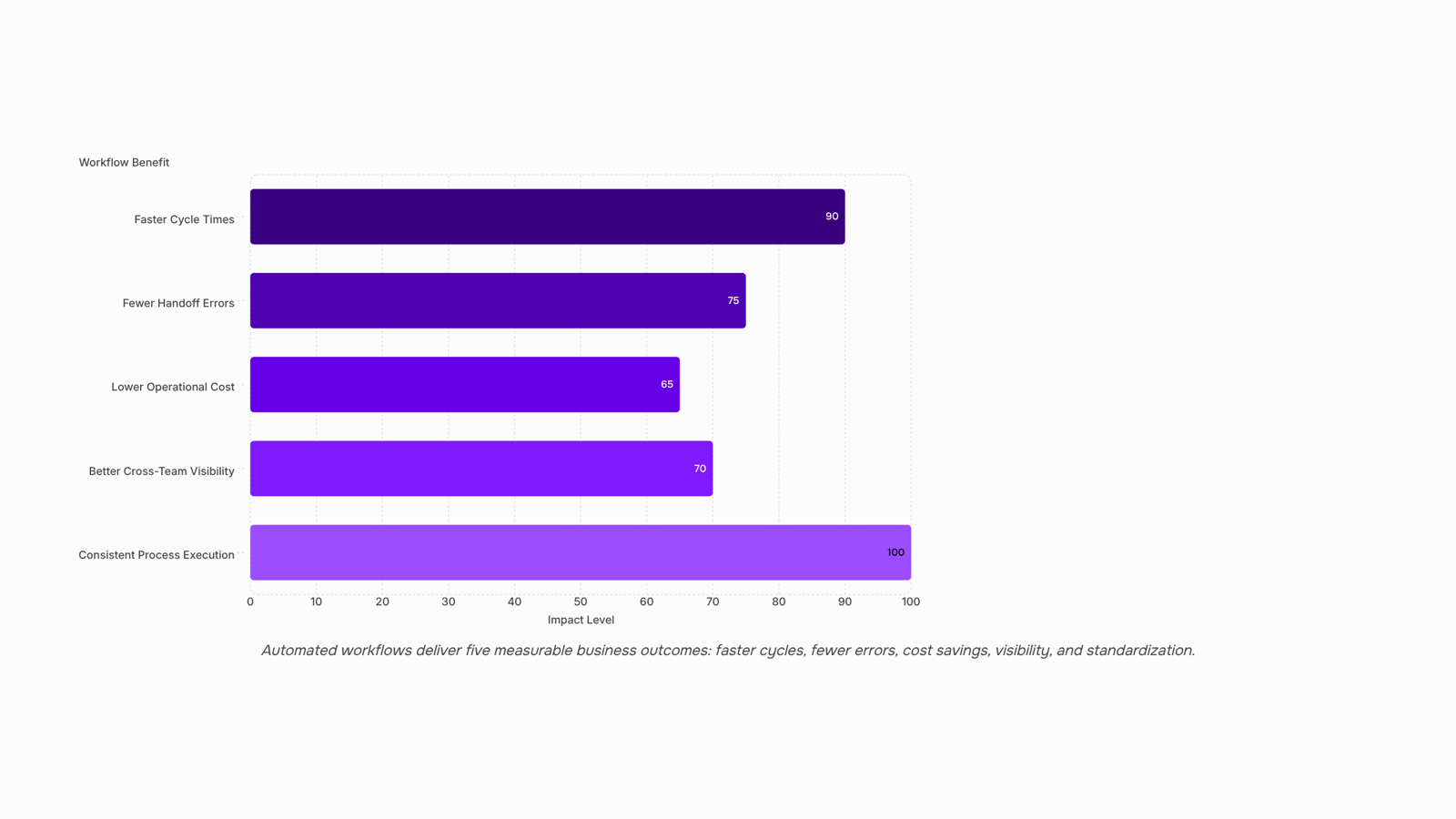
The most direct workflow automation benefits come down to five outcomes your business can actually measure.
Faster cycle times: When an approval request triggers automatically the moment a task completes, you cut the waiting period between steps from hours to minutes. IT teams that automate ticket escalation, for example, typically see response times drop by 50% or more because no one has to manually check a queue before acting.
Fewer handoff errors: Manual data re-entry between tools is where mistakes happen. Automating the transfer of client details from your CRM to your project management system removes that copy-paste step entirely. The error rate on handoff tasks drops significantly once the human hand is out of the loop on routine data movement.
Lower operational cost: When your team stops spending hours on repetitive tasks you can automate, that time shifts to billable work or higher-value problem-solving. For IT company owners, this is where the ROI shows up fastest: fewer hours on admin, more hours on delivery.
Better cross-team visibility: Automated workflows create a timestamped record of every action. Your project lead, account manager, and delivery team all see the same status without a status meeting. That shared visibility reduces the "who's handling this?" conversations that fragment focus.
Consistent process execution: A workflow runs the same way every time. No variation based on who's on shift or how busy the team is. This matters most for client onboarding, compliance checks, and billing cycles, where inconsistency creates downstream problems.
To see how these advantages apply at scale, the guide on automating workflows across your enterprise walks through implementation by team size and complexity. Revo is built specifically to deliver these outcomes without requiring you to write a single line of code.
What types of tasks you can automate first
Not every process in your business is worth automating on day one. Start with tasks that are high-frequency, rule-based, and currently eating time your team could spend on actual work.
These categories give you the highest return with the least setup risk:
Data entry and form routing: Any time someone manually copies information from one system into another, that's a candidate. Client intake forms, ticket creation, and project kickoff data are common examples.
Approval workflows: Budget requests, access permissions, and change orders that sit in someone's inbox for days are exactly what automation handles well. Set the conditions, define the approvers, and the process runs itself.
Status notifications and handoff alerts: When a task moves from one stage to the next, the next owner should know automatically, not because someone remembered to send a message.
Recurring reports and scheduled updates: Weekly summaries, utilization reports, and billing snapshots don't need a human to compile them each time.
Client onboarding steps: Welcome emails, document requests, and account setup tasks follow a predictable sequence every time, which makes them straightforward to automate business processes without disrupting existing team habits.
If you're working inside a platform like Podio, automated workflows for task assignment and status updates are a natural starting point because the data structure is already there.
For a broader look at how to sequence this across departments, automating workflows at the enterprise level covers where most IT teams begin and what they tackle next.
How automated workflows improve team communication
Most cross-team delays don't come from people being slow. They come from missing signals: nobody knows a task finished, so the next person doesn't start, so a manager sends a follow-up message, so someone replies, so work finally moves. That chain can take hours or days.
Automated workflows cut this by replacing the follow-up message with a trigger. When a ticket closes in your service desk, the billing team gets a notification automatically. When a developer pushes a deployment to staging, the QA lead gets an assignment without anyone typing a word. The handoff happens at the moment the work is ready, not when someone remembers to announce it.
For workflow automation for IT teams, the practical result is fewer status meetings and shorter approval cycles. Teams stop asking "where does this stand?" because the system tells them.
Status notifications also create a passive audit trail. Every handoff is timestamped, so when something stalls, you can see exactly where, not guess.
Revo handles these handoff triggers across your connected tools, so the communication layer runs without manual intervention. If you want the broader picture on automating business processes for team efficiency, that's worth reading next.
Seven steps to build your first automated workflow
Start with a process audit before you touch any tool. List every task your team repeats weekly — ticket routing, status updates, client onboarding steps, invoice reminders. If a task follows a predictable pattern, it's a candidate for automation.
Identify the highest-friction process first: Pick one workflow where manual handoffs cause the most delays or errors. A good starting point for most IT teams: the gap between a support ticket being resolved and the client being notified. That single handoff, done manually, creates unnecessary back-and-forth.
Map the current steps end-to-end: Write out every action, decision point, and person involved. You can't automate what you haven't fully described. A whiteboard or a simple spreadsheet works fine here.
Define your trigger and your outcome: Every automated workflow needs a starting condition ("ticket status changes to Resolved") and a target result ("client receives confirmation email, internal log is updated"). Without both, you're building halfway.
Choose the right tools for each step: Match your trigger source, action app, and notification channel. If your stack spans multiple platforms, check whether they share a native integration or need a connector. This is where automating workflows across an enterprise gets more complex — plan for it early.
Build the workflow in a drag-and-drop builder: Revo's visual builder lets you connect triggers, conditions, and actions without writing code. Drop in your steps, set your logic, and configure each node before running a test. For IT teams new to workflow automation for IT teams, this removes the biggest barrier: needing a developer to ship a first version.
Test with real data, not dummy inputs: Run the workflow against an actual scenario from your process audit. Check that every condition fires correctly and that the output matches your defined outcome from step three.
Deploy, then document: Go live on a narrow scope first — one team, one process type. Document the trigger logic and owner so the workflow doesn't become a black box. Once stable, automate additional business processes using the same seven-step pattern.
The goal isn't to automate everything at once. It's to automate repetitive tasks one at a time, validate each one, and build from there.
How you measure whether your automated workflows are working
Three metrics tell you whether your automated workflows are delivering real value: cycle time, error rate, and hours reclaimed.
Cycle time is the minutes or hours between a trigger and a completed output — a ticket resolved, an invoice sent, an approval granted. Pull this from your workflow tool's run history. If cycle time drops after automation, the workflow is working. If it stays flat, the process itself may need fixing before the automation helps.
Error rate tracks how often a workflow produces a wrong output: a misrouted ticket, a duplicate record, a missed notification. Most workflow platforms log failed runs automatically. Compare your pre-automation error count (even a rough estimate from your team) against post-automation failures logged in the system.
Hours reclaimed is the simplest sell internally. Multiply the average time your team spent on the manual task by weekly volume. That's your baseline. Compare it monthly. No spreadsheet required — your workflow platform's run count does the math for you.
The key is collecting these without adding a reporting burden. Revo logs every run with timestamps and status, so cycle time and error rate surface without manual tracking. For a broader view of how automation compounds across your business, these three metrics are the right starting point.
Check your numbers after the first two weeks. That's enough data to know whether you're seeing real workflow automation benefits or just moving the problem.
Common mistakes that slow down workflow automation
Three mistakes kill most automation projects before they show results.
Automating a broken process first is the most common. If a handoff is unclear manually, automating it just makes the confusion faster. Fix the process on paper, then automate it.
Skipping structured testing is the second. Run every new automated workflow through at least three real scenarios before it touches live data. One untested edge case can corrupt a week of records.
Over-automating too early stalls teams who try to wire up everything at once. Start with one high-volume, low-risk task. Once that runs cleanly, expand. Follow workflow management best practices to sequence the rollout correctly.
Closing
Automated workflows aren't about replacing your team—they're about freeing your team from the repetitive handoff work that slows everything down. Start by identifying one high-friction process where manual steps create delays or errors, map it end-to-end, and build your first workflow around a clear trigger and outcome. The measurement piece matters just as much as the setup: tracking cycle time and error rate manually defeats the purpose of automation. Revo's execution tracking captures that data automatically, so you see exactly where your workflows are saving time and where they need adjustment. Ready to start? Try Revo free or visit the product page to build your first workflow today.
FAQ
Q. What are the advantages of using automated workflows in my business?
A. Automated workflows cut cycle times by 50% or more, eliminate handoff errors from manual data entry, free up team hours for billable work, create timestamped visibility across teams, and ensure consistent process execution every time.Q. What types of tasks can be automated in a workflow?
A. Start with data entry and form routing, approval workflows, status notifications and handoffs, recurring reports, and client onboarding steps—anything high-frequency, rule-based, and currently manual.Q. How can I create automated workflows to streamline my operations?
A. Identify your highest-friction process, map it end-to-end, define the trigger and outcome, choose your automation platform, test with real data, train your team, and measure cycle time and error rate to confirm it's working.Q. Can automated workflows improve communication between teams?
A. Yes. Workflows replace follow-up messages with automatic triggers, so the next person gets notified the moment work is ready. This cuts status meetings and approval cycles while creating a timestamped audit trail.Q. How do I measure the effectiveness of automated workflows?
A. Track cycle time (how fast tasks move between stages), error rate (mistakes caught or prevented), and team hours freed up for higher-value work. Revo's execution tracking captures this automatically so you don't have to.


 Elena Petrova15 September 2026


