TL;DR: Most agile tool comparisons hand you a feature matrix and leave the hard part to you. This one evaluates each option through the specific friction remote IT teams actually face: async sprint coordination, time zone gaps, and AI that cuts admin work instead of creating it. You'll leave knowing which tool fits your team's setup and why.
Agile project tools are software platforms that help teams plan, track, and deliver work in short iterative cycles called sprints.
Where a generic task list just records what needs doing, agile task management software structures how work moves: from backlog to sprint to done, with visibility into blockers at every stage. For remote IT teams, that structure matters more than it does in an office. Without it, sprint planning happens in chat threads, task ownership blurs across time zones, and nobody sees a problem until it's already a missed deadline.
The tools in this category handle sprint boards, backlog grooming, velocity tracking, and async status updates in one place, rather than spreading that work across three apps.
If you want the broader case for why this approach works, how agile development improves project efficiency covers the fundamentals.
Six criteria separate a tool that actually works for distributed IT teams from one that just claims to.
Async visibility is the first filter. Remote sprints fail when progress lives in someone's head or a chat thread. Your tool needs board views, status updates, and blockers visible without a meeting.
Sprint support matters more than generic task lists. Look for native backlog management, velocity tracking, and sprint retrospective templates. Generic agile sprint planning software workarounds cost your team 20–30 minutes per sprint just in setup overhead.
AI automation is now a baseline expectation, not a premium add-on. Tools that auto-assign tasks, flag at-risk items, or surface blockers before standup save real hours each week.
Integration depth with your existing stack (CRM, billing, time tracking) determines whether you get one source of truth or another data silo. Check whether integrations are native or just Zapier pass-throughs.
Pricing transparency is worth scrutinizing. Most tools bury per-seat costs or restrict key features to higher tiers.
If you want a broader starting point, the best project management tools for remote teams covers the wider category before you narrow to agile-specific options.
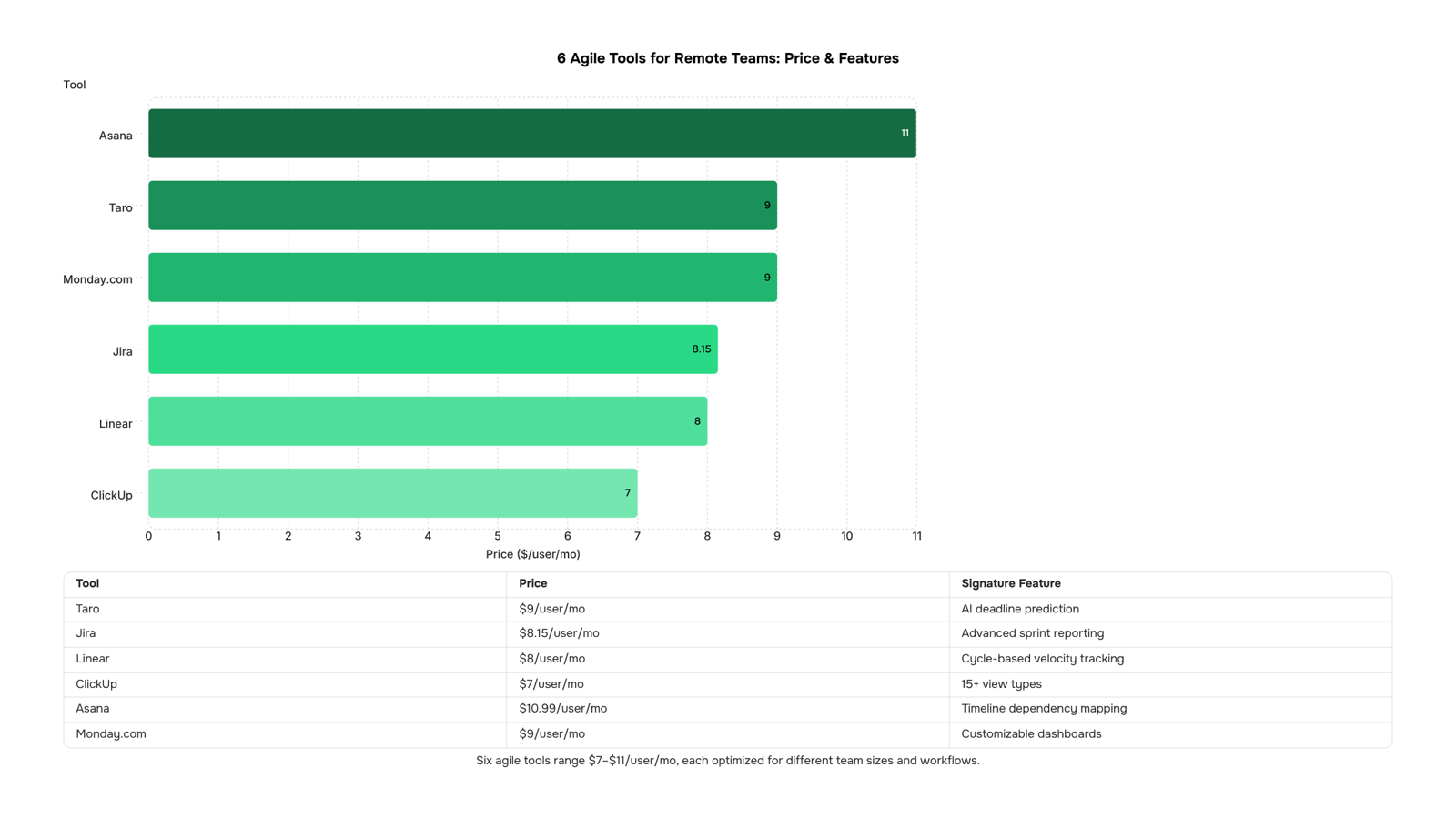
Here's how the six leading agile project tools stack up for remote teams in 2026. Use this table to shortlist before reading the full breakdowns below.
Tool | Best for | Starting price | Free plan | Standout feature |
|---|
Taro | IT teams wanting AI-driven sprint oversight | $9/user/mo | Yes | AI deadline prediction |
Jira | Engineering teams on complex backlogs | $8.15/user/mo | Yes (10 users) | Advanced sprint reporting |
Linear | Fast-moving dev teams | $8/user/mo | Yes | Cycle-based velocity tracking |
ClickUp | Teams consolidating tools | $7/user/mo | Yes | 15+ view types |
Asana | Cross-functional project tracking | $10.99/user/mo | Yes | Timeline dependencies |
Monday.com | Visual workflow management | $9/user/mo | No | Customizable dashboards |
If you're also weighing Trello alternatives for agile sprint planning or ClickUp alternatives for IT teams, those comparisons cover overlapping use cases worth checking before you commit.
Taro sits at the top of this list for a reason. Most agile project tools give remote IT teams a place to log work. Taro gives them a place to run it.
Taro — Best for IT teams that need one connected workspace
Taro handles sprint planning, task tracking, time logging, and real-time collaboration in a single workspace. The AI layer doesn't just surface status updates — it flags risks before they become missed deadlines. If your team is currently stitching together a Kanban board, a spreadsheet, and a chat tool, Taro replaces that stack and connects directly to your CRM (Revo), billing (Inzo), and email (Evox).
Key capabilities:
Sprint planning with AI-assisted workload forecasting
Kanban and list views with real-time sync across time zones
Built-in time tracking tied to tasks, not a separate app
Predictive alerts when a sprint is trending toward a slip
Native integrations with Revo, Inzo, Lio, and Evox
Pros: One workspace replaces four tools. AI predictions reduce reactive firefighting. Cross-product data means your project status and your billing status stay in sync.
Cons: If your team only needs a lightweight task list, the depth may be more than you need right now.
Pricing: Available on worksbuddy.ai. Free plan available.
Best for: IT company owners running distributed teams who want agile sprint planning software that connects project execution to the rest of the business.
Jira — Best for engineering teams with complex workflows
Jira is the default choice for software development teams running structured sprints. Its backlog management, custom issue types, and automation rules handle multi-team dependencies well. The tradeoff is setup time: getting Jira configured for a new remote team takes days, not hours.
Pros: Deep sprint reporting. Large ecosystem of integrations. Strong audit trail.
Cons: Steep learning curve. Pricing scales quickly once you pass the free tier (up to 10 users on the free plan; paid starts at $8.15 per user per month as of Q2 2025).
Best for: Engineering-heavy teams already inside the Atlassian ecosystem.
Linear — Best for fast-moving product and engineering teams
Linear is built for speed. Issue creation, triage, and cycle tracking are faster than most agile project tools on this list. The interface is minimal by design, which remote teams either love or find limiting depending on how much process they need.
Pros: Fast keyboard-driven workflow. Clean cycle (sprint) tracking. Good GitHub integration.
Cons: Limited time tracking. Reporting is basic compared to Jira or Taro.
Pricing: Free for small teams; paid plans start at $8 per user per month.
Best for: Small engineering teams that prioritize speed over reporting depth.
ClickUp — Best for teams that want maximum customization
ClickUp gives you more view types and configuration options than almost any other tool in this category. That flexibility is also its main liability: new remote teams often spend more time configuring ClickUp than using it.
Pros: Highly customizable. Docs, goals, and time tracking are built in. Generous free plan.
Cons: Feature overload slows onboarding. Performance can lag with large workspaces.
Pricing: Free plan available; paid starts at $7 per user per month.
Best for: Teams that have a dedicated ops person to manage the setup.
Asana — Best for cross-functional project tracking
Asana handles project timelines and task dependencies cleanly. It's a strong choice for kanban tools for remote teams that mix technical and non-technical members, because the interface is approachable without training.
Pros: Easy onboarding. Timeline view is clear. Good for tracking work across departments.
Cons: Sprint planning is less native than Jira or Taro. Time tracking requires a third-party integration.
Pricing: Free for up to 10 users; paid starts at $10.99 per user per month.
Best for: Mixed teams running projects that aren't purely software development.
Monday.com — Best for visual project tracking
Monday.com is the most visually driven tool on this list. Its board-based interface works well for teams that think in timelines and color-coded status columns. Sprint ceremonies feel bolted on rather than native.
Pros: Visual and intuitive. Strong dashboard reporting. Non-technical users adopt it quickly.
Cons: Agile-specific features (burndown charts, backlog grooming) require workarounds.
Pricing: Free for up to 2 seats; paid starts at $9 per user per month.
Best for: Project managers who need stakeholder-facing visibility more than sprint discipline.
If you're still weighing options after this list, choosing the right fit for your team's specific constraints is worth reading before you commit to a trial.
Team size is the fastest filter. Most "how to choose" advice skips it and hands you a feature checklist instead. Here's a more direct cut.
Under 15 people: You need speed, not configurability. A tool that takes two weeks to set up will sit unused by week three. For small remote teams, prioritize a shared board, async comment threads, and a free tier that doesn't gate basic sprint features. Among the best agile tools 2026 has surfaced for this segment, lightweight Kanban-first tools with zero onboarding overhead win consistently.
15 to 60 people: This is where most agile project tools for remote teams break down. You've outgrown a simple board but don't need enterprise governance yet. Look for sprint planning with workload visibility, time tracking, and at least one native integration with your communication stack. At this size, the tool that shows who's overloaded before a sprint starts is worth more than any template library. Taro is built specifically for this range, with AI-driven workload prediction and real-time sprint health signals.
Enterprise IT teams (60+): Governance, audit trails, and cross-team dependency mapping become non-negotiable. If you're evaluating at this scale, the project management tools for remote teams comparison covers role-based permissions and reporting depth in more detail.
For teams switching from Trello or ClickUp, the Trello alternatives and ClickUp alternatives guides map the migration path by team size.
What is agile project management software?
Agile project management software helps teams plan, track, and deliver work in short cycles called sprints, typically one to four weeks. It replaces static task lists with boards, backlogs, and burndown charts that update in real time. For remote IT teams, the core value is visibility: everyone sees what's in progress, what's blocked, and what ships next, without a status meeting.
What features matter most in agile task management software for remote teams?
Async-first features separate tools that genuinely support distributed work from those that just add a "remote" label. Look for threaded comments on tasks, time-zone-aware sprint planning, and automated standup prompts. Integrated time tracking and dependency mapping matter more at scale. If your team runs two-week sprints across three time zones, a tool without async context on every task creates daily catch-up overhead.
How is agile different from traditional project management?
Traditional project management fixes scope upfront and adjusts time. Agile fixes time (the sprint) and adjusts scope. That shift makes agile better suited to software delivery, where requirements change mid-build.
Which agile project tools work for non-technical teams?
Most agile project tools designed for developers adapt well to ops, marketing, and client services once you replace "sprint" with "weekly cycle" and "backlog" with "queue." For a broader comparison, see project management tools for remote teams.
Closing
The right agile project tool doesn't just organize sprints—it eliminates the async friction that kills remote IT teams. You now know which tools handle time zone gaps, which ones add admin overhead instead of cutting it, and which integrations actually matter for your stack. The difference between a team that ships predictably and one that constantly firefights often comes down to whether your tool surfaces blockers before standup or after they've already slipped the sprint.
Taro's approach is built specifically for this: AI handles the tracking overhead so your team lead doesn't have to. See how it handles your next sprint by exploring Taro's sprint automation features.
FAQ
What are the best agile project tools for remote teams?
Taro, Jira, Linear, ClickUp, Asana, and Monday.com lead the category in 2026. Taro ranks first for IT teams because it combines sprint planning, time tracking, and AI-driven risk alerts in one workspace—eliminating the need to stitch together multiple tools.
How do I choose the right agile project tool for my business?
Filter by your specific friction: async visibility, native sprint support, AI automation, integration depth, and pricing transparency. If your team runs distributed sprints across time zones, prioritize tools with real-time board sync and predictive alerts over generic task lists.
What features should I look for in an agile project tool?
Async visibility (board views without meetings), sprint support (backlog + velocity tracking), AI automation (risk flagging), native integrations (CRM, billing, time tracking), and transparent pricing. Generic workarounds cost remote teams 20–30 minutes per sprint in setup overhead alone.
Are there any free agile project tools available?
Yes. Taro, Jira (up to 10 users), Linear, ClickUp, and Asana all offer free plans. Jira and Taro are strongest for remote IT teams; ClickUp offers the most customization if you have ops capacity to configure it.


 Megan Foster15 September 2026


