TL;DR: Most guides on CRM and email either review tools or explain concepts separately. This one shows IT company owners how the two systems work as one: where data flows, what breaks when the connection fails, and how to build the integration without creating more admin work for your team.
What CRM and email integration actually means
CRM and email integration means your contact records and your email activity share the same data layer. When a lead opens a proposal email, that signal updates their CRM record automatically. When a rep books a follow-up, the sequence pauses. Nothing sits in a silo waiting to be manually copied across.
Most teams run these as separate tools and pay for it in lag time. A rep sends an email in Gmail, then logs it in the CRM by hand. That gap is where deals go quiet.
True integration closes the loop in both directions: CRM data shapes which emails go out and when, and email behavior feeds back into lead scores, pipeline stages, and rep alerts. That is what crm and email marketing software should do by default, not through a fragile third-party connector.
If you want to track which emails actually moved a deal forward, the data has to live in one place from the start. Otherwise you are reconstructing a timeline after the fact, and that is guesswork, not sales intelligence.
CRM vs. email marketing: where one ends and the other begins
A CRM stores what you know about a contact: company, deal stage, last call notes, contract value. Email marketing software sends messages to lists: sequences, broadcasts, nurture flows. They sound related because they both touch contacts, but they do different jobs.
The confusion comes from overlap at the edges. Both tools hold email addresses. Both track opens. But a CRM tracks one relationship moving through a pipeline, while email marketing tracks a campaign moving through a segment. One is longitudinal; the other is lateral.
For crm and email marketing for small business, this distinction matters more than it does at enterprise scale. Small IT teams can't afford two tools that don't talk to each other. When they're disconnected, a rep manually logs every reply, a campaign fires to a contact who closed last week, and no one knows which email actually moved the deal.
Connected correctly, the CRM feeds the email tool (who to contact, what stage they're in), and the email tool feeds the CRM back (who opened, who clicked, who went cold). That's the data loop the previous section described.
Understanding the difference between CRM and email marketing is the prerequisite for building a campaign management process that actually scales. Without that clarity, integration just automates the mess.
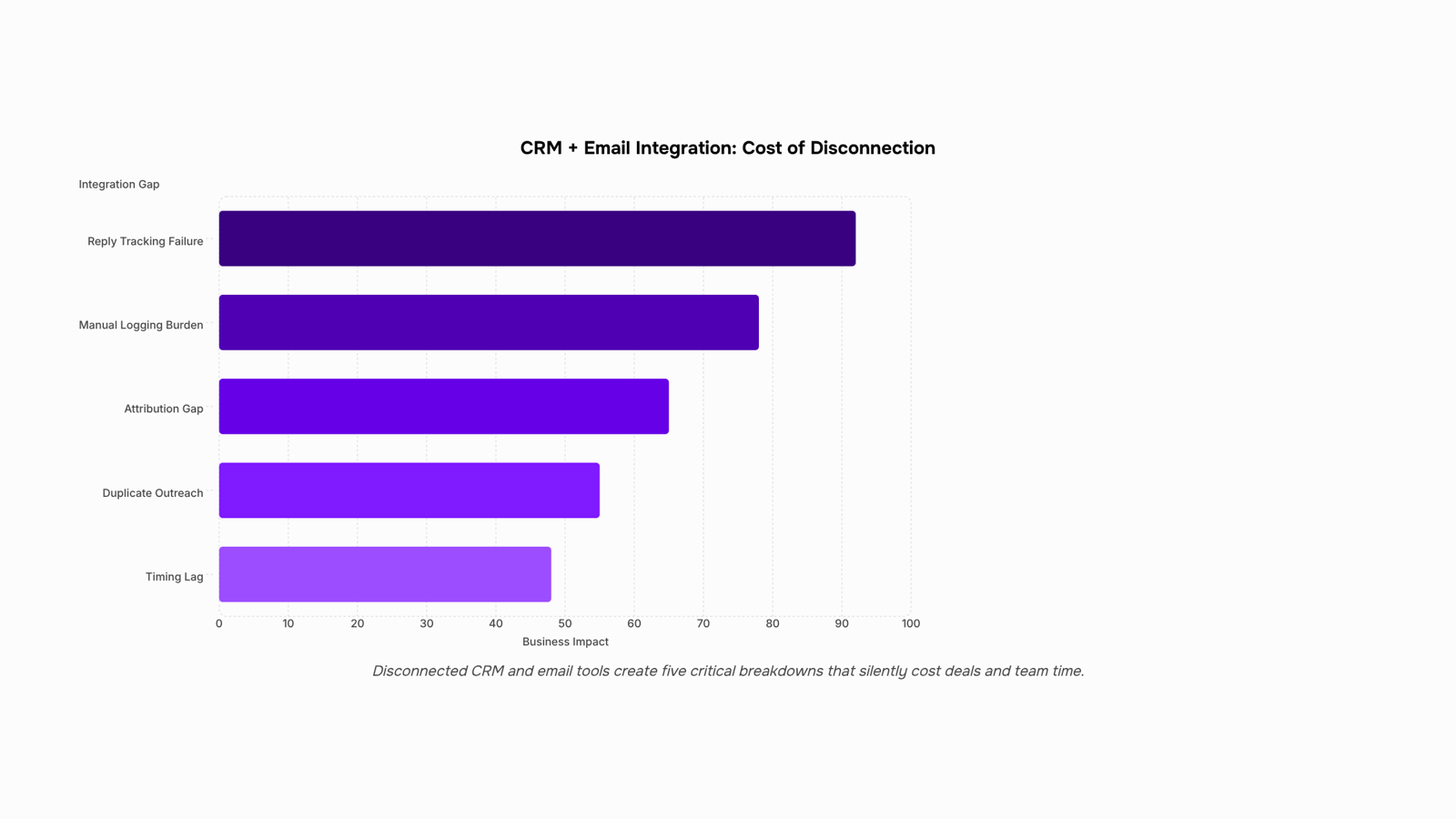
What you lose when your CRM and email do not talk to each other
When your CRM and email tools run separately, the gaps show up in the deals you lose quietly.
The most common breakdown is timing. A lead opens your proposal email three times in two days, but your CRM has no idea. Your rep follows up four days later, after the prospect has already signed with someone else. Tracking which emails actually moved a deal forward requires that both systems share the same data in real time, not in nightly batch syncs.
The second breakdown is duplication. Without crm and email automation keeping contact records in sync, two reps can run separate sequences to the same prospect. That prospect notices. You don't.
The third is the attribution gap. Your crm and email marketing manager asks which campaign sourced the three deals that closed this quarter. Without native integration, the answer is a manual spreadsheet exercise that takes a day and is probably wrong.
These are not edge cases. They are the default state for IT sales teams running tools that were never designed to share data.
Before you compare the top email marketing campaign tools, it helps to know exactly which integration gaps you are trying to close.
Most comparison articles in this space list features. This one scores each option on the four dimensions IT sales teams actually feel: native integration depth, automation capability, two-way inbox sync, and pricing.
Tool | Integration depth | Automation | Inbox sync | Starting price |
|---|
Evox | CRM + email in one product, no connector needed | Multi-step sequences, lead scoring, behavioral triggers | Two-way, native | Contact WorksBuddy |
HubSpot | Deep, but CRM and marketing live in separate hubs | Strong, but full automation requires Marketing Hub Pro | Yes, with paid tier | ~$800/mo for full suite |
ActiveCampaign | CRM bolted onto email marketing core | Good sequence builder, limited lead routing | One-way by default | ~$149/mo |
Pipedrive + Mailchimp | Connected via API or Zapier | Basic triggers only; no shared lead scoring | No native sync | ~$60–$100/mo combined |
Zoho CRM + Zoho Campaigns | Same vendor, but separate products with sync lag | Decent automation, weak behavioral scoring | Partial | ~$50/mo combined |
The pattern across most options: you get a CRM and an email tool, and you spend engineering time keeping them aligned. Research from CSO Insights suggests that a significant share of sales reps still log emails manually rather than through automatic sync, which is the exact gap these integrations are supposed to close.
The practical difference with Evox is structural. Because the CRM and email engine share the same data layer, lead scores update in real time as contacts open emails, click links, or go quiet. Your reps get alerts when a lead shows buying intent, not after they've already gone cold.
For IT company owners evaluating the best CRM and email marketing software, the right question isn't which tool has the longest feature list. It's which one removes the most manual steps between a new lead and a booked call.
If you're also comparing broader automation options, this breakdown of AI email marketing tools covers the wider category.
How to sync your CRM with email in 6 steps
Most CRM-to-email setups fail not because the tools are incompatible, but because the setup skips steps. Here is a repeatable six-step process you can work through in an afternoon.
Audit your contact data first: Before connecting anything, clean your CRM. Duplicate records and missing fields break trigger logic downstream. Export your contact list, remove duplicates, and confirm every record has at minimum an email address, company name, and lifecycle stage. This takes an hour and saves days of debugging later.
Map your data fields: Decide which CRM fields feed into your email tool and in which direction. At minimum, map contact status, last activity date, and deal stage. If your email platform pulls the wrong field, your segmentation collapses. Write the field mapping down before you touch any integration settings.
Configure your triggers: Triggers are the logic that fires an email when a contact does something: opens a proposal, visits your pricing page, or goes 14 days without a reply. Define the trigger condition, the delay, and the exit condition (what stops the sequence). Skipping exit conditions is one of the most common rebuild reasons you will hit in the next section.
Build your sequence structure: Map the email steps before you write a single subject line. For crm and email automation to work, the sequence needs a clear entry point, a branching condition for replies, and a hard stop. Most B2B IT services deals require between five and eight follow-up touches before a decision, so build for that length from the start.
Enable two-way inbox sync: This is where most small business setups break down. One-way sync pushes emails out but does not pull replies back into the CRM. For crm and email marketing for small business to work properly, replies need to log automatically against the contact record. Evox handles this with two-way sync across Gmail and Outlook, so every reply lands in the deal timeline without manual logging.
Test with a live segment before full rollout: Send the sequence to 10 to 20 contacts before enabling it for your full list. Check that triggers fire correctly, replies pause the sequence, and activity logs in the CRM. Use this stage to track which emails actually moved a deal forward before you scale.
Once these six steps are in place, you can compare the top email marketing campaign tools knowing exactly what integration requirements to filter for.
Common mistakes that break CRM and email workflows
The most common mistake is syncing every contact into your email tool without segmenting them first. When a cold prospect gets the same sequence as a renewal account, your reply rates drop and your CRM data becomes noise.
The second mistake is skipping trigger logic. Teams configure a one-time import instead of event-based triggers, so leads who open three emails or visit your pricing page never get a follow-up. That's where crm and email automation pays for itself: the system acts on behavior, not a calendar.
The third mistake is ignoring reply tracking. If your integration doesn't log replies back to the contact record, your reps are flying blind. You can't track which emails actually moved a deal forward without two-way sync in place.
Fix these three before optimizing anything else. A broken foundation makes every crm and email marketing improvement temporary.
How to manage CRM and email as one system going forward
Treat the integration as a living system, not a one-time setup. Three habits keep it working.
Weekly pipeline review: Open your CRM and filter by last email activity. Any lead silent for seven or more days needs a sequence trigger or a manual note explaining why. This is where a crm and email marketing manager earns their time back.
Sequence performance check: Every two weeks, pull open rates, reply rates, and unsubscribes by sequence. If a step drops below 20% open rate, rewrite the subject line before blaming the list. You can track which emails actually moved a deal forward at the message level, not just the campaign level.
Contact hygiene: Monthly, archive contacts who haven't engaged in 90 days. Keeping them inflates your metrics and skews lead scoring.
The best crm and email marketing software enforces these habits through automation. AI-powered email automation handles sequence logic automatically, so the system self-corrects rather than drifting.
Closing
The real cost of disconnected CRM and email tools isn't the software fees—it's the deals that go quiet because your rep didn't see the signal in time, the prospects contacted twice by different team members, and the attribution work that eats a day every quarter. When your CRM and email live in the same platform, none of that happens. Lead scores update as contacts engage, reps get alerted to buying intent in real time, and every touchpoint feeds back into your pipeline automatically.
If you're tired of stitching two tools together and losing data in the gaps, the Evox product page shows exactly how this works in practice—no connectors, no manual logging, no reconstruction. Start there and see what a true integration actually looks like.
FAQ
How does CRM and email automation improve sales?
Real-time data sync closes timing gaps: reps see when a lead opens a proposal and follow up while intent is hot, not days later. Automation eliminates manual logging, removes duplicate contact attempts, and surfaces buying signals instantly through lead scoring and behavioral triggers.
Can you recommend a CRM with built-in email marketing features?
Evox integrates CRM and email in one platform with no connector needed, so lead scores update in real time as contacts engage. Most alternatives like HubSpot or Zoho run CRM and email as separate products with sync lag and added complexity.
What are the benefits of using CRM and email marketing together?
You eliminate timing gaps (reps follow up while intent is hot), prevent duplicate outreach, close the attribution gap (you know which emails moved deals), and remove manual data entry. The CRM feeds email segmentation; email engagement feeds lead scores and pipeline stage updates.
What is the difference between CRM and email marketing?
A CRM tracks one relationship moving through a pipeline; email marketing tracks campaigns moving through segments. Connected correctly, the CRM tells email who to contact and when, and email tells the CRM who engaged and how intent changed.
Do I need a separate email marketing tool if my CRM has automation built in?
No—if your CRM has native email automation with two-way sync and behavioral triggers, a separate tool creates more work. Most CRM-email combinations fail because they're bolted together; true integration means both live in the same data layer from the start.


 Elena Petrova15 September 2026


