TL;DR: Most CRM content for real estate stops at feature lists and star ratings. This article shows IT company owners exactly how a CRM fits into a real estate workflow, from first lead capture to closed deal, with a framework for choosing the right system and the specific criteria that separate tools worth buying from ones that just add overhead.
What CRM means in a real estate context
A CRM (customer relationship management) system is not a glorified spreadsheet. In a real estate context, it's the operational layer that tracks every lead, contact, and active deal across the full transaction lifecycle — from first inquiry to closed sale to repeat referral.
Generic CRM software manages contacts. CRM software built for real estate manages the lead lifecycle: where a prospect came from, how many times you've followed up, which properties they've viewed, and when their lease or mortgage is due for renewal. That distinction matters because the real estate sales cycle is long, non-linear, and relationship-dependent in ways that most industries aren't.
The role of a CRM in the real estate industry is to replace memory and manual follow-up with a system. Without one, leads fall through the gaps between showings, offers, and closings. With one, every contact has a next action, a history, and a trigger for re-engagement.
If you're evaluating options, comparing the best CRM options for real estate agents is a practical starting point. For teams thinking about how automation fits in, how AI-powered lead management works for real estate teams explains the workflow layer most tools skip.
How a CRM improves your real estate business
A CRM built for real estate does four things a spreadsheet never will: it speeds up your first response, keeps follow-up consistent across a long sales cycle, shows you exactly where every lead stands, and surfaces past clients when repeat business is most likely.
Speed matters more than most agents realize: Research consistently shows that leads contacted within five minutes convert at dramatically higher rates than those reached an hour later. A CRM with automated lead routing and instant alerts removes the gap between a form submission and your first call.
Follow-up consistency is where most pipelines leak: Real estate lead management typically requires 8 to 12 touchpoints before a prospect commits. Without a system tracking each one, you rely on memory, and memory fails at volume. Automated sequences handle the in-between touches so you show up at the right moment without manually scheduling every email.
Pipeline visibility tells you where to spend Tuesday morning: Instead of guessing which leads are warm, a CRM for real estate agents surfaces contacts by stage, last activity, and days since contact. You work the list that actually needs attention, not the one that feels familiar.
Repeat business is a long game that rewards systems: Most agents lose past clients to competitors simply because they go quiet after closing. A CRM scheduled to check in at 6, 12, and 24 months keeps you present without extra effort.
For a practical look at how these outcomes connect to specific tools, comparing the best CRM options for real estate agents covers what to prioritize at each stage.
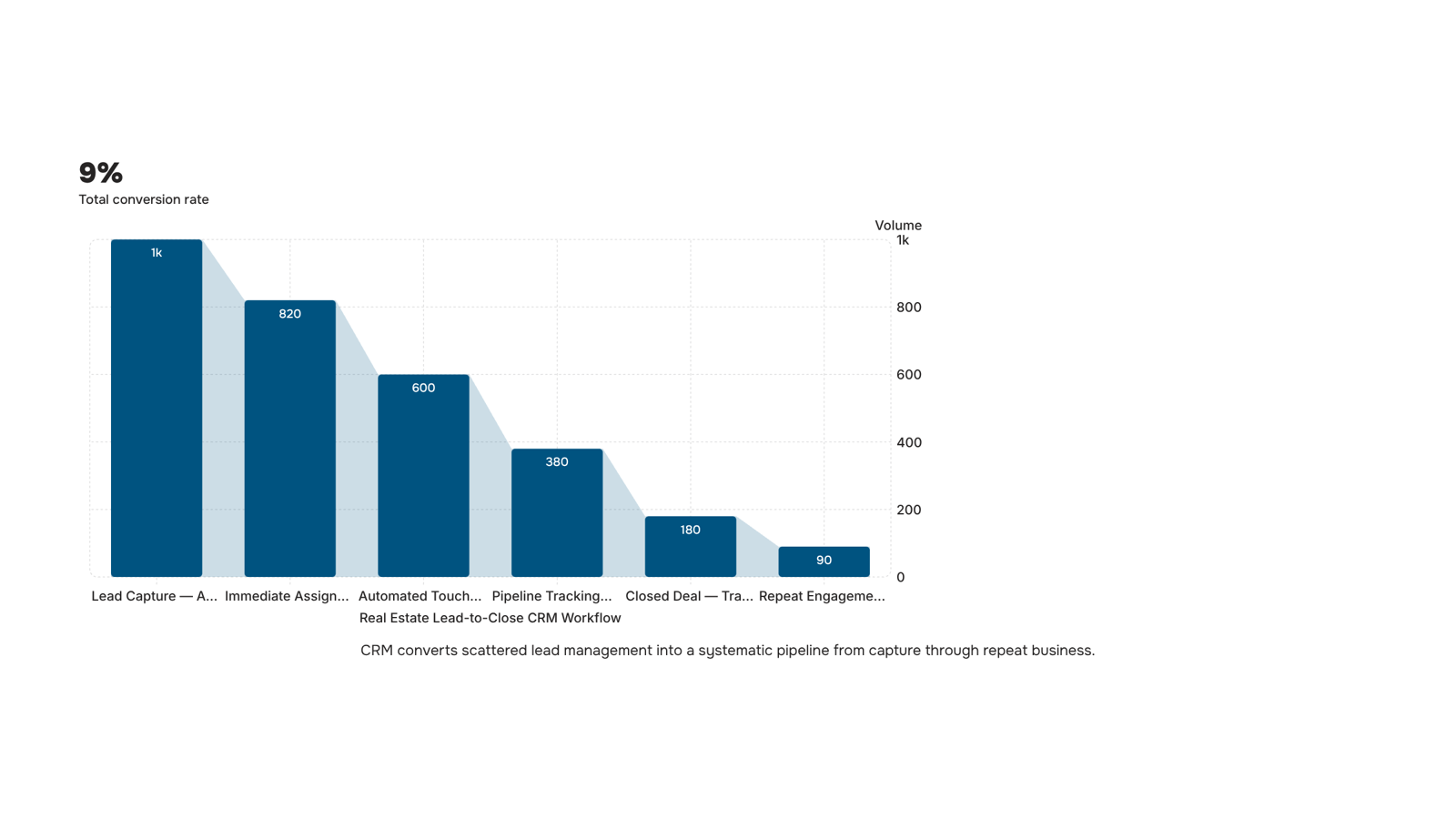
What features a real estate CRM must have
Not every CRM handles the real estate lead lifecycle well. Generic platforms track contacts. A purpose-built CRM for the real estate industry tracks where each lead came from, what they've seen, and when to follow up next — without you managing that manually.
Here are the features that actually matter for agents:
Lead capture with source tracking: Leads arrive from Zillow, your website, open houses, and referrals simultaneously. Your CRM should log the source automatically and route each lead to the right follow-up sequence. Without this, you're guessing which channels produce closings.
Automated follow-up sequences: Converting a real estate lead typically requires multiple touchpoints over weeks or months. A CRM that triggers email and SMS sequences based on lead behavior removes the gap where deals go cold.
Visual pipeline tracking: You need to see every active deal by stage — inquiry, showing scheduled, offer made, under contract — at a glance. This is where lead tracking in real estate moves from reactive to managed.
MLS and listing integrations: If your CRM doesn't connect with your MLS feed or listing platforms, you're manually copying property data. That's the integration gap most generic tools leave open.
Transaction and document management: Storing offers, counteroffers, and disclosures inside the same system where you track the deal cuts the back-and-forth with your transaction coordinator.
Reporting by lead source and agent: If you can't see which sources close at the highest rate, you can't make smart marketing decisions.
For a deeper comparison of platforms that check these boxes, the Best CRM for Real Estate Agents in 2026: A Practical Buying Guide breaks down which tools handle each feature well.
5 steps to use a CRM in your real estate workflow
Most agents set up a CRM, import their contacts, and then wonder why nothing changed. The tool isn't the problem. The workflow is. Here's a five-step framework for using a CRM in real estate from first lead to closed deal.
Capture every lead in one place: Connect your CRM to every source where leads arrive: your website contact form, Zillow or Realtor.com inquiries, open house sign-in sheets, referrals. If a lead lands somewhere outside your CRM, it will fall through. Set up each source as a distinct entry point so you can see which channels actually convert, not just which ones generate volume.
Assign a stage and an owner immediately: Real estate lead management breaks down when contacts sit in a generic "new leads" bucket for days. The moment a lead enters your pipeline, tag it with a stage (new, contacted, qualified, under contract, closed) and assign it to one agent. Ambiguous ownership is how follow-up dies. CRM best practices that keep your pipeline moving cover this in more detail, but the short version is: every record needs a name attached to it.
Automate the first three touchpoints: Speed matters more than most agents realize in lead tracking for real estate. Set your CRM to trigger an immediate acknowledgment email, a follow-up text within the first hour, and a check-in sequence over the next few days. You write these once; the CRM sends them on schedule. This keeps leads warm while you're showing properties or in closing meetings.
Log every interaction, every time: Calls, emails, showings, price conversations. If it isn't in the CRM, it didn't happen for the next agent who picks up the file, or for you three months later when the lead resurfaces. Tracking client relationships across the full deal cycle becomes much easier when the history is already there.
Review your pipeline weekly: A CRM for real estate agents is only as useful as the habits built around it. A 15-minute weekly review, filtering by stage and last-contact date, surfaces deals that have gone quiet before they go cold.
The CRM in the real estate industry works as a system, not a database. How AI-powered lead management works for real estate teams shows what that looks like when the process runs automatically.
A CRM that sits in isolation from your other tools creates more work, not less. For the integration question to be worth asking, you need to know which categories matter most.
The tools most agents already rely on fall into four buckets:
MLS feeds and listing platforms: (Zillow, Realtor.com, IDX feeds): your CRM should pull new leads directly from these without manual import
Email and calendar: (Gmail, Outlook, Google Calendar): two-way sync so every client email and showing appointment logs automatically
E-signature and document tools: contract status should update inside the CRM when a document is signed
Dialer and SMS tools: call notes and text threads should attach to the contact record, not live in a separate app
When evaluating CRM software real estate agents actually use day-to-day, prioritize native integrations over Zapier chains. Native connections break less often and don't require a paid middleware tier.
The real estate CRM features that signal a well-integrated system: automatic lead source tagging, bi-directional calendar sync, and activity logging that doesn't require manual entry.
For a deeper look at how AI-powered lead management works for real estate teams, or if you're still comparing the best CRM options for real estate agents, those resources cover the integration layer in more detail.
Common mistakes agents make with a real estate CRM
The biggest reason CRM adoption fails for real estate agents has nothing to do with the software.
Importing contacts without a follow-up plan: Agents dump their database into the CRM, then wait. A CRM for real estate agents only produces results when every contact has a next action assigned.
Treating the CRM as a rolodex, not a pipeline: If you're not logging calls, tracking deal stage, and setting reminders, you're paying for an expensive address book.
Skipping automation on day one: Manual data entry is the fastest way to abandon any system. Wire up your email and calendar integrations before you add a single lead.
Ignoring lead response time: The CRM tells you who to call. If you're not acting on those alerts within the first hour, the system can't help you.
For a fuller picture of CRM best practices that keep your pipeline moving, that's worth reading before you configure anything.
CRM vs. spreadsheet: what changes and what does not
Spreadsheets track what happened. A CRM shapes what happens next. That distinction matters most in lead tracking real estate workflows, where a 24-hour response delay can cost you the deal.
Dimension | Spreadsheet | CRM |
|---|
Speed | Manual updates after every call | Auto-logs calls, emails, and status changes |
Automation | None | Follow-up sequences trigger on lead actions |
Visibility | One person sees one file | Whole pipeline visible to the team in real time |
Scale | Breaks past ~50 active leads | Handles hundreds without losing context |
The spreadsheet does not disappear entirely. Most agents keep one for commission tracking or reporting exports. But for managing the crm in real estate industry context, where a single client touches your pipeline 8 to 12 times before closing, a spreadsheet creates gaps a CRM closes automatically. CRM best practices that keep your pipeline moving covers how to structure those touchpoints once you make the switch.
Closing
The gap between a lead arriving and someone actually following up is where most real estate deals die—not because agents don't care, but because memory and spreadsheets don't scale. A CRM built for real estate closes that gap by automating the first response, tracking every touchpoint, and surfacing warm leads before they go cold. The framework works: capture every lead in one place, assign it immediately, automate the first three touches, log everything, and review weekly. That's the system. The question isn't whether you need a CRM—it's whether you can afford to keep losing deals to the agents who already have one. Ready to see how your pipeline changes when follow-up becomes automatic? Start with a free trial and watch what happens in your first week.
FAQ
How can a CRM improve my real estate business?
A CRM speeds up your first response to leads (critical within five minutes), keeps follow-up consistent across 8-12 touchpoints, shows you exactly where every deal stands, and automatically reconnects you with past clients for repeat business—all without manual tracking.
What features should a real estate CRM have?
Lead capture with source tracking, automated follow-up sequences, visual pipeline by stage, MLS and listing integrations, transaction document management, and reporting by source and agent. Without these, you're managing real estate like a generic contact database.
How does a CRM help with lead management in real estate?
It tracks where each lead came from, what they've viewed, and when to follow up next—automatically. This replaces the memory gap where deals go cold and ensures every contact has a next action tied to their stage in the buying cycle.
Can a CRM integrate with my existing real estate software?
Yes, a purpose-built real estate CRM should connect with your MLS feed, listing platforms, and website forms. If it doesn't, you're manually copying data—the integration gap most generic tools leave open.
Is a CRM worth it for a solo real estate agent?
Absolutely. Solo agents lose deals to follow-up gaps and forgotten past clients more often than teams do. A CRM's automated sequences and pipeline visibility are most valuable when you're managing everything alone.


 Elena Petrova11 September 2026


