TL;DR: Most guides on how to sign a contract online focus on the signature click and nothing else. This one walks IT company owners through the full contract lifecycle: what to check before you send, how identity verification and audit trails actually work, and how to automate what happens after the signature lands. You'll leave with a framework you can apply to your next contract today.
What signing a contract online actually means
Signing a contract online means applying a legally recognized electronic signature to a document, then storing a tamper-evident record of that action. It is not the same as printing a PDF, signing it by hand, and scanning it back. That process creates a wet signature on a digital file, which introduces version-control problems, breaks the audit trail, and adds days to a close.
Digital contract signing works differently. The signer authenticates, applies their signature through a compliant platform, and the system timestamps every action: who opened the document, when, and from which IP address. That record is what makes the signature enforceable, not the signature image itself.
To electronically sign a contract that holds up, the platform needs to capture intent, identity, and an unbroken chain of custody. Most IT service agreements, MSAs, and SOWs qualify for standard electronic signatures under US and EU law. A small category of documents, including certain real estate deeds and court filings, still require wet ink.
The rest of this article covers which platforms meet that bar, what legal standards apply, and how to collect signatures from multiple parties without chasing anyone down manually.
Is it legal to sign a contract online
Yes, it is legal to sign a contract online in the US and EU, provided four conditions are met.
The US ESIGN Act (2000) and the EU eIDAS Regulation give electronic signatures the same legal weight as wet signatures. Neither law requires a specific technology, which means a typed name, a drawn signature, or a click-to-sign all qualify, as long as the process meets the underlying requirements.
The four elements that make an e-signature legally binding:
Intent to sign : The signer must take a deliberate action, clicking "I agree" or drawing a signature, not just opening a document.
Consent to do business electronically : Both parties must agree to transact digitally. Most platforms capture this with a disclosure at the start of the signing flow.
Association with the document : The signature must be cryptographically linked to the specific document version, so any post-signing edit is detectable.
Audit trail : The platform must log signer identity (email, IP address, timestamp) and every action taken. This is what makes the record defensible in a dispute.
When vetting any platform, check that it generates a tamper-proof completion certificate, stores the full audit trail, and timestamps each event. If it can't produce that record on demand, the signature is harder to enforce.
For a deeper look at what a legally valid signature page requires, that breakdown covers the structural side.
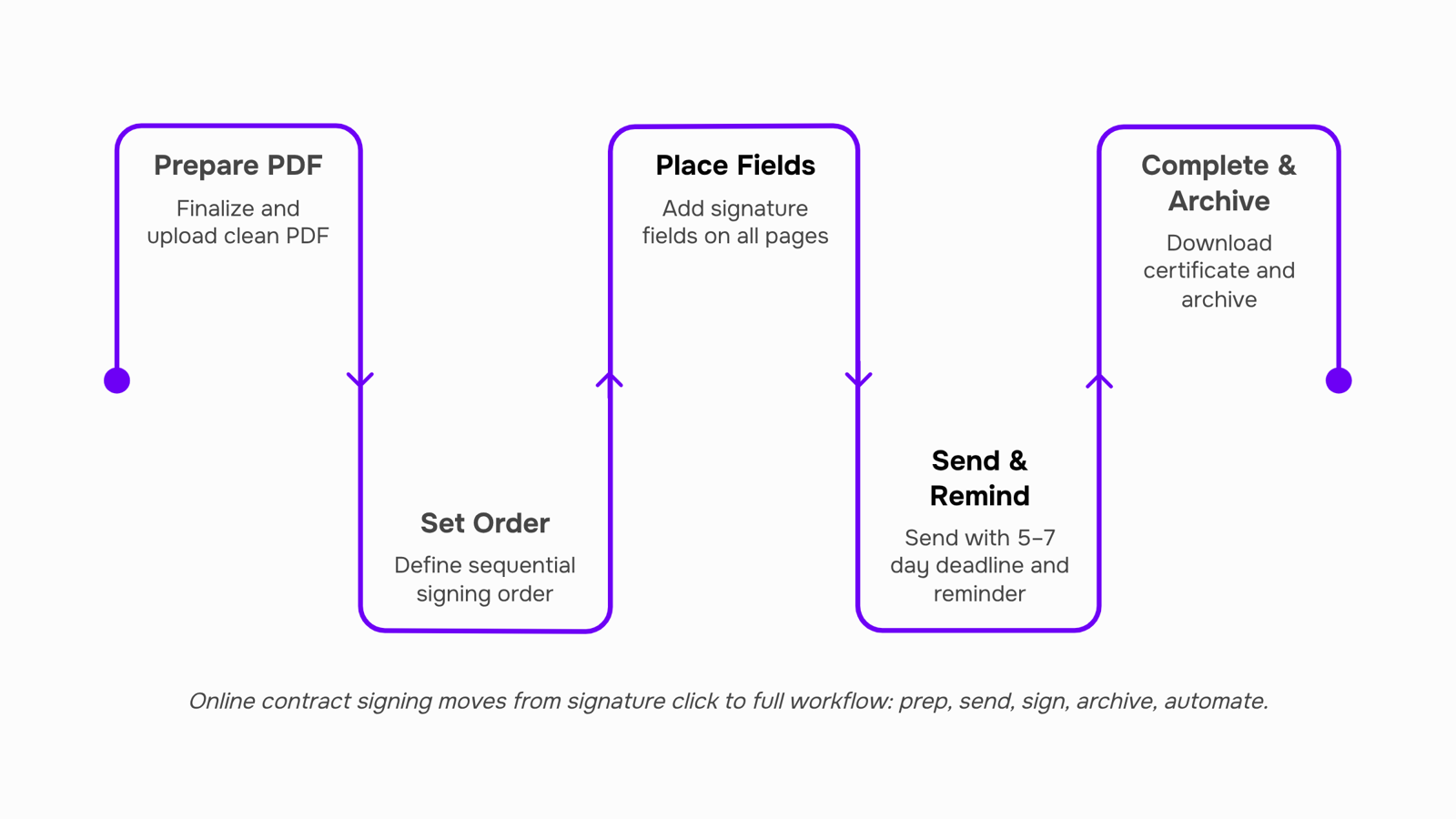
How to sign a contract online in 5 steps
Getting a contract signed online takes about five minutes once you know the sequence. Most people skip the prep work and wonder why deals stall or signatures get challenged later.
Step 1 : Finalize the document before you upload it
Export a clean PDF. Remove tracked changes, comments, and draft watermarks. Rename the file clearly ("MSA_ClientName_2025.pdf" beats "final_v3_REAL.pdf"). A document that looks unfinished signals to the other party that the terms are still in flux.
Common mistake: uploading a Word file and letting the platform convert it. Formatting shifts during conversion, and a clause that wrapped cleanly on your screen can render as ambiguous text on theirs.
Step 2: Define the signing order before you send
If more than one person needs to sign, decide whether they sign sequentially or in parallel. Sequential works when approval depends on hierarchy (your legal lead reviews before the client signs). Parallel works when two independent parties just need to confirm. Set this in your e-signature workflow before the document goes out, not after.
Step 3: Place signature fields deliberately
Drop a signature block at every point that requires consent, not just the final page. Initials on amended clauses, date fields next to effective dates, and a checkbox for any data-processing consent your contract requires. If you want to create a binding contract online, every material term needs explicit acknowledgment, not just a single signature at the end.
Step 4: Send with a clear deadline and context
A signing request without a deadline sits in inboxes. Set an expiry of five to seven business days and include one sentence in the message body explaining what the document is and what happens next. Signers who understand the context sign faster.
Common mistake: sending with no subject-line context. "Please review" gets ignored. "MSA for Project Kickoff, expires Friday" gets opened.
Step 5: Download and archive the completed certificate immediately
Once all parties electronically sign a contract, the platform generates a completion certificate that logs timestamps, IP addresses, and the audit trail. Download it the same day. Store it alongside the signed document in a named folder your team can find in six months. A signed PDF without its certificate is harder to enforce if the signature is ever disputed.
The five steps above assume you're handling the process manually. The next section covers what happens when you connect signing directly to your CRM and invoicing tools.
What happens after you sign: automating the next step
The signature is the milestone most teams celebrate. It's also where most deal cycles quietly break down.
In IT services, the gap between "signed" and "invoiced" is rarely a technical problem. It's a handoff problem. Someone has to notice the contract came back, pull the client details, create the invoice, update the CRM deal stage, and assign the onboarding task. That chain takes anywhere from a few hours to a few days, and it happens manually every single time.
Post-signature automation removes that chain entirely. When your e-signature workflow is connected to your CRM and billing tools, a completed signature can trigger an invoice, close the deal record, and create the first onboarding task without anyone touching it. The contract management side handles itself.
A concrete example: an IT managed services provider closes a 12-month support agreement. The moment the client signs, the system creates a recurring invoice, marks the opportunity as won, and assigns a kickoff task to the account manager. No one had to do any of that.
Most standalone signing platforms stop at the PDF. Sigi connects the signed document directly to WorksBuddy's CRM deals, invoices, and tasks, so the post-signature workflow runs without a manual trigger. If you're evaluating which platform fits your stack, the 7 best e-signature tools for contract management covers how the leading options handle this integration layer.
How secure is online contract signing
Secure online contract signing rests on three verifiable mechanisms, not marketing copy.
Encryption : Is the baseline. Any platform worth using encrypts documents in transit (TLS 1.2 or higher) and at rest (AES-256). If a vendor doesn't publish these standards, treat that as a red flag.
Audit trails : Are where most tools diverge. A real audit trail logs IP address, timestamp, device, and email verification for every action — not just the final signature. That record is what makes a signed document defensible if a dispute reaches court. When you evaluate e-signature security, ask whether the audit log is exportable and tamper-evident.
Tamper detection : Closes the loop. A compliant platform generates a completion certificate that cryptographically ties the signed document to its audit record. Any post-signature alteration breaks that tie and flags the document as compromised.
These three together are what the US ESIGN Act and EU eIDAS frameworks expect when they treat electronic signatures as legally binding. Knowing how to sign a contract online is straightforward; knowing what security infrastructure sits underneath that signature is what protects you when it matters.
Four criteria separate a platform worth buying from one you'll replace in six months.
Legal compliance : Is the baseline. Any platform you evaluate should explicitly support the US ESIGN Act and EU eIDAS Regulation. "Legally binding" in a feature list means nothing without knowing which standard backs it. Ask the vendor directly.
Audit trail depth : Is where most platforms diverge. A shallow audit trail logs who signed and when. A deep one captures IP address, device type, geolocation, and every open/view/decline event. If a signature is ever disputed, the shallow version won't hold up. The previous section covered the encryption and tamper-detection layer; the audit trail is what sits on top of that, readable by a judge or compliance officer.
Post-signature integrations : Matter more than most buyers realize. Signing is a trigger, not a finish line. A contract signed at 4pm should auto-update your CRM deal, generate an invoice, and create a follow-up task without anyone touching a keyboard. Most online contract signing platforms stop at the PDF. Choosing a platform that connects signing to your broader workflow is the decision that saves the most time long-term.
Multi-party signing with controlled order : Is essential for IT service agreements, which often need client sign-off before a legal review counter-signs. Platforms that treat every signer as equal create coordination problems fast.
Sigi handles all four: eIDAS/ESIGN-compliant certificates, timestamped audit trails, native WorksBuddy CRM and invoice triggers, and configurable signing sequences for any number of parties.
Benefits of signing contracts online
Switching to digital contract signing cuts the average contract cycle from days to hours — wet signatures routed by email and courier routinely add 3–5 business days per round trip. That speed directly affects deal velocity: the faster a client signs, the faster you can invoice and start delivery.
The compliance case is equally practical. E-signatures executed under the US ESIGN Act and EU eIDAS Regulation carry the same legal weight as ink, and a proper e-signature workflow generates a timestamped audit trail automatically — no manual logging required.
Here is what IT company owners consistently report after making the switch:
Faster close rates, because clients can sign a contract online from any device without printing anything
Lower admin overhead, since chasing signatures by phone disappears
Cleaner records, with tamper-proof certificates replacing scattered email threads
Tighter post-signature handoffs, especially when signing connects directly to invoicing or project kickoff
Closing
Signing a contract online is legally sound, faster than wet ink, and auditable end-to-end—but only if you treat it as a workflow, not just a signature click. The real win comes when you connect that signed document to your invoicing and CRM tools, so the deal actually closes without manual handoffs. Start with Step 1 this week: audit your next contract for clean formatting, finalized terms, and clear signing order before you send it out. Then ask yourself: what happens the moment the signature lands? If the answer is "someone has to remember to create an invoice," that's your next automation target.
FAQ
What are the best online contract signing platforms?
Sigi stands out for connecting signed contracts directly to your CRM, invoicing, and task tools—so post-signature workflows run automatically. Other platforms handle signing well but stop there; Sigi closes the handoff gap that slows most IT service deals.
How do I electronically sign a contract?
Upload a clean, finalized PDF, set signature fields and signing order, send with a clear deadline, and download the completion certificate once all parties sign. The entire process takes about five minutes per contract.
Is it legal to sign a contract online?
Yes, under the US ESIGN Act and EU eIDAS Regulation. Your signature is legally binding as long as the platform captures intent, consent, document association, and an audit trail with timestamps and IP logs.
What are the benefits of signing contracts online?
Faster turnaround, unbroken audit trails, version control, and the ability to automate post-signature workflows like invoicing and deal closure. Manual wet-signature processes add days and create handoff gaps.
How secure is online contract signing?
Secure platforms use TLS 1.2+ encryption in transit, AES-256 encryption at rest, and tamper-evident completion certificates. The audit trail—not the signature image—is what makes the record defensible in a dispute.


 Elena Petrova15 September 2026


