TL;DR: Most backlog guides stop at definitions and grooming checklists. This one gives IT company owners a concrete operating model: how to structure, prioritize, and maintain a product backlog so it drives sprint decisions instead of collecting dust. You'll leave with specific prioritization criteria, a maintenance cadence, and the signals that tell you your backlog has stopped working.
What is a product backlog in agile project management
A product backlog is the ordered list of everything a team might build, fix, or improve on a product — owned by the product owner, visible to the whole team, and treated as the single source of truth for what gets worked on next.
The 2020 Scrum Guide defines it as "an emergent, ordered list of what is needed to improve the product." That word "emergent" matters. A product backlog isn't a static requirements document you write once. It grows, shrinks, and reorders as you learn more about your users and market.
Where most teams go wrong: they treat the backlog as a dumping ground. Every idea lands there, nothing gets removed, and within a few sprints the list is too long to reason about. A mid-size software team can easily accumulate hundreds of backlog items, most of which will never be built. That's not a backlog — it's a graveyard with a Kanban board on top.
The operational question isn't "what's in the backlog?" It's "how do you keep it small enough to act on?" That means regular refinement sessions, clear acceptance criteria on each item, and a prioritization method your team actually trusts. For a deeper look at how to choose between competing items, the best project prioritization methods for IT teams covers the main frameworks side by side.
Product backlog vs sprint backlog: what is the difference
The two backlogs serve completely different purposes, and mixing them up is one of the fastest ways to lose sprint focus.
The product backlog is the long-term, prioritized list of everything the team might build. The sprint backlog is a short-term commitment: the specific items the team pulled from the product backlog for one sprint, plus the plan for delivering them. One is a living roadmap. The other is a locked-in contract for the next two weeks.
Dimension | Product backlog | Sprint backlog |
|---|
Scope | All future work, across releases | Work committed to one sprint only |
Owner | Product owner | Development team |
Time horizon | Ongoing, no fixed end date | Sprint duration (typically 1–4 weeks) |
Item detail | Varies — rough at the bottom, refined at the top | Fully defined before sprint starts |
Mutability | Changes continuously | Frozen after sprint planning |
Item movement | Items sit until prioritized | Items pulled during sprint planning |
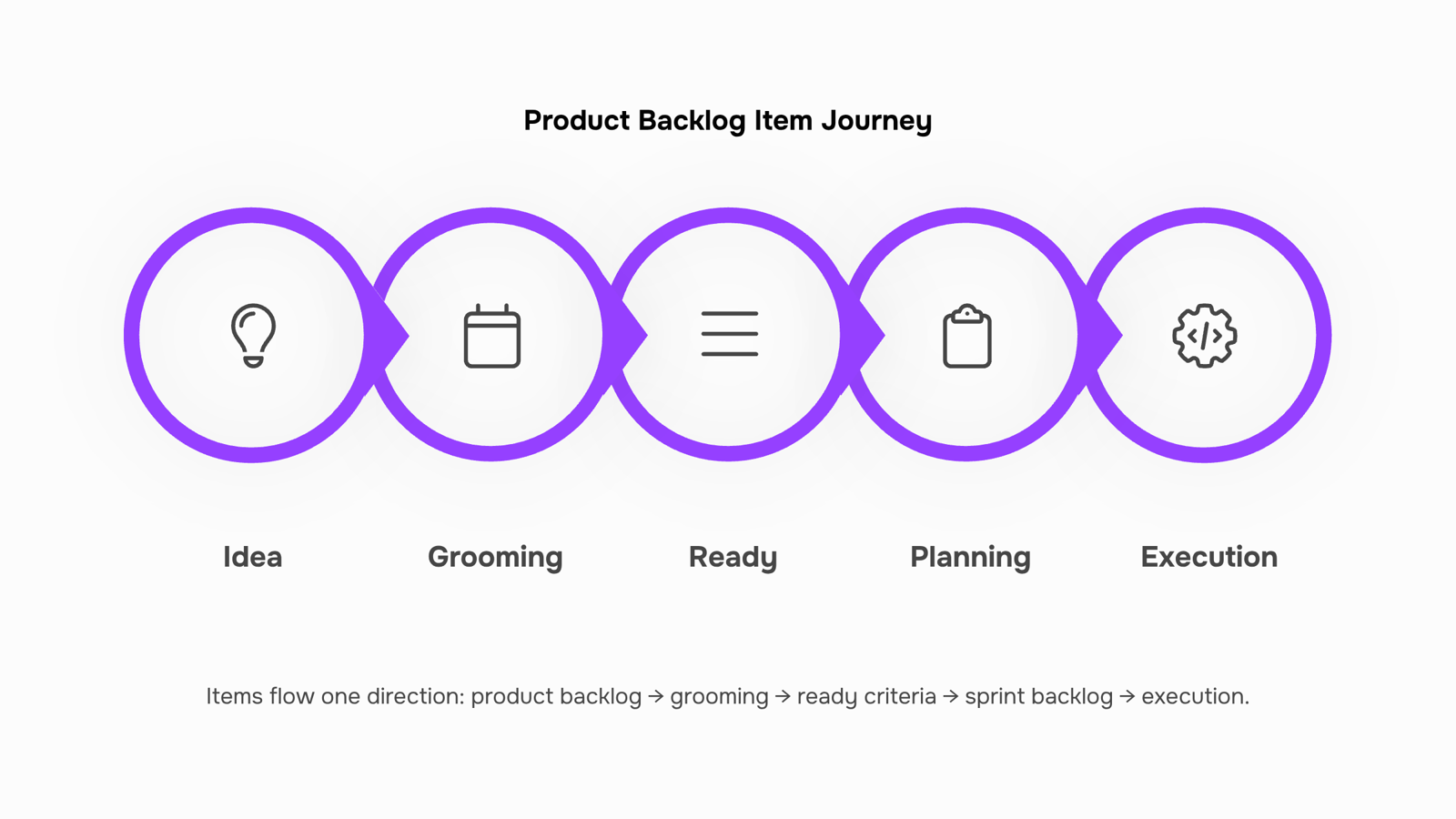
Items move in one direction: from product backlog to sprint backlog during sprint planning. The product owner decides what is ready and high-priority enough to pull; the team decides how much they can take on. Nothing gets added to the sprint backlog mid-sprint without the team's agreement.
The practical implication: if a stakeholder raises a new request on day three of a sprint, it goes into the product backlog first, gets prioritized, and waits for the next planning session. That discipline is what keeps sprints predictable.
For a deeper look at how prioritization decisions work across both lists, how to prioritize items in a sprint backlog vs product backlog covers the sequencing logic in detail.
What belongs in a product backlog
Four item types belong in a product backlog. Everything else is noise.
User stories capture a feature from the end user's perspective: "As a [role], I want [action] so that [outcome]." They're the backbone of any agile methodology product backlog because they tie development work directly to user value.
Bugs belong here too, but only when they're confirmed, reproducible, and scoped. A vague "checkout feels slow" is not a backlog item. "Checkout page takes 4+ seconds on mobile Safari 17, affecting 12% of sessions" is.
Technical debt items cover work the team deferred to ship faster: outdated dependencies, brittle integrations, missing test coverage. Left untracked, they accumulate silently until they block a sprint.
Spike tasks are time-boxed research items. When the team doesn't know enough to estimate a feature, a spike produces the answer. It has a fixed timebox (usually one to two days) and a defined output, not an open-ended investigation.
What doesn't belong: meeting notes, vague ideas, duplicates, and anything the team has already decided not to build. A bloated backlog is harder to prioritize than a lean one. The difference between product backlog and sprint backlog items is partly about this: sprint items must be ready to execute; backlog items just need to be worth keeping.
How to prioritize items in a product backlog
Prioritization only works when you pick the right method for the situation. Three frameworks cover most cases an IT team will face.
MoSCoW (Must have, Should have, Could have, Won't have) is the fastest method when a release deadline is fixed and the team needs to cut scope without a debate. Assign each product backlog item to one of the four buckets before sprint planning. A typical rule: if "Must haves" exceed 60% of capacity, you have a scope problem, not a prioritization problem. For an IT team migrating a client to a new infrastructure stack, MoSCoW quickly separates non-negotiable security configs (Must) from nice-to-have monitoring dashboards (Could).
RICE scoring (Reach, Impact, Confidence, Effort) suits teams choosing between features that all feel equally important. Score each item: estimate how many users it affects, how much it moves a key metric, how confident you are in that estimate, and how many person-weeks it takes. Divide the first three by effort to get a score. A feature touching 200 internal users with high confidence and two weeks of effort will consistently outrank a speculative feature with a vague impact estimate. This method works well in agile methodology product backlog reviews where multiple stakeholders are lobbying for their own items.
Value vs. effort (a 2x2 matrix) is the right tool for a backlog grooming session when the team has 30 minutes, not three hours. Plot items on two axes: business value and implementation effort. Build high-value, low-effort items first. Defer or drop low-value, high-effort ones. For an IT services team, this often surfaces quick wins like automating a recurring client report that takes two hours manually but two days to build.
Switching between frameworks mid-sprint creates confusion. Pick one per planning cycle and apply it consistently. If your product backlog has more than 50 items, Taro's AI auto-prioritization can score and rank items before the meeting starts, so the team debates decisions, not data.
Best practices for managing a product backlog
Six practices separate teams that ship predictably from teams that drown in backlog debt.
1. Groom on a fixed cadence: Run a dedicated grooming session once per sprint, separate from sprint planning. Thirty to forty-five minutes is enough for most IT teams. If you skip it, stale items accumulate and sprint planning turns into triage.
2. Cap item size before anything enters the sprint backlog: A user story that takes more than half a sprint to complete belongs in the backlog, not the sprint vs product backlog handoff queue. Break it down first. This single rule prevents the most common sprint failure: a half-finished item rolling over week after week.
3. Assign one owner: The product backlog has one person accountable for its health. Not the Scrum Master, not the team lead by committee. One person adds items, sequences them, and removes what no longer belongs.
4. Enforce a Definition of Ready: An item is ready for sprint consideration only when it has a clear description, acceptance criteria, and a rough effort estimate. No criteria, no sprint. Teams that skip this step spend the first two days of every sprint clarifying what they should have clarified beforehand.
5. Archive, don't delete, stale items: If an item hasn't moved in three sprints, move it to an archive column rather than deleting it. Requirements resurface. An archive gives you a decision trail; a delete gives you nothing.
6. Prioritize with data, not instinct: The best project prioritization methods combine scoring frameworks with real delivery history. Taro's AI backlog auto-prioritization reads your entire backlog and surfaces what to build next based on effort, dependencies, and business value, so your grooming session starts with a ranked list rather than a blank slate.
These six practices work together. Weak grooming undermines your Definition of Ready. No single owner breaks your prioritization. Get all six running before the next sprint kicks off.
Common product backlog mistakes and how to avoid them
Backlog bloat is the most common failure: teams add items faster than they close them, and the list quietly becomes unmanageable. Fix it by setting a hard cap, typically 3 to 4 sprints worth of ready items, and archiving anything untouched for 90 days.
No single owner is the second pattern. When three people share backlog authority, nothing gets prioritized consistently. Assign one product owner, full stop.
Items without acceptance criteria are the third mistake. A story that says "improve dashboard performance" tells no one what done looks like. Every item entering the agile methodology product backlog should have at least one measurable condition before it's sprint-eligible.
Skipping grooming is the fourth. Teams that skip grooming sessions show up to sprint planning with half-baked items and lose 30 to 45 minutes renegotiating scope on the spot. A weekly 30-minute session prevents that entirely.
How AI is changing product backlog management in 2026
Three specific shifts are reshaping how teams handle their product backlog in 2026.
Automated priority scoring replaces gut-feel ranking with signals pulled from customer impact, technical debt age, and dependency count. Items that would have sat buried for months surface automatically.
Real-time dependency detection flags blockers before sprint planning, not during it. If a back-end task blocks three front-end items, the system surfaces that conflict when you're still in a position to act.
Sprint load forecasting uses historical velocity to warn you when a planned sprint is overloaded before the team commits. That alone cuts mid-sprint scope changes significantly.
In an agile methodology product backlog, these three capabilities shift the product owner's job from manual triage to decision review. Taro's AI auto-prioritization applies this directly, re-ranking backlog items as new data arrives. If you want to understand the broader productivity case, how AI task managers improve team output covers the mechanics in detail.
Closing
A product backlog only works when it shrinks faster than it grows. Most teams have the grooming cadence and acceptance criteria down—they know what belongs in the backlog and how to write it. What they're missing is the prioritization engine that turns a 200-item list into a ranked decision tool. If your team is spending more time debating what to build next than actually building it, the backlog isn't the problem. The manual scoring process is. Taro's auto-prioritization surfaces your next three sprints' worth of work before the planning meeting starts, so your team debates strategy, not spreadsheets. Ready to stop treating your backlog like a storage system? Start a free trial and see how auto-prioritization changes your sprint velocity.
FAQ
What is the purpose of a product backlog in project management?
A product backlog is the single source of truth for all future work—an ordered list that drives sprint decisions instead of collecting dust. It keeps the team aligned on what to build next and ensures nothing gets lost or forgotten.
What are the best practices for managing a product backlog?
Groom on a fixed cadence (once per sprint), cap item size before sprint planning, remove duplicates and decided-against items regularly, and use a consistent prioritization framework. A lean backlog is easier to act on than a bloated one.
Can a product backlog be used in agile project management?
Yes. The product backlog is core to agile and Scrum—it's the emergent, ordered list the product owner maintains to feed sprint planning and keep the team focused on user value.
What is the difference between a product backlog and a sprint backlog?
The product backlog is long-term and continuously changing; the sprint backlog is a locked commitment for one sprint only. Items flow from product backlog to sprint backlog during planning, never the reverse mid-sprint.
How often should a product backlog be groomed?
Once per sprint in a dedicated 30–45 minute session, separate from sprint planning. Skipping grooming lets stale items accumulate and turns sprint planning into crisis triage.


 Elena Petrova15 September 2026


