TL;DR: Most mass email guides stop at subject lines. This one covers the infrastructure decisions, personalization mechanics, and deliverability rules that determine whether your campaign hits 10,000 inboxes or gets buried in spam — written specifically for IT company owners running B2B outreach at volume. You'll leave with a framework you can apply to your next send.
What mass email actually means in 2026
Mass email is a single message sent to a large list simultaneously, typically through a dedicated sending platform rather than a standard email client. That's the mechanical definition. The practical one matters more: in 2026, mass email sits in a specific lane between one-to-one outreach (a sales rep writing to one prospect) and spam (unsolicited bulk sends with no targeting or consent).
The distinction isn't volume. It's intent, consent, and infrastructure. A well-run mass email marketing program sends to opted-in contacts, uses authenticated sending domains, and tracks deliverability at the campaign level, not just opens. A spam run does none of those things. Regulators, inbox providers, and your recipients all treat these differently.
For IT company owners, the stakes are concrete. Validity's 2024 Email Deliverability Benchmark found that average inbox placement rates vary significantly based on sender reputation, meaning a single poorly managed send mass email campaign can damage domain reputation for months.
Before you build any sending cadence, get the email marketing fundamentals right. Then think about bulk email deliverability as a system, not a one-time configuration.
Can you use mass email for B2B marketing
Yes, mass email works for B2B marketing — but the conditions matter more than the channel itself.
B2B mass email differs from B2C in three concrete ways. First, list quality carries more weight. A 500-person list of verified IT decision-makers will outperform a 10,000-person scraped list every time. Second, sending volume is lower by design. B2B campaigns typically run in batches of hundreds to low thousands, not millions. Third, compliance is stricter in practice. GDPR and CAN-SPAM both apply, but B2B audiences are more likely to report irrelevant mail as spam, which damages your sender reputation faster than a B2C miss would.
For mass email marketing to work in a B2B context, segmentation has to happen before you hit send. Job title, company size, and recent behavior (a demo request, a content download) are the minimum cuts worth making. Generic blasts to a mixed list produce low open rates and high unsubscribe rates — the two signals inbox providers use to throttle your future sends.
According to Litmus, email remains one of the highest-ROI channels in B2B, but that return depends on relevance, not volume.
Before scaling, review email marketing fundamentals before you scale and bulk email deliverability best practices to make sure your infrastructure supports what mass emailing service you choose.
How to send a mass email without getting blocked
Getting blocked is an infrastructure problem before it's a content problem. Most IT teams discover this after their first large send lands in spam — by which point the sending domain has already taken a reputation hit that takes weeks to recover.
Start with domain separation. Never send mass email from your primary business domain. Use a dedicated subdomain (mail.yourdomain.com or outreach.yourdomain.com) so a deliverability incident can't take down your transactional mail. Register it at least 30 days before your first send.
Then warm it up. ISPs treat new sending domains as unknown quantities. A cold domain sending 5,000 emails on day one will trigger rate limits or blocks regardless of content quality. A standard warm-up runs 2 to 4 weeks: start at 50 to 100 emails per day, double volume every 3 to 4 days, and monitor bounce and spam complaint rates at each stage. Most mass email programs have automated warm-up sequences built in — use them rather than managing this manually.
Authentication is non-negotiable. Before your first send, configure:
SPF — a DNS TXT record listing which servers can send on your domain's behalf
DKIM — a cryptographic signature your mass email service adds to each message header
DMARC — a policy record that tells receiving servers what to do when SPF or DKIM fails
Validity's research consistently shows that missing authentication is one of the leading causes of inbox placement failure. Getting all three right before you scale is the single highest-leverage infrastructure step.
For queue management, avoid burst sending. Spread a 10,000-email batch over 4 to 6 hours rather than firing it in one shot. Most mass email sender platforms let you set hourly throttles — configure them.
For a deeper look at what happens after authentication is in place, the bulk email deliverability best practices guide covers reputation scoring and list hygiene in more detail.
Spam filter rules every mass email sender must know
Spam filters score every message before it reaches an inbox. That score is based on two things: your authentication records and your content. Get either wrong and even a well-written mass email lands in junk.
Authentication is the baseline. SPF (Sender Policy Framework) tells receiving servers which IPs are allowed to send from your domain. DKIM (DomainKeys Identified Mail) attaches a cryptographic signature to each message, proving it wasn't altered in transit. DMARC ties both together and tells servers what to do when a message fails — quarantine it, reject it, or let it through. According to Validity's 2024 Email Deliverability Benchmark Report, emails missing DKIM or SPF records are significantly more likely to be filtered before a human ever sees them. If you're using a mass emailing service and haven't published all three DNS records, start there.
Content scoring runs in parallel. Filters flag messages with spam-heavy phrases ("Act now," "Free offer," excessive caps), image-to-text ratios that skew heavily toward images, and HTML with broken or hidden elements. A single unsubscribe link isn't optional — it's a legal requirement under CAN-SPAM and a filter signal.
Sending reputation compounds over time. Your domain's history, bounce rate, and complaint rate all feed into how filters treat future sends. A bounce rate above 2% or a complaint rate above 0.1% will suppress inbox placement across most major providers.
For a deeper look at how these signals interact at volume, bulk email marketing best practices covers the full deliverability system, including list hygiene and engagement-based segmentation.
Knowing how to send mass email without triggering filters means treating authentication, content, and reputation as one system, not three separate boxes to check.
How to personalize mass emails for better engagement
Personalization in mass email marketing isn't about adding a first name to a subject line. That's table stakes. What actually moves open and reply rates is matching message content to where the recipient is in a decision cycle.
Start with behavioral segmentation before you write a single word. Split your list by action taken: opened your last email, clicked a specific link, visited your pricing page, or went cold for 90 days. Each segment gets a different message angle, not just a different greeting. A contact who clicked your pricing page gets a message about ROI. A cold contact gets a re-engagement hook. Same send, four different conversations.
Merge fields go further than {{first_name}}. Map fields to company size, role, or the specific product they trialed. A line like "Teams your size typically see X within 60 days" outperforms generic copy because it signals you understand their context. According to Campaign Monitor benchmarks, personalized subject lines lift open rates by roughly 26% compared to generic ones.
Reply-based branching is where most teams leave engagement on the table. When someone replies to a mass email, that thread should trigger a different sequence, not continue the broadcast. Configure your mass email service to detect replies and pause automation for that contact immediately.
Evox handles this with personalization tokens built into its template layer, so you can map merge fields to CRM properties and branch sequences based on reply detection without manual intervention.
If you send mass email at volume without these mechanics, you're broadcasting. With them, you're having parallel conversations at scale. The email marketing fundamentals behind each of these steps are worth reviewing before you build the sequence.
Best practices for writing effective mass emails
Each of these steps applies whether you're sending 500 emails or 50,000. The difference between a campaign that gets replies and one that gets ignored is usually execution at the line level.
Write a subject line under 50 characters: Most mobile clients truncate at that point. Test two variants — a direct one ("Q3 security audit checklist") and a curiosity-based one ("Are you audit-ready?") — and let open rate decide.
Use preview text as a second subject line: The 85–100 characters after your subject line appear in every major inbox. Don't waste them on "View this email in your browser."
Front-load the body: Put your main point in the first two sentences. Readers who scan on mobile will never reach paragraph three.
One CTA per email: Multiple links split attention and reduce click-through. Pick the action you want most and cut the rest.
Write a plain-text version: Some B2B inboxes strip HTML entirely. A missing plain-text fallback can hurt bulk email deliverability and trigger spam filters.
Keep the from-name consistent: "Lia from Acme" outperforms "Acme Corp" for reply rate because it signals a person, not a broadcast.
Test before you send to the full list: Send to a 10% sample first. Check rendering in Gmail, Outlook, and Apple Mail before the mass email goes to everyone.
If you're still figuring out email marketing fundamentals before you scale, start there — these practices compound faster on a clean foundation.
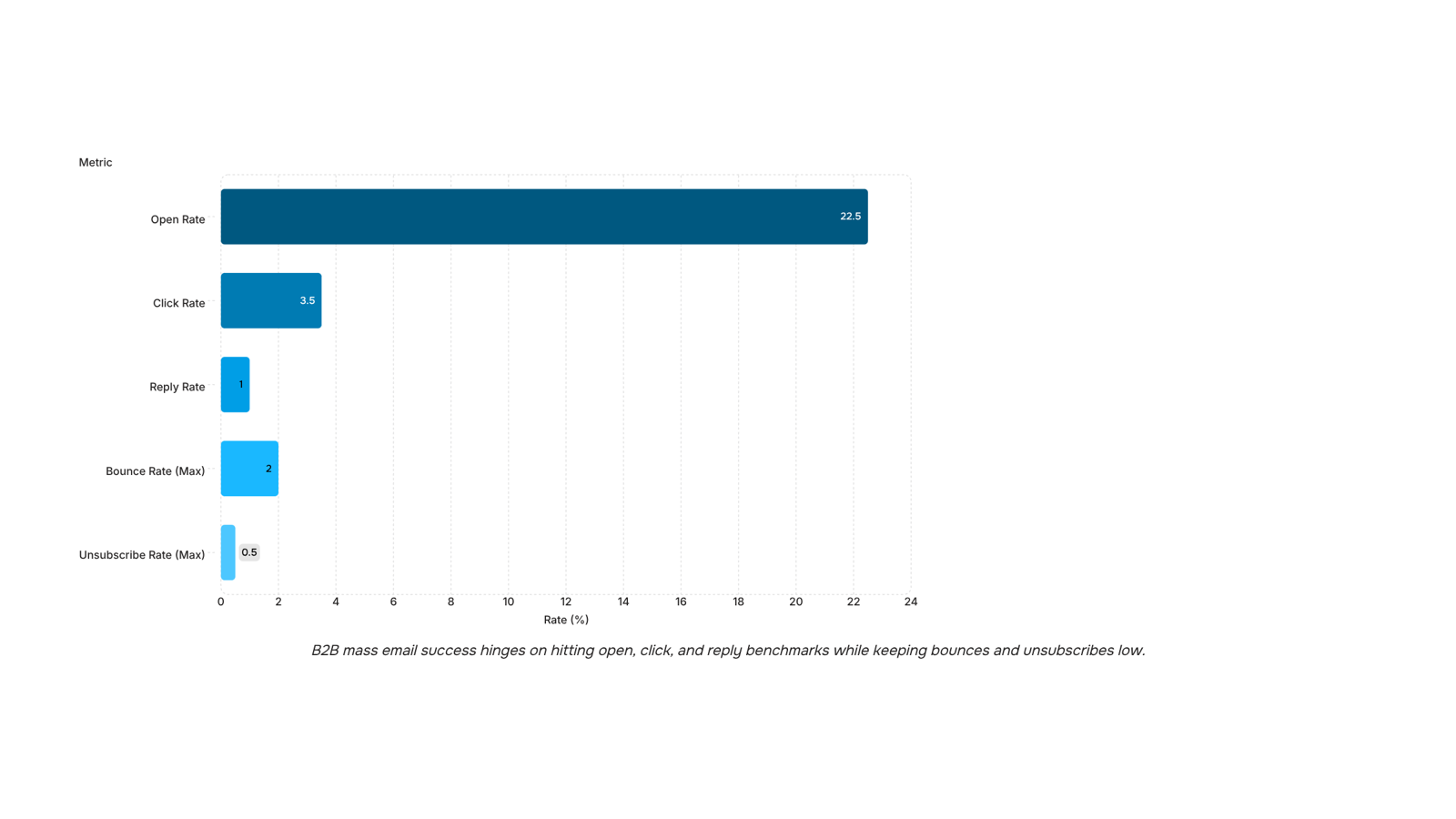
What to measure after you send a mass email campaign
Five metrics tell you whether a mass email campaign worked or needs fixing.
Open rate: B2B benchmark sits around 20–25%. Below 15% points to a subject line or sender name problem.
Click rate: Healthy B2B range is 2–5%. Low clicks with decent opens mean your body copy or CTA isn't landing.
Reply rate: Anything above 1% on a cold mass email sender campaign is strong.
Bounce rate: Keep hard bounces under 2%. Above that, your list hygiene is hurting deliverability.
Unsubscribe rate: Under 0.5% is normal. Spikes signal a targeting or frequency mismatch.
For deeper context on campaign-level strategy, email marketing campaign strategies for e-commerce covers how these metrics connect to broader send decisions.
Closing
You now have the framework: domain separation, authentication, warm-up sequences, content discipline, and behavioral segmentation. The gap between knowing these practices and executing them at scale is infrastructure. Most IT teams either build this manually (queue management, multi-provider sending, reply tracking) or watch their campaigns leak into spam because the pieces aren't wired together. Evox handles that entire workflow — domain warm-up, authentication verification, throttled sending, and reply tracking — so you can focus on list quality and message relevance instead of managing delivery mechanics. Ready to run your next mass email campaign without the manual overhead? Start with Evox.
FAQ
How do I send a mass email campaign without getting blocked?
Use a dedicated subdomain, warm it up over 2–4 weeks starting at 50–100 emails daily, configure SPF/DKIM/DMARC authentication, and throttle sends over 4–6 hours instead of bursting. Missing authentication is a leading cause of inbox placement failure.
What are the best practices for writing effective mass emails?
Segment your list by behavior and job title before writing, match content to the recipient's decision stage, avoid spam-heavy phrases and image-heavy layouts, include a required unsubscribe link, and keep bounce rates below 2% and complaint rates below 0.1%.
Can I use mass email for B2B marketing?
Yes, but list quality matters more than volume. Segment by job title and company size, send in batches of hundreds to low thousands, and prioritize verified contacts over scraped lists. B2B audiences report irrelevant mail as spam faster, damaging sender reputation.
How do I personalize mass emails for better engagement?
Segment by recipient behavior — opened previous sends, clicked links, downloaded content — then match message content to their decision stage. First-name personalization is table stakes; behavioral matching is what moves reply rates.
What are the spam filter rules for mass email senders?
Publish SPF, DKIM, and DMARC records before sending. Avoid spam phrases, keep image-to-text balanced, include a working unsubscribe link, maintain bounce rates under 2%, and complaint rates under 0.1%. Sending reputation compounds over time.
How do I delete mass emails on Gmail?
This article covers sending mass emails, not managing received mail. To delete received emails in Gmail, select them, click the trash icon, or use search filters to find and bulk-delete by sender or date.


 Elena Petrova15 September 2026


