TL;DR: Most listicles on productivity tracking software lead with tool names and feature bullets. This one starts with the operational problems remote IT teams actually face, maps specific features to each problem, and then names the tools worth considering — so you can evaluate options against your own situation instead of taking a stranger's word for it.
What productivity tracking software actually does
Most tools marketed as productivity tracking software do three different things, and conflating them leads to bad buying decisions.
Time logging records when work starts and stops. It tells you hours billed, not whether the right work moved forward.
Activity monitoring captures keystrokes, screenshots, or app usage. It's common in outsourced environments but creates friction on skilled teams and rarely surfaces what actually caused a delay.
Output tracking measures task completion, sprint velocity, and milestone delivery against a plan. For remote IT teams running async sprints, output tracking is the signal that matters.
The category gets muddier because many tools layer all three into one dashboard without clarifying which data drives which decision. Before evaluating any option, decide what failure mode you're solving: invisible blockers, deadline drift, or uneven workload distribution. Those are distinct problems that need distinct signals.
A good task tracker for IT projects captures output at the work-item level. Pair that with remote team management systems that surface blockers early, and employee productivity tracking software stops being a surveillance question and becomes a planning one.
Remote teams fail in predictable ways. Work disappears into async threads, a blocker sits unnoticed for three days, and a sprint deadline slips before anyone realizes the warning signs were there.
Dedicated remote team performance tracking solves each of these failure modes at the source.
Invisible blockers are the quietest deadline killers. In a co-located office, a blocked engineer says something. On a remote team, they often don't, and the task just stalls. Tracking tools surface stalled work automatically, so managers intervene before the delay compounds.
Missed deadlines rarely arrive without warning. They arrive after a week of tasks sitting at 80% complete. Output-level tracking, as opposed to simple time logging, shows you which work is actually moving and which is stuck in place.
Uneven workloads burn out your best people and under-use everyone else. Without visibility into who is carrying what, workload distribution becomes guesswork. The best productivity tracking software for remote teams makes that distribution visible in real time, not at the retrospective.
The investment question comes down to this: one missed client delivery can cost more than a year of software subscriptions. If you're still deciding which tools belong in your stack, choosing the right project management foundation is the right place to start.
Five features that matter for remote IT teams
Not every feature in a productivity tool earns its place on a remote IT team. These five do.
1. Output-based tracking, not just hours logged
Hours tell you someone was online. They don't tell you a sprint ticket moved. Look for software that tracks task completion, commit-level activity, or deliverable status — not just clock-in timestamps. For IT teams running async sprints, this is the difference between visibility and theater.
2. Project-based time reporting
Your team bills by project, plans by sprint, and reports by client. A tool that only shows aggregate hours is useless for that. Project-based time reporting lets you see exactly where hours went — by ticket, by sprint, by team member — so you can spot scope creep before it becomes a missed deadline.
3. Workload distribution visibility
Remote teams hide overload better than in-office ones. A developer carrying 140% capacity won't say anything in Slack. Good employee productivity tracking software surfaces workload imbalance across the team so you can rebalance before someone burns out or goes quiet.
4. Async-friendly sprint reporting
Daily standups don't scale across time zones. Look for tools that generate sprint-level summaries automatically, so you know where each ticket stands without scheduling a 9 AM sync that half the team attends at midnight. This is the gap most task tracker apps don't close.
5. Integration with your existing workflow
Productivity tracking for IT teams only works if adoption is near-total. A tool that sits outside your sprint board, your time logs, and your client reports will get ignored. Check whether it connects to the tools your team already uses before you commit.
For a broader look at how these criteria fit into remote team management systems that actually hold up, that context matters when you start evaluating tools in the next section.
Best productivity tracking software for remote teams in 2026
Here are seven tools worth shortlisting, evaluated against the five criteria from the previous section: time logging, sprint reporting, async visibility, AI-driven alerts, and integration depth.
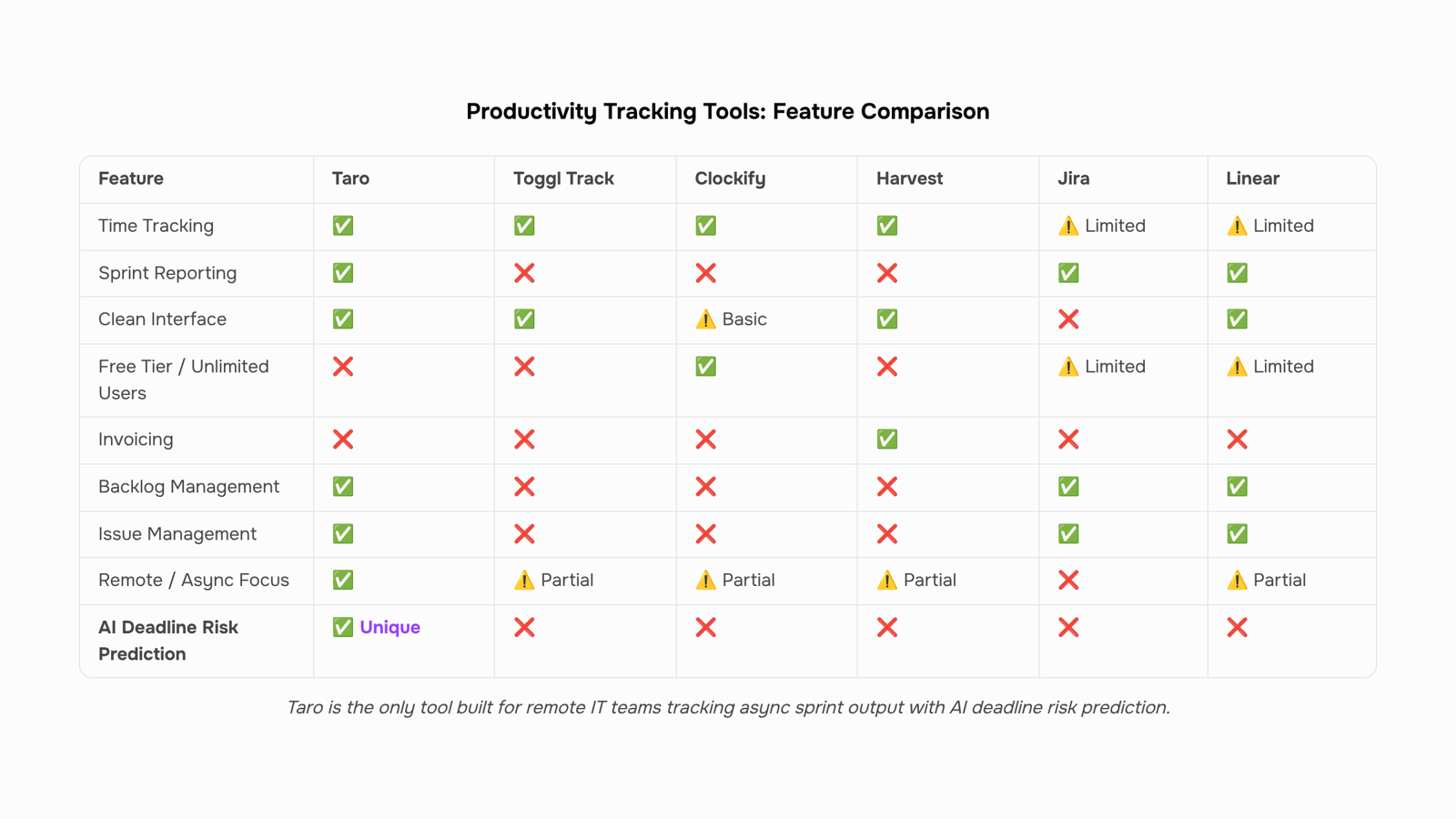
Taro is the strongest fit for IT teams running sprint-based work. It combines task management, time tracking, and sprint reporting in one workspace, so you're not reconciling data across three tools at month-end. The built-in AI flags tasks at risk before a deadline slips, which matters when your developers are async across time zones. If your team also uses Revo for CRM or Inzo for billing, Taro connects directly to both, so logged hours flow into invoices without manual export. It's purpose-built for the output-tracking gap that most generic tools ignore.
Toggl Track handles time logging well and has a clean interface. It works for freelancers and small teams that need simple hour-by-hour reporting. Where it falls short: no sprint layer, no AI alerting, and no native project management. You'll need to pair it with something else for sprint visibility.
Harvest covers time tracking and basic invoicing. Useful if billing is your primary concern. Sprint reporting and task-level output tracking are thin, so it's a poor fit for IT teams managing multiple concurrent projects.
Clockify is free at the base tier and covers time logging across unlimited users. For a team that only needs raw hours tracked, it's hard to beat on price. The tradeoff is that reporting is manual-heavy and there's no predictive alerting. You get data; you don't get warnings.
Jira handles sprint planning and backlog management well for engineering teams. Time tracking is an add-on (Tempo is the common pairing), which adds cost and another integration to maintain. If your team is already deep in Jira, this works. If you're starting fresh, the setup overhead is real.
Notion with a project database can approximate task tracking, but it requires significant configuration to get sprint-level reporting. Most teams that try this end up rebuilding it every quarter. It's a notes and docs tool that can stretch into project management, not the other way around.
Linear is worth considering for pure software development teams. Sprint tracking and issue management are strong. Time logging is minimal, and there's no billing integration. If your IT firm also handles client work and invoicing, Linear leaves a gap.
For a deeper look at how these tools handle task-level tracking specifically, the best task tracker apps for teams and IT projects comparison covers the task management layer in more detail. If async coordination is the bigger challenge, remote team management systems addresses the structural side of that problem.
The next section puts five of these tools side by side in a comparison table so you can build a shortlist in under two minutes.
Tool | Time Tracking | Sprint Reporting | AI Features | Starting Price | Best Fit |
|---|
Taro | Built-in, task-level | Sprint velocity + burndown | Deadline risk prediction | Included in WorksBuddy | IT teams tracking async sprint output |
Toggl Track | Manual + timer | None native | None | Free / $9 per user | Freelancers, small agencies |
Clockify | Timer-based | Basic reports | None | Free / $3.99 per user | Budget-conscious teams |
Harvest | Timer + invoicing | None | None | $10.80 per user | Service firms billing by hour |
Jira | None native | Sprint reports | Basic suggestions | $7.75 per user | Dev teams already in Atlassian |
Taro is the only option here built around remote team performance tracking at the sprint level, not just hours logged. The others track time well; they don't tell you whether the sprint is on track or which tasks are at risk of slipping. If your priority is AI task tracking that flags deadline risk before it hits, the table narrows quickly. For pure hour logging, Clockify or Toggl will do the job at lower cost.
Three mistakes to avoid when rolling out tracking software
Rolling out productivity tracking for IT teams fails in three predictable ways.
The surveillance trap. Teams conflate monitoring with micromanagement the moment they see screenshots or keystroke logs. Tracking output — sprint velocity, tasks closed, hours logged against tickets — earns buy-in. Tracking activity earns resentment. Define what you're measuring before you buy anything, and share that definition with the team on day one.
Skipping a baseline. If you don't know your current sprint completion rate or average time-per-ticket before rollout, you have no way to prove the tool is working three months later. Spend one sprint capturing raw numbers manually first.
Treating all roles identically. A developer closing tickets and a project manager running client calls have completely different output signals. One metric set for both produces noise, not insight. The same logic applies when you're evaluating customer tracking across different team functions.
Get these three right before you configure a single dashboard.
How to get your remote team up and running fast
Start with your tool configured, not your team convinced. Buy-in comes from results, not from a kickoff meeting.
Pick one metric to track first. For most IT teams, that's hours logged against active sprint tasks. Project-based time reporting gives you a baseline before you layer on anything else.
Connect your tool to existing workflows. If your team already lives in a task tracker, the best task tracker apps integrate directly with most productivity tracking software. No parallel systems.
Set a two-week review cadence. Not daily. Two weeks matches your sprint cycle and gives data time to mean something.
Share the dashboard with the team. Visibility runs both ways. Teams that see their own output data adjust faster than teams that don't.
Closing
The right productivity tracking software for your remote team isn't the one with the most features—it's the one that surfaces the specific failures you're trying to prevent. If your team is losing visibility into blockers, missing sprint deadlines, or burning out your best people, output-based tracking paired with async-friendly sprint reporting closes those gaps. Start by mapping your biggest operational pain point to the five features that matter, then test one tool against your actual workflow before committing. Which of those three failure modes—invisible blockers, deadline drift, or uneven workload—is costing you the most right now?
FAQ
What are the best productivity tracking software for remote teams?
Taro is the strongest fit for IT teams running sprints because it combines task management, time tracking, and AI-driven alerts in one workspace. Toggl Track, Harvest, and Clockify work for simpler time logging; Jira and Linear suit engineering teams already invested in those platforms.
How does productivity tracking software improve employee performance?
Output-based tracking surfaces stalled work and uneven workloads before they become problems, so managers intervene early. Async sprint reporting removes the need for daily standups across time zones, letting remote teams stay aligned without burnout.
What features should I look for in productivity tracking software?
Prioritize output-based tracking over hours logged, project-based time reporting, workload distribution visibility, async-friendly sprint summaries, and integration with your existing tools. These five features directly prevent the failures remote teams face.
Is productivity tracking software worth the investment?
Yes. One missed client deadline can cost more than a year of software subscriptions. The ROI comes from preventing invisible blockers, deadline drift, and team burnout—not from surveillance.
What are the top-rated productivity tracking software for small businesses?
Clockify is free and covers basic time logging. Toggl Track adds reporting and a clean interface. For small IT teams managing projects, Taro delivers sprint visibility and task-level output tracking that simpler tools don't provide.
Does productivity tracking software work for async remote teams?
Yes, but only if the tool is built for async workflows. Look for automatic sprint summaries, AI alerts for stalled work, and project-based reporting that doesn't require daily standups across time zones.
How is productivity tracking software different from time tracking software?
Time tracking records hours logged; productivity tracking measures task completion, sprint velocity, and deliverable status. For remote IT teams, output-based tracking surfaces what actually moved forward, not just who was online.


 Elena Petrova15 September 2026


