TL;DR: Most roundups on sales productivity tools rank by feature count and call it a comparison. This one gives IT company owners a decision framework tied to the specific workflow gaps — slow follow-up, ownership confusion, stalled pipelines — that kill close rates. You'll leave with clear criteria for matching tools to problems, not just a list to scroll through.
Sales productivity tools are software built specifically to help sales teams spend more time selling and less time on the work that surrounds selling: manual data entry, follow-up scheduling, lead routing, and pipeline updates.
That distinction matters. A general CRM tracks deals. Project management software tracks tasks. Sales productivity software connects those two layers and automates the handoffs between them, so reps aren't copying data between tools or chasing down who owns a lead.
The category typically covers four functions:
Lead capture and routing (getting the right lead to the right rep, fast)
Automated follow-up sequences (emails, reminders, touchpoints without manual effort)
Pipeline visibility (real-time deal status without a weekly sync)
Activity tracking (calls, emails, and meetings logged without rep input)
Where most roundups go wrong is treating these as feature checkboxes rather than workflow problems. The real question is: which specific breakdown in your sales process is costing you deals? Sales performance management software addresses a related but distinct gap, focused on rep coaching and quota tracking rather than day-to-day task automation.
Knowing the difference is what separates a tool purchase that changes your numbers from one that just adds another login.
The right sales productivity tools don't just save time — they directly affect whether deals close. Three metrics make this concrete.
First, lead response time. Research consistently shows that responding to an inbound lead within five minutes versus 30 minutes can increase conversion likelihood by 100x. Most B2B teams respond in hours, not minutes. That gap is a revenue leak, not a process inconvenience.
Second, rep time-on-selling. Studies across B2B sales teams estimate that reps spend roughly 60-65% of their day on non-selling work: data entry, scheduling, manual follow-up, internal status updates. Sales automation tools reclaim that time by handling the repeatable tasks that don't require a human decision.
Third, pipeline visibility. When managers can't see where deals stall, they can't coach reps on the right problems. The result is generic one-on-ones instead of targeted interventions. Good sales team productivity tooling surfaces this data without requiring manual reporting.
These three outcomes — faster lead response, more selling time, cleaner pipeline data — are where tool choice becomes a revenue decision. You can track the metrics that tell you where your team is losing time to baseline your current state before evaluating any new software.
The next section covers which specific features to prioritize once you know your gaps.
Most sales productivity software gets bought, onboarded halfway, and forgotten inside six months. The tools that stick share a short list of qualities that generic productivity roundups rarely call out.
Automation that targets selling time specifically: The average rep spends roughly 70% of their week on non-selling work: data entry, scheduling, manual follow-ups. The features worth paying for are the ones that cut that number. Look for automatic call logging, sequence-triggered follow-ups, and CRM field updates that happen without rep input. If you want to automate the manual tasks that slow your reps down, the automation layer is where to start.
Lead routing and scoring built into the workflow: Standalone AI sales tools that score leads but dump them into a generic inbox miss the point. Scoring only matters if it triggers the right action for the right rep immediately. Evaluate whether the lead management tools you're considering can route, assign, and notify without a manual handoff step.
Pipeline visibility that doesn't require a weekly meeting to interpret: Real-time dashboards tied to deal stage, activity, and close probability let managers spot stalls before they become losses. If reading the pipeline requires exporting a spreadsheet, the tool isn't doing its job.
Integration depth, not breadth: A long integrations page is marketing. What matters is whether the tool connects cleanly to your CRM, calendar, and inbox without custom middleware. Shallow integrations create data gaps that track the metrics that tell you where your team is losing time will quickly expose.
Sales productivity software earns its seat when it removes friction from the four or five actions reps repeat every day, not when it adds a new dashboard to ignore.
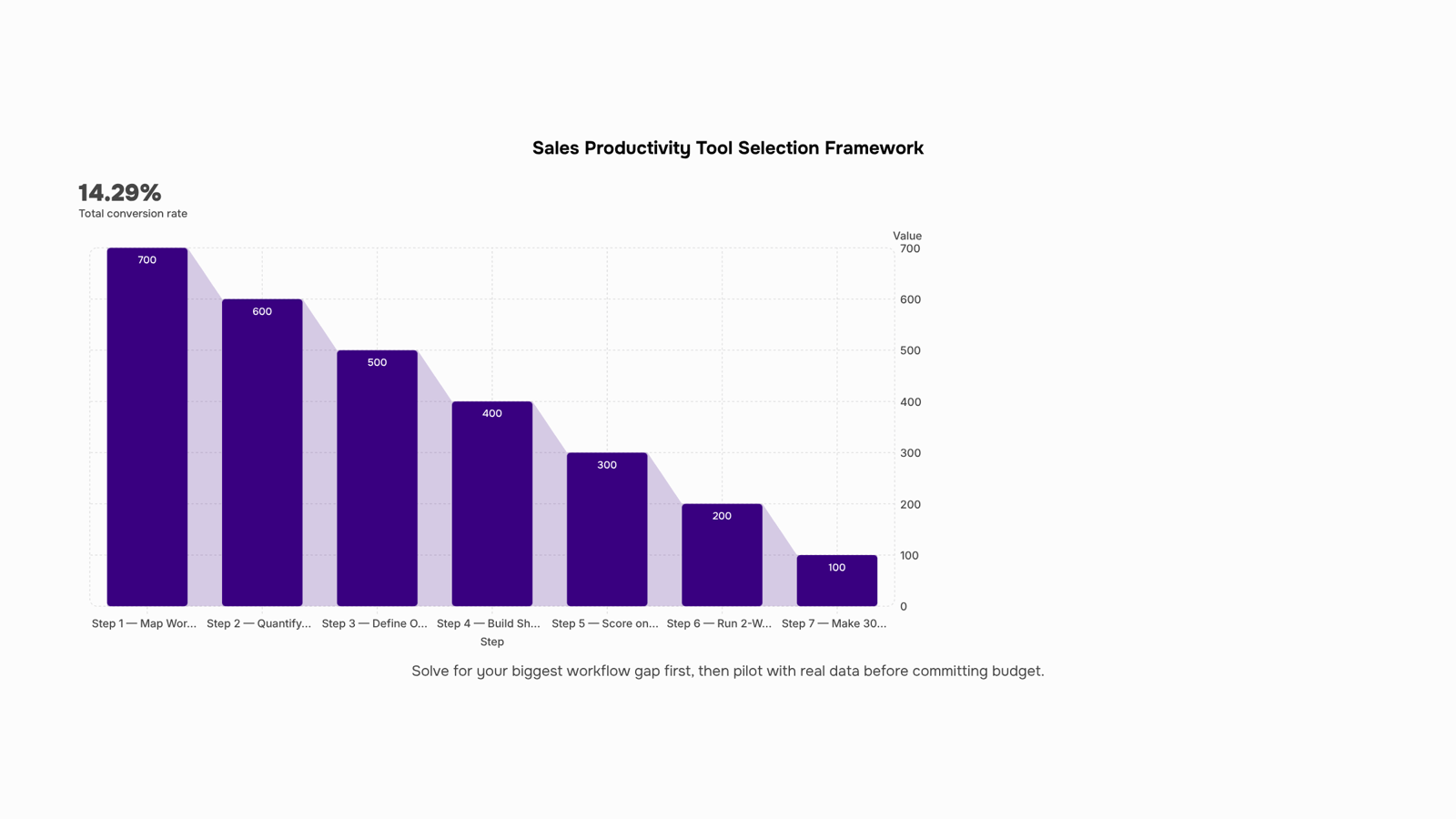
Start by auditing what your team actually does before you evaluate a single tool. Most selection processes fail because they start with a vendor demo, not a workflow map.
Step 1: Map your current workflow gaps: List every step in your sales process, from first contact to closed deal, and mark where work stalls, gets dropped, or requires manual effort. Common gaps: leads sitting uncontacted for hours, reps copying data between systems, follow-ups tracked in a personal spreadsheet.
Step 2: Quantify the cost of each gap: A gap that costs you one deal a month is worth solving. One that costs you an hour of admin per rep per week may not be. Research consistently shows that sales reps spend a significant portion of their day on non-selling tasks, so even modest automation gains compound quickly across a team.
Step 3: Define one primary job for the tool: Sales productivity tools fail when teams buy them to solve five problems at once. Pick the single highest-cost gap from Step 2. Your primary job might be "respond to inbound leads within five minutes" or "eliminate manual CRM data entry." One job keeps your evaluation honest.
Step 4: Build a shortlist of three, not ten: Use your primary job as a filter. Sales automation tools built around lead capture and routing are different from tools built around pipeline reporting. If your gap is lead response time, shortlist tools that specialize in lead management, not general workflow automation.
Step 5: Score against five criteria only. For each shortlisted tool, rate it on: fit to your primary job, integration with your existing CRM, setup time, per-seat cost at your team size, and support quality. A simple 1-to-3 score per criterion is enough. Avoid evaluating features you will not use in the first 90 days.
Step 6: Run a two-week pilot with real data: Give one rep or one workflow the tool under live conditions. Measure the specific metric tied to your primary job, not general "productivity." If the job was faster lead response, track average response time before and after. Numbers from a real pilot beat any vendor case study.
Step 7: Set a 30-day decision deadline: Pilots drift into permanent trials. Set a hard date, review your pilot metric, and make a binary call: adopt or cut. If the tool didn't move the number you defined in Step 2, it won't move it at scale either.
This process works for any category of sales productivity tools, whether you're evaluating AI sales tools, lead management tools, or CRM add-ons. The discipline is the same: gap first, job second, pilot third.
The list below is intentionally short. Every tool here solves a specific bottleneck; none of them are general-purpose apps dressed up as sales software.
Lio captures, scores, and routes inbound leads automatically, so your reps engage the right prospects before response time kills the deal. If tracking the metrics that tell you where your team is losing time reveals lead leakage as your main gap, Lio is the starting point.
Evox handles follow-up sequences and cold outreach, removing the manual scheduling that eats 20-30 minutes per rep per day. Pair it with Lio and your pipeline moves without anyone chasing it.
Revo fills workflow gaps with no-code automation. If your team is copying data between a CRM and a spreadsheet, Revo removes that step entirely.
Taro resolves task ownership confusion. When deals stall because no one is sure who acts next, Taro assigns and tracks accountability across the team.
Inzo closes billing gaps by triggering invoices the moment a deal closes, not two days later when someone remembers.
For a closer look at how these categories compare, evaluating lead management tools in more depth covers the selection criteria worth applying before you commit.
These are AI sales tools built for connected workflows, not standalone point solutions. The productivity gain comes from running two or three together, not from adding another dashboard your team has to check separately. If you want to automate the manual tasks that slow your reps down, start with the gap, then match the tool.
Three patterns kill most sales productivity software investments before they pay off.
Poor adoption is the most common. Reps revert to spreadsheets when a new tool adds steps instead of removing them. If onboarding takes more than a day and the interface isn't faster than what it replaces, usage drops within two weeks.
No process change is the second. Dropping sales productivity tools onto a broken workflow doesn't fix the workflow. If your reps spend most of their day on admin and manual follow-up, software alone won't change that — you need to automate the manual tasks that slow your reps down first.
Wrong tool for the bottleneck is the third. Buying a forecasting tool when your real problem is slow lead response wastes budget. Before purchasing, track the metrics that tell you where your team is losing time — then match the tool to that specific gap.
Three free options worth testing before you commit budget: HubSpot CRM (free tier handles contact tracking and basic pipeline visibility), Google Workspace for shared call notes and deal docs, and Notion for lightweight playbooks. Each removes a specific friction point without requiring a process overhaul.
The ceiling arrives fast, though. Free sales productivity tools rarely handle lead routing, automated follow-up, or the lead management tools your team needs once pipeline volume grows. When you hit that wall, the gap shows up in response time first, then conversion rate. That's the signal to move to paid tools and automate the manual tasks that slow your reps down.
Closing
The difference between a sales productivity tool that transforms your pipeline and one that collects dust comes down to one decision: solve for your biggest workflow gap first, not the longest feature list. Whether that gap is slow lead response, manual data entry, or pipeline visibility, the 7-step framework above removes the guesswork—map your problem, pilot with real data, and measure the one metric that matters. The highest-impact gap for most teams is instant lead capture and routing; that's where Lio was built to work. See how it handles that critical first step in your pipeline with a free trial and watch your response times drop.
FAQ
What are the best sales productivity tools for my team?
The best tool depends on your biggest workflow gap—slow lead response, manual data entry, or pipeline visibility. Use the 7-step framework to map your problem, pilot with real data, and measure results. Lio specializes in instant lead capture and routing, the highest-impact gap for most teams.
What features should I look for in sales productivity software?
Prioritize automation that cuts non-selling work, lead routing built into workflow, real-time pipeline visibility, and clean CRM integration. Skip breadth; focus on depth—tools that remove friction from the four or five actions reps repeat daily earn their seat.
Can sales productivity tools really improve my bottom line?
Yes. Responding to leads within five minutes versus 30 minutes increases conversion likelihood by 100x. Reps spend 60-65% of their day on non-selling work; automation reclaims that time. Better pipeline visibility enables targeted coaching, not generic one-on-ones.
What are some free sales productivity tools to get started?
Most dedicated sales productivity tools require investment, but many CRMs include basic automation. Start by mapping your workflow gaps and defining your primary job; a pilot with a paid tool often delivers faster ROI than free alternatives with shallow features.
What is the difference between a sales productivity tool and a CRM?
A CRM tracks deals; sales productivity software connects CRM and task layers, automating handoffs so reps aren't copying data or chasing ownership. Productivity tools eliminate the work that surrounds selling; CRMs store the results.


 Megan Foster15 September 2026


