TL;DR: Most cold email template guides hand you copy and leave the research to guesswork. This one shows IT consultancy owners how to turn fast, public research into personalization that actually lands, then pairs that with subject line formulas, consultancy cold email templates, and a sending process you can repeat without starting from scratch each time.
What makes a consultancy cold email work
Three structural elements separate a consultancy cold email that gets a reply from one that gets deleted.
Relevance signal: The opening line must show you did 30 seconds of research. Not "I came across your company" — something specific to their industry, recent hire, or service gap. This is what makes cold email templates for IT services feel personal rather than broadcast.
Specific value claim: One concrete outcome, not a capability list. "We cut onboarding time for mid-market SaaS clients from six weeks to two" lands harder than "we offer end-to-end IT consulting." The claim should be narrow enough that the right reader thinks "that's exactly my problem."
Low-friction CTA: Ask for something small. A 15-minute call beats "let's schedule a discovery session." The easier the yes, the higher the reply rate. Cold email subject lines that pair with each template follow the same logic — reduce the cognitive load at every step.
Most consultancy cold email templates fail because they skip the relevance signal entirely and lead with credentials. The reader has no reason to care yet. Build the framework in this order: show you know their world, name one result you produce, then ask for one small action.
The next section covers where to find the personalization detail that makes the relevance signal credible — without paying for a data tool.
How to use Wikipedia to find and research cold email prospects
Wikipedia is one of the most underused free research tools for cold email personalization, and most consultancy cold email templates skip it entirely.
Start with the company's Wikipedia page if one exists. The opening paragraph usually contains the founding year, core business model, and recent strategic shifts, all details you can fold into a relevance signal without spending 20 minutes on their investor relations page. Look for the "History" section too. Acquisitions, pivots, and leadership changes are exactly the kind of triggers that make a prospect receptive to outside expertise.
The "Key people" section is where this gets specific. If the CFO joined 18 months ago, that's a window. New executives often audit vendor relationships and operational gaps in their first year. A cold email that references the timing of a leadership change reads as researched, not generic.
For IT services outreach, the "Notable alumni" section on university or company pages surfaces names and career paths. If your prospect worked at a firm you've helped before, that's a credible connection point, and it costs you nothing to find it.
Industry-level Wikipedia articles work differently. Search for the prospect's sector (say, "managed services provider" or "IT outsourcing") and read the "Criticism" or "Challenges" subsections. Those paragraphs often name the exact operational pain your cold email templates for IT services should address.
Here's a concrete workflow:
Search "[Company name] Wikipedia" and scan History, Key people, and any recent edits flagged in the article's talk page.
Search "[Industry] Wikipedia" and note any named challenges or regulatory pressures.
Pull one specific detail into your email's opening line.
That single detail is what separates a template from a message. Once you have it, pair it with cold email subject lines that pair with each template to match the tone before you hit send.
Five consultancy cold email templates that get replies
Each template below follows the same logic: a specific opening line tied to something real, a single problem named, a low-friction ask. Copy the structure, swap the details.
Template 1: New prospect (no prior contact)
Subject: Quick question about [Company]'s IT roadmap
Hi [First name], I noticed [Company] recently [specific trigger — new hire, product launch, funding round]. Most IT directors we talk to at that stage are dealing with [specific pain, e.g., onboarding bottlenecks or fragmented vendor contracts]. We help [type of company] fix that in [timeframe]. Worth a 15-minute call this week?
Why the structure works: the trigger in line one signals you did actual research. The pain in line two makes the reader feel seen before you've asked for anything.
Template 2: Referral mention
Subject: [Mutual contact] suggested I reach out
Hi [First name], [Name] mentioned you're scaling your IT team and running into [specific friction]. We helped [Name]'s company cut [metric] by [result]. Happy to share what worked if it's relevant to where you are now.
Why the structure works: a named referral triples open rates in most cold email send-data studies. Keep the social proof specific — a vague "we helped similar companies" carries almost no weight.
Template 3: Competitor pain
Subject: Switching from [category, not brand name] — what we see
Hi [First name], A lot of IT leads we speak with have outgrown their current [category, e.g., managed service setup] and are mid-evaluation. If that's where [Company] is, I can share a short breakdown of what the transition usually looks like and where teams hit friction.
Why the structure works: you're entering a conversation the prospect is already having internally. No pitch required — just relevance.
Template 4: Industry trigger
Subject: [Industry event or regulation] — how [Company] is preparing
Hi [First name], With [trigger, e.g., NIS2 compliance deadline] coming up, IT teams in [sector] are prioritising [specific area]. We've been working through this with a few similar firms. If it's on your radar, a quick call might save your team a few weeks of scoping.
Why the structure works: timing specificity does the qualification for you. Anyone not affected by the trigger self-selects out; anyone who is will read on.
Template 5: Re-engagement
Subject: Still relevant?
Hi [First name], We spoke [timeframe] ago about [specific topic]. Things change — if [original pain] is back on the agenda, I'm happy to pick up where we left off.
Why the structure works: short re-engagement emails outperform longer ones on reply rate because they remove friction. One sentence of context, one ask.
These five cover the core scenarios in most consultancy cold email templates. For cold email subject lines that pair with each template, the next section breaks down eight subject line formulas with fill-in-the-blank examples. If you want to extend any of these into a sequence, a full follow-up cadence after your first consultancy email gives you the timing and messaging for each touchpoint.
Best subject lines for consultancy cold emails
Your subject line has one job: earn the open. Everything else, the pitch, the proof, the ask, comes after. A weak subject line means none of that gets read.
Eight fill-in-the-blank formulas for cold email subject lines for consultancy outreach:
Problem + timeframe: "Fixing [specific issue] before Q3 — worth 15 minutes?"
Referral hook: "[Name] suggested I reach out about [topic]"
Trigger event: "Saw [Company] just [event] — had a thought"
Peer proof: "How [similar company] cut [metric] by [X]"
Direct ask: "Quick question about your [process/team/stack]"
Contrarian: "Most [role]s are still handling [X] manually — are you?"
Specific gap: "[Company]'s [page/process] — one thing I'd change"
Re-engagement: "Still dealing with [original pain point]?"
These formulas also work across the consultancy cold email templates covered earlier in this guide.
The one rule that ties subject line to opener: your first sentence must pay off whatever the subject line promised. If the subject says "saw your team just hired five engineers," the opener cannot start with "I help IT companies scale." It must start with what you noticed and why it matters to them. Subject-opener mismatch is the most common reason a good open rate produces no replies.
For a full follow-up sequence that builds on these openers, the next section covers ideal email length and structure.
Ideal length and structure for a consultancy cold email
Most consultancy cold emails fail on length before the subject line even matters. Send-data from Boomerang puts the highest-reply zone at 50 to 125 words. Stay inside that range.
Map those words across four parts:
Hook (1 to 2 sentences): Name a specific problem or trigger. "I saw you're hiring three project managers" beats any generic opener.
Relevance (1 sentence): Connect your work to their situation. One line only.
Value (2 to 3 sentences): State the outcome you produce, not the service you sell. "We cut onboarding time by six weeks for mid-market SaaS teams" is concrete enough to earn a reply.
CTA (1 sentence): Ask for one thing. A 15-minute call, a yes/no, a specific date.
This structure also keeps your consultancy cold email templates consistent across campaigns, so you can test variables one at a time. For subject lines that pair cleanly with each part, see cold email subject lines that pair with each template.
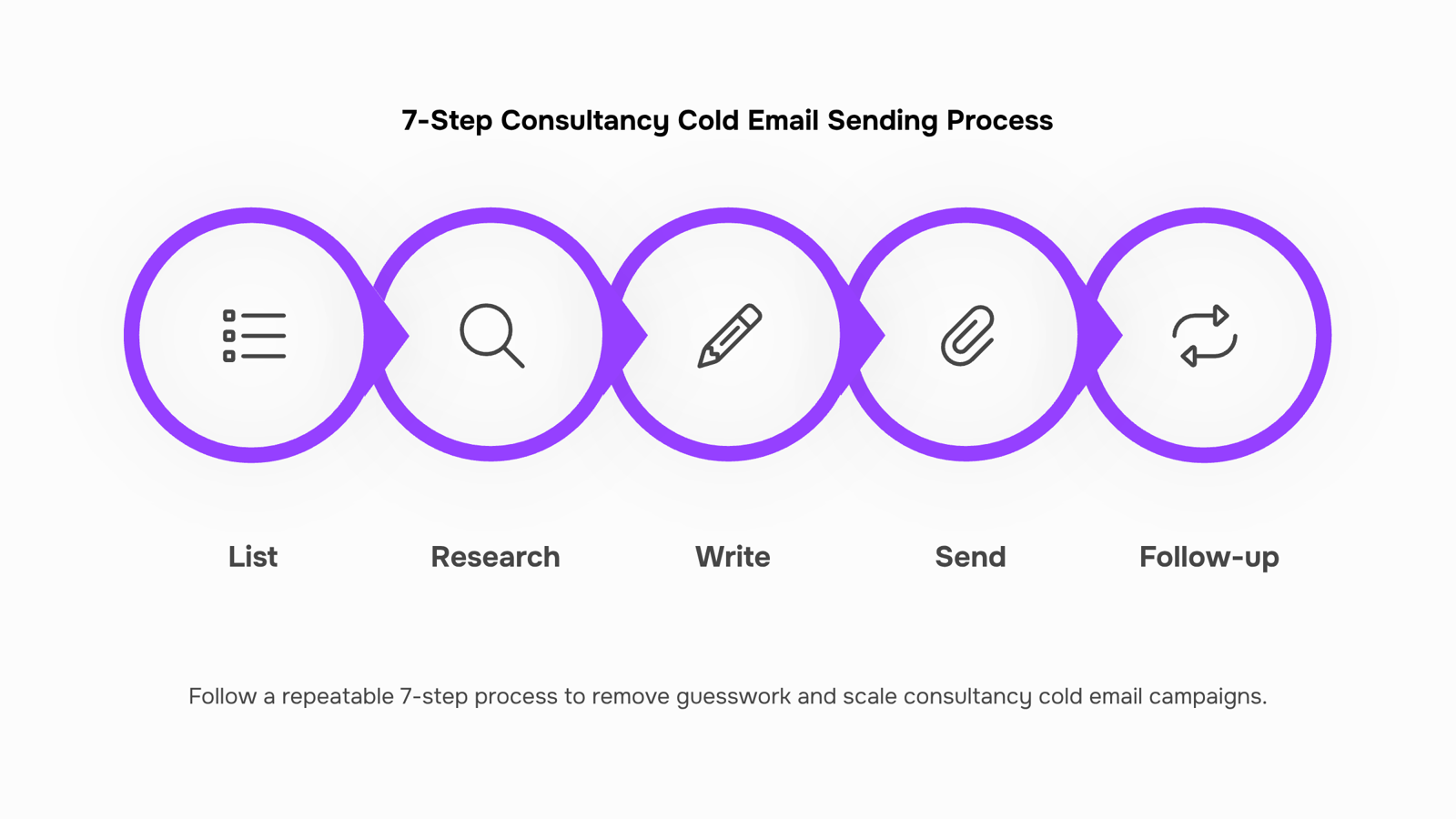
Set up your 7-step consultancy cold email sending process
Build your prospect list: Pull 20 to 30 verified contacts from LinkedIn Sales Navigator or Apollo. Confirm company size, role, and a recent trigger (new funding, hiring surge, tech stack change) before anyone enters your list.
Research each prospect: Spend 3 to 5 minutes per contact. Wikipedia works well for background on the company's industry or parent organization, free and fast.
Write your first email: Use the four-part structure from the previous section. Pair it with cold email subject lines that pair with each template before you hit send.
Send on Tuesday or Wednesday morning: Open rates drop sharply on Fridays and Mondays.
Schedule your cold email follow-up sequence: Most B2B replies come after the second or third touchpoint, not the first. Plan three to four follow-ups spaced four to seven days apart.
Automate follow-up sends with Evox: This is where manual tracking breaks down. Evox queues and sends each follow-up automatically once you set the intervals, removing the scheduling bottleneck entirely.
Review reply signals weekly: Track open rate, reply rate, and which cold email subject lines for consultancy work best. Cut what isn't converting after 30 sends.
Common mistakes that kill consultancy cold email reply rates
Four errors show up in nearly every underperforming consultancy cold email templates audit.
Generic opener: Starting with "I hope this finds you well" signals a mass send. Name a specific trigger instead.
Vague value claim: "We help companies grow" tells the reader nothing. State the outcome and the timeframe.
Oversized CTA: Asking for a 30-minute call in email one is too much friction. Ask for a yes/no question first.
No follow-up: Most replies come after touch two or three. Skipping follow-up means leaving the majority of responses on the table.
Fix one per draft before you send.
Closing
The best consultancy cold emails follow a pattern: one specific research detail, one concrete outcome, one small ask. Your templates are ready. But here's where most consultants stall: manually inserting those Wikipedia-sourced details into each email, scheduling follow-ups by hand, and tracking who replied when. That's the work that eats your week. The faster you move personalization and sequencing out of your inbox and into an automated system, the faster you can run this process at scale without burning out. What's your biggest friction point right now — finding the research detail, or getting the follow-up sequence running?
FAQ
What are some effective cold email templates for consultancy services?
The five core templates are: new prospect with a specific trigger, referral mention with named social proof, competitor pain point, industry event or regulation, and short re-engagement. Each pairs a research detail with one concrete problem and a 15-minute ask.
Can I use Wikipedia data to personalize cold email templates?
Yes. Search the company's Wikipedia page for History, Key people, and recent leadership changes. Check the industry Wikipedia article for named challenges. One specific detail pulled into your opening line separates a template from a real message.
What is the ideal length of a cold email template for consultancy services?
Short. Three to five sentences maximum. Lead with a specific trigger, name one pain point, ask for 15 minutes. Longer emails tank reply rates because they force the reader to work harder to understand why they should care.
How many follow-ups should I send after a consultancy cold email?
A full sequence typically runs three to five touchpoints spaced three to five days apart. Each follow-up should add new information or a different angle rather than repeat the original pitch.
How do I write a cold email opening line that does not sound generic?
Use a specific research detail tied to their company or industry. Reference a recent hire, product launch, funding round, or regulatory deadline. Show 30 seconds of work, not "I came across your company."


 Elena Petrova15 September 2026


