TL;DR: Most articles on risk management solutions stop at frameworks and checklists. This one focuses on where risks actually show up in IT project work — overdue tasks, blocked dependencies, stalled velocity — and how to catch them before they become budget or deadline problems. You'll finish with a clearer picture of what operational signals to watch and how to act on them.
What risk management actually means for a business
Professional risk management dashboard and geometric risk visualization on modern corporate desk
Risk management is the practice of identifying what could go wrong in your business, deciding how likely it is, and taking action before it becomes a problem.
For IT company owners, that definition usually lands as abstract. The operational reality is more familiar: a client project slips two weeks because a senior developer is blocked. A vendor misses a delivery. A compliance audit surfaces a gap nobody caught. These aren't planning failures — they're execution failures, and they happen mid-sprint, not at kickoff.
Most risk management content treats risk as something you document once and revisit quarterly. That framing misses where the damage actually occurs. The Standish Group's CHAOS Report consistently finds that over 60% of IT projects run over budget or timeline — and the root cause is rarely the original risk register. It's the signals nobody was watching during delivery.
Enterprise risk management solutions tend to focus on governance frameworks and audit trails. Useful at scale, but not where most IT firms feel the pain. The real gap is operational visibility: scanning for stalled workflows, velocity drops, and blocked dependencies before they become incidents, then acting on them fast enough to matter.
Risk management, done practically, is less a discipline and more a monitoring habit — one that runs continuously while work is in flight, not just when a project kicks off.
The four categories of business risk you need to cover
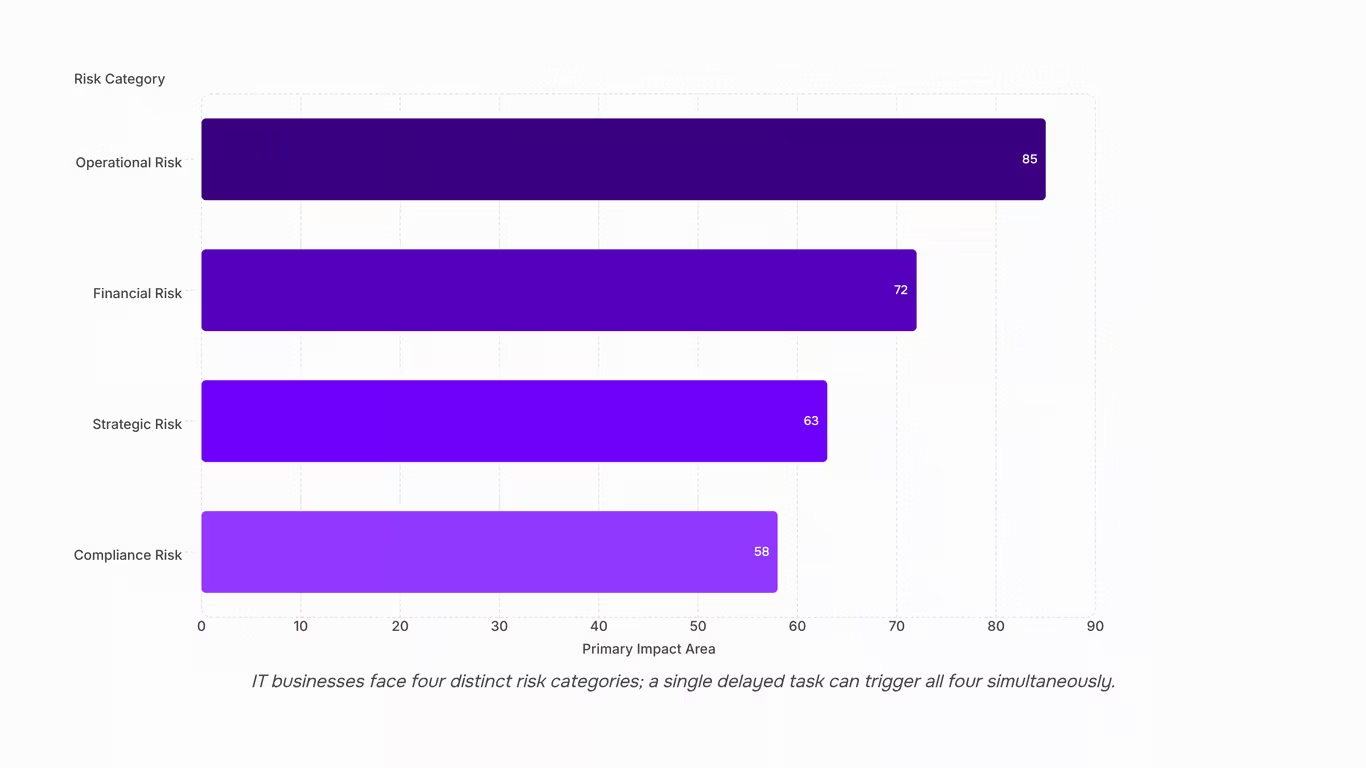
Most IT businesses are already managing risk — they're just not naming it that way. When a vendor goes dark two weeks before a deployment, that's operational risk. When a client delays sign-off and the project bleeds into the next billing cycle, that's financial risk. When a competitor undercuts your retainer pricing and three clients don't renew, that's strategic risk. When a misconfigured server exposes client data, that's compliance risk.
These four categories cover the majority of what can go wrong for an IT company owner:
1.Operational risk
includes project delays, resource bottlenecks, vendor failure, and key-person dependencies. A senior developer leaving mid-sprint is operational risk. So is a third-party API going down the day before go-live.
2. Financial risk
covers budget overruns, payment delays, and scope creep that never gets billed. Most IT firms absorb these losses quietly rather than escalating them — which is exactly why they repeat.
3. Strategic risk
involves decisions that look correct today but erode the business over 12 to 18 months: underpricing services, over-relying on one anchor client, or missing a technology shift your clients are already adopting.
4. Compliance risk
is the one that surprises IT owners most. Data handling obligations, software licensing terms, and client contractual penalties don't announce themselves — they surface during audits or disputes.
The practical gap in most enterprise risk management solutions is that they treat these categories as separate registers. In reality, a single delayed task can trigger all four simultaneously. Effective risk mitigation strategies start by scanning for stalled workflows, velocity drops, and blocked dependencies before they become incidents, then map each signal back to the category it belongs to.
How risk management solutions help reduce financial losses
Risk management solutions reduce financial losses by shrinking the time between when a risk activates and when the team sees it.
The cost math is simple. A blocked dependency that sits unresolved for three days doesn't just delay one task. It slips the sprint, pushes the delivery date, and, if the contract includes milestone penalties, converts a scheduling problem into direct revenue loss. PMI's 2024 Pulse of the Profession report found that organizations with mature risk practices waste significantly less budget per project dollar compared to those without.
Most teams detect risks too late because they're looking in the wrong place. A kickoff-day risk register captures what could go wrong. It doesn't show what's going wrong right now, in an active sprint. The signals that predict cost overruns live in the task queue, not a static document.
Effective risk management solutions close that gap by monitoring the operational signals that precede incidents:
- Overdue task accumulation — indicates scope creep or capacity problems before they surface in reporting
- Sprint velocity drops — an early indicator of team blockers or underestimated complexity
- Blocked dependencies — unresolved handoffs that stall downstream work
- Vendor or third-party silence — external dependencies going quiet before a missed deliverable
- Deadline risk flags — tasks trending toward late completion based on current progress rate
- Workflow bottlenecks — stages where work is piling up faster than it's moving through
Monitoring these alert types in real time is what separates early intervention from expensive damage control. Taro's risk prediction engine scans for stalled workflows, velocity drops, and blocked dependencies before they become incidents, while there's still time to re-assign, re-scope, or renegotiate.
Once a risk surfaces, the next step is response. A structured risk mitigation plan maps each identified risk to a specific action, so detection doesn't stall at the alert stage.
Risk management software vs. consulting services: what each one does
Risk management software automates detection. A consulting service advises on strategy. Both solve real problems, but they operate at different points in the risk lifecycle — and treating them as interchangeable is expensive.
Risk management software monitors active work continuously. It flags overdue tasks, blocked dependencies, and velocity drops as they happen, not after a post-mortem. Taro does this by monitoring eight alert types in real time — including overdue tasks, deadline risk, and workflow bottlenecks, so IT teams catch problems during execution rather than at the next status meeting.
Where software falls short: it can't interpret organizational politics, vendor relationships, or regulatory nuance. It sees the signal. It doesn't explain the context behind it.
Consulting services fill that gap. A risk consultant maps your exposure landscape, builds a framework, and helps you decide which risks to accept versus escalate. What they can't do is watch your sprint board at 11pm on a Tuesday.
| Factor |
Risk Management Software |
Risk Consulting Services |
| Primary function |
Continuous monitoring during execution |
Strategic framework design and risk assessment |
| When it operates |
Real time, throughout the project lifecycle |
Upfront (and periodically during reviews) |
| What it catches |
Overdue tasks, blocked dependencies, velocity drops, deadline drift |
Organizational blind spots, regulatory exposure, vendor risk, structural gaps |
| What it misses |
Context behind the signal (politics, relationships, nuance) |
Day-to-day execution signals between review cycles |
| Cost model |
Subscription, predictable |
Project-based or retainer, variable |
| Best for |
Teams running active projects who need early warning |
Teams building or overhauling a risk strategy from scratch |
| Speed of value |
Immediate, once connected to your workflow |
Weeks to months, depending on scope |
For most IT businesses, the practical answer is sequenced: use a consultant to build your risk mitigation plan that maps each identified risk to a response, then use software to monitor execution against it. The plan without monitoring is a document. The monitoring without a plan is noise.
Teams that need both but can only afford one right now should start with software. Mid-execution is where most financial damage actually happens, and that's exactly where software operates.
Where most businesses miss risk: the execution layer
Most businesses treat risk management as a planning activity. A risk register gets filled out at project kickoff, reviewed once a quarter, and filed somewhere no one checks between meetings. The actual work — sprints, task queues, client deliverables — runs separately, with no live connection to that register.
That gap is where risks materialize.
The execution layer is where project risk management breaks down. Overdue tasks compound quietly. A blocked dependency sits unresolved for three days while the team assumes someone else is handling it. Sprint velocity drops 30% in week two, but no one flags it until the deadline is already in jeopardy. By the time the risk appears in a status meeting, it's already a problem, not a warning.
This is the core failure of most risk management software implementations: the tool monitors the register, not the work. Risks are tracked as entries, not as signals inside active workflows.
The Standish Group's CHAOS Report consistently finds that the majority of IT project failures trace back to execution-phase breakdowns — scope drift, resource conflicts, and missed handoffs — not to risks that were unidentified at the start. Most were visible in the task data before they escalated. The detection lag, not the risk itself, is what drives cost overrun.
Effective project risk management means scanning for stalled workflows, velocity drops, and blocked dependencies before they become incidents — not waiting for a retrospective to surface them. That requires monitoring eight alert types in real time — including overdue tasks, deadline risk, and workflow bottlenecks inside the same system where work actually happens.
The risk register doesn't need to be abolished. It needs to be connected to execution.
How to implement a risk management solution in your organization
Most implementation efforts fail at step one: assigning a risk owner before any tooling is in place. Start there.
Step 1: Assign risk owners by project, not by department
Each active project needs one person accountable for escalating risk signals. A department-wide "risk committee" is too slow when a sprint is already stalling.
Step 2: Map your operational signals
Before configuring any software, list the conditions that have caused problems before — overdue tasks left unacknowledged past 48 hours, dependencies blocked for more than two days, sprint velocity dropping below 60% of baseline. These become your alert thresholds. Taro's dashboard supports monitoring eight alert types in real time — including overdue tasks, deadline risk, and workflow bottlenecks, so you're not building these from scratch.
Step 3: Configure alert thresholds before your first sprint
Generic defaults miss the signals that matter for IT service work. Set thresholds based on your team's actual delivery patterns, not industry averages.
Step 4: Connect risk monitoring to active work
The most dangerous risks in IT businesses surface in task queues and blocked dependencies, not in a risk register written at kickoff. Wire your risk mitigation strategies to where execution actually happens. Taro's prediction layer handles scanning for stalled workflows, velocity drops, and blocked dependencies before they become incidents.
Step 5: Run a structured risk review at the end of week one
Not month one. Use it to validate that your alert thresholds are firing on real problems, not noise.
For teams building this process from the ground up, building a risk mitigation plan that maps each identified risk to a response gives a practical starting framework for enterprise risk management solutions.
Can risk management solutions be customized for your industry
Yes, and for IT businesses, customization matters more than most risk frameworks acknowledge.
A manufacturing firm weights supplier delays and equipment failure. A finance team monitors compliance thresholds and audit triggers. An IT services company needs something different: alert types built around overdue tasks, deadline risk, and workflow bottlenecks, with risk scoring that reflects sprint velocity and blocked dependencies.
In practice, customization means adjusting three things: which signals trigger an alert, how heavily each signal weighs in your overall risk score, and which workflow step fires automatically in response. Generic templates skip that third layer entirely — and that's where project risk management actually breaks down mid-execution.
Closing
Effective risk management isn't a single tool or a one-time audit. It's a set of connected practices — identification, assessment, monitoring, and response — that run continuously alongside the work itself. The businesses that handle risk well treat it as operational infrastructure, not a compliance checkbox.
Where most teams fall short is the gap between spotting a risk and acting on it fast enough to matter. That gap closes when risk monitoring sits inside the same system where work actually happens, not in a separate spreadsheet reviewed once a month.
If you want to see what operational risk monitoring looks like when it's built into project execution rather than bolted on afterward, Taro shows how AI-driven alerts surface deadline risks, resource conflicts, and blockers before they escalate. Teams that want to compare how this fits into a broader WorksBuddy plan can review options at Pricing Page. Free plan available. No credit card required.
FAQ
Q. What are the most effective risk management solutions for businesses?
A. The most effective solutions combine real-time project monitoring with clear escalation paths. For IT businesses, that means tracking task health, logging blockers as they happen, and maintaining an audit trail before a client or stakeholder asks for one.
Q. How can risk management solutions help mitigate financial losses?
A. By surfacing warning signals early — slipping completion rates, missed check-ins, budget drift — before the cost of fixing the problem spikes. Intervening at the pattern stage is always cheaper than responding after a deadline is missed or a client escalates.
Q. What is the difference between risk management software and consulting services?
A. Software provides continuous monitoring: dashboards, alerts, and audit trails that run as your projects do. Consulting delivers a periodic outside assessment with recommendations but no ongoing visibility. Most IT teams use software for day-to-day tracking and consulting to fill methodology or compliance gaps.
Q. Can risk management solutions be customized for my industry?
A. Yes. Effective solutions should map to your specific risk profile. For IT companies, that means configuring risk categories around delivery timelines, vendor dependencies, and client SLAs rather than generic frameworks built for other industries.
Q. How do I implement a risk management solution in my organization?
A. Start by mapping active projects to their most likely failure points: missed deadlines, scope changes, resource gaps. Assign ownership and response steps for each. Review your risk log weekly until the habit is established, then shift to bi-weekly.
Q. What risks are hardest to catch before they cause damage?
Scope creep and dependency failures. Both build gradually across tasks and sprints until a deadline is already missed. They rarely appear as a single event — they show up as a slow drift across multiple workstreams that goes unnoticed until the damage is done.


 Elena Petrova15 September 2026


