TL;DR: Most resource allocation guides describe the three methods and stop there. This one shows you when to use each, how to choose between them when capacity is uneven and priorities shift mid-sprint, and where AI workload tools change the decision. You'll finish with a framework you can apply to your next project, not just a definition to file away.
What resource allocation actually means in a project
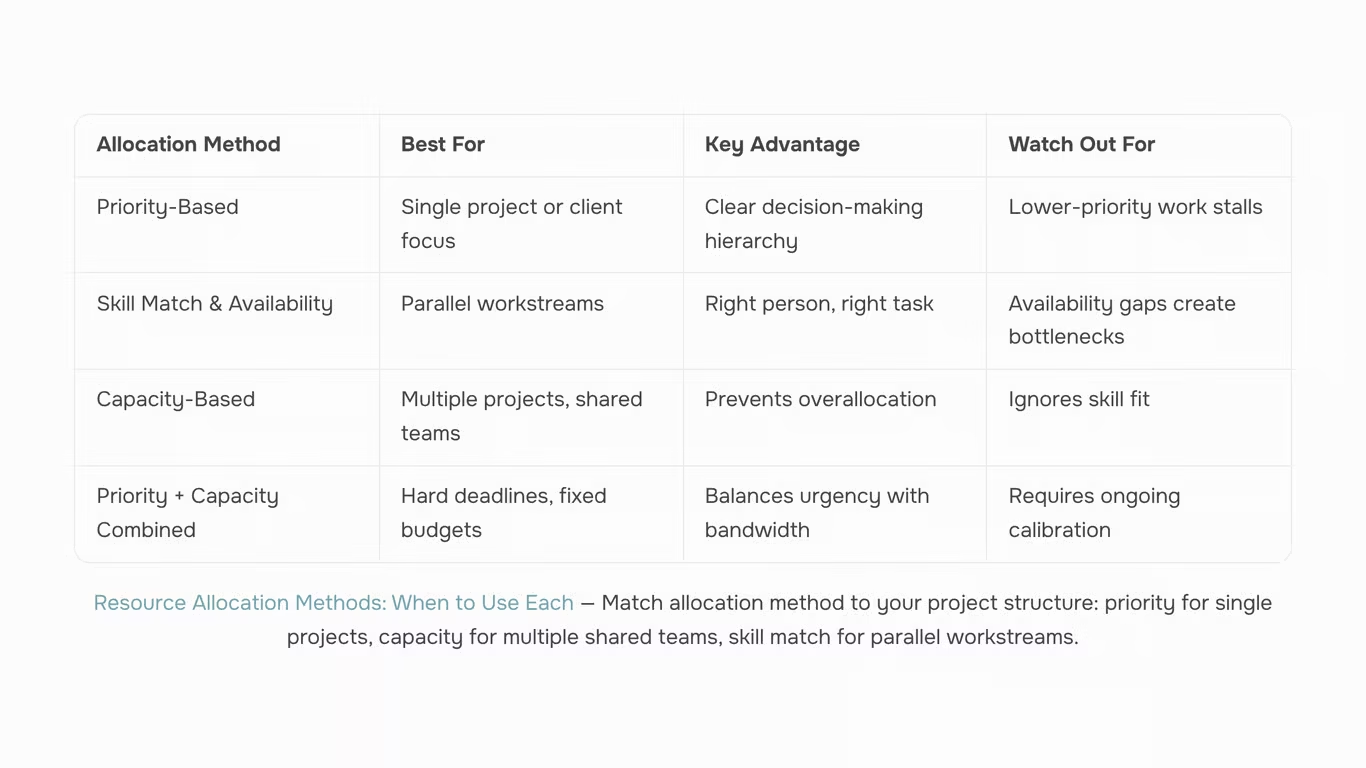
Resource allocation in project management is the process of assigning people, budget, time, and tools to specific tasks so work can actually get done. Effective allocation of resources means matching the right capacity to the right work at the right moment, not just filling a spreadsheet with names.
In practice, most IT project slippage starts here. A senior developer gets pulled across three active projects. A budget line gets committed before the scope is clear. A tool license runs out mid-sprint. Each of these is an allocation failure, and they compound fast when you're managing multiple simultaneous projects with overlapping deadlines.
The four resource types that matter in any project:
- People: skills, availability, and seniority level
- Budget: committed spend versus remaining contingency
- Time: working hours, sprint capacity, and deadline constraints
- Tools: software licenses, infrastructure, and equipment
Getting this wrong is the most common reason IT projects slip, not unclear requirements, not scope creep. Poor allocation creates bottlenecks that team planning tools can surface early, but only if you know which method to apply first.
The next section covers exactly that: how to allocate resources efficiently using a priority-based approach when deadlines compete and senior staff are stretched thin.
Way 1: Allocate by priority and project impact
Priority-based allocation starts with a simple question: which work, if delayed, causes the most damage? You score or rank every active project by business impact, deadline pressure, and dependency risk, then assign your best people to the highest-scoring items first.
This method works best when you're trying to allocate resources to meet multiple project deadlines that are all competing for the same senior staff. Without a scoring system, assignment decisions default to whoever asks loudest or emails fastest, which is how a critical infrastructure migration loses its best engineer to a lower-stakes internal tool request.
How to apply it in four steps:
- List every active project and assign each a priority score (1 to 5 works; some teams use weighted criteria like revenue impact, client tier, and regulatory deadline).
- Rank your available people by the capability each project actually needs, not just their job title.
- Assign top-scored projects first, filling roles from your ranked list until those projects are staffed.
- Revisit the scores weekly. Priorities shift, and a static assignment made in week one is often wrong by week three.
IT team example: A 12-person IT team is running a client-facing API migration (score: 5), a security patch rollout (score: 4), and an internal dashboard rebuild (score: 2). Using priority scores, the two senior backend engineers go to the API migration. The security team lead owns the patch rollout with one mid-level engineer. The dashboard rebuild gets scheduled for the next sprint when capacity opens up, rather than pulling resources now and stalling both higher-priority workstreams.
For teams managing several projects at once, pairing this method with solid priority management techniques reduces the guesswork considerably. The scoring criteria matter more than the exact scale you use, so agree on them with stakeholders before the sprint starts, not during it.
Way 2: Allocate by skill match and availability
Priority-based allocation works well when you have a clear hierarchy of tasks. But when two workstreams need to run in parallel and both require specialized skills, ranking by priority alone won't tell you who should do what. That's where skill match and availability becomes the more useful method.
The logic is straightforward: assign each task to the person best qualified to do it, among those who have capacity right now. This matters most in IT projects where a backend engineer and a DevOps engineer aren't interchangeable, even if both are "available." Sending the wrong person to a task doesn't just slow it down — it often creates rework.
Here's a concrete example. A sprint has four tasks: API integration, CI/CD pipeline setup, front-end component build, and security audit. You have six engineers. Instead of assigning by seniority or whoever is free first, you map each task to the skill set it actually requires, then check who among the qualified engineers has the lightest current load. The API integration goes to the engineer with REST API experience who has 60% capacity this week, not the one with 90% capacity but a background in infrastructure.
This approach is one of the more reliable resource allocation methods for teams running parallel workstreams, because it keeps specialized roles focused on work they can execute without a ramp-up period.
The risk is that skill-match allocation can create invisible bottlenecks. If your only security engineer is already at 80% capacity, every task requiring a security review stacks up behind them. That's where workload balancing becomes critical — and why capacity-based allocation, covered in the next section, acts as a check on this method rather than a replacement for it.
Way 3: Allocate by capacity and workload balance
Priority-based and skill-based allocation can both fail the same way: they tell you what to assign but not how much. Capacity-based allocation adds the missing check. Before any task moves to a team member, you calculate how many hours they actually have available, then assign work against that number.
The calculation is straightforward. Take a person's working hours for the sprint or week, subtract time already committed to meetings, support rotations, and existing tasks, and what remains is their allocatable capacity. A developer with a 40-hour week who carries 12 hours of recurring obligations has 28 hours to assign, not 40. Treating that number as 40 is where burnout starts.
Workload balancing is what happens when you apply this across the whole team. Instead of assigning the next task to whoever has the right skill, you assign it to the person with the right skill and the available hours. The distinction matters most when two or three projects run simultaneously, because that's when over-allocation hides. A team member can look available on Project A's board while already at capacity on Project B.
A concrete example: a five-person QA team supporting two parallel releases. Without capacity checks, the two senior testers absorb every high-priority ticket because they're the most skilled. With capacity checks, you see one senior tester is already at 90% utilization and route the next ticket to a mid-level tester who has 15 hours free. Quality holds; the senior tester doesn't hit Friday burned out.
For resource allocation in project management to work efficiently across simultaneous projects, capacity data needs to be current. Manually tracking this in spreadsheets creates lag. Tools that surface real-time utilization, like AI workload distribution features in work management platforms, close that gap without adding a weekly admin task to your plate.
How to choose the right method when deadlines stack up
When deadlines stack up across multiple projects, picking the wrong allocation method doesn't just slow one team down — it creates a chain reaction. Use this decision framework before you assign a single task.
| Situation |
Best method |
Why |
| One project, clear scope |
Priority-based |
Assign top resources to highest-impact work first |
| Multiple projects, shared team |
Capacity-based |
Prevents double-booking and burnout |
| Shifting deadlines, unclear scope |
Resource leveling |
Smooths demand without extending every timeline |
| Hard deadline, fixed headcount |
Priority + capacity combined |
Forces honest trade-offs before work starts |
Three conditions tell you which row you're in:
- How many active projects share the same people? If the answer is more than two, capacity-based allocation is your floor, not an option.
- Are deadlines fixed or movable? Fixed deadlines with shared teams require you to prioritize tasks across your team before capacity math makes sense.
- Do you have visibility into non-project time? If not, any method you choose will be wrong. Build that visibility first using team planning tools that surface actual availability, not just scheduled hours.
Most teams skip condition three. That's where over-allocation hides.
Common mistakes that break resource allocation plans
Four mistakes show up repeatedly when IT managers audit their allocation plans.
Over-assigning top performers is the most common. When one senior engineer carries three concurrent workstreams, you get a single point of failure, not efficiency. As Epicflow notes, uneven workload distribution leaves some people overwhelmed while others with identical skills sit idle.
Skipping mid-project rebalancing is the second. Allocation set at kickoff rarely survives contact with scope changes or unexpected blockers. Build a rebalancing checkpoint into every sprint or phase gate.
Ignoring non-billable time quietly destroys capacity plans. Meetings, code reviews, onboarding, and internal admin routinely consume 20-30% of a developer's week, yet most plans treat them as zero.
Treating all tasks as equal priority compounds the rest. Pairing priority management techniques with your allocation method is what separates a plan that holds from one that collapses under pressure.
Spreadsheets and status meetings can manage resource allocation in project management for a single project. Across three or four simultaneous projects, that approach collapses under its own weight.
A dedicated work management tool centralizes what the three methods above require separately: visibility into who has capacity, real-time workload balancing when priorities shift, and a single place to apply priority management techniques without chasing updates across Slack threads.
Taro's AI workload distribution handles the part most teams skip: mid-project rebalancing. When a senior engineer gets pulled onto an incident, Taro flags the gap and redistributes affected tasks automatically, rather than waiting for a Friday retrospective to surface the problem.
The result is less time spent on manual tracking and more time on decisions that actually move the project forward. If your team juggles multiple active projects, explore AI workload distribution to see how automated rebalancing works in practice.
Closing
Here's the thing: all three methods work on paper. Priority scoring looks clean in a planning doc. Skill matching feels logical when you're mapping roles to tasks. Capacity math checks out in a spreadsheet. But the moment you're tracking five active projects, three team members pulling double duty, and priorities shifting mid-sprint, that spreadsheet becomes fiction. The allocation plan and the live work drift apart. That's where workload distribution tools step in, they're the place where your allocation decisions actually stay synced with what people are really doing, hour by hour, across every active project. If you're serious about keeping allocation honest, that's your next move.
FAQ
Q. What are three effective ways to allocate resources in a project?
A. Priority-based (rank projects by impact and assign top talent first), skill match and availability (assign tasks to qualified people with capacity), and capacity-based workload balancing (calculate actual available hours before assigning work).
Q. How can I allocate resources efficiently in my business?
A. Map each task to the skill it requires, score projects by business impact, calculate actual available capacity per person, then match work to the right person with available hours — not whoever asks first.
Q. What are some common methods for allocating resources in a team?
A. Priority scoring, skill-based assignment, and capacity balancing. Most teams use all three in sequence: prioritize which work matters most, match skills to tasks, then check available hours before finalizing assignments.
Q. How do I allocate resources to meet multiple project deadlines?
A. Rank projects by deadline pressure and business impact, assign your strongest people to highest-priority work first, then use capacity checks to prevent over-allocation. Revisit scores weekly as priorities shift.
Q. Can you describe three strategies for resource allocation in operations management?
A. Priority-based (rank by impact and dependency risk), skill match (assign to qualified people with capacity), and workload balancing (calculate available hours and distribute work evenly to prevent burnout).
Q. What happens when you don't rebalance resources mid-project?
A. Bottlenecks hide, specialized roles become invisible chokepoints, and team members burn out while others look idle. Static allocations made in week one are usually wrong by week three when priorities shift.
Q. How do I know if my team is over-allocated before a deadline hits?
A. Calculate actual available capacity per person (working hours minus meetings and existing commitments). If anyone is above 80% utilization across all projects, you're over-allocated and need to rebalance or defer work.



 Elena Petrova15 September 2026


