What a milestone actually means in project management
-
A milestone is a specific point in a project that marks the completion of a meaningful phase or decision, not a task you check off or a date you're racing toward. The PMBOK Guide (7th edition, 2021) defines it as a significant point or event in a project — zero duration, no effort attached, just a clear signal that something consequential has been reached.
-
That distinction matters in practice. A task is work. A deadline is a time constraint. A milestone is evidence that a defined outcome exists. "Complete API integration testing" is a task. "Friday" is a deadline. "API integration signed off by QA lead" is a milestone in project management.
-
The difference shapes how your team thinks about progress. Tasks fill calendars. Milestones answer the question stakeholders actually ask: are we on track?
-
Most IT projects run across overlapping workstreams, which makes milestone meaning even more important. Without shared checkpoints, two teams can be individually on schedule while the project as a whole is drifting. A milestone forces alignment at the seams, not just within each lane.
-
The six steps ahead show how to define, sequence, and track milestones across a product development roadmap — from kickoff through delivery.
Why milestones matter for your team's work outcomes
Skipping milestones doesn't just create ambiguity — it removes the checkpoints that tell you a project is drifting before it's too late to correct course.
Four concrete reasons they matter:
- Clarity on what "done" looks like: A milestone in project management defines a specific, verifiable state — not ongoing effort. When your team knows the target, they stop guessing which work counts.
- Stakeholder alignment without status meetings: Milestone dates give executives and clients a shared reference point. Instead of weekly check-ins to gauge progress, you point to what shipped and what's next.
- Earlier warning signals: When a milestone slips, you know within days, not weeks. PMI's research consistently shows that projects without defined checkpoints surface problems too late for recovery. Tracking milestones in a tool like Prax makes that slip visible the moment it happens.
- A natural bridge to OKRs: Milestones and OKRs work well together when milestones mark the measurable outputs that move a key result forward. If your Q3 OKR is "reduce deployment time by 40%," a milestone like "CI/CD pipeline live in staging" tells you whether you're on track.
Understanding the different stages of project management helps you place milestones where they create the most accountability — at phase transitions, not just at the end.
Milestone vs deadline: how they work together
A milestone marks a meaningful event in a project's timeline. A deadline marks when work must be finished. They're related, but they're not the same thing, and mixing them up creates real accountability gaps.
Here's how they differ across three dimensions:
| Dimension |
Milestone |
Deadline |
| Scope |
A point in time, zero duration |
A time boundary for completing work |
| Accountability |
Signals team-wide progress |
Assigned to a specific owner or task |
| Time-boxing |
Measures whether you arrived |
Measures when work must be done |
A practical example: "API integration complete" is a milestone. "Developer submits integration code by Friday" is a deadline. The deadline feeds the milestone. Miss enough deadlines, and the milestone slips.
This distinction matters when you're reporting to stakeholders. A missed deadline is a task-level signal. A missed milestone is a project-level signal, one that tells you whether your project management stages are on track or need replanning.
Understanding milestone meaning this way also sharpens your milestone vs deadline conversations with executives, who care about delivery phases, not individual task dates.
Prax tracks both layers simultaneously, so you can see which deadlines are threatening an upcoming milestone before it slips, not after.
How to set and track milestones in 6 steps
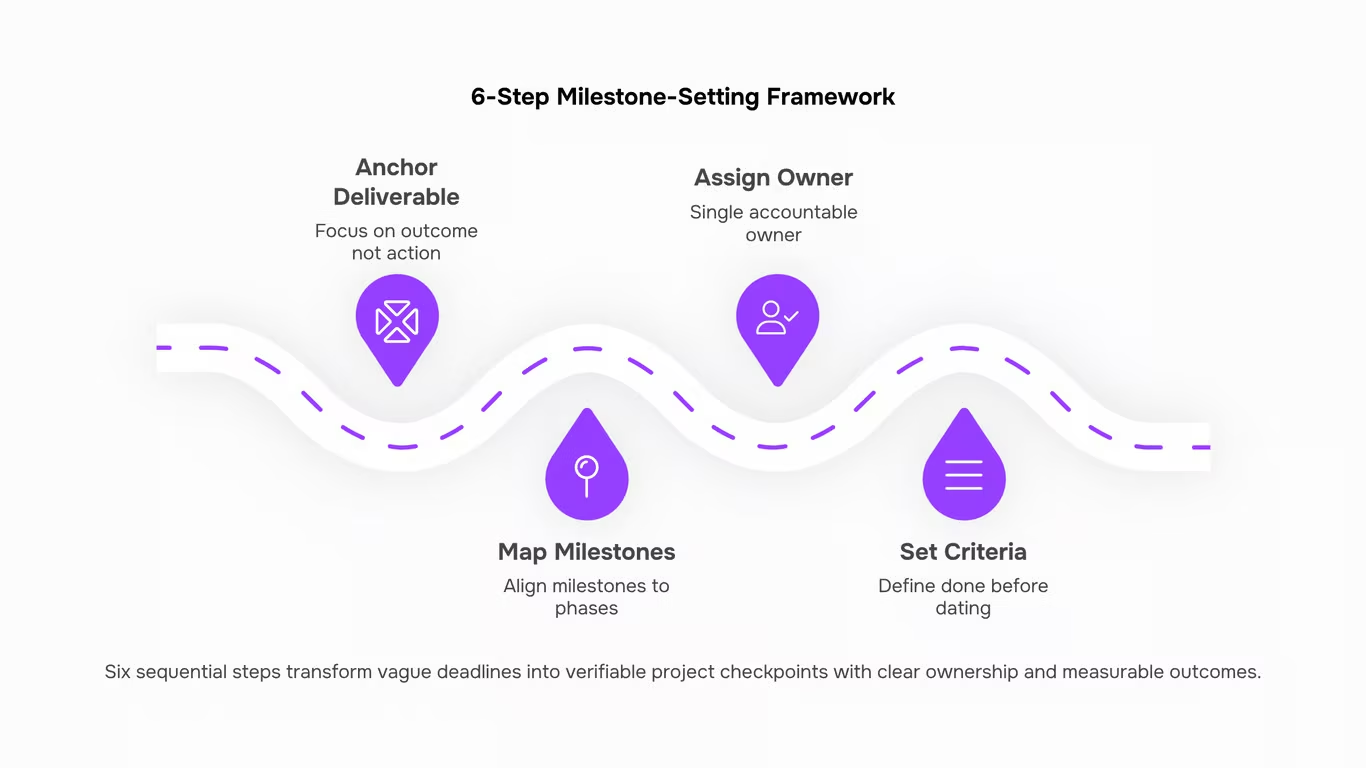
Setting a milestone in project management without a clear process behind it is just putting a date on a calendar. Here is a six-step framework for doing it in a way that actually keeps projects on track.
1. Anchor each milestone to a deliverable, not an activity
A milestone marks that something exists and is verifiable, not that work is happening. "Development sprint in progress" is an activity. "API integration complete and tested" is a milestone. Before you write anything down, confirm you can answer: what will we inspect or hand off at this point?
2. Map milestones to your project phases
Work through the different stages of your project and place at least one milestone at the end of each phase. For a typical IT infrastructure rollout, that might look like: requirements signed off, architecture approved, staging environment live, UAT passed, production deployed. Five phases, five checkpoints. This structure also makes it easier to prioritize milestones when two workstreams are competing for the same resources, since phase-end milestones carry higher sequencing weight than mid-phase ones.
3. Assign a single owner to each milestone
Every milestone needs one person who is accountable for confirming it is complete, not a team, not a committee. If the UAT milestone is owned by "QA," nobody owns it. Assign a name. That person is responsible for communicating status and escalating blockers, not necessarily doing all the work.
4. Set the criteria before you set the date
Define what "done" looks like before you pick a target date. For a software release milestone, done might mean: zero P1 bugs open, release notes approved, rollback plan documented. Once the criteria are written, estimating the date becomes a planning exercise rather than a guess. This is the step most teams skip, and it is why milestones slip.
5. Build your tracking cadence
Decide how often you will review milestone status and in what format. For most IT projects, a weekly status check against open milestones is enough. If a milestone is more than two weeks out and shows no progress signals, that is a flag worth raising now, not at the deadline. Prax tracks milestone progress and surfaces blockers automatically, so your status reviews start with facts rather than chasing updates.
6. Conduct a brief milestone retrospective at each checkpoint
When a milestone closes, spend ten minutes on three questions: Did we hit the criteria we defined? If not, why? What do we adjust for the next phase? This is also the right moment to revisit your product development roadmap and confirm the remaining milestones still reflect current scope and priorities.
A concrete example: a 90-day SaaS onboarding project might have six milestones: kickoff complete, data migration validated, integrations live, training delivered, pilot sign-off received, full rollout confirmed. Each has an owner, a definition of done, and a review date. That structure is what separates a project that delivers from one that drifts.
How to connect milestones to your OKRs
Milestones and OKRs map cleanly once you treat each key result as a destination and each milestone as a checkpoint on the route there.
The method is straightforward:
- List your active OKRs for the quarter. One column: the objective, one column: each key result with its target number.
- For each key result, ask what project event would prove you're on track at the halfway point. That event is your milestone.
- Assign an owner and a date to each milestone, then link it explicitly to the key result it supports.
A concrete example: if your key result is "reduce mean time to deployment from 14 days to 7 days by Q3," your milestone might be "CI/CD pipeline fully configured by week 6." When that milestone hits, you have factual evidence the key result is progressing, not a status-meeting estimate.
This matters most during project management stages where scope tends to drift. Tying milestone meaning directly to a measurable key result keeps reviews grounded in data. Prax surfaces milestone status against project progress automatically, so your OKR check-ins reflect what actually shipped rather than what someone remembers.
How to prioritize milestones in a complex project
When multiple workstreams compete for the same engineers, not every milestone can move at once. You need a filter to prioritize milestones before bandwidth decisions get made by default.
Use three criteria in sequence:
- Dependency position: Does another workstream block on this milestone completing? If yes, it moves first. Blocked work compounds delay across every downstream task.
- Risk exposure: Which milestone, if it slips, creates the highest cost or compliance consequence? Security sign-off before a client deployment beats a UI polish checkpoint every time.
- Business value: When two milestones share similar dependency weight and risk, sequence the one tied to measurable revenue or a committed delivery date.
A practical example: an IT team running infrastructure migration alongside a client portal build should complete the network-layer milestone first, because the portal team can't test in production without it.
This filter also helps when you set and track milestones across the full project lifecycle, since sequencing decisions made early reduce the rescheduling conversations that consume sprint planning later.
Manually chasing milestone status across spreadsheets and Slack threads is how risk goes unnoticed until it's too late. When you set and track milestones inside a single work management tool, every status change is visible to the whole team without a meeting.
Prax handles this through automated project tracking and completion forecasting, so you see which milestones are on schedule and which are slipping before they affect delivery. Pair that with Gantt-based timeline views and you can spot a milestone in project management terms that's at risk, then act on it the same day.
Closing
Project Milestones Done Right Mean Projects That Actually Finish
- Milestones aren't checkpoints for their own sake. They're the mechanism that turns a vague deadline into a sequence of decisions your team can actually act on. When you define them clearly, assign real owners, and review them at a fixed cadence, you stop managing by hope and start managing by evidence.
- The six steps covered here give you that structure: from scoping milestones at kickoff, to flagging slippage early enough to course-correct, to closing each phase with a deliberate sign-off. Teams that follow this consistently spend less time in status meetings and more time shipping.
- The tracking layer is where most teams lose the gains. Ownership confusion and task misalignment quietly erode milestone progress long before a deadline appears on a dashboard. If you'd rather not chase that manually, Taro handles task ownership, accountability mapping, and milestone alignment automatically, so your attention stays on decisions, not spreadsheets.
Start there and see how much of the overhead disappears.
FAQ
Q. What is a milestone in project management?
A. A fixed point on your timeline that marks the end of a phase or delivery of something meaningful. No duration, just a date that confirms progress before the next phase starts.
Q. How is a milestone different from a deadline?
A. A deadline drives urgency. A milestone confirms something significant is done and the project is still on track.
Q. How do I set milestones in a project?
A. Pin one to the end of each project phase tied to a real deliverable or decision, then review status on a fixed weekly cadence so slippage surfaces early.
Q. Can milestones connect to OKRs?
A. Yes. Treat each Key Result as the destination and each milestone as a checkpoint. If your KR is "deploy three integrations by Q3," each launch date becomes a milestone.
Q. How do I prioritize milestones when a project gets complex?
A. Start with dependencies. A milestone that blocks five workstreams outranks one that affects a single task. Then weight by client or business impact.
Q. Does a milestone have a duration?
A. No. It marks a single point in time. If you are assigning a start and end date, what you have is a task or phase, not a milestone.



 Elena Petrova15 September 2026


