TL;DR: Most guides on signatory authority stop at the legal definition. This one shows IT company owners how to structure signing permissions, document them in a policy that holds up under audit, and enforce them through a workflow that removes bottlenecks without adding risk. You'll leave with a five-step framework you can put into practice this week.
What signatory authority means
Signatory authority is the legal right to bind an organization to a contract by signing on its behalf. When someone with that authority signs, the company is bound. When someone without it signs, the contract may be unenforceable — or worse, it creates a dispute about whether the company ever agreed at all.
Under US contract law, actual authority must be granted explicitly (through a board resolution, operating agreement, or delegation of authority letter) or implied by someone's role. A department lead who signs a $200,000 vendor agreement without documented signing rights hasn't just bent an internal rule — they've created a liability the company may not be able to walk back cleanly.
This is where informal arrangements break down. Most IT companies operate on assumptions: the CEO signs everything, or whoever manages the vendor relationship handles the paperwork. That works until a dispute surfaces and no one can prove the signer had the right to commit the company.
Understanding what signatory authority means in practice starts with knowing how an electronic signature creates a legally binding record — and how that record becomes evidence. The signatory authority meaning, legally, is about documented permission, not assumed permission. Getting that documentation right is the foundation everything else builds on.
Who holds signatory authority in a company
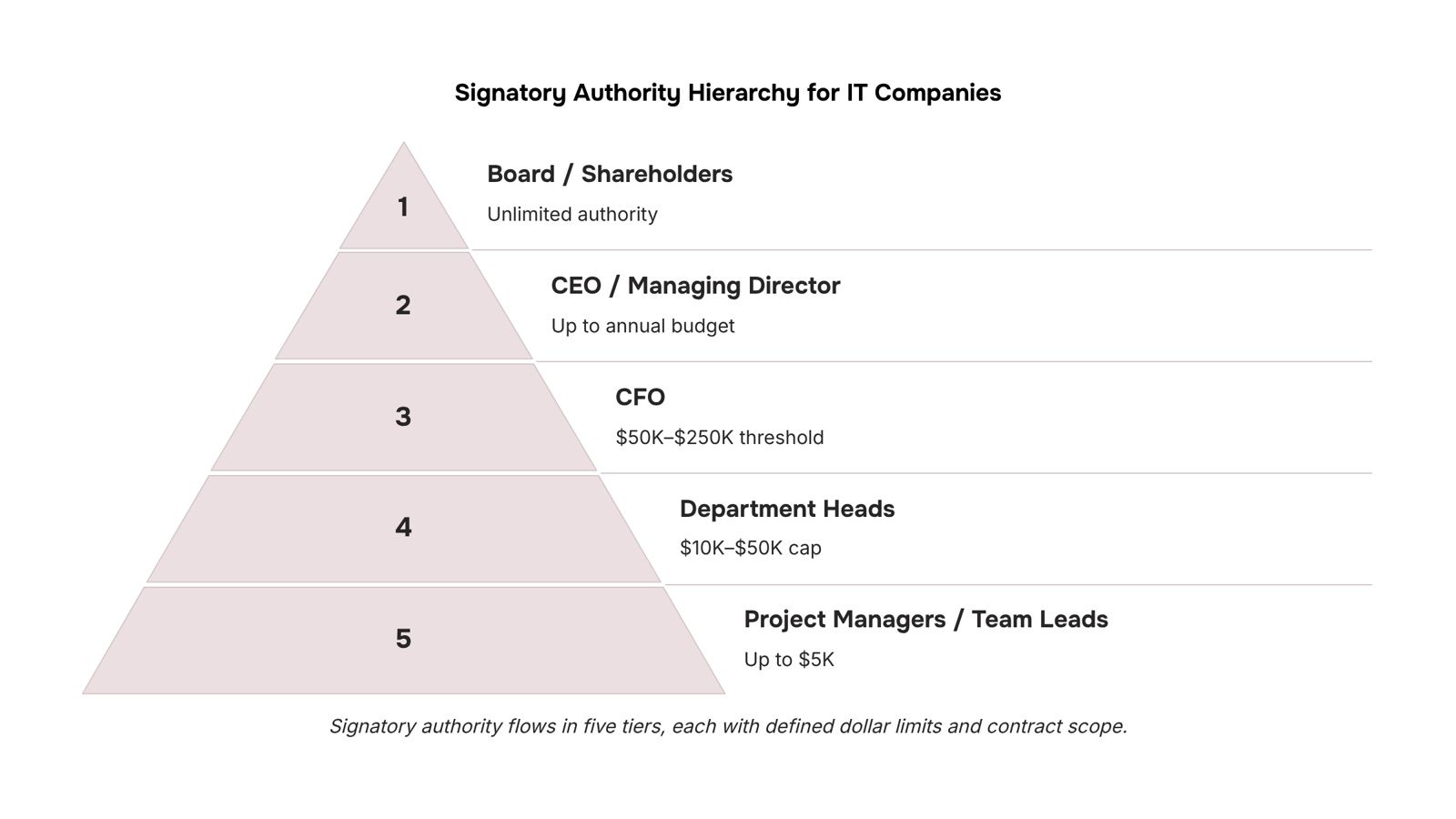
Signatory authority typically flows in three tiers. Board-level authority covers the highest-value commitments: equity agreements, major financing, and anything that binds the company beyond a single fiscal year. Executive authority (CEO, CFO, COO) covers operational contracts within approved budget limits. Department-level authority covers routine vendor agreements, SOWs, and renewals below a defined dollar threshold.
For most IT companies, the practical breakdown looks like this:
Board or majority shareholders: Unlimited signing authority, required for M&A, debt instruments, and equity issuance
CEO / Managing Director: Operational contracts up to the company's full annual budget
CFO: Financial agreements, banking mandates, and supplier contracts above a set threshold (often $50K–$250K depending on company size)
Department heads (IT, HR, Legal): Vendor contracts and service agreements within their function, usually capped at $10K–$50K
Project managers or team leads: Purchase orders and work orders below a low threshold, often $5K or less
The dollar thresholds above are illustrative. Your actual limits depend on board resolutions or a formal delegation of authority policy, which is the document that makes these tiers legally enforceable rather than just assumed.
One gap that catches IT owners off guard: knowing who has signatory authority in a company on paper is different from enforcing it at the moment a contract lands. Without a system that assigns specific fields to specific signers and enforces signing roles in real time, the hierarchy exists only in a document nobody checks.
Why getting this wrong is expensive
Poorly defined signatory authority meaning isn't just a governance gap — it has direct financial consequences.
Unauthorized commitments happen when someone signs a vendor contract or service agreement outside their permitted scope. The company may still be legally bound, depending on whether the other party acted in good faith. That means you could owe payment on a contract your board never approved.
Contract disputes follow quickly when signing rights aren't documented. If a client or vendor challenges a signature, you need a clear paper trail showing that person had the authority to sign. Without it, you're arguing from a position of weakness, and litigation costs money even when you win.
Audit failures are the quieter problem. Compliance audits — whether for SOC 2, ISO 27001, or a client's vendor review — routinely ask for evidence of internal controls around contract execution. If you can't produce a delegation policy or show who was authorized to grant signatory authority at the time of signing, you fail that control.
All three problems share the same root: no documented system for who can sign what, up to what value, and under what conditions. The fix is a defined workflow where you assign specific fields to specific signers and enforce signing roles and track who signed what in real time.
How to set up signatory authority in 5 steps
Setting up signatory authority isn't a legal exercise you do once and forget. It's an operational policy that needs clear scope, written documentation, and a workflow that enforces it every time a contract moves.
Here's a repeatable five-step process you can work through this week.
1. Map every contract type your business sends or receives
List the agreements that move through your company: client service agreements, vendor contracts, NDAs, SOWs, employment offers. Group them by dollar value and risk level. A $500 software subscription renewal carries different exposure than a $50,000 managed services contract. That grouping becomes the foundation for every permission decision that follows.
2. Define the scope of each signing role
For each contract category, decide who can sign, up to what dollar threshold, and under what conditions. A common structure for IT companies: the owner or CEO holds unlimited authority, a department head can commit up to a defined limit (say, $10,000), and individual team leads can execute standard vendor renewals below a lower threshold. Write this down. A verbal agreement about who can sign what is not a policy.
3. Document authority in writing
A delegation of authority letter or a board resolution formalizes the permission you've granted. For IT service companies, this matters when a client or auditor asks who authorized a contract. The document should name the individual, specify the scope (contract types, dollar limits, time period), and carry a signature from whoever is granting the authority. Include an expiry date. Open-ended delegations create exactly the audit exposure the previous section described.
4. Build signing roles into your document workflow
This is where most teams skip a step. They document the policy in a PDF that lives in a folder no one checks, then send contracts through email with no enforcement. A better approach: configure your document workflow tool to reflect the policy directly. Sigi lets you set recipient roles (signer, approver, viewer) at the document level, so the right person gets the right action and no one outside that role can execute the agreement. When you assign specific fields to specific signers, the workflow itself becomes the control, not a reminder email.
5. Set a review cadence and expiry for delegated authority
Signatory authority granted to an employee who has since changed roles, left the company, or moved to a different project is a liability. Set a calendar review every six months. When someone's role changes, revoke and reissue. If you've used a document workflow tool to enforce signing roles and track who signed what in real time, that audit trail also tells you exactly which documents each person executed, which makes the review faster and the records defensible.
Understanding what an electronic signature is and how it creates a legally binding record matters here too: the signature is only as valid as the authority behind it.
Common mistakes that undermine signatory authority
Four mistakes show up repeatedly when IT company owners try to grant signatory authority without a formal process.
Ambiguous scope. A delegation that says "authorized to sign contracts" without specifying dollar thresholds, contract types, or counterparty categories is nearly useless. When a dispute arises, "authorized" means whatever each side remembers.
No expiry date. Delegated authority granted for a specific project or role often outlives that context. A former project manager or a contractor who left six months ago may still technically hold signing rights if no end date was set.
Missing documentation. Verbal approvals and email threads are not a delegation policy. If you cannot produce a signed delegation letter or board resolution that names the person, scope, and term, the authority is difficult to enforce and easy to challenge.
No audit trail on the documents themselves. Even a well-drafted delegation policy fails if your document workflow does not record who signed, when, and under what authority. A tamper-proof completion certificate tied to each signed contract closes this gap. If you are also rethinking how your contract agreement signature page is structured, that is a good place to catch formatting gaps before they create ambiguity.
Fix these four before the next contract goes out.
Signatory authority vs. authorized signatory: the difference
Signatory authority is the permission to bind a company to a contract. An authorized signatory is the person who holds that permission at a given moment.
The confusion matters operationally. A contract addressed to the wrong person, someone whose title looks right but whose authority was never formally granted, can be disputed or voided under US contract law even after they've signed.
Think of it this way: signatory authority meaning lives in your governance documents (board resolutions, delegation letters, employment agreements). The authorized signatory is whoever those documents name. One is the rule; the other is the person the rule points to.
For IT company owners, the practical failure is conflating the two. You send a contract to a senior engineer because they manage the vendor relationship, but their role carries no documented signing rights. That signature is exposed.
Understanding what is signatory authority at the document level is the first step toward making it enforceable.
How to enforce signatory authority in a document workflow
A written authority policy does nothing if your document tool lets anyone sign anything. Enforcement happens at the workflow level.
Start by mapping each contract type to the role that holds signatory authority for it. Service agreements might require a director-level signer; vendor renewals under $5,000 might allow a department lead. Once that matrix exists, configure your document tool to match it.
In Sigi, you assign each recipient a specific role: signer, approver, or viewer. An approver can review and decline without adding a signature, which is useful when a legal or finance stakeholder needs to clear a contract before it reaches the authorized signatory. Sequential signing then enforces the order, so a junior team member cannot sign before the approver has cleared the document.
For consistent execution across contract types, reviewing your signature page setup is worth the time before you grant signatory authority to new roles.
Closing
Setting up signatory authority isn't paperwork you file away. It's a live policy that moves with your team, enforced in the workflow where contracts actually get signed. The five-step framework above gives you the structure. The missing piece for most IT companies is the tool that keeps the policy from drifting — where signing permissions live in the document process itself, not in a policy document that gets ignored.
If you're ready to move signatory authority off paper and into your contract workflow, Sigi enforces it automatically. You define the roles, assign them to signers, and the system ensures the right person signs the right agreement at the right threshold — every time. Start here: explore how Sigi's role-based signing works and see how it connects to the rest of your document process.
FAQ
What is signatory authority and how does it work?
Signatory authority is the legal right to bind your organization to a contract by signing on its behalf. Under US contract law, it must be granted explicitly through a board resolution or delegation letter, or it's implied by someone's role. Without documented authority, a signature may not be enforceable.
Who has signatory authority in a company?
It flows in tiers: board or shareholders (unlimited), CEO/CFO (operational contracts), department heads (within budget caps), and team leads (low-threshold purchase orders). Dollar limits depend on your delegation policy, typically $5K–$250K depending on role and company size.
How do I grant signatory authority to an employee?
Document it in writing through a delegation of authority letter or board resolution naming the person, specifying contract types and dollar limits, and including an expiry date. Then enforce it in your document workflow so the policy is checked every time a contract moves.
What is the difference between signatory authority and an authorized signatory?
Signatory authority is the legal right itself; an authorized signatory is the person who holds it. Both require documented permission and clear scope to be enforceable and auditable.
Can signatory authority be temporary or limited to a specific contract type?
Yes. You can grant authority for a defined time period, specific contract categories (e.g., vendor renewals only), or a dollar threshold. Always include an expiry date and revoke it when the employee's role changes.
What happens if someone signs a contract without proper signatory authority?
The company may still be legally bound, creating unauthorized commitments, contract disputes, and audit failures. You lose the ability to prove the signer had permission, weakening your position in any dispute and exposing you to compliance violations.


 Elena Petrova15 September 2026


