TL;DR: Most buying guides for automated billing software list features without explaining which ones actually matter for recurring payment models. This one evaluates options through the lens of an IT company owner running retainers, subscriptions, or milestone-based contracts, showing which capabilities prevent revenue leakage and which are table stakes you should not pay a premium for.
What automated billing software actually does
Modern 3D dashboard visualization of automated billing software with payment processing metrics and data flows
Most billing tools let you create and send an invoice. Automated billing software goes further: it handles the entire payment cycle without manual input at each step.
The practical difference shows up in recurring work. A one-time invoice requires someone to open the tool, fill in the details, and hit send. Recurring invoice automation handles that trigger on a schedule, applies the correct line items, and sends without anyone touching it. For IT companies running monthly retainers or milestone-based contracts, that distinction matters every billing cycle.
What the software is actually managing:
Scheduled invoice generation tied to contract terms or project milestones
Payment tracking and automatic follow-up on overdue balances
Retry logic when a payment method fails
Sync with project tracking and workflow tools downstream
The connection to downstream tools is where most generic feature lists stop short. Recurring invoice scheduling only holds up if the billing trigger reflects what actually happened in the project, not what was planned three months ago.
If you want a fuller picture of how these pieces connect, how to automate your invoice workflow walks through the sequence step by step.
How automated billing software reduces errors
Manual billing fails in predictable ways. A technician closes a project ticket, the line item never makes it to the invoice, and the client pays less than they owe. A retainer renews but the billing trigger misfires. A duplicate charge goes out because two team members exported the same data. Each error has a specific cause, and automated billing software addresses each one at the source.
Missed line items happen when invoice data is assembled by hand from project notes, timesheets, or email threads. Automated invoice generation pulls billable data directly from your project or time-tracking system, so nothing gets left behind. If a milestone closes, the charge appears.
Duplicate charges come from manual exports and copy-paste workflows. When billing runs from a single connected data source, there is no second export to create a duplicate entry.
Failed recurring triggers are the most expensive error for IT companies specifically. Retainer drift, where a client's scope quietly expands but the recurring amount stays fixed, goes undetected for months in a manual setup. Billing automation for IT companies ties recurring schedules to live contract terms, so rate changes update the next cycle automatically. Failed payment retries follow a defined schedule rather than a staff member remembering to chase them.
If you want to see how these mechanisms fit together end-to-end, automating your invoice process covers the full workflow from trigger to payment confirmation.
Benefits for small and growing IT businesses
For small IT businesses, the math on manual billing is straightforward and unflattering. Most teams spend several hours each month building invoices by hand, chasing payment confirmations, and correcting errors that slipped through. That time compounds fast when you're managing five retainers, three milestone-based projects, and a handful of one-off engagements simultaneously.
Automated billing software for recurring payments removes that overhead at the source. Retainer invoices go out on schedule without anyone queuing them up. Milestone triggers fire when project status updates, not when someone remembers to check. The result is fewer gaps between work delivered and revenue collected.
The revenue recovery angle matters as much as the time savings. Failed recurring charges are common, and most businesses lose a portion of that revenue permanently because follow-up is manual and inconsistent. Automated retry logic and payment reminders recover a meaningful share of those charges without any manual intervention. You can read more about how recurring invoice scheduling handles this in practice.
Client trust is the less-discussed benefit. Invoices that arrive on time, reflect the correct scope, and match prior agreements signal operational competence. For IT companies where contracts renew annually, that consistency influences renewal decisions more than most account managers realize.
If you want a practical starting point, how to automate your invoice workflow covers the setup steps in detail.
Five capabilities separate tools that handle recurring payments well from those that just generate invoices on a schedule.
Scheduling flexibility: A billing tool should handle fixed monthly cycles, milestone-based triggers, and usage-based intervals without manual intervention. If you have to touch a setting every time a retainer scope changes, the automation is incomplete. Look for recurring invoice scheduling that updates downstream when a contract term changes, not just when you remember to update it.
Retry logic for failed payments: Failed charges are a recoverable problem only if the tool handles them automatically. Ask any vendor: does the system retry on a configurable schedule, notify the client, and flag the account for follow-up — or does it just mark the invoice overdue and wait? The difference between those two behaviors is measurable revenue.
Integration depth with project and workflow tools: Surface-level sync means your billing tool reads a client name from your CRM. Real integration means a completed project milestone in your project tracker triggers an invoice without anyone opening the billing tool. For IT companies managing retainers and deliverable-based contracts simultaneously, that connection is what makes billing automation for IT companies worth the cost.
Audit trail and error visibility: Manual data entry is a known source of invoicing errors in B2B billing. A good tool logs every change, flags mismatches between what was scheduled and what was sent, and gives you a clear record if a client disputes a charge.
Reporting tied to cash flow, not just invoice status: Knowing an invoice was sent is not the same as knowing when you'll be paid. Look for automated billing software for recurring payments that shows expected cash by period, not just open invoice counts.
Score each vendor on these five before comparing price.
A real accounting integration does more than push invoice totals into QuickBooks once a day. It maps line items, tax codes, payment status, and client records bidirectionally, so your general ledger reflects what actually happened without manual cleanup.
Surface-level syncs break down fast in IT billing. A retainer that shifts mid-month, a milestone payment that arrives in two parts, a credited overage — these create reconciliation gaps that a basic CSV export will never catch. What you want is field-level mapping between your automated invoice generation workflow and your accounting chart of accounts, with status changes (sent, viewed, paid, overdue) triggering updates downstream automatically.
Before you commit to any invoice management software, ask the vendor four things:
Which accounting platforms are natively supported versus connected through a third-party middleware like Zapier?
Does payment status sync in real time or on a scheduled pull?
How does the integration handle credit notes, partial payments, and refunds?
Can you map custom fields to specific GL codes without developer help?
If the vendor struggles to answer the last two, the integration will cost your team time every month. Review features that matter in enterprise billing software before finalizing your shortlist.
Best automated billing software for recurring payments compared
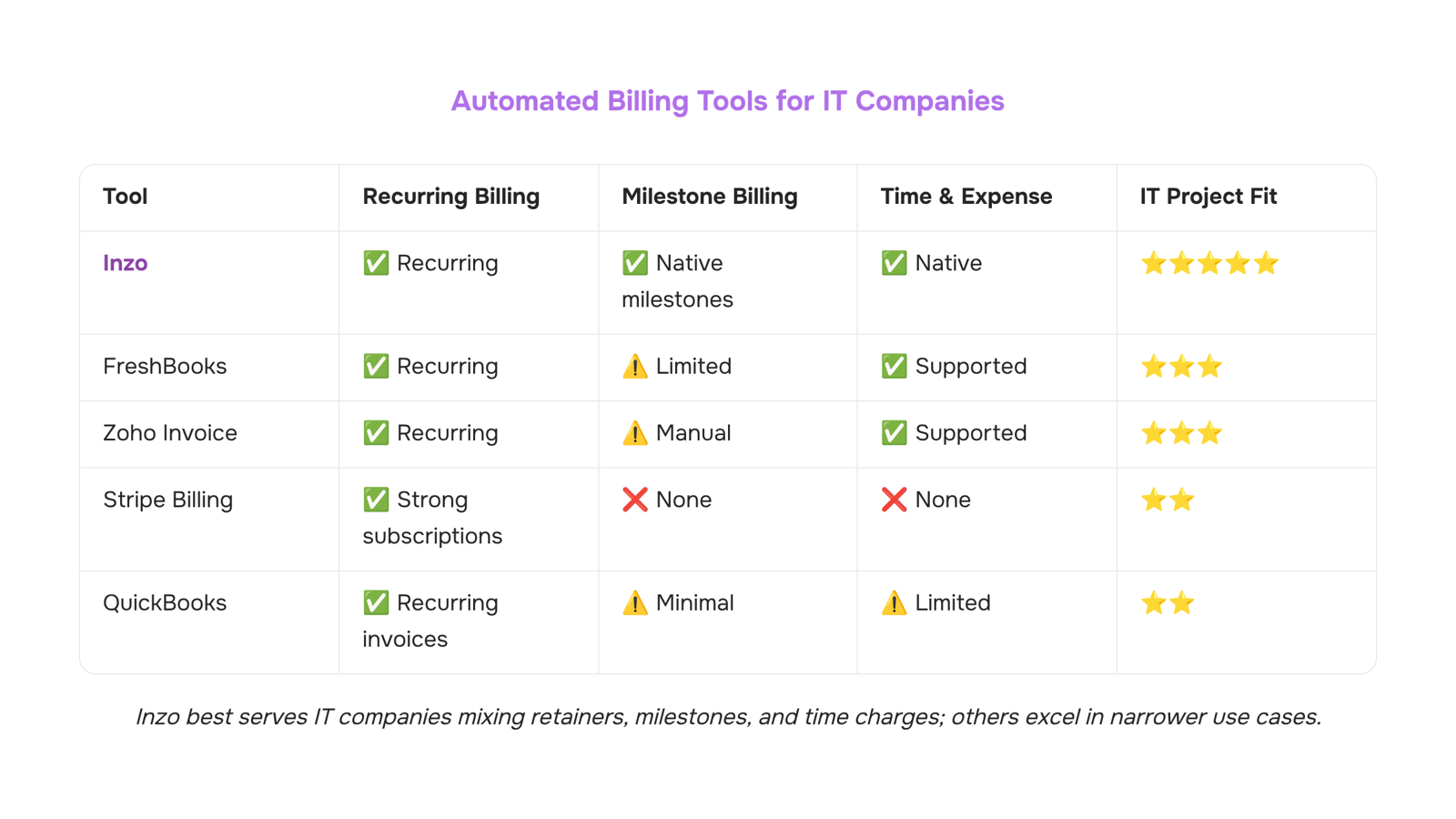
Here's how four tools stack up when IT companies evaluate them specifically for recurring and project-based billing — not general invoicing.
Tool | Recurring billing | Project/milestone billing | Accounting sync depth | Workflow triggers | Best fit |
|---|
Inzo | Automated scheduling, retry logic | Milestone and retainer billing | Native, bidirectional | Yes — connects to project and expense tracking | IT companies with mixed billing models |
FreshBooks | Subscription billing | Limited milestone support | QuickBooks, Xero sync | Minimal | Freelancers, small service businesses |
Zoho Invoice | Recurring templates | Manual milestone setup | Zoho Books only (native) | Basic | Companies already in the Zoho ecosystem |
Stripe Billing | Strong subscription engine | No native project billing | Requires third-party connectors | API-level only | SaaS products with developer resources |
QuickBooks | Recurring invoices | Minimal | Native accounting | No workflow triggers | Accounting-first teams |
The gap most IT companies hit isn't features — it's how billing connects to what happens before and after an invoice goes out. Stripe handles subscription logic well, but wiring it to project milestones or expense tracking requires custom API work. QuickBooks covers accounting but treats billing as a downstream output, not an active workflow.
Inzo sits differently. Its recurring billing automation handles scheduling and retry logic, but it also connects to project tracking and expense management inside the same system. That matters when your billing model mixes monthly retainers, milestone releases, and ad-hoc time charges — a combination that breaks single-purpose tools quickly.
If you're evaluating features that matter in enterprise billing software, the question to ask every vendor is: what triggers an invoice, and what happens when a payment fails? Most tools answer the first. Fewer answer the second with anything beyond a manual retry.
For IT companies specifically, recurring invoice scheduling tied to project milestones — not just calendar dates — is where automated billing software earns its cost.
Common mistakes to avoid when switching to automated billing
Three mistakes account for most recurring billing failures in the first 90 days.
Migrating all clients at once: Move one billing tier or contract type first. If your retry logic or invoice templates have gaps, you'll catch them on five clients, not fifty.
Skipping payment failure rules before go-live: Automated retry schedules, dunning email timing, and escalation thresholds need to be configured before the first charge runs, not after the first failed payment. For IT companies running retainer billing, an unconfigured retry sequence can mean 30 days of missed revenue before anyone notices.
Treating billing as isolated from project delivery: Recurring invoice automation breaks down when milestone completions or scope changes don't trigger invoice updates automatically. Wire your billing tool to your project tracking system on day one.
For a deeper look at how the underlying process works, automated invoice processing in six steps covers the full setup sequence.
Closing
The gap between sending invoices and actually collecting recurring revenue comes down to one thing: whether your billing runs on a schedule you set once or a manual process you repeat every cycle. Automated billing software eliminates the repetition, catches errors before they hit your client, and recovers failed charges without anyone chasing them down. The tools that matter most for IT companies tie billing triggers directly to your project and contract data, so scope changes update your next invoice automatically and milestone completions fire charges without delay.
The real test is whether your current setup handles a retainer scope change, a failed payment retry, and a milestone invoice all in the same week without creating reconciliation work downstream. If that sounds like friction you're living with, it's time to see how Inzo's recurring invoice scheduling connects your project data to your billing cycle — before you commit to anything, just walk through how the automation actually works.
FAQ
How does automated billing software reduce errors?
It pulls billable data directly from your project system instead of manual assembly, eliminating missed line items and duplicates. Automated retry logic on failed charges and live contract sync prevent revenue leakage that manual workflows miss.
What are the benefits of using automated billing software for small businesses?
It recovers hours spent building invoices monthly, eliminates failed recurring charges through automatic retries, and delivers invoices on time—signaling operational competence that influences client renewal decisions.
Can automated billing software integrate with existing accounting systems?
Yes, real integrations map line items, tax codes, and payment status bidirectionally to your general ledger. Surface-level syncs break down with mid-month retainer shifts and milestone splits; look for field-level mapping instead.
What is the best automated billing software for recurring payments?
The best fit depends on scheduling flexibility, retry logic for failed payments, integration depth with your project tools, audit trails, and cash flow reporting—not just price. Evaluate vendors on these five criteria before deciding.
What is the difference between automated billing and automated invoicing?
Automated invoicing generates and sends invoices on schedule. Automated billing handles the entire payment cycle: scheduling, failed payment retries, downstream sync, and payment tracking—without manual intervention at any step.
How long does it take to set up recurring billing automation?
Setup time depends on integration complexity with your project and accounting systems. Field-level mapping and contract-to-billing connections take longer than basic sync, but eliminate reconciliation work downstream.


 Elena Petrova15 September 2026


