TL;DR: Most content on lead follow-up systems lists tool features or tells you to "follow up faster." This one gives IT company owners the specific rules, triggers, and handoff logic that make a follow-up system actually work, plus the metrics that tell you whether it's performing or just keeping reps busy. You'll leave with a framework you can configure this week.
What a lead follow-up system actually is
A lead follow-up system is a defined set of rules, triggers, and sequences that tells your team exactly who contacts a lead, when, through which channel, and what happens if there's no response. It is not a CRM. A CRM stores contact data. A follow-up system governs the actions taken on that data.
Most IT sales teams confuse the two. They buy software, import leads, and assume the tool handles the rest. It doesn't. Without defined rules, follow-up becomes rep-dependent: one person sends three emails in a week, another sends one and moves on. That variation is where leads die.
A proper lead follow-up process has four components: a trigger (what starts the sequence), a schedule (when each touchpoint fires), an escalation rule (what happens after no response), and a handoff condition (when a lead moves to a different rep or stage). These rules exist before you choose any software.
Once those rules are written, tracking each lead's status and movement through your pipeline becomes straightforward, and automated email follow-up software handles the sequencing layer without rep intervention. The system runs. The rep focuses on leads that respond.
Why your current follow-up process is losing you deals
The numbers here are blunt. Research from Harvard Business Review found that reps who contacted a lead within an hour were nearly 7 times more likely to qualify it than those who waited even 60 minutes longer. Most IT sales teams aren't responding in an hour. They're responding the next day, or not at all.
That gap is where deals die.
The problem isn't effort. It's the absence of a consistent lead follow-up process. When follow-up depends on a rep's memory or mood, you get variation: one rep sends three emails and calls twice, another sends one email and moves on. The lead gets a different experience based on who picked it up, not based on where they are in the buying cycle.
Lead decay is real and measurable. A lead that goes cold for 48 hours is a fundamentally different conversation than one you caught at the moment of intent. Patching this with reminders or "be more proactive" coaching doesn't fix the structure. It just adds pressure to a broken system.
If you want to understand why deals are slipping before you build anything, effective lead management starts with diagnosing where your current process breaks down. And if you're already losing leads mid-funnel, the 4-layer follow-up framework is worth reading before you move to system design.
Key features to look for in a lead follow-up system
Four capabilities determine whether a lead follow-up system actually works or just adds another layer of admin.
Routing logic comes first. Before any email goes out, the system needs rules: which rep owns which lead, based on territory, company size, or product line. Without defined routing, two reps chase the same prospect while a third territory goes cold. This is where most teams skip a step and wonder why follow-up rates vary so much between reps.
Follow-up scheduling is the second requirement. The system should let you set time-based and behavior-based triggers, not just "send on day 3." A lead who opens your pricing page twice in 24 hours needs a different cadence than one who hasn't touched anything since the initial inquiry. Tracking each lead's status and movement through your pipeline is what makes that distinction possible.
Automation triggers handle the sequencing layer without rep intervention. When a lead hits a defined signal, like a form fill, a reply, or a no-response window, the next step fires automatically. How automated email follow-up software handles the sequencing layer explains how that works in practice.
Activity tracking closes the loop. You need a record of every touchpoint: sent, opened, replied, or ignored. Without it, reps make decisions on gut feel, and managers can't spot where leads are dropping.
An automated lead follow-up system that covers all four of these requirements is also the foundation for recovering 30 to 40 percent of leads most teams write off.
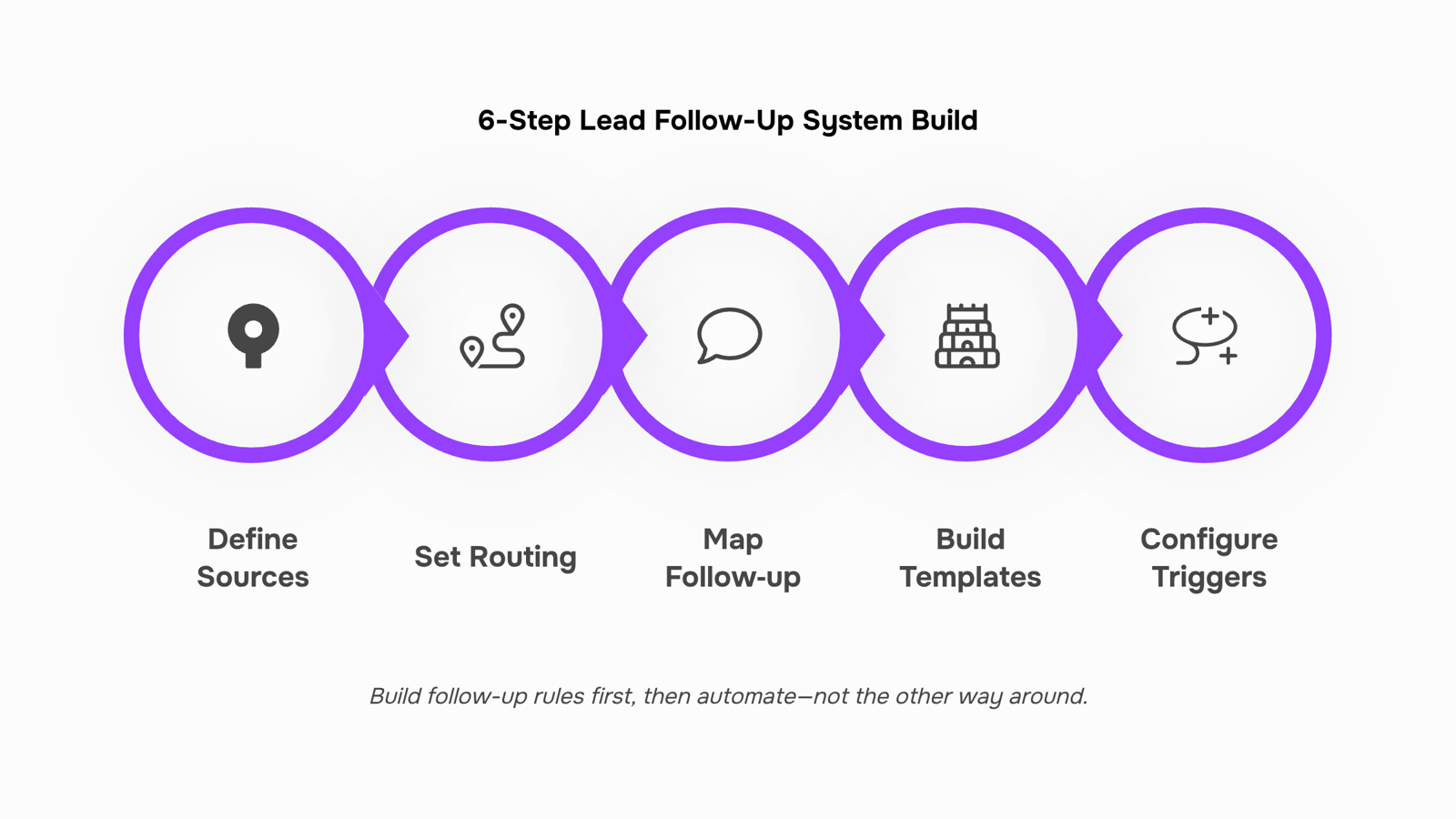
How to build your lead follow-up system in 6 steps
Building a lead follow-up system before you pick a tool saves you from configuring the wrong automation. Most IT company owners do it backwards: they buy software, then try to reverse-engineer a process into it. Start with the rules, then wire up the technology.
Here are the six steps to build yours.
1. Define your lead sources and assign a priority tier to each
Not every lead deserves the same response speed. A demo request from your website is not the same as a cold list import. Map each source (inbound form, paid ad, referral, cold outreach) and assign it a tier: Tier 1 gets a response within five minutes, Tier 2 within the same business day, Tier 3 within 48 hours. This single decision shapes every rule that follows.
2. Set your lead routing rules before anything else
Lead routing is the decision logic that determines who contacts which lead, and when. Define it in writing: by territory, by company size, by product line, or by rep capacity. A 20-person IT services firm might route SMB leads to one rep and enterprise leads to another. If you skip this step, your automation will deliver leads to the wrong person at the right time, which is almost as bad as no follow-up at all.
3. Map the follow-up sequence for each tier
Write out the exact touchpoints: how many attempts, over how many days, through which channels. Research consistently shows that most deals close after five or more follow-up attempts, yet most reps stop after one or two. A Tier 1 sequence might look like this: call within five minutes, email at hour two, LinkedIn message on day two, email on day four, final call on day seven. Keep the sequence short enough that reps will actually run it.
4. Build your templates before you automate anything
Templates are not shortcuts. They are the guardrails that keep your messaging consistent while giving reps room to personalise the first line. Write one template per touchpoint per tier. A Tier 1 day-two email is different from a Tier 3 day-four email in tone, urgency, and call to action. Getting this right now means your automated lead follow-up system sends the right message, not just a message.
5. Configure your automation triggers
Triggers convert your sequence map into actual follow-up scheduling. Common triggers include: lead created, form submitted, email opened, link clicked, or a set number of days with no response. Evox handles this layer with automation triggers tied to lead lifecycle events, so a rep gets a task created the moment a Tier 1 lead goes cold past the five-minute window. No manual monitoring required.
6. Set the metrics you will review weekly
A follow-up system without measurement is just a process document. Pick three numbers and review them every week: contact rate (percentage of leads reached within your defined window), sequence completion rate (percentage of leads who received every planned touchpoint), and conversion rate by tier. These three metrics will tell you whether your routing rules are working, whether your templates need rewriting, and whether your timing is off. For a deeper look at tracking each lead's status and movement through your pipeline, that layer sits on top of this foundation.
Done in sequence, these six steps give you a system you can hand to a new rep on day one. The broader lead management process that your follow-up system sits inside covers what happens upstream and downstream, but this is the core engine. Get it running, then optimise from real data.
How to personalize follow-up without slowing your team down
Personalization at scale comes down to one principle: your templates do the writing, your variables do the personalizing.
Start by mapping three data points your CRM already holds: lead source, lead score, and industry vertical. Those three fields drive most of the meaningful variation in a follow-up message. A high-score inbound lead from a LinkedIn ad needs a different opening line than a cold outbound contact from a trade show list. Build separate template branches for each combination, then let your automated lead follow up system pull the right branch based on those field values.
The rep's only job is filling one or two custom tokens: the prospect's specific pain point or a reference to their recent activity. That takes 30 seconds, not 10 minutes.
For example, a template branch tagged "IT services, score 70+, inbound" might auto-populate the company size tier and reference the product page the lead visited. The rep adds one sentence. The message reads personal because the system pre-loaded the context.
This is where a structured lead follow-up process separates teams that scale from teams that burn out. Tracking each lead's status and movement through your pipeline gives you the data those variables need to stay accurate.
How to measure whether your follow-up system is working
Four metrics tell you whether your lead follow up system is earning its place or just creating activity.
Contact rate is the percentage of new leads your team actually reaches. Below 40% usually means your first-touch timing is off. Leads contacted within five minutes convert at dramatically higher rates than those reached after an hour, so if contact rate is low, check your lead response time before anything else.
Follow-up attempt rate measures how many touches happen before a rep marks a lead dead. Most reps stop at two. Most closed deals require five or more. If your average sits below four attempts, your sequence is too short.
Lead-to-meeting conversion by response window is the most diagnostic metric here. Segment your conversions by how quickly the first reply went out: under five minutes, five to sixty minutes, and over sixty minutes. The gap between those buckets shows you exactly where leads are decaying.
Lead decay rate tracks how fast an uncontacted lead loses conversion probability over time. If you're losing leads you could have saved, a structured follow-up system recovers 30 to 40 percent of leads most teams write off.
Closing
The difference between a lead follow-up system that works and one that doesn't isn't the tool. It's the rules you define first: routing logic, sequence timing, escalation triggers, and handoff conditions. Once those rules exist on paper, your team knows exactly what to do, and your metrics tell you whether it's working.
The final step is automating that system so it runs the moment a lead arrives, not when a rep remembers to check their inbox. Lio enforces the routing rules and follow-up schedules you just defined, turning your framework into automatic action. Start by mapping your tiers and sequences this week. Then wire them up so they run without intervention. That's when follow-up becomes a system instead of a habit.
FAQ
What is the best lead follow-up system for my sales team?
The best system defines your routing rules, follow-up sequences, and escalation triggers before choosing any tool. Start with tiers (Tier 1 within five minutes, Tier 2 same day, Tier 3 within 48 hours), then automate those rules so they run consistently.
How can I automate my lead follow-up process to increase conversions?
Map your sequence first (call, email, LinkedIn, email, call), then use automation triggers tied to lead events (form filled, email opened, no response after X hours). Evox handles sequencing; Lio enforces routing so the right rep gets the right lead at the right time.
What are the key features to consider when choosing a lead follow-up system?
Routing logic (which rep owns which lead), follow-up scheduling (time and behavior-based triggers), automation triggers (form fill, no-response windows), and activity tracking (every touchpoint recorded). All four determine whether your system actually works.
Can a lead follow-up system help me personalize my outreach to potential customers?
Yes. Templates per touchpoint per tier let reps personalize the first line while keeping messaging consistent. Behavior-based triggers (pricing page clicks, email opens) also let you tailor sequence speed and tone to how the lead is engaging.
How can I measure the effectiveness of my lead follow-up system?
Track response rate by tier, time-to-first-contact, sequence completion rate, and conversion by follow-up attempt. Most deals close after five or more attempts; if your reps stop at two, your system isn't working.
How many follow-up attempts should a rep make before marking a lead as cold?
Research shows most deals close after five or more attempts. A Tier 1 sequence might be: call within five minutes, email at hour two, LinkedIn on day two, email on day four, final call on day seven. Tier 3 can be shorter but shouldn't drop below three touches.


 Elena Petrova11 September 2026


