TL;DR: Most content defines document management and workflow separately, then vaguely suggests combining them. This article treats them as a single operational layer, showing exactly where documents break workflows and how to wire both systems together so neither operates in isolation.
What is document management and workflow?
Document management and workflow is the single system that governs how a file is created, routed to the right people, acted on, and stored once complete. It is not two disciplines that overlap. It is one operational loop where storage decisions shape routing logic, and routing logic determines whether approvals happen in hours or weeks.
Most IT company owners experience this as two separate problems: "where do our documents live?" and "who needs to touch them next?" But the moment you treat storage and movement as independent concerns, gaps appear. A signed SOW sits in a shared drive with no trigger to generate the next invoice. A contract revision gets emailed to three people with no defined sequence, so two of them edit simultaneously and one version wins by accident.
The distinction worth making is between circulation and control. Moving a document from inbox to inbox is circulation. Knowing who reviews it, what conditions advance it, and where the final version lands is control. Most teams have the first. Almost none have the second built into the same system.
When you connect both halves into one system, you get a single source of truth that also knows its own next step. The next section breaks this into five concrete integration points, from creation through archival, so you can see where your current setup likely breaks.
How document management and workflow systems work together
A document doesn't sit in one place. It moves. The connection between document management and workflow is the path a file takes from the moment someone creates it to the moment it's archived and retrievable. Understanding that path gives you the integration points where things break or accelerate.
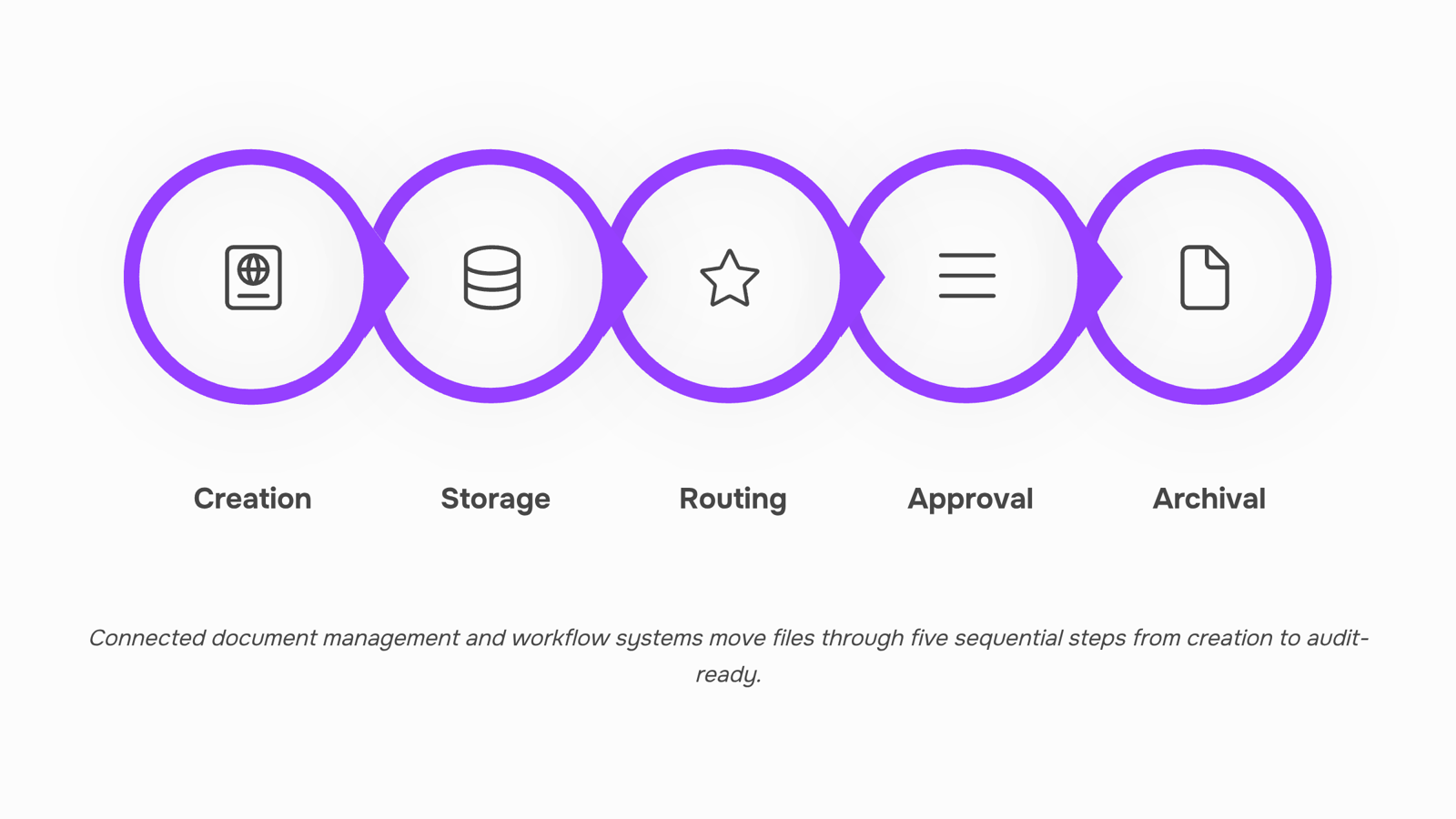
Here's the five-step mechanism:
Creation or capture. A document enters the system, whether drafted internally (an SOW, a proposal) or received externally (a signed contract, a vendor invoice). At this point, metadata gets attached: client name, document type, date, owner.
Storage and indexing. The file lands in a central repository with version control rules that prevent duplicate edits and lost revisions. Without this step, the workflow engine has nothing reliable to route.
Routing. Document workflow automation kicks in here. The system sends the file to the right person based on rules you define: document type triggers a specific path, dollar thresholds trigger additional reviewers, client tier determines urgency. Instead of files getting lost in email chains, a workflow system creates a clear, repeatable path for every document to follow.
Approval or action. The recipient reviews, signs, requests changes, or rejects. This is where most delays live. If your document management and workflow automation are disconnected, approvals stall because nobody knows the document is waiting for them.
Archival and audit. Once complete, the document moves to long-term storage with a full activity log: who touched it, when, what changed. This matters for compliance, dispute resolution, and client re-engagement six months later.
For IT companies managing client-facing documents, each of these five steps maps directly to your broader process workflow. Break one connection and you get manual chasing, missed signatures, or versioning conflicts.
Key components of a connected document and workflow system
Five structural pieces determine whether your document management and workflow setup actually holds together or quietly falls apart. Evaluate any tool against these.
1. Central repository. Every document lives in one place. Not "mostly" one place. If your SOWs sit in Google Drive, your NDAs in email, and your change orders in a shared folder, routing breaks before it starts. The repository handles storage, metadata tagging, and retrieval. A capable DMS provides efficient organization and retrieval so your team spends seconds finding a file, not minutes.
2. Routing engine. This decides where a document goes next based on conditions you define. A signed SOW routes to the project manager. An unsigned one routes back to the client with a reminder. Without explicit routing rules, documents stall in inboxes and nobody notices for days. You can build and automate business process workflows that handle this without manual forwarding.
3. Approval logic. Sequential or parallel, conditional or fixed. A $5K contract might need one signature. A $50K one might need legal review, then finance sign-off, then the partner. Your system needs to encode these rules, not rely on someone remembering the chain.
4. Version control. Every edit creates a new version. Every version is retrievable. No "final_v3_REAL_final.docx" naming conventions. This matters most for IT companies managing client-facing contracts where a single outdated clause creates liability. A solid document control process with version control prevents that.
5. Audit trail. Who opened it, when, what changed, who signed. This is non-negotiable for compliance and dispute resolution. If your workflow and document management system cannot produce a timestamped log on demand, it is incomplete.
Benefits of automating document management and workflow
When you connect document management and workflow automation into a single system, five outcomes show up in the numbers:
Fewer hours lost to searching. Most IT teams store SOWs, contracts, and change orders across shared drives, inboxes, and project folders. A unified repository with automated routing cuts retrieval time from minutes per document to seconds, compounding across dozens of client engagements per month.
Lower error rates on client-facing documents. Automating the full document lifecycle from capture through approval to archive reduces manual workloads and the mistakes that come with them. One wrong version of a SOW sent to a client can cost you a week of rework and a dent in credibility.
Faster approval cycles. When routing logic pushes a contract to the right signer without someone manually forwarding an email, approval times drop from days to hours. For a 20-person IT firm handling 30+ active contracts, that reclaims entire business days each month.
Audit-ready records without extra effort. Every signature, revision, and approval gets logged automatically. When a client disputes scope six months later, you pull the trail in seconds rather than digging through inboxes.
Revenue recognized sooner. Documents that move faster mean deals close faster. Tools like Sigi tie signing directly to your CRM deals, so a completed contract triggers invoicing without a handoff gap.
For a deeper breakdown, see how document workflow automation benefits businesses operationally.
How to implement document management and workflow systems step by step
Most IT companies already have documents scattered across drives, inboxes, and project folders. The goal is not to start from scratch but to layer structure on top of what exists. Here is a six-step sequence you can run internally.
Audit your current document flow. Map where SOWs, contracts, and change orders live today. Note who touches each document, how many times, and where handoffs stall. This step alone usually reveals 2-3 bottlenecks you did not know existed. A practical framework for assessing and restructuring your workflow and document management can speed this up.
Define completion criteria for each document type. For a client contract, "done" might mean signed by both parties, countersigned by your ops lead, and filed with a naming convention. Write these down per document category.
Choose a single source of truth. Pick one platform where the canonical version lives. Everything else becomes a reference copy. This is where version control discipline matters most.
Build your routing logic. Decide who approves what, in what order, and what triggers the next step. Keep it to three approval layers maximum for any document under $50K in value.
Automate the repeatable parts. Status notifications, reminder nudges, and filing into the correct folder after signature are all candidates. You can build and automate these process workflows without writing code.
Run a two-week pilot on one document type. Pick your highest-volume document (usually proposals or NDAs). Measure cycle time before and after. Adjust routing rules based on where things still stall.
The key with document management and workflow implementation: solve one document category fully before expanding. Breadth without depth just recreates the chaos in a new tool.
Integrating document management and workflow with existing systems
Most IT companies already run a CRM for deals, a project management tool for delivery, and an invoicing system for billing. The integration question isn't whether document management and workflow automation can connect to these systems. It's whether the connection passes data both ways without manual re-entry.
Start with your CRM. When a deal moves to "proposal sent," that status change should trigger a contract template, pre-filled with the client's name, scope, and value pulled directly from the deal record. Sigi does this natively with LIO (WorksBuddy's CRM agent), so a signed SOW updates the deal stage automatically, no copy-paste round trips.
For project management, the integration point is handoff. A signed document should create a task or kick off an onboarding workflow without someone remembering to do it. Map your business process workflows so each signed document has a defined "next action" in your PM tool.
Invoicing is where most IT shops leak time. If your signed contract contains payment terms, those terms should flow into your billing system as a scheduled invoice, not sit in a PDF someone checks manually next month.
The pattern across all three: the document is the trigger. If you're still treating signed documents as endpoints rather than workflow inputs, you're maintaining two disconnected systems by hand. That's the gap workflow management best practices exist to close.
Common mistakes that disconnect documents from workflows
Four failure patterns show up repeatedly when IT company owners treat document management and workflow as parallel but unconnected systems.
Storing documents outside the process that needs them. SOWs live in Google Drive, approvals happen in email, and nobody links the two. Staff waste time searching for misplaced files instead of acting on them, a problem IBML flags as one of the most common document management mistakes.
Skipping version rules on client-facing files. Without a clear document control process with version control, your team sends outdated contracts and then spends hours on rework.
Automating steps before mapping the full path. If you build and automate business process workflows without first documenting where documents enter and exit, you automate the wrong handoffs.
No single owner for document management and workflow rules. When responsibility is shared by default, nobody updates templates, nobody retires old forms, and drift compounds quarterly.
Closing
The gap between document management and workflow isn't technical—it's operational. When storage and routing are wired together, a single file can move from draft to signed contract to invoiced project without anyone manually forwarding it or hunting through shared drives. For IT company owners managing dozens of client engagements, that connection reclaims hours every month and eliminates the version conflicts that slow deals down. The question isn't whether to connect both systems. It's whether you're ready to see how a unified layer actually works in practice. Start by mapping one document type—your SOWs, for example—and trace where it stalls today. That's your integration point.
FAQ
How can I improve document management and workflow in my organization?
Start by centralizing storage in one repository, then define explicit routing rules for each document type based on dollar amount, client tier, or document status. Wire approval logic so the right person gets notified automatically instead of waiting for manual forwarding.
What are the benefits of automating document management and workflow?
Faster approvals, fewer search hours, lower error rates on client documents, automatic audit trails, and revenue recognized sooner. A 20-person IT firm typically reclaims entire business days monthly through reduced manual routing and chasing.
What is the best way to implement document management and workflow systems?
Choose a central repository that supports metadata tagging and version control, then layer in a routing engine with conditional approval logic. Start with one high-volume document type—like SOWs—to prove the model before scaling.
Can document management and workflow be integrated with existing systems?
Yes. Most modern DMS and workflow tools connect via API or native integrations to your CRM, accounting software, and project management platform. The key is ensuring routing rules trigger actions downstream, not just move files around.
How does document management and workflow automation increase productivity?
By eliminating manual forwarding, version confusion, and approval delays. When a document routes automatically to the right signer with full context, teams spend time on value work instead of chasing signatures or hunting for the latest version.


 Elena Petrova15 September 2026


