TL;DR: Most guides define a client database and list software features. This one gives you a 7-step structure for building one that stays accurate over time, covering what data to capture, who owns each record, and how to prevent the slow decay that turns most databases into unusable contact graveyards.
What a client database actually is
Modern 3D dashboard interface showing organized client database with clean gray and blue color scheme
A client database is a structured system that stores, organizes, and links every piece of information your company holds about the businesses and people you serve. Contact details, project history, communication logs, contract terms, renewal dates, support tickets. All connected to a single record per client.
This is not a contact list. A contact list gives you names and phone numbers. A client database system ties those names to their purchase history, open invoices, internal hierarchies, and every interaction your team has had with them. It answers "what's the full picture on this account?" without anyone digging through email threads or Slack messages.
For IT company owners managing retainers, project engagements, and multi-stakeholder accounts, the distinction matters. Your clients span multiple contacts, companies, and service agreements. A spreadsheet row cannot hold that complexity. A client database can, and it becomes the single source your team references before every call, proposal, or renewal conversation.
Why your sales team needs one
Without a structured client database, your sales team spends its time hunting for information instead of closing deals. Here's what changes when client database management is actually working:
Faster response times. When a client calls, any rep can pull up their history, open proposals, and last conversation in seconds. No digging through inboxes or asking a colleague. As Badger Mapping notes, a database allows everyone on the team to access the same information, so one salesperson can jump in for another as needed.
Fewer dropped follow-ups. A client database for small business teams means every promised callback, pending quote, and trial expiration lives in one place. Nothing falls through because someone forgot to check a spreadsheet tab.
Cleaner handoffs. When a rep leaves or an account moves to customer success, the next person inherits context, not a blank slate. This works especially well when you're tracking company hierarchies and contact relationships inside a single record.
Better renewal visibility. Contract end dates, upsell signals, and at-risk indicators sit where the whole team can see them. You stop discovering churned clients after the fact. That visibility feeds directly into a customer retention system rather than reactive firefighting.
The pattern is simple: organized data removes the friction between knowing something and acting on it.
Client database vs. CRM: which one do you need
The answer depends on where your IT company sits today, not where you want to be in two years.
A client database is a centralized repository for collecting and storing customer data, including contact details, service history, and contract terms (act.com). A CRM builds on that foundation with automation, pipeline tracking, and reporting. Many teams conflate the two and overspend on features they never configure.
Here's how to decide:
Dimension | Spreadsheet / simple database | Client database software | Full CRM |
|---|
Team size | 1–3 people | 3–10 people | 10+ or multi-department |
Data complexity | Name, email, contract date | + service history, notes, tags | + deal stages, forecasting, scoring |
Automation needs | None (manual follow-ups) | Basic reminders, duplicate alerts | Sequences, triggers, workflow rules |
Monthly budget | $0 | $20–$60/user | $75–$150+/user |
If you run a 5-person MSP and your biggest pain is finding the right contact during a renewal call, client database management software solves that without the overhead of unused CRM modules. A full CRM earns its cost only when you need automated sequences or multi-pipeline visibility.
For a deeper breakdown of where CRM ends and service tooling begins, see how CRM compares to customer service software.
Pick the tier that matches your current complexity. You can always migrate up.
How to organize a client database in 7 steps
The goal here is to give you a process you can hand to an ops manager or office admin and have a functioning client database by Friday. These seven steps work whether you picked a spreadsheet, a standalone tool, or a full CRM in the previous section. The difference is just how much of each step you automate versus do manually.
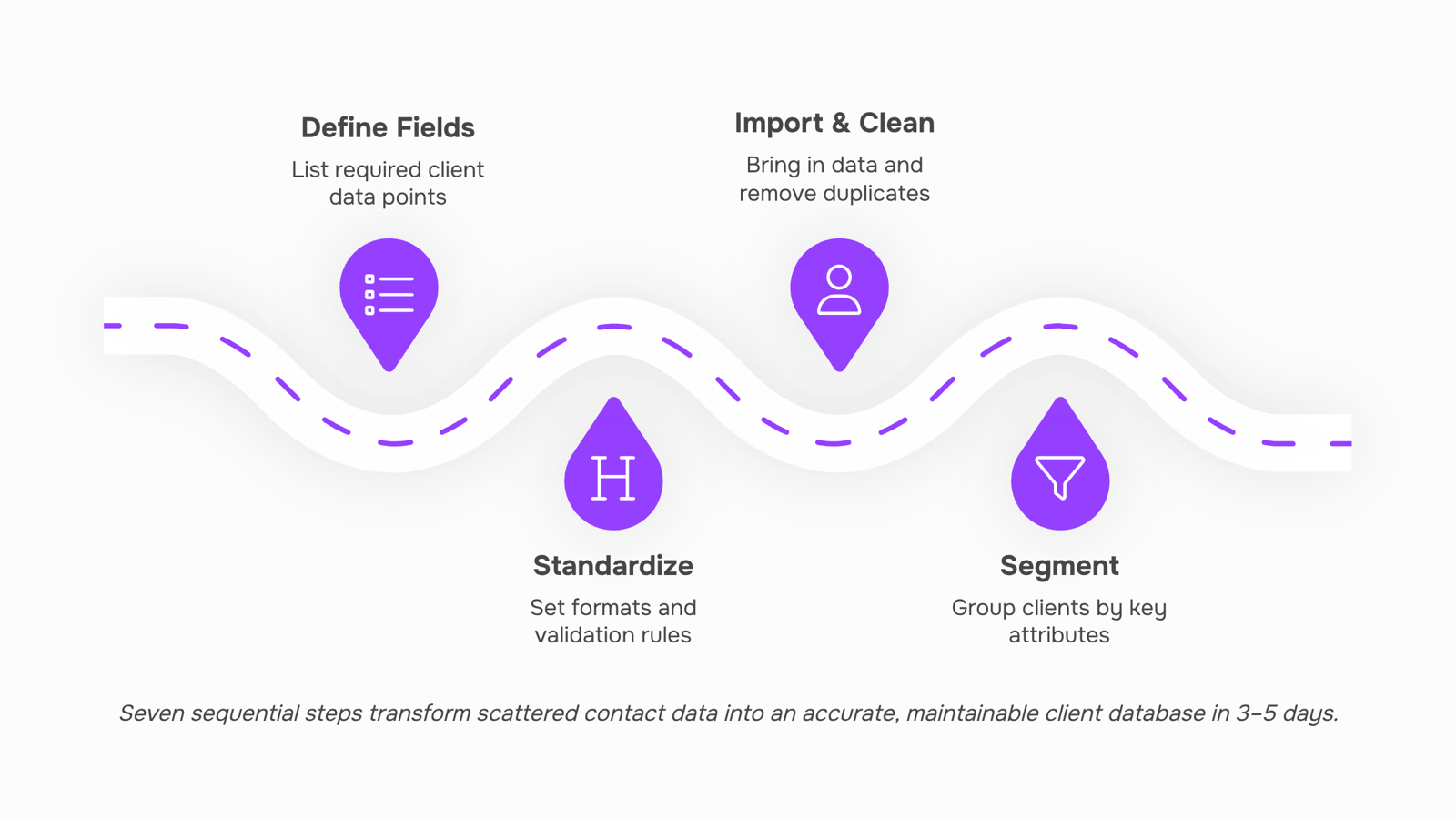
1. Define exactly what data you need to capture.
Start with the fields your team actually uses to close deals and deliver work. For most IT companies, that means: company name, primary contact, email, phone, contract type, monthly recurring revenue, last interaction date, and project status. Resist the urge to add 30 fields on day one. Every unused field becomes a field your team skips, which degrades trust in the entire client database over time. A good rule: if nobody would filter or sort by it, don't add it yet.
2. Standardize how data gets entered.
This is where most client database systems break down within weeks. If one person types "Managed Services" and another types "managed svcs," your filters are useless. Lock down entry formats using dropdown menus, required fields, and naming conventions. You can do this by standardizing dropdown values and field entries across all client records so every team member picks from the same list instead of free-typing.
3. Import and deduplicate existing records.
Pull contacts from your email, invoicing tool, project management system, and any spreadsheets floating around. Merge duplicates before they enter the new system, not after. Look for matching email addresses first, then company name plus phone number. A 500-contact list typically has 10-15% duplicates when pulled from multiple sources.
4. Segment clients into groups that reflect how you actually work.
Flat alphabetical lists don't help when you need to find "all clients on quarterly retainers whose contracts renew in Q2." Segment by service type, contract value, lifecycle stage, or geography. You can layer this further by categorizing client records with tags and color-coded labels so a quick visual scan tells your team what they need without opening each record.
5. Map relationships between contacts and companies.
IT companies often have three to five contacts per client organization: a technical lead, a billing contact, a decision-maker, and maybe an end-user champion. If your client database management doesn't reflect who reports to whom and who signs off on renewals, your team wastes time emailing the wrong person. Structure this by tracking company hierarchies and contact relationships inside a single record.
6. Assign ownership and define update responsibilities.
Every record needs one owner. That person is responsible for keeping it current. Without clear ownership, data rots. A practical split for a 5-15 person IT company: account managers own active client records, the ops lead owns prospect records, and finance owns billing-specific fields. Document this in a one-page "who updates what" sheet and pin it where your team can see it.
7. Schedule recurring data audits.
Set a monthly 30-minute review where someone runs a report on records with no activity in 90+ days, missing email addresses, or blank contract-renewal dates. Fix what's broken, archive what's dead. This is the step competitors skip entirely, and it's the reason most databases become unreliable within six months. One audit per month keeps your client database accurate enough to actually support a customer retention system instead of undermining it.
The entire build, from step one through the first audit, should take a small IT team three to five working days if you block two hours per day for it. The payoff is immediate: your team stops asking "do we have their current email?" and starts asking "which clients haven't heard from us in 60 days?" That second question is the one that generates revenue.
Key features to look for in client database software
Not every client database software tool reduces admin work. Many add to it. When you evaluate options, prioritize these capabilities:
Automatic data capture from emails and meetings, so your team stops copying contact details by hand. Tools that lack this create the very data-entry burden you're trying to eliminate.
Custom fields with enforced formats. You need standardized dropdown values across all client records to prevent the "same company, three spellings" problem.
Relationship mapping. IT companies work with holding groups, subsidiaries, and multiple contacts per account. Your client database management software should support tracking company hierarchies and contact relationships inside a single record.
Tag-based segmentation. Flat lists break past 200 records. Look for color-coded labels and tags that let you filter by service type, contract status, or revenue tier without building reports.
Integration with your existing stack. If the tool doesn't connect to your invoicing, email, and project management tools, you'll maintain two systems instead of one.
Skip feature-count comparisons. Test whether the tool keeps records accurate without your team babysitting it daily.
How to keep your client database accurate over time
Most client databases don't fail at setup. They fail at month three, when records go stale and duplicates pile up. Effective client database management requires a recurring hygiene routine with clear ownership.
Assign one person (or rotate weekly) to run a 15-minute audit every Friday. That audit covers three things:
Merge duplicates created by different team members entering the same contact
Flag incomplete records missing a phone number, company name, or last-contact date
Archive inactive contacts with no activity in 90+ days
Standardize how data enters the system in the first place. Standardizing dropdown values and field entries across all records prevents the "same client, three spellings" problem that plagues every client database for small business teams.
Set quarterly reminders to verify email addresses and confirm company relationships. As Industry Newsletters notes, conducting regular data audits is the single most effective practice for maintaining clean records over time.
A dedicated client database software captures new records at the point of contact, tags them by service type or deal stage, and assigns ownership automatically. No copy-pasting from inboxes or spreadsheets. Lio's client record tracking does exactly this: every inquiry gets logged, tagged, and routed to the right person without manual entry. The result is a client database system that stays current because humans never touch the data-entry layer directly.
Closing
The 7-step framework gives you a clear path to build a client database your team will actually use. But here's what separates working databases from ones that decay: most teams nail steps 1 through 5, then stumble at step 3 (capturing new client records consistently) and step 6 (keeping them current). Without automation at those two points, your database becomes outdated within 90 days, and your team stops trusting it.
Lio solves this by capturing new contacts automatically as they enter your email and sales tools, then flagging stale records so your team knows exactly when to refresh them. That means the database you just built stays accurate without manual busywork. Ready to see how it works? Start with a Lio demo or free trial to watch it pull and organize real client data from your existing tools.
FAQ
What is the best way to organize a client database?
Start with fields your team actually uses to close deals, standardize how data gets entered using dropdowns and naming conventions, then segment clients by service type or contract value. Assign one owner per record and schedule quarterly audits to keep data current.
How do I create a client database from scratch?
Pull contacts from email, invoicing, and project tools into one place, deduplicate them, define your core fields, standardize entry formats, then segment by how you actually work. The 7-step framework in this article walks you through each phase in order.
What are the key features of a client database management system?
Contact storage with custom fields, duplicate detection, relationship mapping between contacts and companies, tagging and segmentation, ownership assignment, and audit trails. The best systems also flag stale records and capture new contacts automatically.
How do I ensure data security and privacy in a client database?
Use role-based access controls so team members see only their accounts, encrypt data at rest and in transit, limit who can export or delete records, and audit access logs quarterly. Compliance depends on your industry and client locations.
What are the benefits of using a client database for sales and marketing teams?
Faster response times, fewer dropped follow-ups, cleaner handoffs between reps, and better renewal visibility. Your team spends less time hunting for information and more time closing deals or delivering work.
What is the difference between a client database and a CRM?
A client database stores contact and service history. A CRM adds automation, pipeline tracking, and forecasting. Pick a database if you're 3–10 people and need organized data; pick a CRM if you're 10+ and need multi-pipeline visibility and sequences.
Can a small business manage a client database without expensive software?
Yes, a spreadsheet with clear field definitions and ownership rules works for under 500 contacts and one or two users. As you grow past 10 people or need automation at capture and refresh points, dedicated software pays for itself in time saved.


 Elena Petrova15 September 2026


